
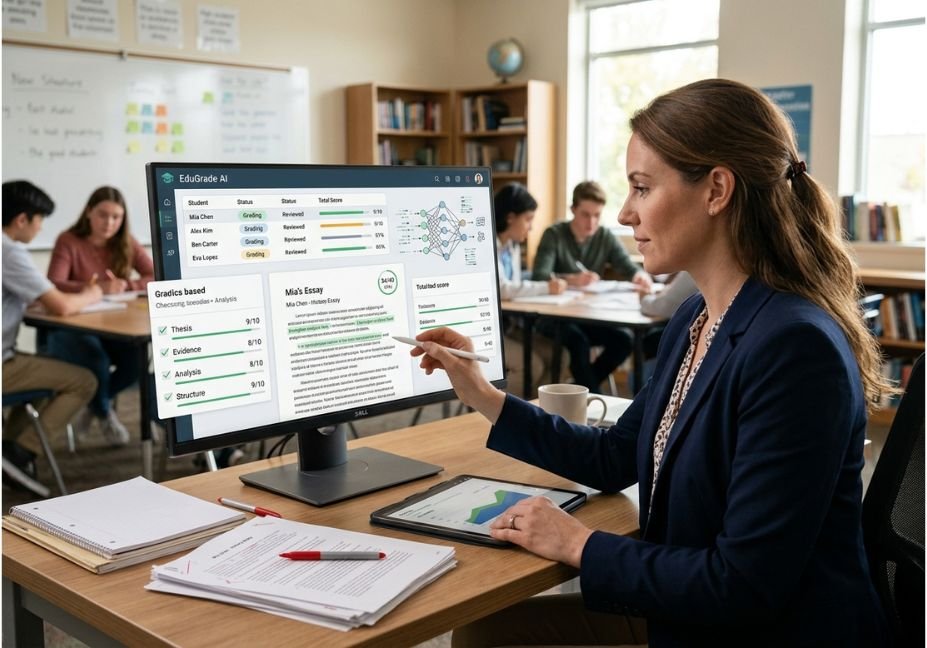
Grading is one of the easiest teaching workflows to automate badly. A model can produce a polished score and convincing feedback while missing a rubric requirement, inventing a problem that is not in the student’s work, or rewarding writing style instead of subject knowledge.
That is why AI grading tools for teachers should be treated as assessment assistants rather than autonomous graders.
Modern tools can evaluate essays, short answers, quizzes, handwritten responses, and rubric criteria. Some also generate individualized feedback, group similar answers, or integrate with classroom workflows.
But performance varies dramatically by assignment type. Research comparing LLMs with human essay graders has found that models can diverge substantially from human evaluations, reinforcing the need for teacher review.
The practical question, therefore, is not simply “Which AI grader is best?” It is which tool fits your assessment workflow without removing teacher judgment from the loop?
[Insert diagram: Student submission → AI analysis → rubric scoring → teacher review → feedback → LMS]
What Are AI Grading Tools for Teachers?
AI grading tools are software systems that use machine learning, natural language processing, computer vision, or large language models to help evaluate student work.
Depending on the product, an AI grading assistant may:
- Score essays against a custom rubric.
- Evaluate short-answer questions.
- Identify recurring mistakes.
- Generate draft feedback.
- Group similar answers.
- Read selected handwritten responses.
- Detect patterns across a class.
- Export or synchronize results with an LMS.
The important distinction is between automated grading and AI-assisted grading.
Automated grading attempts to produce a final result with minimal human intervention. AI-assisted grading gives the teacher a proposed score, explanation, or feedback draft that the teacher can validate.
For subjective assignments, the second approach is generally safer. A 2025 systematic review of AI-based assessment identified efficiency and personalized feedback as important benefits while also highlighting validity, bias, and privacy concerns.
Technical Note: A rubric is effectively the grading contract between the teacher and the model. The more explicit the criteria, evidence requirements, point allocation, and exceptions, the easier it is to audit an AI-generated result.
How Do AI Grading Tools Work?
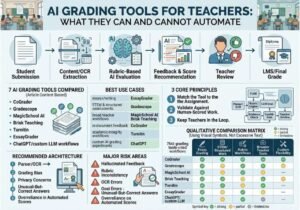
Most modern AI grading workflows can be understood as a pipeline:
- Submission ingestion The system receives text, PDF, image, quiz responses, or another supported format.
- Content extraction OCR or document parsing converts the submission into machine-readable content when necessary.
- Context assembly The system combines the student’s response with the question, rubric, standards, and teacher instructions.
- Evaluation An ML model or LLM evaluates the response against the supplied criteria.
- Feedback generation The system produces comments, strengths, weaknesses, or suggested revisions.
- Teacher validation The teacher accepts, edits, rejects, or overrides the recommendation.
- Grade synchronization Approved results can move into the classroom or LMS workflow.
This architecture matters because errors can occur at every stage.
For example, OCR may misread handwriting before the LLM ever sees the answer. A poorly specified rubric can then cause a perfectly functioning model to produce an inappropriate score.
For developers building custom grading assistants, structured model output is particularly useful. The application can require fields such as score, criterion_results, evidence, confidence, and teacher_review_required rather than accepting an unstructured paragraph.
OpenAI’s current API documentation supports structured model workflows and direct analysis of text and files, making this pattern practical for prototypes and internal assessment tools.
Minimal Python grading pattern
from openai import OpenAI

client = OpenAI()

rubric = """
Score from 0-4.

4 = Accurate thesis, strong evidence, clear reasoning.
3 = Accurate thesis, adequate evidence, mostly clear reasoning.
2 = Partial understanding or weak evidence.
1 = Major misunderstanding with limited evidence.
0 = No meaningful response.

Return:
- score
- evidence - feedback - needs_teacher_review """ student_answer = """ The Industrial Revolution changed cities because factories created jobs, which encouraged people to move from rural areas. """ prompt = f""" You are assisting a teacher. Do not invent evidence. RUBRIC: {rubric} STUDENT RESPONSE: {student_answer} Evaluate only what the student actually wrote. """ response = client.responses.create( model="gpt-5.6", input=prompt print(response.output_text)The production version should add schema validation, audit logging, privacy controls, calibration examples, and a mandatory teacher-review state.
Pro Tip: Never let the generated explanation become the only evidence for a grade. Store the student’s original response, rubric criterion, extracted evidence, proposed score, and teacher decision separately.
7 Best AI Grading Tools for Teachers
in 2026
There is no universal winner. The best choice depends on whether you grade essays, STEM problems, handwritten assessments, short answers, or mixed classroom assignments.
| Tool | Best For | Main Strength | Important Limitation |
| CoGrader | Essays and written work | Rubric-based writing feedback | More specialized toward writing |
| Gradescope | STEM, exams, structured work | Answer grouping and rubric workflows | AI-assisted grouping has assignment-format constraints |
| MagicSchool AI | Broad teacher workflows | Large educator toolset | Less specialized as a dedicated grading platform |
| Brisk Teaching | Google/Microsoft workflows | Feedback inside existing tools | Grading depth varies by workflow |
| Turnitin Feedback Studio | Academic integrity + feedback | Writing feedback and integrity tools | More institution-oriented |
| EssayGrader | Essay evaluation | Writing-focused grading | Narrower use case |
| ChatGPT / LLM workflows | Custom grading experiments | Flexible rubrics and prompts | Requires stronger teacher validation |
1. CoGrader Best for Rubric-Based Writing
CoGrader is designed around teacher grading workflows, particularly essays and written assignments. Its product surface includes AI essay scoring, rubric-aligned feedback, originality checking, and teacher-focused grading tools.
It is a strong fit when your bottleneck is reading dozens of similar essays and producing consistent first-pass comments.
Best for: ELA, social studies, writing-intensive courses.
Watch for: Teachers should still verify whether generated feedback accurately refers to the student’s actual writing.
2. Gradescope Best for Structured and STEM Assessment
Gradescope takes a different approach. Its AI-assisted grading can identify groups of similar answers so instructors can review and grade them together.
The current workflow supports AI-assisted answer grouping for certain fixed-template assignments, including multiple choice and some math or text fill-in-the-blank formats. Instructors review suggested groups before grading them.
That makes it particularly useful for large classes where many students make the same mistake.
Best for: STEM, exams, worksheets, and high-volume structured assessments.
Limitation: AI-assisted grouping is not a universal feature across every assignment type.
3. MagicSchool AI Best for Broader Teacher Workflows
MagicSchool is better understood as an educator AI platform rather than a dedicated grading engine.
Its broader toolkit can support lesson planning, assessment creation, rubrics, feedback, and other classroom tasks. That makes it attractive when grading is only one part of the teacher’s AI workflow.
Best for: Teachers wanting one platform for multiple instructional tasks.
Limitation: A broad platform may not offer the same depth as a specialist grading system.
4. Brisk Teaching Best for In-Document Feedback
Brisk is designed to work within tools teachers already use, including Google and Microsoft environments.
That workflow can be valuable when the teacher does not want to export student work into a separate grading dashboard.
Best for: Google Workspace and Microsoft-oriented classrooms.
Limitation: Its feedback workflow is more compelling for in-document assistance than for replacing a sophisticated batch grading system.
5. Turnitin Feedback Studio Best for Integrity-Focused Workflows
Turnitin combines writing feedback with academic-integrity workflows.
Its official product materials describe capabilities around feedback, grading efficiency, plagiarism detection, and signals related to potentially AI-generated writing.
Best for: Schools and universities already using Turnitin infrastructure.
Limitation: It is generally a better fit for institutional workflows than lightweight individual experimentation.
6. EssayGrader Best for Essay-Focused Assessment
Essay-focused graders make sense when the majority of your workload consists of written responses.
Their advantage is specialization: the workflow can concentrate on rubric criteria, writing quality, and individualized comments instead of providing dozens of unrelated teacher utilities.
Best for: High-volume essay grading.
Limitation: Specialized essay tools are less useful for handwritten math, quizzes, or multimodal assignments.
7. ChatGPT or a Custom LLM Workflow Best for Flexibility
A general-purpose LLM can be surprisingly useful for teachers who need a custom rubric workflow.
You can provide:
- The assignment prompt.
- The grading rubric.
- Exemplary responses.
- Common misconceptions.
- Grade-level expectations.
- A required feedback format.
The downside is operational. A general LLM does not automatically become a reliable grading system simply because you give it a rubric.
Best for: Prototyping custom workflows and drafting feedback.
Limitation: You must build the evaluation controls yourself.
How to Choose an AI Grading Tool
Feature count is a poor selection criterion. Instead, score each tool against the actual grading pipeline your school uses.
1. Match the tool to the assignment
Choose based on whether you primarily grade:
- Essays and long-form writing.
- Short answers.
- Mathematics.
- Coding assignments.
- Multiple-choice assessments.
- Handwritten work.
- Mixed-format submissions.
A tool optimized for essay feedback may be a poor choice for handwritten calculus exams.
2. Test rubric fidelity
Give the system three deliberately different submissions:
- A clearly excellent response.
- A borderline response.
- A technically correct but stylistically unusual response.
Check whether the scores reflect your rubric rather than superficial writing patterns.
3. Measure feedback usefulness
Ask:
- Does feedback quote or reference actual evidence?
- Does it identify a specific improvement?
- Does it distinguish major from minor errors?
- Does it avoid generic comments?
- Can a student act on the feedback?
4. Check privacy and retention
Before uploading student work, determine:
- Where data is processed.
- Whether student information is retained.
- Whether the platform uses submissions for model training.
- What contractual protections exist.
- Whether your school or district permits the workflow.
Architect’s Note: Strip unnecessary personally identifiable information from experimental grading pipelines. Student names, IDs, email addresses, and metadata rarely improve the model’s ability to evaluate an answer.
5. Run a calibration test
Before deployment, create a benchmark set of previously human-graded submissions.
Compare:
AI score → teacher score → score difference → reason for disagreement
Do this before using the system for consequential grades.
Can AI Grading Tools Accurately Grade Student Work?
AI grading tools can produce useful, consistent first-pass evaluations, but accuracy depends heavily on assignment type, rubric quality, model behavior, and human review.
Research does not support treating an LLM as universally interchangeable with a trained human evaluator. One study comparing LLM-based essay scoring with human ratings found weak alignment in several experimental conditions and concluded that the models were better viewed as assistance tools than replacements for human graders.
More recent research also raises a specific concern: grading bias caused by writing style. A 2026 study found statistically significant style-related effects in LLM grading of essay tasks, even when researchers instructed models to focus on content.
That means accuracy should be measured at the classroom level rather than assumed from a vendor’s feature list.
Common AI Grading Mistakes and How to Avoid Them
The most dangerous grading workflow is not “AI makes mistakes.”
It is AI makes mistakes that look reasonable.
Mistake 1: Using AI as the final grader
Use AI to produce a recommendation, then require teacher approval for consequential grades.
Mistake 2: Giving vague prompts
“Grade this essay” is insufficient.
Define the rubric, point allocation, evidence requirements, grade level, and prohibited assumptions.
Mistake 3: Ignoring unusual but correct answers
A student may solve a problem differently from the model’s expected path.
Always evaluate correctness against the learning objective rather than stylistic similarity.
Mistake 4: Trusting generic feedback
“Add more detail” is not useful unless the tool identifies what detail is missing and why it matters.
Mistake 5: Skipping bias testing
Test responses with:
- Different writing styles.
- ESL phrasing.
- Short but correct answers.
- Informal language.
- Alternative reasoning paths.
Research into automated grading has specifically identified fairness concerns affecting ESL learners and other linguistic variations.
Mistake 6: Uploading identifiable student data without approval
Privacy should be a procurement criterion, not an afterthought.
Mistake 7: Measuring only time saved
A tool that cuts grading time by 70% but forces teachers to repair inaccurate feedback is not actually saving 70% of the workload.
What Teachers Should Actually Automate
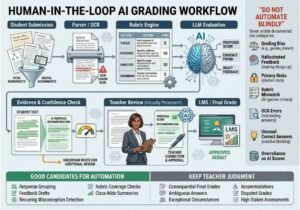
The safest AI grading strategy is to automate repetitive evaluation work, not professional judgment.
Good candidates include:
- Grouping similar responses.
- Drafting feedback.
- Identifying recurring misconceptions.
- Checking rubric coverage.
- Flagging responses requiring review.
- Summarizing class-wide patterns.
- Generating revision suggestions.
Keep teachers responsible for:
- Final consequential grades.
- Ambiguous answers.
- Exceptional student circumstances.
- Accommodation-related interpretation.
- High-stakes assessment decisions.
- Disputed grades.
This approach also aligns with the broader direction of responsible AI adoption in education: AI can reduce administrative burden, but educators remain central to meaningful instructional decisions.
What Developers Can Learn From AI Grading Workflows
AI grading is a useful example of why human-in-the-loop architecture matters.
A robust grading system should not be:
Student → LLM → Grade
A better architecture is:
Student → Parser/OCR → Rubric Engine → LLM Evaluation → Evidence Check → Confidence Gate → Teacher Review → LMS
The confidence gate is especially important.
For example:
if score_confidence >= threshold
    send to teacher review queue
else
    require manual grading
For institutional deployments, you can extend this into an evaluation pipeline:
- Store a human-scored benchmark set.
- Run the AI grader against the benchmark.
- Calculate agreement metrics.
- Inspect disagreement cases.
- Test demographic and linguistic variations.
- Adjust prompts or rubrics.
- Re-run the benchmark.
- Deploy only after predefined quality thresholds are met.
This turns “AI grading seems good” into a measurable engineering process.
Technical Disclaimer: AI platforms, model behavior, pricing, and APIs evolve rapidly. Code examples should be treated as implementation patterns rather than permanent API contracts. Verify the current documentation and your institution’s privacy requirements before deploying a grading workflow.
FAQ People Also Ask
Are AI grading tools safe for teachers to use?
AI grading tools can be used safely when schools control data handling, permissions, human review, and acceptable-use policies. Teachers should avoid uploading identifiable student information to unapproved services and should understand retention and training policies before processing student work.
Can AI grade essays better than teachers?
AI should not be assumed to grade essays better than trained teachers. LLM-based automated essay scoring can provide useful rubric-based feedback, but research has found differences between model scores and human evaluations. AI is generally more useful as a grading assistant than an unquestioned replacement for teacher judgment.
What is the best AI grading tool for essays?
The best AI grading tool for essays is the one that supports your rubric, produces evidence-based feedback, and fits your existing workflow. CoGrader and other writing-focused platforms are designed specifically for essay assessment, while general-purpose LLMs provide greater customization but require more teacher validation.
Can AI grade handwritten assignments?
Some AI grading platforms can process selected handwritten responses, but support depends on the assignment format and handwriting type. Gradescope, for example, documents support for handwritten English text and mathematical notation in specific fixed-template workflows.
How can teachers reduce AI grading bias?
Teachers can reduce AI grading bias by testing representative submissions, using explicit rubrics, separating content from writing style, and auditing disagreements against human scores. Testing ESL writing and alternative response styles is particularly important because recent research has identified style- and language-related effects in automated scoring.
Should AI assign final student grades?
AI should generally recommend grades rather than independently assign consequential final grades. A teacher-in-the-loop workflow allows educators to review ambiguous responses, correct hallucinated feedback, account for context, and override inappropriate scores.
Conclusion
The best AI grading tools for teachers are not the ones that promise to eliminate teachers from grading. They are the ones that remove repetitive work while preserving professional judgment.
Three principles matter most:
- Match the tool to the assignment. Essay graders, STEM assessment systems, and broad educator platforms solve different problems.
- Validate before trusting. Build a benchmark of human-scored work and measure where AI agrees and disagrees.
- Keep humans in the loop. AI can organize, score, explain, and draft feedback, but consequential assessment still benefits from teacher oversight.
For agent builders, AI grading is also a strong example of responsible agentic design: use structured inputs, explicit rubrics, confidence gates, audit trails, and human approval instead of a single opaque model call.
The practical starting point is simple: choose one low-stakes assignment, anonymize the submissions, test two or three tools against your existing rubric, and compare the results with your own grading.
Bookmark this guide and explore more practical AI workflow engineering at agentiveaiagents.com.



