

Most PPC accounts don’t underperform because of weak ad copy. Instead, they underperform because the feedback loop between conversion data and bid decisions is broken dirty tracking, thin creative variety, or a human checking bids twice a week in a market that re-prices every millisecond. Consequently, Google has leaned all the way into automation: Performance Max, AI Max, and Smart Bidding Exploration now touch most ad accounts by default. On top of that, a growing layer of third-party Google Ads AI tools exists specifically to audit, generate, and optimize what Google’s own models don’t fully cover.
This guide, therefore, breaks down how AI actually operates inside Google Ads as a closed loop, not a magic switch and which tools are genuinely worth adding on top of it in 2026.
What Are AI Tools for Google Ads?
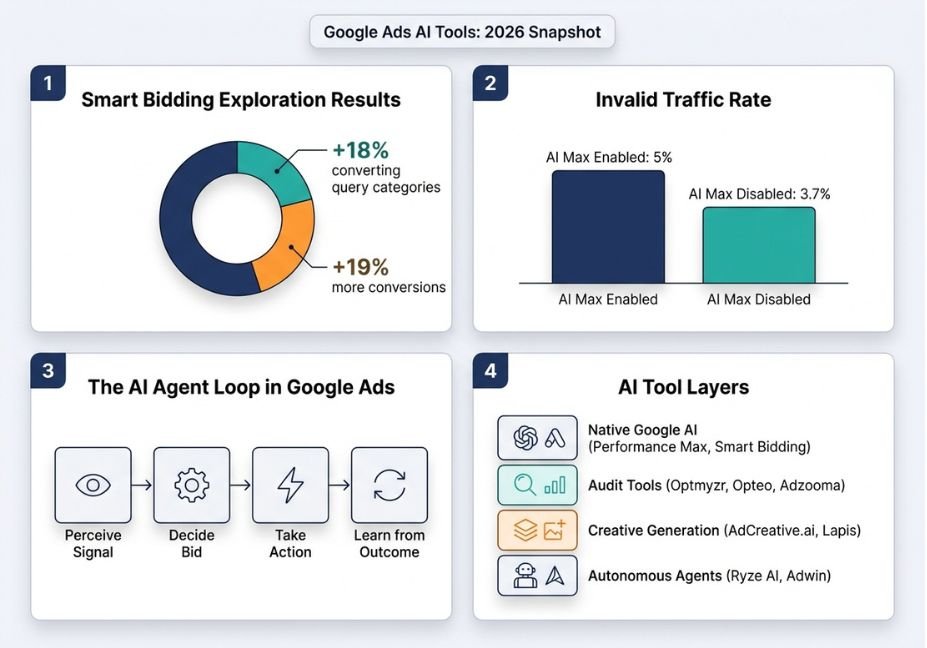
AI tools for Google Ads are systems, built either by Google or by third-party vendors, that use machine learning to automate bidding, targeting, creative generation, or account auditing. In other words, they act as narrow autonomous agents: each one perceives a signal (spend, conversions, search queries), makes a decision (bid amount, budget split, ad variant), takes an action inside the account, and updates itself based on the outcome. This perceive-decide-act-update cycle closely resembles the tool-use loop used in general-purpose AI agent frameworks it’s simply scoped to one job: spending an ad budget efficiently.
How Does AI Bidding Actually Work in Google Ads?
Google’s Smart Bidding strategies Target CPA, Target ROAS, and Maximize Conversions evaluate auction-time signals such as device, location, time of day, and audience, then set a bid for that specific impression. Because this happens per auction, it’s a decision speed no human PPC manager can match. Additionally, Smart Bidding Exploration, which reached broad availability for Performance Max in mid-2026, lets the algorithm test search categories a campaign wouldn’t normally bid on, within a tolerance the advertiser sets, then folds the results back into the bidding model.
In short, three things happen on every auction:
- Bids are recalculated per auction, not on a fixed schedule.
- The model treats conversion data as a training signal similar to a reinforcement-learning-style feedback loop.
- Exploration widens the query surface first, then narrows it based on which queries actually convert.
Technical Note: Wider query surfaces also let more invalid traffic through when conversion tracking is loose. In fact, industry monitoring has found accounts running AI Max saw meaningfully higher invalid-traffic rates than accounts without it. Clean signal in is therefore a precondition for good bids out, not an afterthought.
Google Ads AI Tools: Native vs. Third-Party
Broadly speaking, the market splits into two layers, and conflating them is the single biggest mistake teams make when shopping for ai tools for google ads automation.
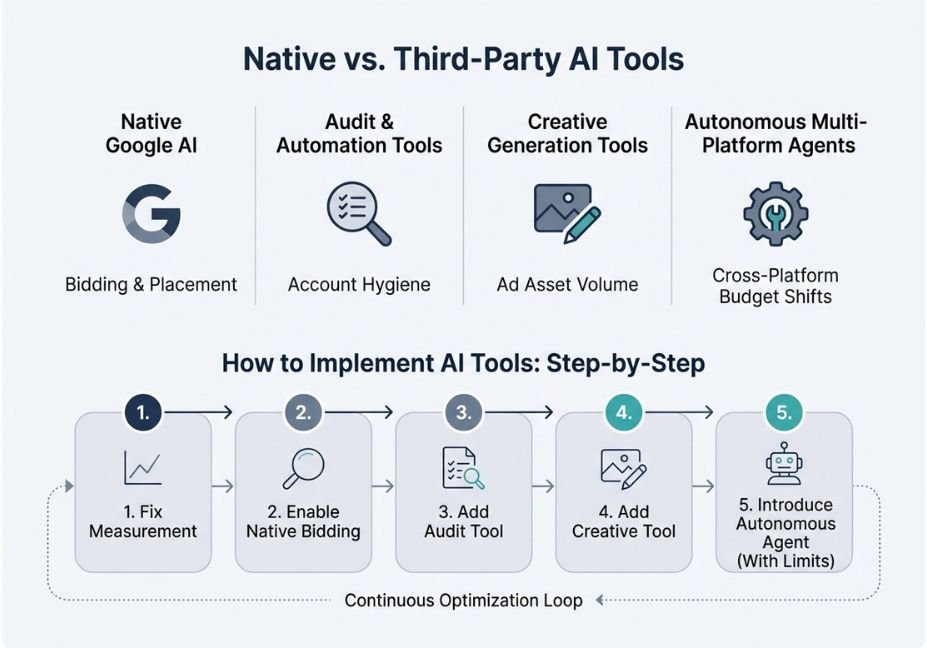
| Layer | Examples | What It Optimizes | Where It Falls Short |
|---|---|---|---|
| Native (built by Google) | Performance Max, AI Max for Search, Smart Bidding Exploration | Bidding, placement, cross-channel budget allocation | Limited visibility into why a decision was made; account-hygiene issues go unflagged |
| Third-party audit/automation | Optmyzr, Opteo, Adzooma | Account structure, wasted spend, one-click fixes | Doesn’t generate creative; still depends on Google’s bidding models underneath |
| Third-party creative generation | AdCreative.ai, Lapis | Ad copy and image variants for Performance Max asset groups | Output still needs human review for brand voice and compliance |
| Autonomous multi-platform agents | Ryze AI, Adwin | Cross-platform bid and budget shifts with minimal human input | Needs 2–4 weeks of learning time; requires guardrails before trusting full autonomy |
Pro Tip: Don’t add a fourth tool to fix what a broken conversion action is causing. If tracking or the Merchant Center feed is wrong, every layer above it native or third-party optimizes toward the wrong number, only faster.
AI Tools for Google Ads Campaigns: 5 Real Use Cases
- Account audits at scale. Audit tools scan hundreds of settings negative keywords, disapproved ads, budget caps that would otherwise take a human hours to check manually, then surface a prioritized fix list.
- Performance Max asset generation. Creative-generation tools produce the volume of headlines, descriptions, and images Performance Max needs across Search, Display, and YouTube placements from a single campaign.
- Budget reallocation between campaigns. Autonomous platforms shift budget toward the campaigns converting best in near real time, rather than waiting for a weekly review.
- Query-category expansion. Smart Bidding Exploration finds converting search categories a manually built keyword list would never have included.
- Retention and lifecycle bidding. Newer Performance Max goals let advertisers bid differently for lapsed versus new customers something manual bid rules handle poorly.
Step-by-Step: How to Use AI Tools for Google Ads Campaigns
- Fix measurement first. Before layering on any tool, confirm conversion actions, Enhanced Conversions, and for retail Merchant Center feed accuracy.
- Start with Google’s native layer. Turn on Target ROAS or Target CPA, then let Performance Max run with clean signals for at least two to three weeks before judging it.
- Add one audit tool. Next, connect an account-audit tool, such as Opteo or Adzooma, to catch hygiene issues Google’s automation won’t flag on its own.
- Layer in creative generation only if that’s the bottleneck. Since Performance Max asset groups need volume, a creative tool solves a real constraint here — not a hypothetical one.
- Consider full autonomy last, and with limits. If you eventually move to an autonomous multi-platform agent, cap the initial spend it controls and set explicit bid ceilings before expanding its authority.
// Simplified pseudocode for a Smart-Bidding-style agent loop
while campaign_active:
    signal = get_auction_signals(device, location, audience, query)
    bid = model.predict_bid(signal, target_metric="ROAS")
    place_bid(bid)
    outcome = observe_conversion(auction_id)
    model.update(signal, outcome)  # feedback loop
Common Mistakes and How to Avoid Them
- Judging autonomous tools after three to five days. Since bidding and budget-allocation agents typically need two to four weeks of data to learn a conversion pattern, pulling the plug early is the most common reason teams call AI “not worth it.”
- Running Smart Bidding Exploration on dirty conversion data. Because Exploration widens the traffic surface, inaccurate tracking means the model learns the wrong lesson faster, not slower.
- Stacking tools instead of fixing the system. Adding a fifth optimization tool rarely helps when the real issue is account architecture or feed quality.
- Handing full budget control to an autonomous agent on day one. Instead, start with a capped percentage of spend and expand authority only once the tool’s decisions match expectations.
What Practitioners Are Saying
PPC practitioners tracking the August 2026 Bidding Target Optimization rollout have generally welcomed wider query coverage. However, they’ve also flagged the same concern raised in independent reporting on the bidding overhaul: automation is only as good as the conversion signal feeding it, and teams that skipped a pre-rollout tracking audit saw the least predictable results.
FAQ — People Also Ask
What are AI tools for Google Ads?
AI tools for Google Ads are systems built by Google or by third parties that use machine learning to handle bidding, targeting, creative generation, or account auditing automatically.
How does AI bidding work in Google Ads?
Smart Bidding evaluates auction-time signals per impression, sets a bid to hit a target cost or return, then updates its model using conversion outcomes in a continuous feedback loop.
Are third-party AI tools for Google Ads worth it?
Yes, but only when they solve a specific bottleneck account hygiene, creative volume, or cross-platform budget shifts rather than duplicating what Performance Max already does natively.
Can AI fully replace a PPC manager?
No. AI executes bidding and creative decisions at scale, but strategy, goal-setting, and catching measurement errors still require human judgment.
Is Google’s own AI enough, or do I need extra tools?
For small accounts with clean tracking, Google’s native tools are often sufficient; larger accounts typically add one audit tool and, if needed, one creative-generation tool.
What’s the best free AI tool for Google Ads?
Adzooma offers the most useful free tier, since it connects to Google, Meta, and Microsoft Ads and surfaces a weekly optimization score at no cost.
Conclusion
AI now runs the majority of bid, placement, and budget decisions inside Google Ads by default. As a result, the real skill in 2026 is knowing which layer to trust: Google’s native Smart Bidding and Performance Max for auction-level decisions, a lightweight audit tool for hygiene, and creative-generation tools only when asset volume is the actual constraint. Ultimately, none of it fixes bad measurement that’s still a human job. Bookmark this guide, and explore more hands-on breakdowns of agentic AI systems at agentiveaiagents.com.



