
Most agency account managers still lose their Monday mornings to the same ritual: pulling Google Ads, Meta, and GA4 exports into a spreadsheet, reconciling numbers that don’t match, and writing a narrative summary that explains why CPA moved before the 9am client call. AI tools for agency account management have quietly rebuilt this workflow around an agent that watches the data continuously instead of a human who checks it once a week. The shift matters because the bottleneck was never the dashboard it was the manual tool-use loop between “notice the anomaly” and “explain it to the client.” This guide breaks down how that loop is architected, which platforms handle it best in 2026, and how to implement it without breaking your current reporting stack.
What Is AI-Powered Account Management?
AI-powered account management is the use of autonomous or semi-autonomous agents to monitor client performance data, detect anomalies, generate narrative reports, and route the results to the right stakeholder without an account manager manually assembling each report. It sits one layer above traditional business-intelligence dashboards: a dashboard shows you what changed; an account-management agent tells you why it changed and drafts the client message about it. The category overlaps with agentic workflow design more broadly planning, tool use, and memory retrieval applied to a narrow, recurring business process rather than an open-ended task.
How Does AI Client Reporting Automation Work?
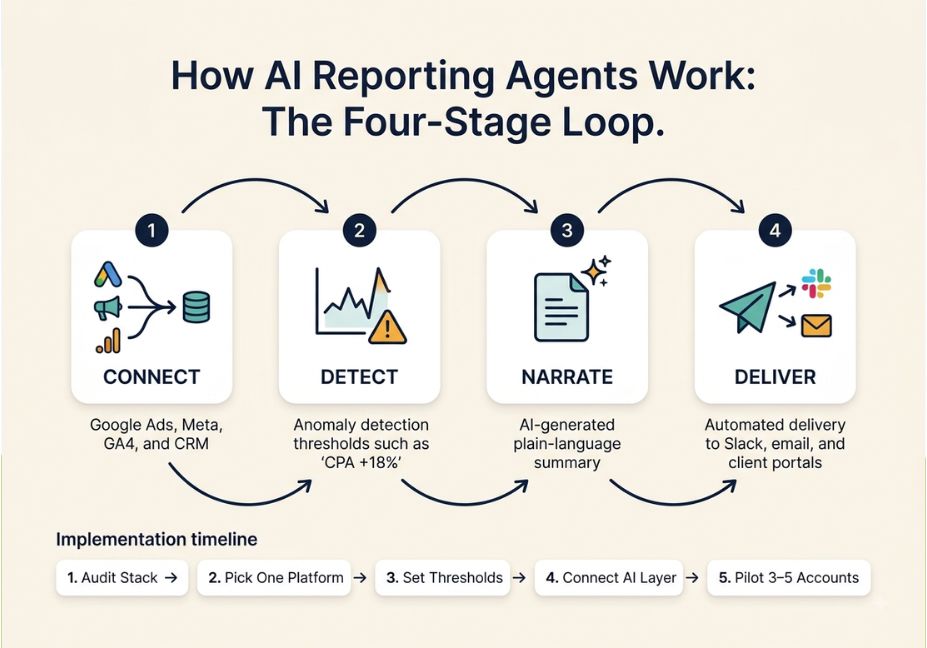
Under the hood, most 2026 platforms follow the same four-stage loop:
- Connect data connectors pull from ad platforms, GA4, CRMs, and spreadsheets on a scheduled or real-time basis.
- Detect an anomaly-detection layer flags metrics that cross a threshold (CPA up 18%, open rate below historical average).
- Narrate a language model turns the flagged numbers into plain-English commentary, often citing the specific campaign or channel responsible.
- Deliver the finished report or alert is routed to Slack, email, or a client portal, sometimes triggering a follow-up task like a check-in call.
The newest wrinkle in this stack is the Model Context Protocol an open standard Anthropic introduced in late 2024 to standardize how AI systems connect and share data with external tools and data sources. In practice, MCP gives AI applications like Claude or ChatGPT a standardized way to connect to data sources, tools, and workflows. This is why Databox, Whatagraph, and AgencyAnalytics now let an account manager type a question directly into Claude or ChatGPT and get an answer pulled from live client data instead of opening a dashboard first.
Pro Tip: If you’re evaluating tools, ask specifically whether the MCP connection exposes your governed metric definitions (blended ROAS, custom attribution windows) or just raw API fields. The difference determines whether the AI’s answers match the numbers already on your client’s report.
AI Reporting Automation Use Cases
Agencies are deploying this pattern across a handful of recurring jobs:
- Anomaly alerts a client’s cost-per-lead spikes overnight and the account manager gets a Slack message before the client notices.
- Monthly executive summaries raw metrics are compressed into a two-paragraph narrative a non-technical client can act on.
- Cross-channel blending paid, organic, and email data are normalized into one report instead of three exports.
- Scheduled, unattended reporting this is where the workflow stops being a tool and starts being an agent. Cloud-hosted agents can run on a schedule, pulling data, generating charts and summaries, and sharing results with a team without anyone manually starting the process. For an agency billing 15–30 clients, that’s the difference between a reporting function that scales with headcount and one that doesn’t.
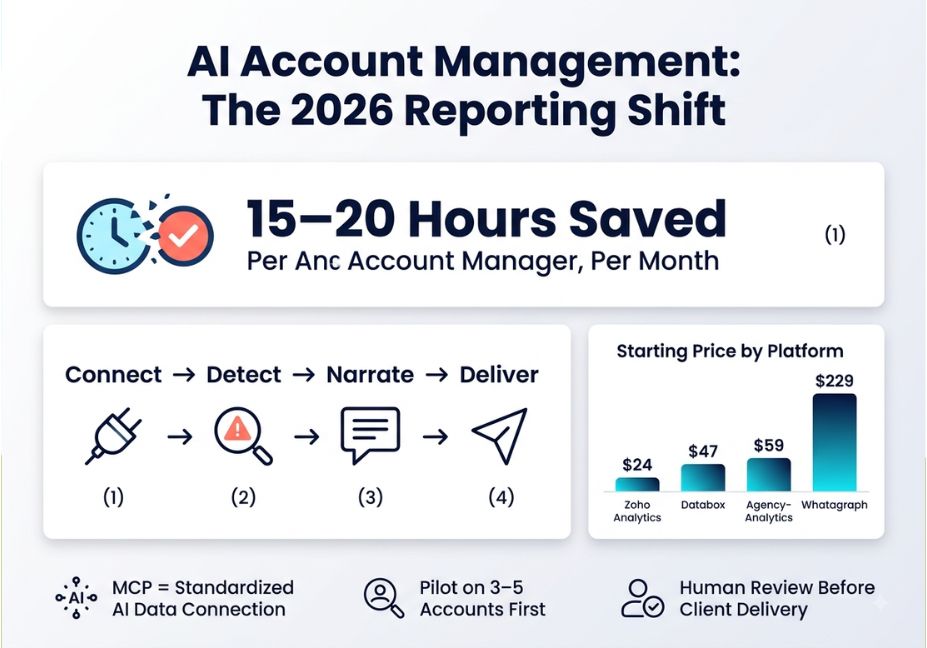
Did You Know? Industry surveys of 2025–2026 agency implementations put manual reporting time at roughly 15–20 hours per account manager per month before automation the labor cost most of these tools are built to eliminate.
Best AI Tools & Frameworks for Agency Reporting
No single platform wins on every dimension connector depth, report design, and AI-query maturity trade off differently across the category.
| Tool | Best For | AI / MCP Support | Starting Price |
|---|---|---|---|
| Databox | Real-time internal KPI monitoring, conversational Q&A | MCP connection to Claude/ChatGPT; “Genie” analyst for ad-hoc questions | ~$47/mo |
| Whatagraph | Polished, client-facing report design at scale | MCP exposes governed data layer (custom metrics, blends); AI-written report summaries | ~$229/mo |
| AgencyAnalytics | SEO/PPC-focused agencies wanting branded client portals | MCP available but limited to querying individual client campaigns via API | ~$59/mo |
| Zoho Analytics | Agencies blending CRM + marketing data on a budget | Zia AI assistant surfaces anomalies automatically | ~$24/mo |
Architect’s Note: Treat “MCP support” as a spectrum, not a checkbox. Some tools expose only raw campaign data through the protocol; others Whatagraph is the clearest 2026 example expose the same custom metrics and blends your dashboards already use, so an answer from Claude matches the number a client sees on their report. The orchestration layer matters more than the connector count once you’re managing more than a handful of accounts. That principle holds beyond marketing, too the same case has been made for global business services, where unlocking agentic capabilities at the orchestration layer enables contextual perception, cross-domain collaboration, and autonomous action while governance stays intact.
Step-by-Step: Implementing AI Account Management in Your Agency
- Audit your current stack. List every data source each client’s report pulls from most agencies land on 4–6 recurring sources (GA4, Google Ads, Meta Ads, Search Console, CRM).
- Pick one reporting layer, not three. Running Databox for internal monitoring and a separate client-delivery tool is common, but don’t stack more automation platforms than you can maintain.
- Define anomaly thresholds explicitly. An agent is only as useful as the KPI targets you feed it (e.g., ROAS below 4.0, CPA above $50).
- Connect the AI layer last. Get raw data flowing and validated in dashboards first; connect MCP or a chat-based query layer once the underlying numbers are trustworthy.
- Pilot on 3–5 accounts before rolling automated narrative reports out agency-wide, and have an account manager review the first month of AI-generated copy before it reaches a client inbox.
# Example: scheduled anomaly check via an MCP-connected agent (pseudocode)
if metric("cost_per_lead", client="Acme Co") > threshold * 1.15:
    draft = generate_summary(metric_history, client_context)
    send_to_channel("#acme-account-team", draft)
Technical Disclaimer: MCP implementations and connector coverage evolve quickly. The comparisons above reflect publicly available product documentation as of August 2026 verify current connector lists and pricing directly with each vendor before purchasing.
Common Mistakes and How to Avoid Them
- Automating before the data is clean. An AI narrative built on a broken UTM taxonomy just produces confident, wrong commentary faster than a human would.
- Letting AI-generated copy go out unreviewed. Treat the first draft as a first draft, especially for enterprise or high-touch accounts.
- Confusing a dashboard tool with an agent. Databox and Looker Studio show you what happened; only a small subset of 2026 platforms actually act on it triggering alerts, drafting follow-ups, or updating a CRM stage.
- Ignoring governance. If multiple client accounts share one AI reporting layer, make sure metric definitions and data access are scoped per client a governed data layer prevents one client’s numbers from leaking into another’s summary.
FAQ People Also Ask
What is AI account management for agencies?
AI account management uses agents to monitor client performance data, flag anomalies, and generate narrative reports automatically, reducing the manual work of exporting and interpreting metrics by hand across ad platforms and analytics tools.
How do AI tools automate client reporting?
They connect to data sources via APIs or MCP, apply anomaly detection to flag unusual metric changes, generate plain-language summaries with a language model, and deliver the result through Slack, email, or a client portal on a schedule.
Can AI replace account managers at agencies?
No current tools automate the reporting and monitoring layer, not the relationship or strategy layer. Account managers still interpret context, negotiate scope, and make judgment calls the agent flags but doesn’t own.
Is MCP required for AI-powered agency reporting?
No. Traditional API connectors still work fine for dashboards. MCP specifically enables conversational, natural-language querying of your data from Claude or ChatGPT without opening a separate reporting tool.
What’s the difference between a reporting dashboard and an AI reporting agent?
A dashboard displays metrics you have to interpret yourself. An agent monitors those same metrics continuously, decides when something warrants attention, and drafts or sends the explanation without a human triggering each step.
Conclusion
The agencies pulling ahead in 2026 aren’t the ones with the most integrations they’re the ones that treat reporting as an agentic workflow: connect clean data, define clear anomaly thresholds, let an AI layer draft the narrative, and keep a human reviewing what goes out the door. AI tools for agency account management won’t replace the account manager relationship, but they’ve already eliminated the 15–20 hours a month that used to go into building the report in the first place. Start with one platform, one governed data layer, and a small pilot group of accounts before rolling it out further.