

Most teams that search for AI automation tools with no restrictions aren’t looking for something dangerous. They’re looking for something that won’t throttle them. For example, they hit a task cap on Zapier mid-project, or they discover their vector store bill scales worse than expected, or they realize their “AI workflow” platform quietly requires one closed model they can’t swap out. According to a recent industry analysis tracking enterprise buying behavior, a large and growing share of teams now prefer open-source models for production workloads specifically to avoid this kind of lock-in.
In other words, “no restrictions,” used properly, is an architecture decision self-hosting, open licensing, and model portability not the absence of guardrails. This guide covers what actually removes restrictions from an agentic workflow, which frameworks deliver it, and how to build one from scratch, including how to choose between the best self-hosted AI automation tools for developers who want to avoid usage limits entirely.
What Is an “Unrestricted” AI Automation Stack?
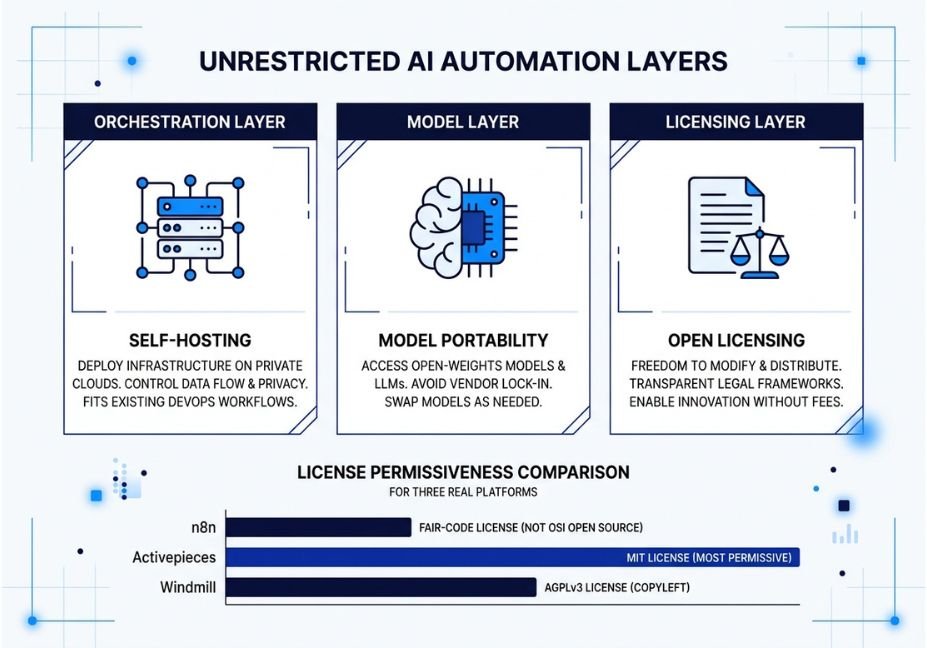
An unrestricted stack is one where you control the three layers that typically gate you: the orchestration layer (what runs your workflow), the model layer (what generates the output), and the licensing layer (what you’re legally allowed to do with the software). A SaaS automation tool that meters you per task, forces a single LLM provider, and ships under a proprietary license is restricted on all three axes even if its marketing says “unlimited.”
Semantic pairing to note: vendor lock-in and usage caps almost always travel together. As a result, a platform that caps your usage is usually also the one that owns your model access.
How Do I Choose an AI Automation Tool With No Restrictions?
This is the question most people are actually asking, whether they type it or say it out loud to a voice assistant. Start by identifying which restriction is actually costing you money or flexibility: is it a per-task usage cap, a single-vendor model requirement, or a licensing term that blocks resale? Once you know that, the decision gets much simpler, because each restriction maps to a specific fix self-hosting solves usage caps, bring-your-own-API-key solves model lock-in, and an MIT license solves resale restrictions.
How Does Restriction-Free Automation Actually Work?
The mechanism is the same tool-use loop every agent framework implements: the model reasons about a task, selects a tool, executes it, observes the result, and repeats. This is formalized in the ReAct pattern for interleaving reasoning and tool calls, which most modern agent frameworks including LangChain’s agent and tool-calling documentation implement in some form.
So what actually changes when you remove platform restrictions? Mainly, it’s where that loop runs and who owns the infrastructure:
- Orchestration: self-hosted, on your own server, instead of managed SaaS
- Model calls: bring-your-own-API-key or local inference, instead of a bundled, single-vendor model
- Memory and retrieval: a vector store you control (for example, Qdrant), instead of one gated behind the platform’s pricing tier
Technical Note: Removing a platform’s usage restrictions doesn’t remove the model provider’s own rate limits or acceptable-use terms. In short, you’re relocating the constraint, not eliminating it.
Real-World Use Cases
Consider these four scenarios, which cover most of the reasons teams end up here in the first place:
- Internal ops copilots an agent that reads support tickets, checks a CRM, and drafts responses, run entirely on internal infrastructure for data-sovereignty reasons.
- Multi-tenant SaaS features embedding automation directly inside your own product, which requires a permissively licensed engine you can legally redistribute.
- High-volume document pipelines RAG-based research or compliance tooling where per-task SaaS pricing (the kind Zapier and similar platforms use) would make the workload uneconomical at scale.
- Regulated-industry auditing finance and healthcare teams that need to inspect every node in a workflow, which closed, black-box platforms don’t allow.
Best Tools and Frameworks Compared
Two names dominate the open-source, self-hosted corner of this space in 2026: n8n and Activepieces. Both let you run workflows on your own infrastructure with no per-task metering. However, they differ meaningfully in licensing and AI maturity, which is why the comparison matters more than a simple feature checklist.
| Platform | License | AI / Agent Support | Best For |
|---|---|---|---|
| n8n | Fair-code (Sustainable Use License) | Native LangChain nodes, MCP support, deep AI agent workflows | Technical teams needing the deepest integration catalog |
| Activepieces | MIT (fully permissive) | Native OpenAI/Anthropic blocks, AI-native builder | Teams embedding automation into their own product |
| Windmill | AGPLv3 | Python-native, code-first ML access | Developers who want full code flexibility over a no-code UI |
Before redistributing n8n commercially, check n8n’s fair-code license terms on GitHub the license is more restrictive for hosted resale than Activepieces’ MIT terms, even though both are free to self-host.
Pro Tip: If your restriction is licensing meaning you plan to resell automation as a feature pick by license first and feature set second. Feature parity between these tools is closing fast, but license terms are not.
Step-by-Step: How to Build an AI Automation Workflow With No Restrictions
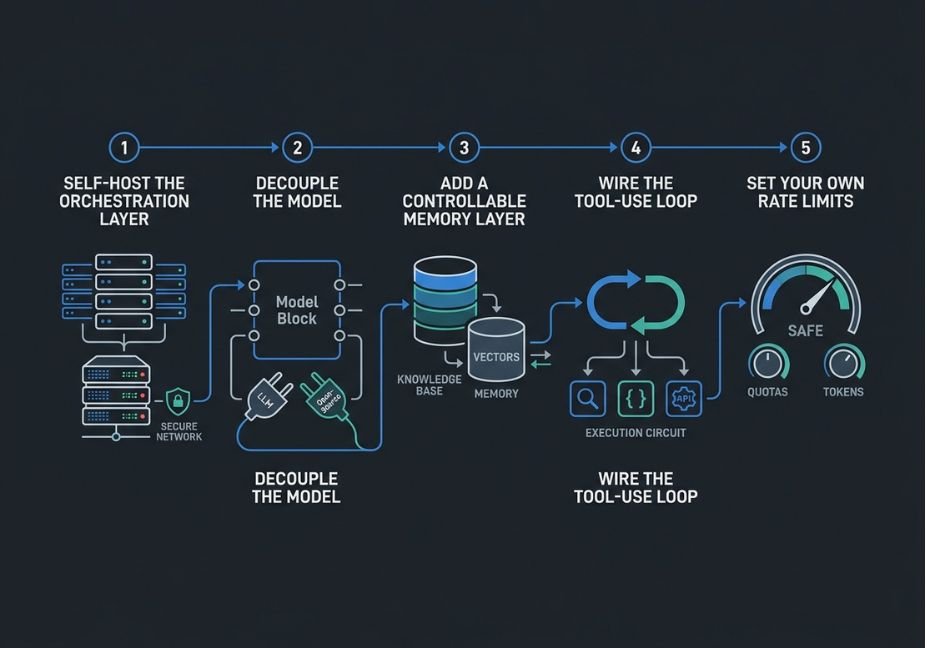
- Self-host the orchestration layer. Deploy n8n or Activepieces on your own VPS or container instead of the managed cloud tier. This alone removes per-task billing caps.
- Decouple the model. Configure your own API key (OpenAI, Anthropic, or an open-weights model served locally) instead of relying on a platform-bundled model you can’t swap.
- Add a controllable memory layer. Connect a vector store you host yourself Qdrant, Weaviate, or pgvector so retrieval isn’t gated behind a SaaS storage tier.
- Wire the tool-use loop. Use an MCP-compatible agent node so tools can be added or removed without redeploying the whole workflow.
- Set your own rate limits. Ironically, the last step in a genuinely unrestricted build is choosing your own limits, and that’s for cost control, not platform control.
python
# Minimal example: self-hosted agent loop calling a tool via LangChain
from langchain.agents import initialize_agent, Tool
from langchain_openai import ChatOpenAI

def lookup_ticket(ticket_id: str) -> str:
    # replace with a call to your self-hosted CRM/database
    return f"Ticket {ticket_id}: open, priority high"

tools = [Tool(name="lookup_ticket", func=lookup_ticket,
               description="Look up a support ticket by ID")]

llm = ChatOpenAI(model="gpt-4.1", temperature=0)  # swap for any provider
agent = initialize_agent(tools, llm, agent="zero-shot-react-description")

print(agent.run("What's the status of ticket 4471?"))
Technical Disclaimer: Framework versions evolve rapidly. This example reflects LangChain’s Python SDK as of mid-2026 always check the official docs for current API signatures before shipping.
Common Mistakes and How to Avoid Them
- Confusing “self-hosted” with “unlimited.” Your own infrastructure still has compute limits, and your model provider still has rate limits. So really, you’ve relocated the ceiling, not removed it.
- Ignoring license terms until you scale. Fair-code and AGPL licenses restrict commercial resale differently than MIT does. Therefore, check this before building a product on top of a framework, not after.
- Skipping agent memory design. An unrestricted platform with no thought given to retrieval accuracy or context-window management will still hallucinate, because architecture freedom doesn’t fix prompt or memory design on its own.
- Over-indexing on one vendor’s model. The whole point of a restriction-free stack is portability. Hardcoding a single model provider simply recreates the lock-in you were trying to avoid.
What Developers Are Saying
Threads on open-source automation tend to converge on the same tradeoff developers keep raising in community discussions on GitHub and elsewhere: managed platforms are faster to start with, but self-hosted, open-license tools win once a workflow needs to scale past a few hundred runs a month without the bill scaling with it. This mirrors the broader shift documented by a16z’s research on enterprise open-source AI adoption.
FAQ People Also Ask
What does “no restrictions” actually mean in AI automation tools?
It typically refers to the absence of platform-imposed usage caps, single-vendor model lock-in, or restrictive commercial licensing not the absence of safety guardrails. A genuinely unrestricted stack is self-hosted, model-portable, and permissively licensed.
Are open-source automation tools free to use commercially?
It depends on the license. MIT-licensed tools like Activepieces allow commercial resale freely, while fair-code or AGPL-licensed tools like n8n or Windmill place restrictions on hosting the software as a paid service for others.
Can I run AI agents without relying on a single AI provider?
Yes. Frameworks like LangChain support swapping between OpenAI, Anthropic, and local open-weights models with minimal code changes, which is the core mechanism behind model portability.
Do self-hosted automation tools still have rate limits?
Your own infrastructure removes the platform’s task caps, but the underlying LLM provider’s API still enforces its own rate limits and usage terms. So you’re managing limits at a different layer, not eliminating them.
What’s the difference between n8n and Activepieces for AI workflows?
n8n has the deeper integration catalog, native LangChain nodes, and MCP support, making it stronger for complex agent workflows. Activepieces has a more permissive MIT license and a cleaner interface, which makes it better for embedding automation into your own product.
Conclusion
Ultimately, unrestricted AI automation isn’t about finding a tool with no guardrails. It’s about owning the three layers that usually box you in: orchestration, model access, and licensing. Self-hosted platforms like n8n and Activepieces, paired with a portable model layer and a self-managed vector store, give you that control without recreating the lock-in you started with. Bookmark this guide and explore more hands-on agentic workflow tutorials at agentiveaiagents.com.



