
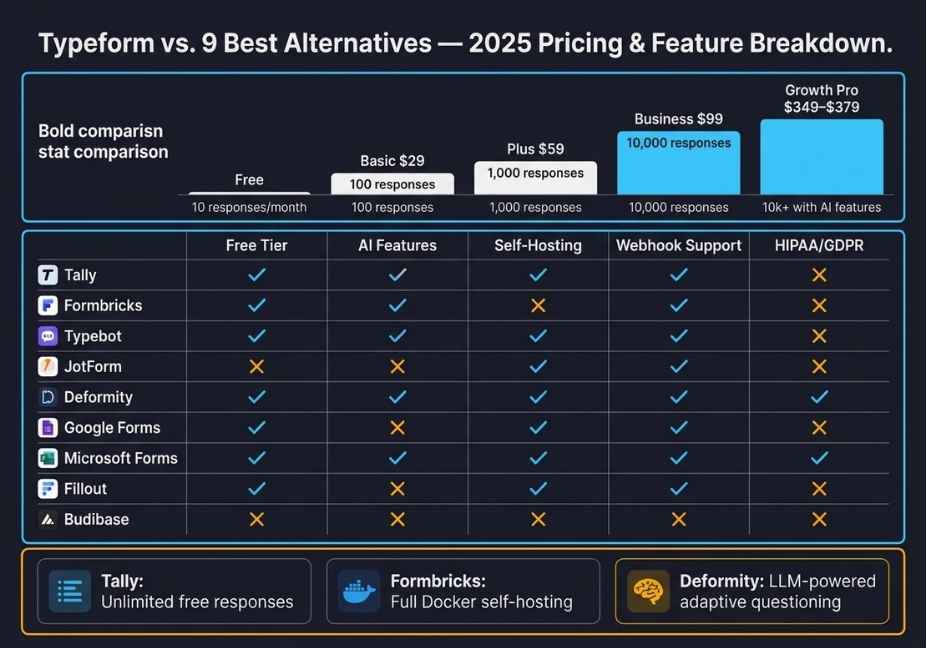
Typeform still has the same general pricing structure. You continue to pay for responses, which are kept locked behind paywalls and the free tier (10 responses per month) essentially serves as a demonstration of how Typeform can be used rather than an actual tool.
Here’s how the issues compound in practice:
- The response limits for users with Typeform accounts have hard caps. Once you reach those caps your forms will be put into private status with no auto-degradation capability.
- Automation is an additional charge for users. If a user wants to create 2400 triggers through Typeform, they will have to pay an additional $.29 per month and only those who are subscribed to the “Plus” plan will be able to purchase them.
- If you are removing Typeform branding from your forms you will have to pay for that removal. In order to have a form that appears to you as your own, you will have to upgrade from the basic plan.
- Compliance with HIPAA and/or GDPR will only be provided to those who are in the “Enterprise” tier. Companies operating within a regulated industry either must pay the enterprise fee for compliance or must go without.
Did you know? Typeform’s “Growth Pro” plan (which is the plan you will need if your company generates 10,000 or more responses with AI questions) costs between $349 and $379 a month. For that cost, many technical groups would be able to fund a fully agency-based data pipeline.
So, is Typeform a well-designed product? It is. What will be your company’s experience with the product and its ability to support your company as it grows.
What to Look for in a Typeform Alternative
Before jumping to the list, it helps to define the right evaluation framework especially for technical teams who need more than a pretty survey tool.
Look for these factors when comparing options:
- Response limits and pricing model per-response billing vs. flat-rate subscriptions vs. open-source self-hosting
- Conditional logic depth branching, skip logic, calculated fields, and multi-step form flows
- Webhook and API support does the tool push structured data directly to your stack, or does it need Zapier in the middle?
- AI features LLM-driven clarifying questions, sentiment analysis, and AI-generated response summaries
- Data residency and compliance GDPR, HIPAA, and self-hosting availability
- Completion rate optimization conversational UX, mobile load performance, and embedding flexibility
With those criteria established, here are the nine best Typeform alternatives ranked by use case fit.
9 Best Typeform Alternatives in 2026
1. Tally Best Free Alternative with Unlimited Responses
Tally is the most direct Typeform replacement for teams who want the one-question-at-a-time UX without the monthly billing anxiety. Importantly, its free plan includes unlimited forms and unlimited responses no caps, no silent shutdowns.
Key strengths:
- Unlimited responses on the free tier no monthly reset surprises
- Conversational form UX almost identical to Typeform’s core experience
- Native integrations with Notion, Airtable, Google Sheets, and Slack
- Conditional logic and calculated fields available on the free plan
- Hidden fields for pre-populating data directly from URL parameters
Limitations: The free tier displays Tally branding. However, the Pro plan at $29/month removes it and unlocks custom domains, file uploads, and priority support.
Pro Tip: Tally’s embeddable forms load significantly faster than Typeform on mobile connections. This matters because mobile form abandonment spikes sharply once load time crosses three seconds.
It is best for Startups indie developers, and small teams who need professional forms without an escalating monthly bill.
2. Formbricks Best Open-Source Alternative (Fully Self-Hostable)
Formbricks is the strongest open-source Typeform alternative available in production today. Notably, it covers the full survey and experience management stack in-app surveys, link surveys, website pop-ups, and multi-step forms all from one platform you control entirely.
The open-source Typeform alternative has grown rapidly through 2026. Consequently, it is now recognized as one of the fastest-scaling survey platforms for teams that need GDPR compliance without enterprise contracts.
Key strengths:
- Full self-hosting via Docker for complete data ownership
- GDPR and privacy compliance built in, not bolted on
- Advanced targeting: trigger surveys based on user attributes, page visits, or custom events
- Built-in analytics and response heatmaps
- Free cloud plan available alongside affordable paid tiers
Limitations: Self-hosted deployments require some DevOps familiarity. Additionally, the interface is functional but less visually polished than Typeform.
Architect’s Note: Formbricks exposes a REST API and a native webhook system. Therefore, wiring it into a LangChain-based agentic pipeline for automated response processing is straightforward.
It is best for Technical teams, SaaS products running in-app feedback loops, and any organization that requires full data sovereignty.
3. Typebot Best for Chatbot-Style Conversational Forms
Typebot blurs the line between form builder and chatbot builder. As a result, it creates visual, flow-based conversational sequences that feel more like a guided dialogue than a static survey with full open-source availability and self-hosting support included.
Key strengths:
- Visual flow builder with deep branching logic
- Embeds as a chat bubble, full-page overlay, or inline widget
- Native integrations with OpenAI, Google Sheets, webhooks, Zapier, and Make
- Open-source and fully self-hostable
- Conditional logic with variables and formula-based calculations
Limitations: Complex flows can become difficult to maintain visually at scale. Furthermore, analytics remain basic compared to enterprise-tier platforms.
It is best for Lead qualification flows, user onboarding sequences, and any use case where conversational UX meaningfully increases completion rates over a static form layout.
4. JotForm Best for Enterprise Features at Mid-Market Pricing
JotForm is the most feature-complete Typeform alternative on the market today. Specifically, it covers form building, workflow approvals, PDF generation, e-signatures, payment collection, and HIPAA-compliant data handling all under one subscription.
Key strengths:
- Over 10,000 templates across industries and use cases
- HIPAA compliance available on paid plans not locked behind enterprise gates
- Payment integrations with Stripe, PayPal, and Square available on all paid tiers
- Approval workflows with automated PDF generation baked in
- AI form builder: describe your form in plain language and JotForm generates it instantly
Limitations: The interface feels heavy for simple use cases. Moreover, pricing scales with features and can rival Typeform at the upper tiers.
Comparison Snapshot:
| Feature | Typeform Business | JotForm Bronze |
|---|---|---|
| Monthly price | $99 | $39 |
| Responses/month | 10,000 | 1,000 |
| HIPAA compliance | Enterprise only | Available on paid plans |
| Payment collection | Plus tier and above | All paid plans |
| AI form generation | Growth tier only | Available on all tiers |
Best for: Operations teams, HR departments, and businesses that need multi-step approval workflows with document generation already built in.
5. Deformity Best AI-Native Conversational Form Builder
Deformity is purpose-built for teams who want LLM-powered conversations, not static branching logic. Specifically, it uses modern language models to run adaptive, context-aware form sessions where the AI probes deeper based on what a respondent actually says, rather than routing them down a pre-written decision tree.
Understanding how building AI-driven conversational data collection works at the architecture level helps clarify why Deformity’s approach is genuinely different. In short, it replaces rigid conditional logic with a live LLM inference loop.
Key strengths:
- LLM-powered adaptive questioning questions shift in real time based on prior responses
- Strong branding control and white-label customization options
- Webhook routing to downstream tools including Slack, email, and CRM platforms
- Scheduled form open and close windows ideal for launches, waitlists, and capped applications
- Conversion-focused UX with fast model response rendering
Limitations: The platform is newer, so niche workflow integrations may require workarounds. Additionally, it is not open-source.
Technical Note: Deformity’s adaptive questioning approach is conceptually similar to a ReAct-style agent loop. Essentially, the model reasons over prior conversational context to determine the most relevant next question rather than following a fixed branching path.
It is best for Marketing teams, product researchers, and user interview workflows where richer qualitative responses matter more than raw submission volume.
6. Google Forms Best Free Baseline for Simple Data Collection
Google Forms remains the most accessible zero-cost form builder for basic data collection needs. Although it lacks Typeform’s UX polish, it covers the fundamentals reliably at no cost and with no response limits whatsoever.
Key strengths:
- Completely free with unlimited responses and no monthly caps
- Native Google Workspace integration across Sheets, Drive, and Calendar
- Real-time collaboration and shared editing built in
- Quiz mode with automatic grading available
Limitations: There is no conversational UX, minimal design customization, no native webhook support (Zapier required), and no AI-powered features of any kind.
It is best for Internal surveys, quick feedback rounds, academic research, and any scenario where completion rate optimization and visual design are not priorities.
7. Microsoft Forms Best for Microsoft 365 Organizations
Microsoft Forms offers seamless integration across the Microsoft 365 ecosystem including Excel, SharePoint, Teams, and Power Automate. Consequently, it is the obvious default for organizations already running Microsoft infrastructure.
Key strengths:
- Free with most Microsoft 365 subscriptions no additional software spend required
- Power Automate integration enables native workflow triggers without third-party connectors
- Branch logic and quiz modes available out of the box
- Real-time response summaries with basic visual charts
Limitations: Design customization is minimal. Furthermore, the tool is effectively limited to teams already operating within the Microsoft ecosystem.
It is best for Enterprise organizations standardized on Microsoft tooling who need lightweight internal forms without onboarding a separate platform.
8. Fillout Best for Developer Teams Wanting API-First Forms
Fillout has earned strong traction among developer teams, particularly for its clean API design, native database integrations, and UX that sits between Typeform’s polish and a fully headless form solution.
Key strengths:
- Direct database connections to Airtable, Notion, Supabase, and REST APIs
- Prefilled fields from URL parameters or logged-in user session data
- Powerful conditional logic with calculated fields and formula support
- Scheduling add-ons that enable Calendly-style booking directly within forms
- Generous free tier with 1,000 responses per month no credit card required
Limitations: Fillout is newer than most incumbents, and some enterprise-grade features are still maturing.
Pro Tip: Fillout’s prefilled field support makes it particularly effective for onboarding flows. Specifically, you can combine what you already know about a user with what you still need to ask which meaningfully reduces friction and lifts completion rates.
It is best for Product teams, SaaS onboarding sequences, and developers who need form data flowing directly into their database without ETL overhead or connector dependencies.
9. Budibase Best for Advanced Custom Forms on Any Data Source
Budibase sits at the intersection of form builder and low-code application platform. Essentially, it is the right choice when your form logic is complex enough that off-the-shelf tools produce brittle workarounds. The AI form builder landscape in 2026 shows Budibase leading on data connectivity supporting relational databases, NoSQL stores, REST APIs, Google Sheets, and its own built-in low-code database.
Key strengths:
- Connectors for virtually any data source: PostgreSQL, MySQL, MongoDB, REST, and S3
- Autogenerated CRUD forms directly from connected data schemas
- Optional custom CSS and JavaScript for complete design control
- Visual workflow automation with branching, looping, and LLM operations built in
- Open-source core with full self-hosting available
Limitations: The learning curve is steeper than pure form builders. Moreover, Budibase is not optimized for simple, high-volume public-facing survey collection.
It is best for IT teams and developers building internal tools, admin panels, or complex multi-step approval workflows on top of existing data infrastructure.

How AI Is Changing Form Builders in 2026
The most significant shift in the form builder market is not about UI anymore. Instead, it is about what happens to data after submission and how intelligently the form behaves during the session.
Traditional form builders collect responses and hand them off to Zapier or Make for routing. AI-native builders, however, are beginning to close that loop entirely. Specifically, they generate adaptive questions in real time, summarize open-text responses automatically, flag sentiment anomalies, and trigger downstream agentic workflows all without connector glue.
Researchers at WyeWorks documented a compelling architecture in their work on LLM-powered conversational form agents. Essentially, they replaced static conditional logic with prompt-engineered inference loops that maintain full context across a conversation. The result was richer qualitative data from the same number of respondents without adding questions.
For teams already building on LangChain or similar orchestration frameworks, this opens a direct integration path. Specifically, a form session becomes a structured data extraction agent rather than a passive questionnaire waiting to be exported.
What this means in practical terms:
- Completion rates improve because questions feel contextually relevant and adaptive
- Open-text responses become structured data via real-time AI summarization
- Form data enters your pipeline already enriched not raw and unprocessed
Currently, Deformity, Formbricks, and Typebot are furthest ahead on this trajectory. Nevertheless, most major platforms are moving in this direction through 2026.
Common Mistakes When Switching Away from Typeform
Even well-planned migrations can break in unexpected ways. Therefore, avoid these four mistakes before you make the switch.
1. Migrating forms without auditing your conditional logic first. Complex Typeform branching logic does not map 1:1 to every alternative platform. Consequently, always audit your full logic tree before migration not after your first broken form surfaces in production.
2. Ignoring mobile completion rate changes. Typeform’s one-question-at-a-time UX was specifically designed to reduce mobile abandonment. Therefore, if you switch to a multi-field form layout, measure completion rates carefully across at least two weeks before scaling to high-volume campaigns.
3. Underestimating webhook reliability differences. Some alternatives rely on Zapier triggers rather than native webhooks. Notably, Zapier-dependent pipelines introduce latency and additional failure points that native webhook integrations avoid entirely.
4. Skipping your GDPR and HIPAA compliance review. If you collect EU user data or any health-related information, confirm your alternative’s compliance posture before switching. Specifically, self-hosted tools like Formbricks give you full control, while cloud tools vary widely in what they actually guarantee.
FAQ People Also Ask
What is the best free alternative to Typeform?
Tally is the best free Typeform alternative for most teams. It offers unlimited responses, a conversational one-question-at-a-time UX, and native integrations with Airtable, Notion, and Slack all completely free. Google Forms is the better choice only if setup simplicity matters more than design quality.
Which Typeform alternative has the best AI features?
Deformity leads on AI-native conversational questioning, using large language models to generate adaptive follow-up questions based on respondent context in real time. JotForm offers AI form generation from plain-language prompts. Additionally, Formbricks is actively rolling out AI summarization for open-text responses.
Is JotForm better than Typeform?
For feature breadth, yes JotForm provides HIPAA compliance, payment processing, PDF generation, and approval workflows at significantly lower price points than Typeform. However, for pure conversational UX and form design elegance, Typeform remains the benchmark.
What Typeform alternatives work best for developers?
Fillout, Budibase, and Formbricks are the strongest developer-oriented alternatives. Specifically, all three support native webhook delivery to custom endpoints, direct database integrations, and open APIs without requiring Zapier or Make as middleware.
Can I self-host a Typeform alternative?
Yes. Both Formbricks and Typebot offer fully self-hosted deployments via Docker. Consequently, you get complete data ownership and GDPR-compliant form infrastructure running entirely on your own servers.
Which form builder produces the highest completion rates?
Conversational, one-question-at-a-time formats consistently outperform traditional multi-field forms on completion rate. Therefore, tools like Tally, Typebot, and Deformity which use this approach tend to perform best. Mobile load speed matters equally: CDN-backed lightweight embeds significantly outperform heavy JavaScript bundles on mobile connections.
Conclusion
Typeform’s UX is genuinely excellent. However, its pricing model hard response caps, branding locked behind paywalls, and automation sold as a separate add-on creates friction that compounds painfully as teams scale.
In 2026, the alternatives have caught up on design. Moreover, they have opened meaningful gaps in areas Typeform never prioritized: open-source self-hosting, LLM-powered adaptive questioning, and direct data pipeline integration without third-party connectors.
Three takeaways to bookmark before you decide:
- Tally is the default free replacement for most teams. Start there unless you have specific compliance or AI-workflow requirements.
- Formbricks is the right call for any organization that needs data sovereignty, GDPR compliance, or in-product survey triggers without an enterprise contract.
- Deformity or Typebot deserve serious evaluation if your form’s purpose is generating qualitative insight — not simply capturing structured data at volume.
For deeper dives into building agentic data collection pipelines where forms feed directly into LLM processing, structured output workflows, and downstream automation explore more hands-on tutorials at agentiveaiagents.com.