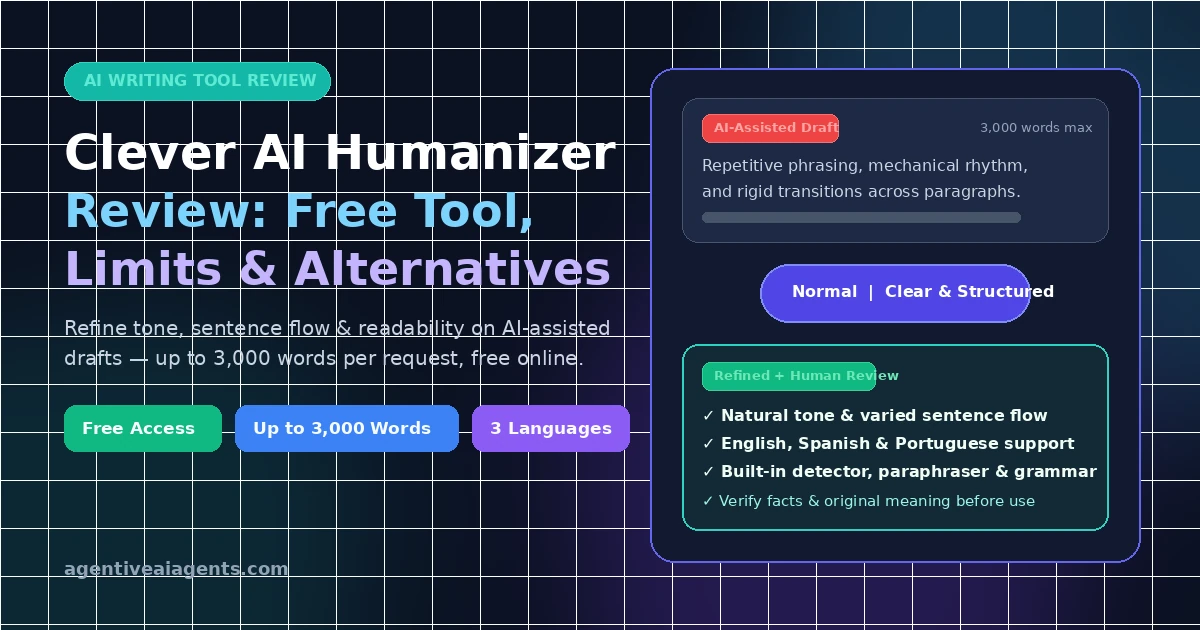
Finding a reliable tool to improve AI-generated writing can be challenging. For example, some tools make text easier to read, while others produce awkward sentences or change the original meaning. Clever AI Humanizer free is an online writing tool that improves tone, sentence structure and readability without manual rewrites.
Specifically, this Clever AI Humanizer review explores its free features, supported languages, strengths, limitations and possible alternatives. It also explains how to use an AI to human text converter responsibly for blog posts, emails, reports and essays.
Whether you want to humanize AI text free of charge or find the best AI humanizer tool, several factors matter. Above all, readability, accuracy, privacy and the amount of final editing needed are most important.
What Is Clever AI Humanizer Free?
Clever AI Humanizer is a browser-based writing tool available at cleverhumanizer.ai. Specifically, it helps users revise AI-assisted drafts by adjusting sentence patterns, phrasing and tone.
Moreover, the tool makes text sound more natural and less repetitive. Therefore, it helps when a draft feels mechanical, repeats sentence structures or lacks a suitable tone for its audience.
According to its official website, the tool supports English, Spanish and Portuguese. It also offers writing styles such as Normal and Clear & Structured.
Who Can Use It?
For instance, Clever AI Humanizer may be useful for:
- Bloggers who want clearer, more natural articles.
- Content writers editing AI-assisted drafts.
- Marketers refining website copy and product descriptions.
- Professionals polishing emails and reports.
- Students improving the clarity of their own writing, subject to their institution’s rules.
However, a humanizer is an editing assistant, not a substitute for research, original thinking or fact-checking.
Clever AI Humanizer Free: Features and Limits
One reason people search for Clever AI Humanizer free is its advertised access without a mandatory paid subscription.
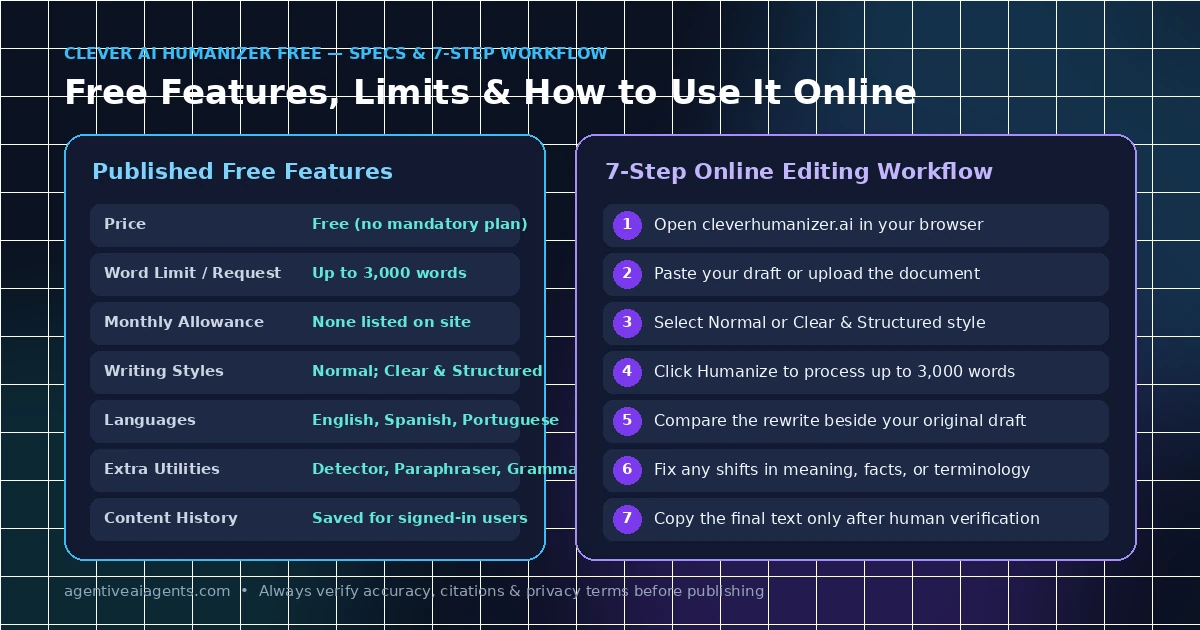
Specifically, the official website currently lists these features:
| Feature | Official website information |
|---|---|
| Price | Free |
| Word limit per request | Up to 3,000 words |
| Fixed monthly word allowance | None listed |
| Writing styles | Normal and Clear & Structured |
| Supported languages | English, Spanish and Portuguese |
| Additional tools | AI detector, paraphraser and grammar checker |
| Content history | Available for signed-in users |
Overall, these details reflect the website’s published information when reviewed. However, processing availability and features may change.
Is Clever AI Humanizer Free Really Free?
First, the official website advertises Clever AI Humanizer free access without a fixed monthly word allowance or a paywall. In addition, each request can contain up to 3,000 words.
However, a free tool can still have technical limitations, service interruptions or restrictions explained in its terms. Therefore, check the current website before processing a large project.
Does It Require an Account?
Fortunately, you can start using the tool without signing in. According to the website, an account also lets users access their saved content history.
If you plan to work with unpublished articles or private documents, review the privacy policy before uploading them.
Clever AI Humanizer Online: How to Use It
Because the online interface is straightforward, most users can start without installing software.
Simply follow these steps:
- First, visit Clever AI Humanizer.
- Next, paste your draft into the input box or use the available upload option.
- Then, select a writing style that matches your purpose.
- Afterward, click the humanize button to process the text.
- Meanwhile, review the rewritten version beside the original.
- Additionally, correct any changes in meaning, facts, tone or terminology.
- Finally, copy the final text only after checking it carefully.
Although the tool can help with sentence variety and readability, the result may not always match your preferred voice.
For example, a professional report needs precise language, while a lifestyle blog benefits from a warmer, conversational tone. Therefore, choose the style according to the reader rather than assuming one setting works for every document.
Clever AI Humanizer Review: Pros and Cons
Of course, no writing tool is perfect. Therefore, the best way to evaluate Clever AI Humanizer free is to weigh its features against human judgment.
Pros
- Free access: First, the official website advertises free use without a fixed monthly word allowance.
- Simple interface: Second, users can paste text, select a writing style and review the result in one place.
- Useful editing options: Furthermore, the tool focuses on tone, sentence structure and readability.
- Multiple writing styles: In addition, Normal and Clear & Structured provide different approaches to editing.
- Additional writing tools: Finally, the website also lists an AI detector, paraphraser and grammar checker.
Cons
- Editing is still necessary: However, the rewritten version may contain awkward phrasing or unintended changes.
- Limited language selection: Currently, the website lists English, Spanish and Portuguese, so other languages may not work.
- Lack of factual guarantee: Moreover, the tool does not replace research, source checking or expert review.
- Uncertain detector results: Similarly, a more natural-sounding draft does not guarantee a particular AI detection score.
- Privacy needs attention: Therefore, review the site’s data-handling policies before submitting sensitive information.
Is It Worth Trying?
Overall, Clever AI Humanizer free is worth considering if you want a starting point for improving an AI-assisted draft. Moreover, its advertised word allowance is useful for writers who edit longer articles.
However, do not judge the result only by how different it looks from the original. Instead, check whether the revised text is clearer, accurate and appropriate for its intended audience.
Best AI Humanizer Tool: Alternatives to Consider
Ultimately, the best AI humanizer tool depends on your actual goal. For instance, some writers need sentence-level editing, while others want paraphrasing, grammar corrections or a consistent style.
Therefore, here are several alternatives worth comparing.
1. QuillBot
First, QuillBot offers paraphrasing and writing assistance. Specifically, it can help you explore alternative wording when a sentence sounds repetitive or unclear.
Thus, it is worth considering if your main goal is to rephrase existing text rather than restructure an article. However, check its current free limits and paid features before choosing a plan.
2. Grammarly
Second, Grammarly focuses on grammar, clarity, tone and writing assistance. For example, it can be useful when you want to polish a draft while checking sentence-level issues.
Consequently, this option may suit professionals, bloggers and students who prioritize correctness and clarity.
3. Wordtune
Third, Wordtune offers rewriting and wording suggestions. In particular, it can help when you want to express an idea more clearly or explore different sentence structures.
Even so, review the suggestions carefully to make sure the revised sentence preserves your original meaning.
4. Manual Editing With a Writing Assistant
Finally, you can also revise your draft manually with a general writing assistant. For instance, ask for help identifying repetitive sentences, vague wording, unnecessary filler and unclear transitions.
As a result, this approach gives you more control over the final draft. Specifically, you can accept or reject individual changes instead of replacing the entire draft.
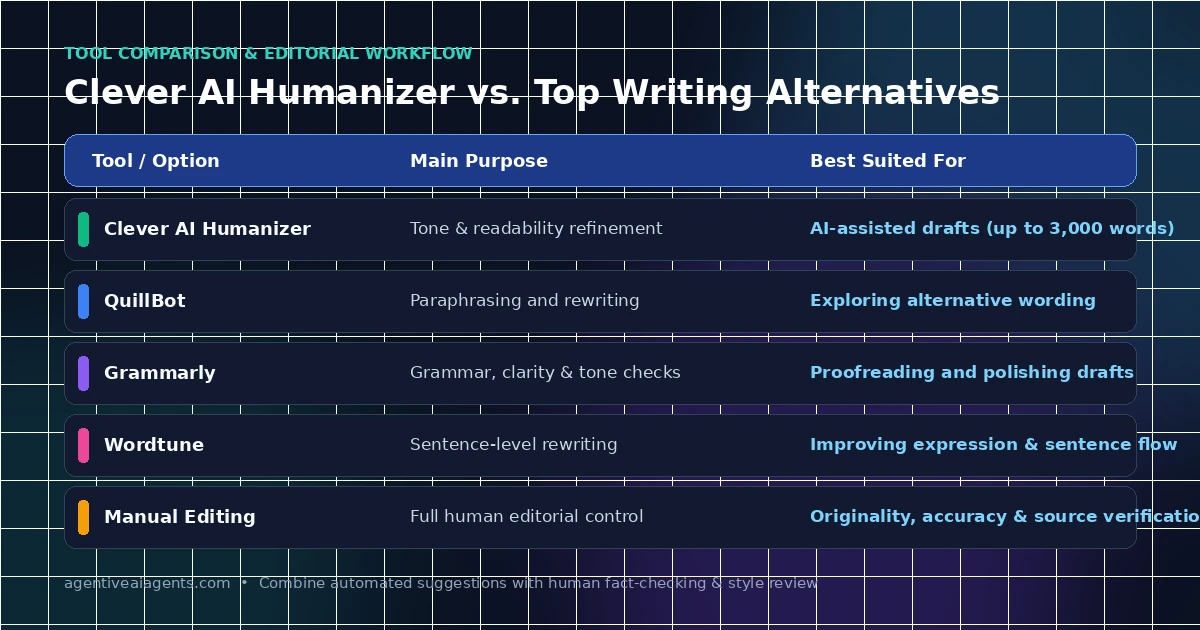
Clever AI Humanizer Alternative: Quick Comparison
| Tool | Main purpose | Best suited for |
|---|---|---|
| Clever AI Humanizer | Tone and readability refinement | AI-assisted drafts |
| QuillBot | Paraphrasing and rewriting | Alternative wording |
| Grammarly | Grammar and clarity | Proofreading and polishing |
| Wordtune | Sentence rewriting | Improving expression |
| Manual editing | Full editorial control | Originality and accuracy |
Keep in mind that features, prices and free limits can change. Therefore, visit each provider’s official website to compare the current plans before making a decision.
AI to Human Text Converter: How to Improve Your Writing
An AI to human text converter can help revise text that sounds repetitive or overly formal. However, the strongest results usually come when you combine automated suggestions with your own judgment.
Therefore, use this practical workflow:
Step 1: Check the Main Message
Before editing, identify the central point of each paragraph. If a paragraph does not contribute useful information, remove or rewrite it.
Step 2: Remove Repetition
Next, look for repeated ideas, unnecessary introductions and generic statements. Instead, keep details that help readers understand the topic.
Step 3: Vary Sentence Structure
Additionally, combine short sentences where appropriate and break up long sentences that contain too many ideas. After all, natural writing does not require every sentence to have a different length.
Step 4: Add Specific Information
Furthermore, use verified examples, relevant details and clear explanations. Remember, a tool cannot replace firsthand experience or reliable research that the draft lacks.
Step 5: Check Facts and Sources
Then, verify names, dates, figures, quotations and references. Even a polished sentence can still contain incorrect information.
Step 6: Read the Final Version
Finally, read the text aloud or review it line by line. Then, correct unnatural wording and make sure the result reflects your intended meaning.
Undetectable AI Humanizer and AI Detection: What Should You Know?
Searches for an undetectable AI humanizer or a bypass AI detection tool are common. Usually, readers want to know whether rewriting software can guarantee a low AI detection score.
However, the important distinction is that improving writing quality is not the same as guaranteeing detector evasion.
In fact, Clever AI Humanizer’s own ethics statement says the tool is not built to bypass AI detection systems. Likewise, it cannot guarantee compliance with institutional standards.
Research from 2026 also highlights differences in how AI detectors perform on original, mixed and humanized text. For example, a study in the International Journal for Educational Integrity found that detector performance varied across tested systems and text categories. Consequently, the authors cautioned against using detection results as the sole basis for high-stakes decisions.
For that reason, avoid relying on claims that a tool can make content completely undetectable. Because detection scores can vary, no rewriting tool serves as proof of authorship.
If a teacher, employer or publisher has rules about AI use, follow those requirements. In short, use editing tools to improve clarity and disclose AI assistance when required.
AI Humanizer for Essays: Responsible Use Tips
Although an AI humanizer for essays can help you edit a draft, academic writing requires special care.
First, use a writing tool to improve grammar, clarify complicated sentences or identify repetitive wording. Then, verify your evidence, citations and conclusions yourself.
Before submitting an essay:
- First, confirm your institution’s rules about AI-assisted editing.
- Second, make sure the argument reflects your own understanding.
- Third, verify every quotation, citation and factual claim.
- Additionally, keep drafts and research notes when appropriate.
- Furthermore, disclose AI assistance if your institution requires it.
- Finally, do not use a humanizer to disguise work that you must produce independently.
Overall, these steps help protect academic integrity while allowing appropriate writing support.
Conclusion
In conclusion, Clever AI Humanizer free is an online tool that improves the tone, structure and readability of AI-assisted drafts. Specifically, its published features include up to 3,000 words per request, multiple writing styles and additional writing utilities.
Therefore, it may be useful for bloggers, content writers and professionals who want a straightforward editing tool. Meanwhile, QuillBot, Grammarly and Wordtune are also worth considering for paraphrasing, proofreading or sentence rewriting.
Ultimately, the most important factor is the quality of the final text. Always review every rewrite for accuracy, natural wording and original meaning. Above all, do not rely on promises of undetectable content or guaranteed AI detection results.
Frequently Asked Questions
Yes. Specifically, its official website advertises free use with no fixed monthly word allowance and up to 3,000 words per request. However, check the website for current service availability and terms.
First, review its privacy policy and terms before submitting personal, confidential or unpublished material. In addition, always check the rewritten text for errors before using it.
No, it does not guarantee that content will pass AI detectors. In fact, its published ethics statement says the tool is not designed to bypass detection systems.
For instance, QuillBot may suit paraphrasing, Grammarly can help with grammar and clarity, and Wordtune offers sentence rewriting. Therefore, compare their current features and pricing to find the best fit.
Yes, you can use writing tools for permitted editing tasks, such as improving clarity and grammar. However, follow your institution’s academic integrity rules and disclose AI assistance when required.
No. Although a rewrite can improve readability, it can also introduce errors or change the meaning. Consequently, review the output and verify all facts before publishing or submitting it.