A content team publishes a 3,000-word guide. It’s AI-polished and grammatically flawless. Two days later, it gets pulled because the AI-refined draft invented a statistic that a reader flagged in the comments. This is the real risk behind expert tips for editors using AI tools for content refinement: the tools are excellent at surface-level polish. However, they are mediocre at catching their own factual mistakes. Frontier models have driven down hallucination rates on grounded summarization tasks dramatically since 2021. Even so, the best models still miss a meaningful share of claims on harder, open-ended tasks. In other words, that’s exactly the kind of content editors refine every single day.
Quick Answer: The best AI tools for editors refine tone, grammar, and structure not facts. Generative models can invent numbers, names, and quotes during a rewrite. So every AI-refined draft still needs a human fact-check before publishing. Build an AI content refinement workflow for editorial teams. Center it on separated passes, a documented style guide, and a mandatory verification step.
So, the fix isn’t avoiding AI. Instead, it’s building an AI content refinement workflow for editorial teams. That workflow treats AI the way an engineering team treats an autonomous agent. It’s useful for speed, but never trusted without a verification step. Below is a practical, tool-specific system editors can use to refine content. It stops AI from quietly introducing errors, flattening brand voice, or burying original ideas under generic phrasing.
What Is AI-Assisted Content Refinement?
AI-assisted content refinement is the practice of using language models and NLP tools to improve an existing draft. It sharpens clarity, tone, structure, and readability score without letting the model originate new facts or claims. It’s distinct from AI writing, where the model generates content from a prompt. Refinement tools work on text that already exists. They tighten sentences, flag passive voice, check terminology against a style guide, and surface readability metrics.
This distinction matters because it’s also where hallucinations sneak in. A model asked to “make this paragraph punchier” will sometimes add a specific number, date, or quote that sounds plausible. Yet that detail wasn’t in the source draft. This failure mode is documented at length on the Wikipedia page on hallucination (artificial intelligence). Models unfamiliar with a fact generate a confident-sounding guess instead of saying “I don’t know.”
Meanwhile, some refinement tools also run named entity recognition and semantic analysis in the background, checking whether a draft covers the same entities and concepts that topically authoritative competitors already rank for. This is part of why editors increasingly treat AI-assisted proofreading as an SEO task, not just a grammar task.
How Does AI Content Refinement Actually Work?
Most modern editing tools run one of two architectures:
- Rule-based + ML hybrid (Grammarly, ProWritingAid): grammar and style rules layered with a language model for tone and clarity suggestions. Low hallucination risk because these tools rarely originate new factual claims.
- Generative rewrite layer (ChatGPT, Claude, Gemini used as an editor): the model reads a passage and rewrites or restructures it. Higher capability, higher hallucination risk, because generative rewriting can introduce unverified specifics.
Technical Note: If you’re building a custom editorial tool instead of using an off-the-shelf product, an orchestration layer like LangChain can help. It chains a rewrite step with a retrieval-augmented generation (RAG) fact-check step. As a result, the original source document gets pulled back into context before the model finalizes a claim. This beats letting it rely purely on memorized training data.
Retrieval-augmented generation matters here specifically. It grounds the model’s output in a real, retrievable document found through semantic search, instead of its parametric memory. In fact, this is the single biggest lever editorial teams have for cutting down invented statistics and misattributed quotes.
Expert Tips for Editors Using AI Tools for Content Refinement
Workflow Discipline
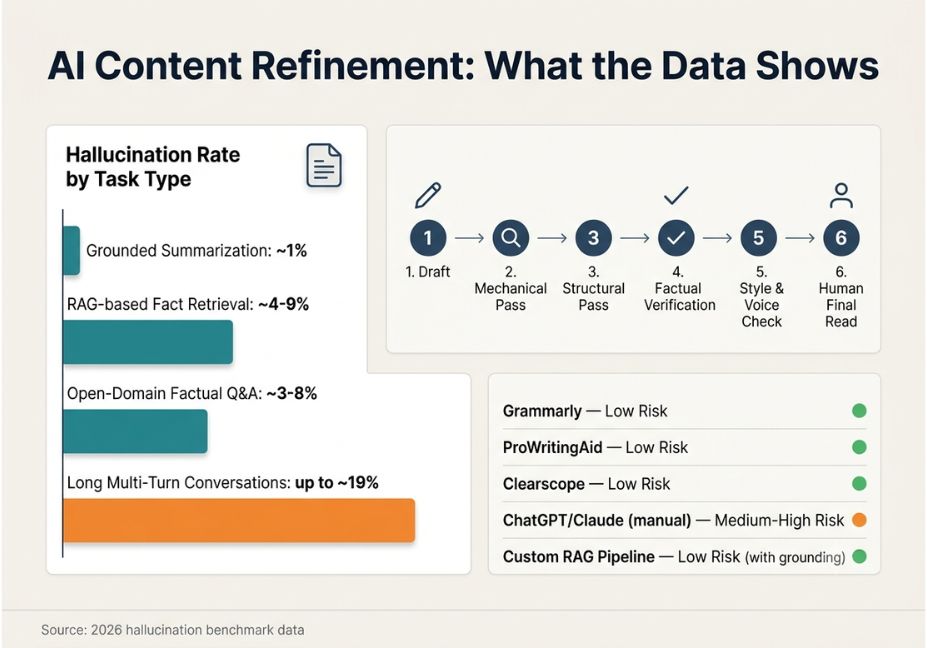
1. Separate the passes. Don’t ask one prompt to fix grammar, restructure paragraphs, and check facts at the same time. Instead, run three distinct passes: mechanical (grammar/readability), structural (flow, transitions), and factual (claims, numbers, attributions). Otherwise, mixing them causes the model to prioritize fluency over accuracy.
2. Write the AI a style guide, not a vibe. “Make it sound better” produces generic, flattened prose. A documented style guide gives the model concrete constraints instead of aesthetic guesswork. Include preferred terminology, a sentence-length ceiling, formality level, and point of view.
3. Never let AI add specifics it wasn’t given. If a rewrite introduces a number, name, date, or quote that wasn’t in your original draft, treat it as unverified. Then confirm it independently before it goes anywhere near a published page.
Tool Selection and Verification
4. Use AI for the developmental edit, not the final read. AI is strong at flagging structural weaknesses early a weak lede, a missing transition, an unsupported claim. Even so, the last read before publishing should always be a human one.
- Pro Tip: Keep a running “AI catch log” a shared doc where your team notes every factual error AI introduced. Patterns emerge fast, since dates and statistics are usually the most common failure points. The log then becomes onboarding material for new editors.
5. Match the tool to the task. Don’t use a generative rewrite model for a task a rules-based tool handles better, like typo-catching or readability scoring. Otherwise, you’ll spend more time reviewing unnecessary rewrites than you save.
6. Build in a source-check step for every statistic. Before publishing, click through every cited number back to its original source. This single habit catches the majority of AI-introduced factual errors, according to editorial teams tracking their own error logs.
- Did You Know? Hallucination rates vary enormously by task type. Grounded summarization tasks now see error rates near 1% on top models, per Vectara’s published hallucination leaderboard. However, open-ended factual questions and long multi-turn conversations can still see error rates in the high single digits to high teens. That’s precisely the territory most “make this more engaging” editorial prompts fall into.
Best AI Editing Tools and Approaches
| Tool / Approach | Best For | Hallucination Risk | Cost |
|---|---|---|---|
| Grammarly | Grammar, tone, mechanical edits | Low | Free tier / paid |
| ProWritingAid | Style, readability, repetition | Low | Free tier / paid |
| Clearscope | SEO/keyword alignment | Low (metrics-based) | Paid |
| ChatGPT / Claude (manual prompting) | Restructuring, developmental edits | Medium–High | Free tier / paid |
| Custom RAG-grounded editing pipeline | High-volume teams, fact-heavy content | Low (with retrieval grounding) | Engineering time |
Technical Disclaimer: Tool capabilities and pricing tiers change frequently. Details above reflect general positioning as of mid-2026. Confirm current features and pricing on each vendor’s site before standardizing your workflow around a specific tool.
Step-by-Step: Building an AI-Assisted Editing Workflow
- Draft first, unassisted or lightly assisted. Get the core argument and structure down before introducing AI tools.
- Run the mechanical pass. Grammar, spelling, readability scoring low-risk, high-value cleanup.
- Run the structural pass. Ask the model to flag (not rewrite) weak transitions, unsupported claims, and pacing issues.
- Run the factual verification pass. Every number, name, date, and quote gets checked against a primary source. This can be done manually, or via a retrieval-grounded tool if your team has engineering support.
- Apply brand voice and style guide constraints. Feed the model your documented style rules before any tone-related rewrite suggestions.
- Human final read. No AI-refined piece publishes without a human editor reading it end-to-end.
json
// Example structured prompt for a factual verification pass

  "task": "verify_claims",
  "instructions": "List every statistic, date, name, and quoted claim in the text below. For each, state whether it appears in the attached source document. Do not attempt to verify claims not present in the source — flag them as 'unverified' instead.",
  "source_document": "{{original_source_text}}",
  "draft_text": "{{editor_draft}}"
Common Mistakes and How to Avoid Them
- Trusting AI’s confidence as a proxy for accuracy. A model states false claims with the same fluent tone as true ones. Confidence and correctness are unrelated in generative text.
- Letting AI rewrite quotes. Direct quotes should never be paraphrased by an editing tool; verify against the original recording or transcript instead.
- Skipping the style guide step. Without documented constraints, AI suggestions regress toward generic, brand-less prose.
- Using one model for everything. Different models fail on different questions. Cross-checking a high-stakes claim across two tools catches errors that a single self-review misses.
- Treating AI editing as a one-and-done pass. Refinement works best as iterative passes with a human check between each one, not a single “fix everything” prompt.
What Editors and Developers Are Saying
Editorial teams and AI practitioners are actively comparing notes on where these tools help. They’re also flagging where AI quietly introduces risk. This includes developers discussing editorial AI workflows on forums, where people share prompt templates and failure cases in the open. The recurring theme: treat AI output as a first-pass suggestion engine, never a final authority. Instrument your workflow so errors get caught before publication, not after.

FAQ People Also Ask
No. AI tools handle mechanical and structural suggestions well. But they cannot reliably judge whether a claim is true or whether a joke lands. They also can’t judge whether content serves a business goal all of which require human judgment AI doesn’t have.
There’s no single best tool. Grammarly and ProWritingAid suit mechanical edits with low hallucination risk. Generative models like ChatGPT or Claude suit structural rewrites but need a verification step for factual claims.
Check every statistic, name, date, and quote against its original source individually. For high-volume teams, a retrieval-augmented generation setup helps. It grounds the model in source documents, reducing though not eliminating the need for manual verification.
Not inherently. Google’s guidance focuses on content quality and helpfulness, not how it was produced. Content that’s factually accurate, well-structured, and genuinely useful performs regardless of AI involvement in the editing process.
Writing tools generate new content from a prompt; editing tools refine existing text for grammar, tone, structure, or readability. Editing tools carry lower hallucination risk because they aren’t originating new facts. That changes once you ask them to rewrite or restructure, which reopens that risk.
Feed the model a documented style guide before asking for tone changes. Reject any rewrite that flattens distinctive phrasing into generic corporate language. Keep your own final pass focused on restoring voice, not just checking facts.
Conclusion
The most useful expert tips for editors using AI tools for content refinement boil down to three things. First, separate your editing passes instead of asking AI to do everything at once. Second, never let a model add a specific fact it wasn’t given. Third, keep a human final read as a non-negotiable last step. AI genuinely speeds up the mechanical and structural work of editing. The risk isn’t the technology it’s skipping the verification layer that catches what it gets wrong. Build that layer into your workflow once, and it pays off on every piece you publish after. Bookmark this guide and explore more hands-on AI workflow tutorials at agentiveaiagents.com.