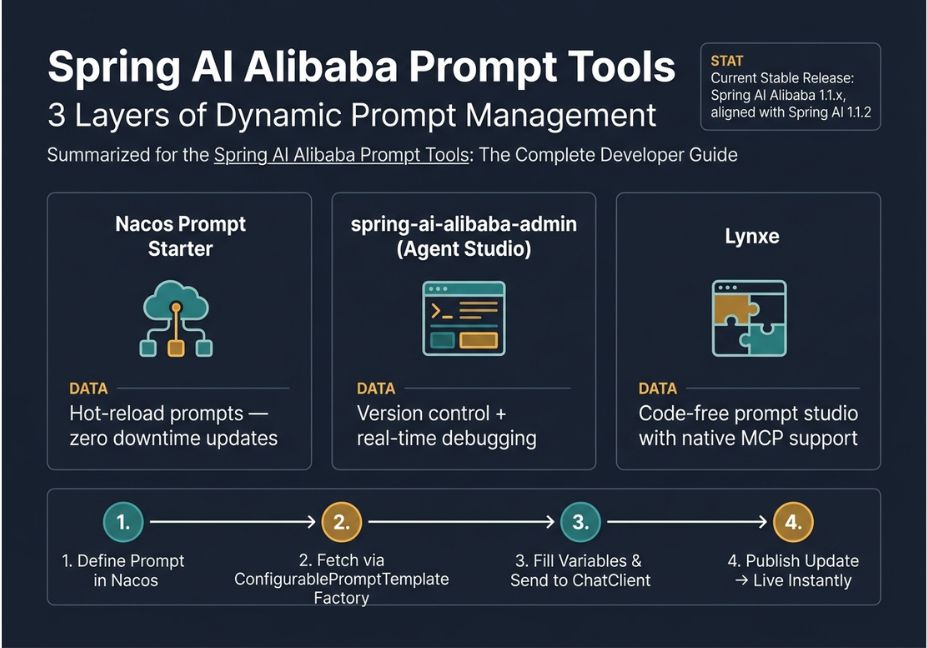
Spring AI Alibaba prompt tools let Java developers manage, version, and hot-swap LLM prompts without redeploying an application. The three core components are the Nacos dynamic prompt starter, the spring-ai-alibaba-admin console, and Lynxe, a no-code prompt studio. Together, they turn prompt engineering into a configuration-managed workflow instead of a code-and-redeploy cycle.
Most Java teams building LLM apps hit the same wall: prompts are hardcoded into strings, so every wording tweak means a full redeploy. Fortunately, Spring AI Alibaba was built on top of Spring AI specifically to solve this problem. Its prompt tooling is, in fact, one of the framework’s most underdocumented strengths. Rather than a single feature, it’s really three: a Nacos-backed dynamic prompt system, a full prompt-engineering console called spring-ai-alibaba-admin, and a code-free “Prompt Programming” studio named Lynxe.
In this guide, we’ll walk through all three with the actual configuration and Java code you need, not just a feature list.
What Is Spring AI Alibaba?
Spring AI Alibaba is an open-source Java framework, built on top of Spring AI, that packages Alibaba Cloud’s model services including DashScope, Bailian, and the Tongyi Qianwen model family together with cloud-native infrastructure like Apache Nacos, ARMS observability, and the Model Context Protocol (MCP, originally developed by Anthropic).
In short, it layers low-level building blocks prompt templating, chat memory, output parsing under higher-level RAG and agent abstractions from Spring AI. It also adds a ReAct paradigm implementation for reasoning-action tool loops. Its prompt tools sit at the templating layer, so a running Spring Boot application can pull, version, and hot-swap prompt text without a rebuild.
How Do Spring AI Alibaba Prompt Tools Work?
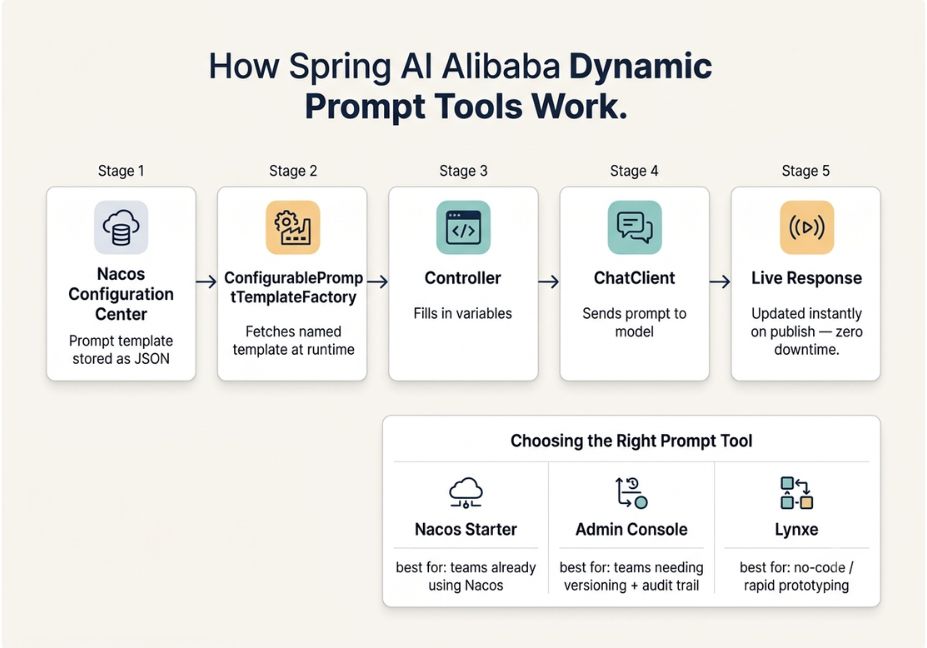
At the core is ConfigurablePromptTemplateFactory, a Spring bean that reads prompt definitions from a Nacos configuration center instead of a Java string literal. Because Nacos pushes config changes to the running app in real time, there’s no polling and no restart required.
Pro Tip: Enable spring.ai.nacos.prompt.template.enabled=true, and Spring AI Alibaba automatically configures the listener bean for you you don’t need to wire it manually.
Here’s how the flow works, step by step:
- First, you define a prompt template as JSON in Nacos under a dataId (
spring.ai.alibaba.configurable.prompt). - Next,
ConfigurablePromptTemplateFactoryfetches the named template at runtime. - Then, your controller fills in variables and passes the resulting
Promptobject toChatClient. - Finally, if someone edits the prompt in the Nacos console and publishes it, the very next request uses the new wording immediately.
Here’s the minimal setup. Start by adding the starters:
xml
<dependency>
  <groupId>com.alibaba.cloud.ai</groupId>
  <artifactId>spring-ai-alibaba-starter-dashscope</artifactId>
</dependency>
<dependency>
  <groupId>com.alibaba.cloud.ai</groupId>
  <artifactId>spring-ai-alibaba-starter-nacos-prompt</artifactId>
</dependency>
Then, point the app at Nacos in application.yml:
yaml
spring:
  config:
    import:
      - "optional:nacos:prompt-config.json"
  nacos:
    username: nacos
    password: nacos
  ai:
    nacos:
      prompt:
        template:
          enabled: true
After that, build and fire the prompt inside a controller:
java
@RestController
@RequestMapping("/prompts")
public class PromptController

    private final ChatClient client;
    private final ConfigurablePromptTemplateFactory templateFactory;

    public PromptController(ChatModel chatModel,
                             ConfigurablePromptTemplateFactory templateFactory)
        this.client = ChatClient.builder(chatModel).build();
        this.templateFactory = templateFactory;


    @GetMapping("/summary")
    public Flux<String> summarize(@RequestParam String topic)
        ConfigurablePromptTemplate template = templateFactory.create
                "summaryPrompt",
                "Summarize the key facts about {topic} in three bullet points."

        Prompt prompt = template.create(Map.of("topic", topic));
        return client.prompt(prompt).stream().content();
Finally, here’s the matching Nacos config, published under dataId spring.ai.alibaba.configurable.prompt:
Json
    "name": "summaryPrompt",
    "template": "Summarize the key facts about {topic} in three bullet points.",
    "model": { "key": "default" }
Once you update that JSON in the Nacos console and hit publish, the next request picks up the new template with zero downtime. For a deeper walkthrough, the official Spring AI Alibaba dynamic prompt documentation on java2ai.com covers this exact monitor-then-publish flow, down to the console log line that confirms the change was picked up.
Technical Note: Spring AI Alibaba wraps Spring’s native @ConfigurationProperties refresh mechanism. As a result, the same config-import pattern also works for hot-reloading model parameters (temperature, top-p) and encrypted API keys not just prompt text.
Spring AI Alibaba Prompt Tools: Real-World Use Cases
Developers typically reach for dynamic prompt tools in a handful of recurring scenarios:
- A/B testing prompt wording in production without a deploy pipeline, by publishing a second Nacos config version and routing a percentage of traffic to it.
- Multi-tenant SaaS prompts, where each dataId or group in Nacos maps to a different customer’s system prompt or persona.
- Compliance-driven prompt rollback since Nacos keeps configuration history, a bad prompt push can be reverted within seconds.
- Natural-language-to-SQL tooling, where the underlying prompt structure for query generation is centrally tuned as the database schema evolves.
- Enterprise agent memory tuning for example, AssistantAgent, Alibaba’s Code-as-Action framework built on Spring AI Alibaba, ships a dynamic prompt builder that injects runtime context and prefetched “experience” candidates based on the current scenario.
Best Prompt Tools in the Spring AI Alibaba Ecosystem
| Tool | What it does | Best for |
|---|---|---|
Nacos Prompt Starter (spring-ai-alibaba-starter-nacos-prompt) | Hot-reloadable prompt templates stored in the Nacos config center | Teams already running Apache Nacos for microservice config |
| spring-ai-alibaba-admin (Agent Studio) | A console for prompt creation, versioning, debugging, and dataset-based evaluation | Teams that want a UI plus an audit trail for prompt engineering |
| Lynxe | A code-free, high-determinism “Prompt Programming” studio with native MCP support | Non-engineers or rapid prototyping without writing Java |
| Playground example app | A reference chat, RAG, and tool-calling UI built on the framework | Learning how the pieces fit together before building your own |
Did You Know? The spring-ai-alibaba-admin console doesn’t just store prompt text. Instead, it handles the full prompt template lifecycle version control, change history, and real-time online debugging with streaming responses so you can test an edit before it ever reaches production.
Step-by-Step: How to Set Up the Admin Prompt Console
If you’re wondering how to add prompt versioning to an existing Spring AI Alibaba app, here’s the process:
- Start Nacos (2.3.0+, or the newer 3.x line) as your configuration backend.
- Run spring-ai-alibaba-admin, pointing its
application.ymlat your Nacos address, username, and password. - Open the console at
http://localhost:8080and create a prompt template through the UI instead of hand-editing JSON. - Wire your agent app to the console proxy by adding the
spring-ai-alibaba-agent-nacosandspring-ai-alibaba-autoconfigure-arms-observationdependencies, then settingspring.ai.alibaba.agent.proxy.nacos.promptKeyto the key you created. - Debug live — the console streams responses back, so you can iterate on wording before it reaches production traffic.
- Track experiments using the built-in dataset and evaluator modules, rather than eyeballing outputs manually.
Technical Disclaimer: Spring AI Alibaba is under active development. The current stable line is 1.1.x, aligned with Spring AI 1.1.2. Because dependency coordinates shift between releases, always cross-check against the official GitHub releases before pinning a version in production.
Common Mistakes and How to Avoid Them
- Hardcoding the DataId across environments. Instead, use separate Nacos namespaces per environment (dev, staging, prod), so a prompt edit in staging can’t leak into production.
- Skipping the
optional:prefix inspring.config.import. Without it, a missing Nacos config on first boot will crash startup rather than falling back gracefully. - Treating prompt versioning as optional. Without the admin console’s history tracking, you lose the ability to diagnose why an agent’s behavior changed after a config push.
- Ignoring tool-call context in prompts. When using ReAct-style tool calling, forgetting to pass
ToolContextinto the prompt template means the model loses state between reasoning steps. Consequently, this is a common source of drift and hallucination in multi-step tool-use loops. - Mixing static and dynamic prompts inconsistently. It’s best to pick one system per module, since a codebase that mixes hardcoded strings with Nacos-managed templates becomes hard to audit for compliance.
What Developers Are Saying
Community discussion around Spring AI Alibaba tends to center on two things: how closely it tracks upstream Spring AI releases, and how well the Nacos-based config hot-reload holds up under real traffic. For the most current take, discussions and issue threads on the project’s GitHub repository are the best source, since the framework ships frequent point releases 1.1.x alone saw multiple fixes to NacosReactAgentBuilder and system-prompt handling in quick succession.
FAQ People Also Ask
Spring AI Alibaba is used to build enterprise Java AI applications including chatbots, RAG pipelines, and multi-agent systems using Alibaba Cloud’s DashScope models alongside Nacos-based configuration and observability tooling.
You store the prompt template in Nacos as configuration, enable spring.ai.nacos.prompt.template.enabled=true, and use ConfigurablePromptTemplateFactory to fetch it at request time. Publishing a new version in Nacos then updates live traffic instantly.
No. Spring AI Alibaba is built on top of Spring AI. It adds Alibaba Cloud model integrations, Nacos-based dynamic configuration, MCP support, and agent orchestration to Spring AI’s core abstractions.
Lynxe is a Java-based, code-free “Prompt Programming” studio in the Spring AI Alibaba ecosystem. It natively supports the Model Context Protocol (MCP), so you can connect prompts to external tools without writing custom integration code.
Yes. The spring-ai-alibaba-admin console provides prompt template versioning, history tracking, and real-time debugging essentially functioning as a dedicated prompt-engineering workspace on top of the framework.
The recommended approach is to use separate Nacos namespaces per environment, so a prompt change in dev or staging never accidentally affects production traffic.
Conclusion
Spring AI Alibaba’s prompt tooling turns prompt engineering from a code-and-redeploy chore into a configuration-managed, versioned workflow. Nacos handles hot-reload at the infrastructure layer; the admin console adds a UI with history and debugging; and Lynxe opens the door to non-engineers building tool-connected prompts with no Java at all. In short, if you’re already running Nacos for service discovery, adding dynamic Spring AI Alibaba prompt tools is a small dependency change with an outsized payoff in iteration speed. Bookmark this guide and explore more hands-on AI agent tutorials at agentiveaiagents.com.