
AI Mode analysis tools track whether Google’s AI Mode, ChatGPT, Gemini, or Perplexity mention and cite your brand when answering user questions. They work by sending test prompts, extracting citations, and scoring sentiment similar to running your own RAG evaluation pipeline pointed at Google instead of your own database.
Most teams can tell you exactly where a page ranks on page one. However, almost none can tell you whether Google’s AI Mode just recommended a competitor instead of them. That’s the gap AI Mode analysis tools were built to close.
Here’s why this matters right now: AI Mode doesn’t return ten blue links. Instead, it runs a query fan-out process, splitting one question into several sub-searches, then synthesizing a single answer with inline citations. As a result, if your content isn’t retrieved and cited during that process, you’re effectively invisible no matter how well you rank organically.
For engineers who already build agents, RAG pipelines, or vector search systems, this isn’t a mysterious black box. It’s a retrieval-and-classification problem you’ve likely solved before, just aimed at Google’s AI surface instead of your own knowledge base. This guide covers how these tools actually work, how they compare, how to optimize for them, and how to build a lightweight version yourself.
What Is an AI Mode Analysis Tool? (Definition)
An AI Mode analysis tool is software that queries Google’s AI Mode and often ChatGPT, Gemini, and Perplexity with a set of prompts, then parses the response to extract brand mentions, cited URLs, and sentiment.
In other words, it’s a retrieval-augmented generation system aimed outward. Instead of grounding your own model in your own documents, it audits Google’s model to see which documents it chose to cite. Wikipedia’s overview of retrieval-augmented generation, which grounds model output in external documents, is a useful mental model here: AI Mode answers are themselves RAG outputs, so these tools essentially reverse-engineer the retrieval step.
This practice sits under two closely related disciplines: generative engine optimization (GEO) and answer engine optimization (AEO). Both aim at the same outcome getting cited inside an AI-generated answer rather than just ranked in a list of links.
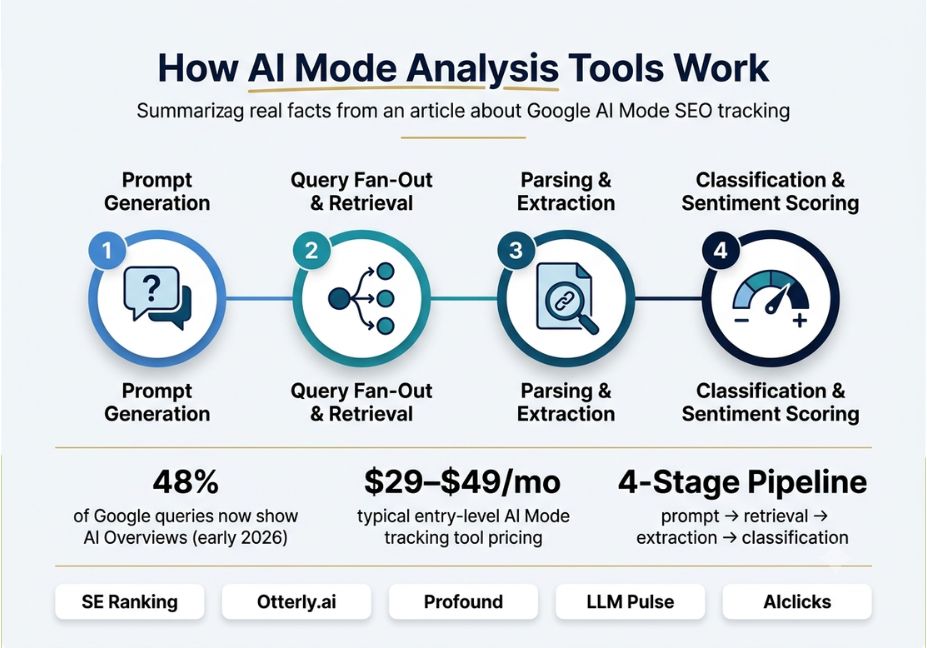
Did You Know? By early 2026, AI Overviews were appearing on roughly 48% of Google queries. Meanwhile, a growing share of searches ended without a single click to an outside site which is exactly why citation tracking, not just rank tracking, has become necessary.
How Do AI Mode Analysis Tools Work?
Under the hood, most AI Mode analysis tools run a four-stage pipeline. This will look familiar to anyone who has built an agent before:
- Prompt generation a set of category, comparison, and “best for” prompts is built for a topic.
- Query fan-out and retrieval each prompt is sent to AI Mode, which performs its own internal fan-out across sub-queries before synthesizing an answer.
- Parsing and extraction the tool pulls entities, brand names, and cited URLs from the generated text.
- Classification a secondary model scores sentiment and calculates share-of-voice metrics against competitors.
That loop plan, retrieve, act, observe, repeat is structurally the same as the ReAct pattern for interleaving reasoning and action, a well-known agent design popularized in AI research. Here, though, it’s applied to search auditing instead of task completion. The classification stage typically relies on an embedding model to cluster semantically similar mentions. For example, a brand described as “widely recommended” and one described as “an industry leader” get grouped together even without exact keyword overlap.
Technical Note: AI Mode responses vary by prompt phrasing, location, and even time of day. Therefore, single-query snapshots are unreliable. Tools that refresh on a schedule and aggregate across many prompt variants produce far more stable share-of-voice numbers.
How to Track AI Mode Visibility for Free (Long-Tail: Budget & DIY Options)
Not every team needs an enterprise platform on day one. If you’re testing the waters, here’s a practical starting point:
- Manual spot-checks: Run your top 10–15 category prompts directly in AI Mode weekly and log results in a spreadsheet.
- Free-tier tools: Otterly.ai and similar entry-level platforms offer limited free or low-cost monitoring for small prompt sets.
- Build-your-own script: Use an LLM API with web search enabled to replicate the fan-out-and-extract process (see the code example below).
This approach won’t match a dedicated platform’s polish, but it answers the core question “is my brand showing up at all?” at effectively zero cost.
AI Mode Analysis Tools Real-World Use Cases
- Competitive share of voice: tracking how often a brand is cited versus named competitors across the same prompt set.
- Missed-opportunity detection: flagging prompts where a competitor is cited and your brand is absent.
- Content gap prioritization: finding pages that rank organically but are never cited in AI Mode.
- Sentiment monitoring: catching negative AI-generated framing before it becomes a PR issue.
- Cross-model comparison: seeing how AI Mode, ChatGPT, Gemini, and Perplexity answer the same prompt differently.
Best AI Mode Analysis Tools & Frameworks Compared
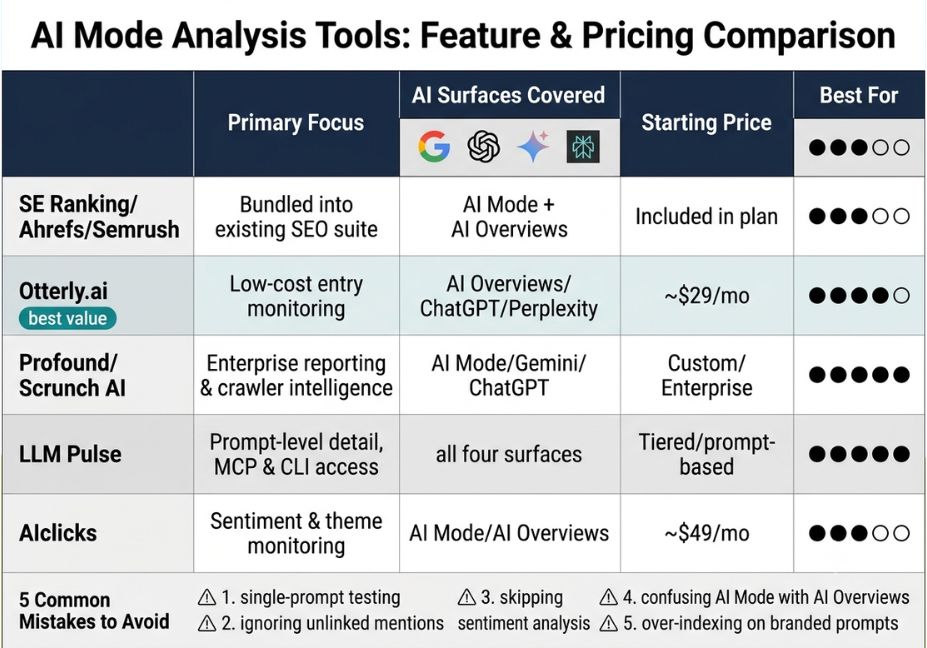
| Tool | Primary Focus | AI Surfaces Covered | Starting Price |
|---|---|---|---|
| SE Ranking / Ahrefs / Semrush | AI visibility bundled into an existing SEO suite | AI Mode, AI Overviews | Included in existing plans |
| Otterly.ai | Low-cost entry-level monitoring | AI Overviews, ChatGPT, Perplexity | ~$29/mo |
| Profound / Scrunch AI | Enterprise reporting, AI crawler intelligence | AI Mode, Gemini, ChatGPT | Custom/enterprise |
| LLM Pulse | Prompt-level detail, MCP & CLI access | Google AI Mode, ChatGPT, Perplexity, Gemini | Tiered, prompt-based |
| AIclicks | Sentiment + theme monitoring | AI Mode, AI Overviews | ~$49/mo |
Pro Tip: If your team already uses Ahrefs, Semrush, or SE Ranking, check the built-in AI-visibility add-on first. This avoids duplicating prompt-tracking infrastructure and lets you correlate AI Mode citations directly with existing keyword data.
Step-by-Step: How to Build a Lightweight AI Mode Monitor
You don’t need a $500/month platform to get directional data. Instead, a minimal version is just a scheduled script that sends prompts, stores responses, and diffs them over time. If you’re already comfortable with LangChain’s agent orchestration framework, you can wire this into an existing agent stack in an afternoon.
python
import os
from datetime import datetime
from anthropic import Anthropic

client = Anthropic(api_key=os.environ["ANTHROPIC_API_KEY"])

PROMPTS = [
    "What are the best tools for monitoring AI search visibility?",
    "Compare the top AI Mode analysis platforms for SEO teams.",


def run_prompt_check(prompt: str) -> dict:
    response = client.messages.create
        model="claude-sonnet-4-6",
        max_tokens=800,
        messages=[{"role": "user", "content": prompt}],
        tools=[{"type": "web_search_20250305", "name": "web_search"}],

    text = "".join(b.text for b in response.content if b.type == "text")
    return
        "prompt": prompt,
        "timestamp": datetime.utcnow().isoformat(),
        "response": text,


results = [run_prompt_check(p) for p in PROMPTS]
From here, the next steps are straightforward: first, extract brand and URL mentions with a named-entity model; second, store results in a time-series table; third, run a lightweight classifier for sentiment. Ultimately, this is the same architecture as any RAG evaluation harness just pointed at an external model instead of your own retriever.
Technical Disclaimer: Framework versions and model names evolve rapidly. The code above uses the Anthropic Messages API as of mid-2026 always check current API docs before deploying to production.
How to Optimize Content So Google AI Mode Cites You (Long-Tail)
Tracking visibility is only half the job. To actually improve it:
- Answer the question in the first sentence. AI Mode favors content that states the answer immediately, then supports it the same structure that wins featured snippets.
- Use structured data. FAQ schema and HowTo schema help AI crawlers parse question-answer pairs directly, improving both AI Mode citation odds and featured-snippet eligibility.
- Build topical clusters, not single pages. Google’s AI systems favor sites that demonstrate depth across a topic link related articles together to signal topical authority.
- Keep claims verifiable. Cite named sources and data points; AI Mode tends to prefer citable, specific content over vague generalizations.
Common Mistakes and How to Avoid Them
- Treating one prompt as representative. AI Mode answers shift with phrasing, so always test prompt variants.
- Ignoring unlinked mentions. A brand can be named without a clickable citation; tools that only count linked URLs undercount visibility.
- Skipping sentiment classification. Mention frequency without sentiment context can hide negative citations.
- Confusing AI Mode with AI Overviews. They’re related but architecturally distinct, so tracking them as one metric muddies the data.
- Over-indexing on branded prompts. Unbranded, category-level prompts are where competitive displacement actually happens.
What Developers Are Saying
Discussion threads on AI search visibility tend to echo one theme: monitoring alone doesn’t move the needle. Instead, the teams seeing results are the ones pairing tracking data with real content restructuring clearer entity definitions, structured comparison tables, and citable statistics. This mirrors VentureBeat’s reporting on the shift toward answer engine optimization, which frames citation-worthiness as a content architecture problem rather than a tracking problem.
FAQ People Also Ask
What is Google AI Mode?
Google AI Mode is a conversational search experience, powered by Gemini, that synthesizes multi-paragraph answers with inline citations instead of a ranked list of links. It uses query fan-out to search several subtopics at once.
How do AI Mode analysis tools work?
They send test prompts to AI Mode on a schedule, extract brand mentions and cited URLs from the responses, then score sentiment and calculate share of voice against competitors.
What’s the difference between AI Mode and AI Overviews?
AI Overviews appear inline on the standard results page next to organic listings. AI Mode is a full conversational interface where users can ask follow-up questions, so it needs separate tracking.
Are AI Mode tracking tools accurate?
Accuracy varies, since AI Mode responses shift with prompt phrasing, location, and time. Tools that aggregate many prompt variants and refresh often give more reliable data than single checks.
How much do AI Mode analysis tools cost?
Prices range from about $29 a month for entry-level monitoring to custom enterprise pricing for platforms with crawler intelligence. Many SEO suites now include AI visibility as a built-in add-on.
Can I track AI Mode visibility for free?
Yes. You can manually run your top prompts in AI Mode each week, or build a simple script using an LLM API with web search enabled to replicate basic citation tracking at no extra cost.
Conclusion
AI Mode analysis tools exist because AI-generated answers, not ranked links, increasingly decide who gets seen. The category comes down to three moves: querying AI surfaces at scale, extracting and classifying what gets cited, and turning that data into content changes. Whether you buy a platform like LLM Pulse or Profound, or build a lightweight version on top of an existing agent stack, the underlying architecture query fan-out, retrieval, classification is one most AI engineers already understand. Bookmark this guide and explore more hands-on AI agent tutorials at agentiveaiagents.com.