Most “free” AI image-to-video tools aren’t actually free. Instead, they’re a two-generation demo wrapped around a paywall. Anyone who has spent an afternoon signing up for five different platforms, only to hit a watermark or credit wall on the first real export, knows this pattern well.
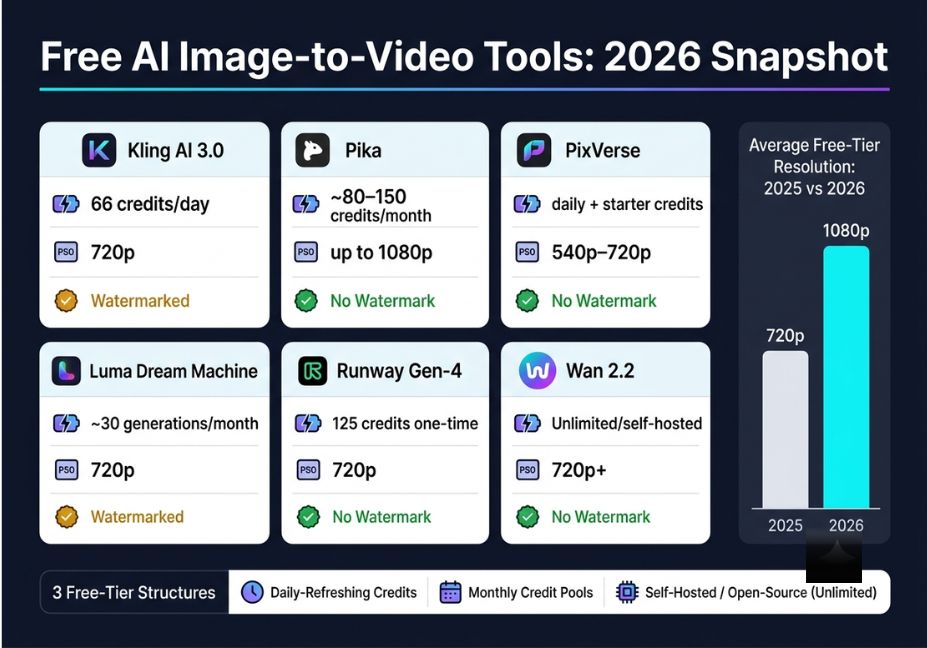
In 2026, the average free tier now supports resolutions up to 1080p, compared with 720p just a year earlier. However, resolution is only half the story, since credit limits and watermark policy still decide whether a “free” clip is actually usable. The best free AI image to video tools in 2026 fall into three distinct categories: daily-refreshing credit systems, one-time trial grants, and self-hosted open-source models. Picking the wrong category for your workflow is the single most common mistake creators make. Kling AI, Pika, PixVerse, Luma Dream Machine, and Wan 2.2 now anchor most free workflows, and understanding how each one actually gates “free” is more useful than any flat ranked list.
Key takeaways:
- Free tiers fall into three structures: daily credits, monthly pools, and one-time grants plus a fourth option, self-hosted open-source models, with no limits at all.
- Kling AI, Pika, and PixVerse are currently the most usable free options for regular iteration.
- Commercial-use rights and watermark policy vary by platform and change often, so always verify before client work.
What Is Image-to-Video AI?
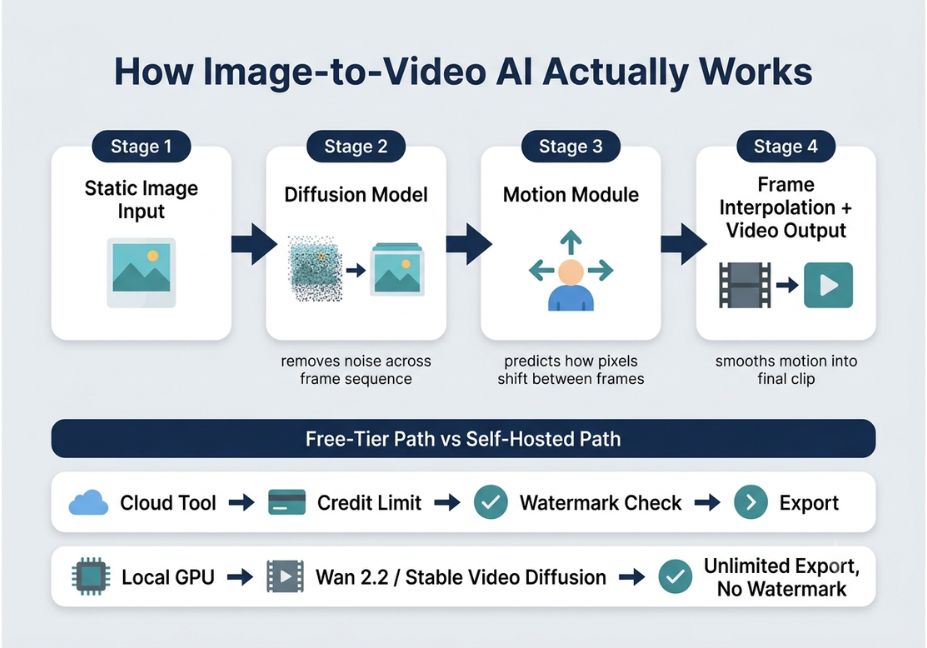
Image-to-video AI takes a single static image and generates a short video clip that animates it. It does this using a diffusion model trained to predict plausible motion, camera movement, and continuity between frames. Under the hood, most tools run a variant of latent video diffusion, generating a sequence of frames and then relying on a motion module to predict how pixels shift between them. Where the gaps between generated frames are too large, a frame interpolation step smooths the motion so playback doesn’t look choppy the same general architecture behind the diffusion model approach underlying most modern video generators, where noise is progressively removed across a sequence of frames rather than a single image.
The model, therefore, has to solve two problems at once: keep the subject visually consistent (temporal consistency) and generate motion that looks physically plausible rather than warped or floaty. This same underlying technology powers well-known systems from OpenAI (Sora), Google DeepMind (Veo), and ByteDance (Seedance) which is worth knowing even though this guide focuses specifically on free-tier access.
How Do Free Tiers Actually Work?
Free-tier structures vary more than most comparison articles admit, and the structure matters more than the brand name.
- Daily-refreshing credits Kling AI issues a fixed daily allowance that resets every 24 hours and doesn’t roll over. As a result, it suits iterative testing but rarely covers commercial-grade output.
- Monthly credit pools Pika and Luma Dream Machine allocate a set number of credits or generations per month. This is better suited to fewer, more deliberate attempts.
- One-time trial grants Runway’s free tier is a single lifetime credit deposit. In practice, this functions more like a product demo than an ongoing free plan.
- Self-hosted open models Wan 2.2 and Stable Video Diffusion run locally on your own GPU with no credits, no watermark, and no daily cap at all though setup takes more technical effort.
Pro Tip: Before testing any platform, check whether its free tier resets daily or monthly. For instance, a daily-reset tool with a small allowance (like Kling’s 66 credits/day) can outproduce a larger one-time grant over a week of steady use.
Best Free AI Image to Video Tools, Ranked by Use Case
Each of these tools solves a different problem. Confusing “talking-photo” animation (a still portrait speaking a script with lip sync) with “motion/animation” generation (cinematic camera movement and scene animation) is, in fact, the most common evaluation mistake creators make.
- Kling AI (Kling 3.0) Refreshes 66 credits daily, enough for roughly two to six short clips depending on mode. Free exports are capped at 720p, watermarked, and restricted to personal or portfolio use. That said, the daily refresh makes it the strongest option for creators who want to iterate consistently without budgeting a monthly pool.
- Pika Offers a monthly credit pool (reported anywhere from ~80–150 credits depending on the current plan) with no watermark on standard exports. This makes it a practical pick for social-style clips without a visible logo baked in.
- PixVerse Combines an initial credit bonus with a daily refresh and exports without a watermark on the free tier, which is unusual among the major platforms.
- Luma Dream Machine Provides roughly 30 generations a month at up to 720p with a distinctive cinematic, physics-aware motion style. However, free output is watermarked and restricted to non-commercial use.
- Runway (Gen-4 family) A one-time credit grant rather than a renewing allowance, which makes it difficult to evaluate thoroughly without eventually paying. Still, it’s useful for a single serious test of its camera-control tools.
- Wan 2.2 (open-source, self-hosted) No credits, no watermark, and no daily limit. The tradeoff, of course, is that you need a capable GPU and comfort with a local pipeline like ComfyUI or Diffusers.
“Hey, what’s a good free app to animate a photo?”
For casual, one-off use, Pika is the easiest entry point no credit card, no watermark on standard exports, and a simple upload-and-prompt flow suited to a single quick clip rather than a production pipeline.
Which Free AI Video Tool Has No Watermark?
Pika and PixVerse are currently the most reliable watermark-free options on their free tiers. Wan 2.2, since it runs locally, never adds a watermark either.
Which Free AI Image to Video Tool Is Best for TikTok or Reels?
PixVerse and Pika are best suited to short-form social content, since both offer clean, watermark-free exports with built-in aspect-ratio presets for vertical video.
Readers searching for a way to turn a photo into a video for free with no sign-up should note that no major platform currently supports that; Kling, Pika, and PixVerse all require a free account. For anyone specifically hunting a 5 second free AI video clip with no watermark, PixVerse and Pika remain the most consistent free options.
Free-Tier Comparison Table
| Tool | Free Allowance | Resolution | Watermark | Commercial Use |
|---|---|---|---|---|
| Kling AI 3.0 | 66 credits/day | 720p | Yes | No |
| Pika | ~80–150 credits/month | Up to 1080p (varies) | No | Varies by plan |
| PixVerse | Daily + starter credits | 540p–720p | No | Varies |
| Luma Dream Machine | ~30 generations/month | 720p | Yes | No |
| Runway Gen-4 | 125 credits, one-time | 720p | Varies | Limited |
| Wan 2.2 (self-hosted) | Unlimited (local GPU) | 720p+ | No | Yes |
Other Notable Mentions
A handful of adjacent tools are worth knowing for topical context, even though they didn’t make the core ranking above. HeyGen and D-ID focus specifically on talking-photo generation rather than cinematic motion. Hailuo and ByteDance’s Seedance 2.0 offer competitive daily credit allowances in some regions. Meta AI provides free, unlimited generation at lower output quality, and Adobe Firefly is worth watching as it expands video features under commercial-safe licensing. Google’s Veo 3.1, meanwhile, is increasingly bundled into third-party platforms rather than offered as a standalone free tool. None of these currently beat Kling, Pika, PixVerse, or Wan 2.2 on free-tier value, but they’re useful to know when evaluating the wider landscape.
Step-by-Step: Testing a Tool’s Real Free-Tier Limits
Before committing a project to any “free” tool, run this quick audit:
- Create an account and generate one clip using a neutral test image (a plain product photo works well).
- Check the exported resolution against the tool’s marketing claims. Many, in fact, quietly downgrade below their advertised cap on free plans.
- Confirm whether the credit balance refreshes daily, monthly, or once — this determines your real weekly output capacity.
- Read the commercial-use clause in the terms of service, not just the pricing page summary.
- If you want to automate testing across models, a local pipeline built on Stability AI’s open-source Stable Video Diffusion codebase removes the credit-tracking step entirely.
python
# Minimal example: running an open-source image-to-video pipeline locally
from diffusers import StableVideoDiffusionPipeline
import torch

pipe = StableVideoDiffusionPipeline.from_pretrained(
    "stabilityai/stable-video-diffusion-img2vid",
    torch_dtype=torch.float16

pipe.to("cuda")

frames = pipe("input_image.png", num_frames=25).frames[0]
Technical Disclaimer: Framework versions evolve rapidly. The snippet above uses Hugging Face diffusers as of mid-2026 — always check the current Diffusers documentation before running it in production, since pipeline arguments and model IDs shift between releases.
Common Mistakes and How to Avoid Them
- Assuming “free” means unlimited. Most credit systems are designed to expire before you reach a usable clip count for real projects.
- Ignoring commercial-use restrictions. Several tools, including Luma’s free tier, explicitly prohibit commercial use even without a watermark.
- Skipping resolution checks. Advertised 1080p support often only applies to paid tiers; free exports frequently cap at 720p or lower.
- Overlooking open-source options. For teams with GPU access, Wan 2.2’s Mixture-of-Experts video diffusion architecture delivers cinematic-quality output with no credit ceiling — a genuine alternative to cloud credit economies.
What Developers Are Saying
Developer sentiment on forums like Reddit’s r/LocalLLaMA and r/MachineLearning generally agrees that cloud free tiers exist for evaluation, not production. A recurring theme, for example, is that small daily credit allowances get consumed quickly once a generation requires more than one attempt to get right. For teams already comfortable with a GPU workflow, Wan-Video’s official implementation is frequently cited as the most sustainable “actually free” path, since it removes the credit economy from the equation entirely.
Frequently Asked Questions
Kling AI is generally the strongest pick for frequent free use because its credits refresh daily. Pika and PixVerse are better if you specifically want no watermark, and Wan 2.2 is the only genuinely unlimited option.
Not currently. Most reliable tools, including Kling, Pika, and PixVerse, require a free account to prevent abuse so despite frequent searches for a no-sign-up option, none of the major platforms offer usable quality without one.
Sometimes. Terms vary significantly by platform and change often, so always confirm the current commercial-use clause before using free-tier output in client work or ads.
Most do. Kling, Luma, and Runway typically watermark free exports, while Pika and PixVerse are more often watermark-free on their free tiers, though this can shift between updates.
Talking-photo tools animate a still portrait to speak a script with lip sync; motion/animation tools add cinematic camera movement or scene animation to any image. They solve different problems and aren’t interchangeable.
Self-hosted open-source models like Wan 2.2 and Stable Video Diffusion are the closest thing available. There are no credits or watermark, but they require your own GPU and setup.
Most free tiers cap clips between five and eight seconds; longer output generally requires a paid plan or credit top-up.
Conclusion
The “best” free AI image-to-video tool in 2026 ultimately depends on how you define free. A daily-refreshing credit system like Kling suits iterative testers, a clean monthly pool like Pika or PixVerse suits watermark-sensitive social creators, and a self-hosted model like Wan 2.2 suits anyone who wants zero limits and has the GPU to run it. Match the tool’s free-tier structure to your actual production volume before committing a project to it, and re-check the provider’s terms regularly, since pricing and watermark policies in this space shift every few months. For a deeper technical breakdown, see our related guide on prompting AI agents for consistent output on agentiveaiagents.com.