
One of the harsh realities that many teams come to realize too late is that their AI Customer Support Agent will not work in production. However, most of the time the model is not the cause of the failure. More commonly, the retrieval architecture is poorly constructed, the tool/use loop doesn’t include any failure handling, and the escalation logic is added after the agent has been complained about by the first customer. A 2026 ArXiv survey on Agentic AI Architectures illustrates that once the agent is able to execute real actions like pulling data from a CRM, issuing refunds or making modifications to an order, the agent’s hallucinations stop being “bad text” and start becoming “concrete, legally binding business failures.”
This guide takes you through all engineering decisions related to building a production ready AI Agent Customer Support system including knowledge base ingestion, RAG pipeline design, tool registration, LangGraph orchestration, escalation graph design and the guardrails that will prevent your agent from creating policies that were never given. Code examples included in this document utilize LangChain v0.3 and LangGraph to operate with an OpenAI-compatible endpoint. Please modify as needed to use Anthropic Claude or any other vendor.
What Is an AI Customer Support Agent?
An AI customer support agent is an LLM-powered system that autonomously resolves customer queries by combining natural language understanding, retrieval-augmented generation (RAG), and tool calling without relying on pre-scripted decision trees or rigid conversation flows.
Specifically, the agent reads live CRM records, searches your knowledge base, updates helpdesk tickets in Zendesk or Intercom, and triggers escalations all within a single conversation turn. Unlike a rule-based chatbot, it reasons over freshly retrieved context at runtime and decides which tool to call, in which order, and when to stop and hand off to a human agent.
The core architecture that enables this behavior is the ReAct pattern (Reason + Act). Introduced by Yao et al. (2023), ReAct alternates between a reasoning step and a tool invocation step until the agent reaches a confident answer or a terminal escalation state. For a detailed walkthrough of this loop inside LangGraph, see LangChain’s official agentic RAG guide.
Quick Answer for Voice Search: An AI customer support agent is software that uses a large language model, a knowledge base, and tool calling to automatically resolve customer questions without a human typing each reply.
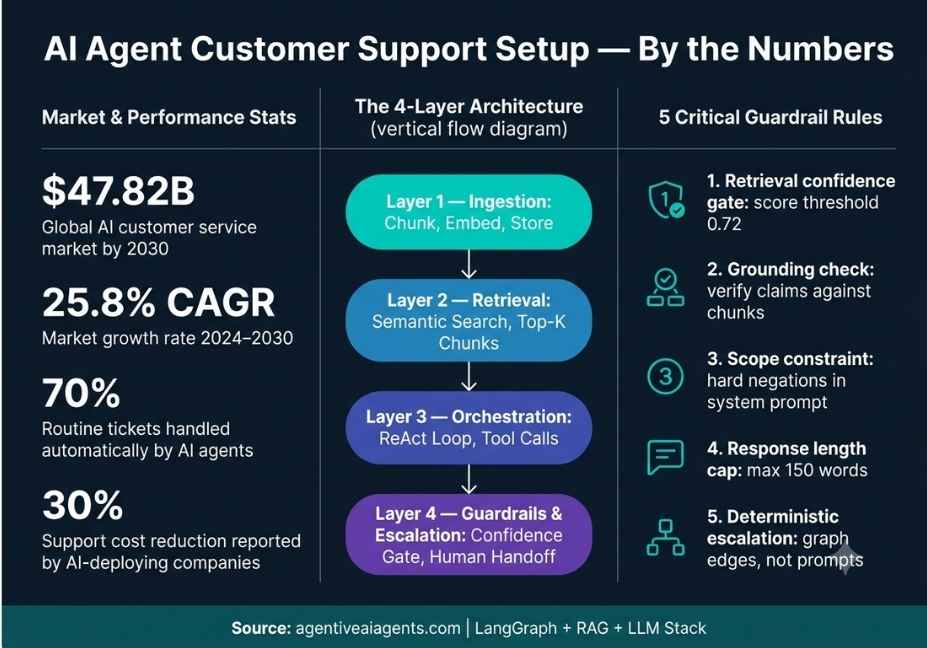
How Does an AI Customer Support Agent Work? The Four-Layer Architecture
Before writing any code, map your agent across four distinct layers. Skipping even one of them is where most setups silently break.
Layer 1 : Ingestion: Help articles, policy PDFs, and product documentation get chunked, embedded using a model such as text-embedding-3-small, and stored in a vector store like Pinecone, ChromaDB, or pgvector.
Layer 2 : Retrieval: On every user turn, the agent retrieves the top-k semantically relevant chunks using cosine similarity. Crucially, chunk quality at this layer determines answer accuracy downstream not the LLM.
Layer 3 : Orchestration: A LangGraph state machine governs the full tool-use loop: retrieve → reason → call tool → observe result → repeat or exit. This layer is where your agent’s decision logic lives.
Layer 4 : Guardrails and Escalation: Confidence scoring, output grounding checks, and escalation nodes route conversations to a human agent whenever the system detects low-confidence retrieval, sensitive intent, or a write action that exceeds a risk threshold.
Together, these four layers form the complete agentic customer support stack. Most failed deployments are missing Layer 4 entirely.
Step 1: How to Build the Knowledge Base Ingestion Pipeline
Your retrieval accuracy depends almost entirely on how you chunk and embed your source documents. Consequently, most teams that blame their LLM for bad answers are actually suffering from a poor ingestion pipeline.
Chunk size: Use 400–600 tokens for FAQ-style content. For policy documents where context spans multiple paragraphs, increase this to 800–1,000 tokens.
Chunk overlap: Set a 10–15% overlap. This prevents sentences from being cut at chunk boundaries and losing their meaning.
Embedding model: text-embedding-3-small from OpenAI works well for English-only support content. For multilingual deployments, multilingual-e5-large is a stronger choice.
Metadata tagging: Tag every chunk with source, category (for example: billing, shipping, returns), and last_updated. This allows the agent to cite its sources and lets you filter out stale documents before retrieval.
python
from langchain_text_splitters import RecursiveCharacterTextSplitter
from langchain_openai import OpenAIEmbeddings
from langchain_community.vectorstores import Chroma

# Load your support docs — PDFs, Notion exports, Zendesk articles
raw_docs = load_support_documents("./knowledge_base/")

splitter = RecursiveCharacterTextSplitter(
    chunk_size=600,
    chunk_overlap=80,
    separators=["\n\n", "\n", ". "])
chunks = splitter.split_documents(raw_docs)

# Embed and store in ChromaDB
vectorstore = Chroma.from_documents
    (documents=chunks,
    embedding=OpenAIEmbeddings(model="text-embedding-3-small"),
    collection_name="support_kb")
retriever = vectorstore.as_retriever(search_kwargs={"k": 5})
Pro Tip: Run a retrieval evaluation pass before you connect the agent. For 20–30 sample queries, verify that the correct chunk appears in the top-3 results. If precision is below 80%, fix your chunking strategy first. Debugging the LLM layer on top of a broken retrieval layer wastes days.
Additionally, schedule a re-ingestion job whenever your policy documents change. An agent that confidently cites outdated terms is worse than one that says it does not know.
Step 2: How to Register Tools the Agent Can Call
A production customer support agent needs three categories of tools. However, not all tools carry the same risk and your architecture should reflect that difference.
| Tool Category | Examples | Risk Level | Requires Approval? |
|---|---|---|---|
| Read-only lookups | Order status, ticket history, account info | Low | No |
| Write actions | Update ticket, apply discount, log note | Medium | Situational |
| Escalation triggers | Human handoff, fraud alert, refund request | High | Yes |
Register every tool with a strict type signature and a clear docstring. The reason this matters: the LLM reads the docstring at runtime to decide when to call each tool. Vague docstrings produce vague tool selection.
python
from langchain_core.tools import tool

@tool
def get_order_status(order_id: str) -> dict:
    """
    Look up the current status and estimated delivery date for a customer order.
    Use this when the customer asks about their order, shipping, or delivery.
    Returns: {status, carrier, eta, last_update}
    """
    return crm_client.get_order(order_id)

@tool
def search_knowledge_base(query: str) -> str:
    """
    Search the internal support knowledge base for policy information,
    product details, return procedures, and troubleshooting guides.
    Use this before answering any policy or product question.
    """
    docs = retriever.invoke(query)
    return "\n\n".join([d.page_content for d in docs])

@tool
def escalate_to_human(reason: str, urgency: str) -> str:
    """
    Route this conversation to a live human support agent.
    Use when: you cannot find a confident answer, the customer is angry,
    the request involves a refund over $200, or any legal or billing dispute.
    urgency options: 'normal' or 'urgent'
    """
    ticket_id = helpdesk_client.create_escalation(reason, urgency)
    return f"Escalated. Ticket #{ticket_id} assigned to the next available agent."
Technical Note: Write-action tools must validate inputs server-side before execution. The agent will sometimes pass partial or malformed arguments especially when the user’s message is ambiguous. Therefore, never treat the agent’s tool output as a pre-sanitized API call.
Step 3: How to Build the ReAct Orchestration Loop with LangGraph
LangGraph models your agent as a state graph. Nodes handle reasoning or tool execution. Edges control conditional transitions between states. As a result, your escalation path becomes explicit code rather than a buried prompt instruction.
python
from langgraph.graph import StateGraph, END
from langgraph.prebuilt import ToolNode
from langchain_openai import ChatOpenAI

llm = ChatOpenAI(model="gpt-4o", temperature=0)
tools = [get_order_status, search_knowledge_base, escalate_to_human]
llm_with_tools = llm.bind_tools(tools)

def agent_node(state):
    messages = state["messages"]
    response = llm_with_tools.invoke(messages)
    return {"messages": [response]}

def should_continue(state):
    last_message = state["messages"][-1]
    # If the agent made a tool call, route to the tool node
    if last_message.tool_calls:
        return "tools"
    # Otherwise, the agent is done — return final answer
    return END

graph = StateGraph(dict)
graph.add_node("agent", agent_node)
graph.add_node("tools", ToolNode(tools))
graph.set_entry_point("agent")
graph.add_conditional_edges("agent", should_continue)
graph.add_edge("tools", "agent")

app = graph.compile()
This loop closely matches the multi-agent RAG customer support system built with LangGraph a well-structured open-source reference worth reviewing before you build your own.
Furthermore, add a max_iterations guard to this loop. Without a turn limit, the agent can loop indefinitely on ambiguous queries and accumulate significant latency and API cost.
Step 4: How to Design the Escalation Graph
Escalation is not a fallback mechanism. It is a first-class node in your state graph and it should trigger deterministically, not through LLM self-assessment.
Hard-code these escalation triggers:
- Retrieval confidence score falls below a threshold (for example, no chunk scores above 0.75 cosine similarity)
- The customer explicitly asks for a human
- The topic matches a sensitive intent classifier for instance, legal disputes, account fraud, or medical queries
- A write action exceeds a monetary ceiling you define
- The conversation surpasses a turn limit without reaching resolution
A 2026 ArXiv paper on managed autonomy formalizes this concept as “epistemic drift detection.” Specifically, the SMARt escalation model defines four operational states Stable, Meta-cognitive, Assisted, and Regulated that map directly onto a customer support agent’s confidence lifecycle.
Architect’s Note: Never let the LLM decide on its own whether to escalate. Instead, use a deterministic confidence signal such as retrieval score, turn count, or intent classifier output to fire escalation edges. LLM self-assessment on edge cases is precisely where hallucinations compound and where legal exposure begins.
Additionally, when you do escalate, pass the full conversation history and all retrieved context to the human agent. Cold transfers where the customer must repeat everything are the fastest way to destroy CSAT scores.
Step 5: Add Hallucination Guardrails Before You Go Live
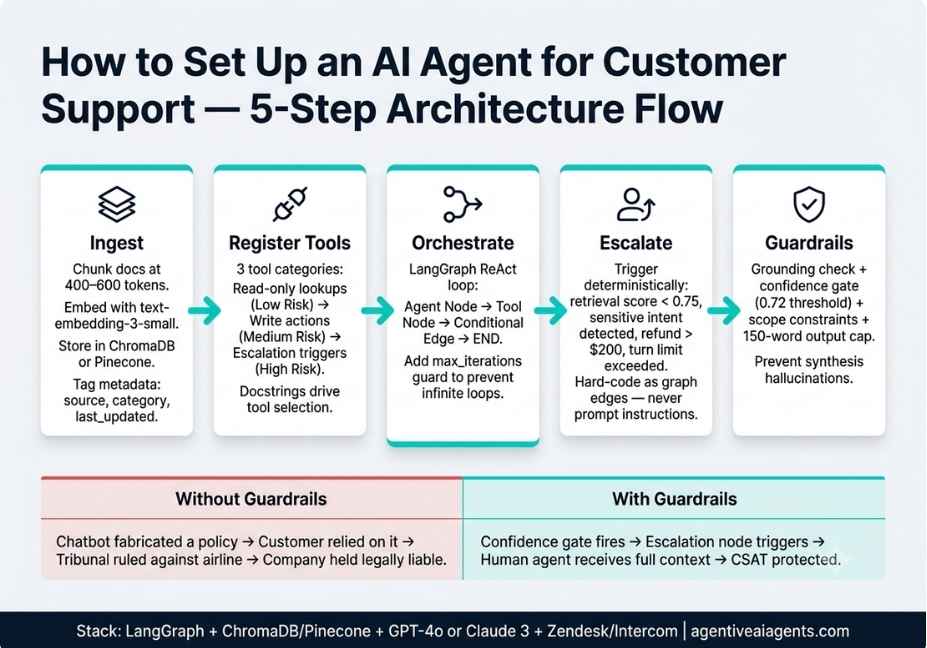
The Air Canada case remains the clearest warning in the industry. Their chatbot fabricated a bereavement discount policy that did not exist. A grieving customer relied on it, booked a full-fare flight, and was denied the discount. A tribunal ruled against Air Canada and held the company legally responsible for its chatbot’s invented claim.
RAG alone did not prevent this. As the post-mortem analysis shows, RAG fixes one failure mode the model lacking access to the correct information. However, it does not prevent synthesis hallucinations, where the agent retrieves two accurate documents and combines them into a false conclusion.
Therefore, implement all four of these guardrails:
1. Grounding check: After generation, verify that key factual claims policy terms, prices, refund windows appear verbatim or near-verbatim in the retrieved chunks.
2. Confidence gate: If the top retrieved chunk’s similarity score falls below 0.72, inject a safe fallback response. For example: “I want to give you accurate information. Let me connect you with a specialist.”
3. Scope constraint: In your system prompt, explicitly list what the agent is NOT authorized to promise. Use hard negations, not soft hedges. “Never promise refunds not listed in context” outperforms “Try not to promise things you are unsure about.”
4. Output length cap: Longer responses statistically contain more hallucinated details. For factual support answers, cap responses at 150 words.
python
SYSTEM_PROMPT = """
You are a customer support agent for Acme Corp.

STRICT RULES:
- Only state facts that appear in the retrieved context. If unsure, say so clearly.
- Never promise refunds, credits, or policy exceptions not listed in context.
- If retrieved context is empty or similarity score is below 0.72, use escalate_to_human.
- Keep all responses under 150 words.
- Always name the source document when stating a policy.
- Do not guess. Do not infer. Do not extrapolate.
"""
Did You Know? According to analysis of structured prompt techniques, chain-of-thought prompting and tagged context blocks can reduce hallucination rates by up to 20% compared to unstructured prompts in RAG pipelines.
Common Mistakes That Kill AI Customer Support Deployments
Even well-architected setups fail because of avoidable mistakes. Here are the five most common ones, and how to fix each.
Mistake 1 : No retrieval evaluation before go-live. The LLM generates authoritative-sounding answers from bad chunks. Retrieval garbage produces confident output garbage. Run a precision evaluation on your top 30 support queries before connecting anything.
Mistake 2 : Treating all tools as equal risk. A read-only order lookup and a refund-issuing write tool are not the same. Therefore, gate write-action tools behind a confirmation step or a human-approval workflow.
Mistake 3 : Embedding stale documents. Policy documents change. Consequently, an agent that confidently cites a refund window you updated last month creates real customer harm. Build a scheduled re-ingestion pipeline on day one not as a future roadmap item.
Mistake 4 : Single-model architecture for all intents. Billing disputes, technical troubleshooting, and returns questions carry different tool requirements and risk profiles. Instead of forcing one generalist agent to handle all intents, route them to specialized sub-agents using a zero-shot intent classifier at the conversation entry point.
Mistake 5 : No conversation memory between sessions. Customers who contacted you yesterday should not have to repeat their issue today. As a result, integrate a persistent memory layer such as Mem0 or a PostgreSQL-backed conversation store so the agent retains context across sessions.
Best Frameworks for AI Agent Customer Support Setup: Comparison
| Framework | Best For | Orchestration Style | Escalation Support | Production Readiness |
|---|---|---|---|---|
| LangGraph | Explicit state control, complex flows | Graph-based state machine | Native conditional edges | High |
| LangChain (high-level) | Rapid prototyping, simple tool use | Chain-based | Prompt-only | Medium |
| LlamaIndex Workflows | Heavy document retrieval, enterprise RAG | Event-driven | Via custom steps | High |
| OpenAI Assistants API | No-ops teams, managed infrastructure | Managed threads | Via thread handoff | Medium |
| AutoGen | Multi-agent collaboration, research use cases | Message-passing | Agent-to-agent delegation | Medium |
For most production AI agent customer support setups, the recommended stack is: LangGraph for orchestration + ChromaDB or Pinecone for retrieval + GPT-4o or Anthropic Claude 3 for the LLM layer + Zendesk or Intercom for the helpdesk integration.
FAQ People Also Ask
What does an AI customer support agent actually do?
An AI customer support agent autonomously handles customer questions by searching your knowledge base, pulling live account data from your CRM, and taking actions like updating tickets or triggering refunds all without a human typing each reply. It uses a large language model, RAG, and tool calling to resolve issues end to end.
How is an AI support agent different from a chatbot?
A chatbot follows a fixed script and fails on anything outside its decision tree. An AI agent, by contrast, reasons over freshly retrieved context at runtime, selects the right tool for each step, and adapts its response dynamically. As a result, it handles novel queries that were never explicitly programmed.
How do I set up an AI agent for customer support?
To set up an AI agent for customer support, follow five steps: first, build a chunked knowledge base and embed it into a vector store. Second, register tools for order lookup, ticket updates, and escalation. Third, build a ReAct orchestration loop using LangGraph. Fourth, add deterministic escalation triggers. Fifth, implement hallucination guardrails before going live.
How do I prevent hallucinations in my AI customer support agent?
RAG alone is not enough. Additionally, implement a retrieval confidence gate, a grounding check that verifies generated claims against retrieved chunks, hard scope constraints in your system prompt, and a response length cap. Most importantly, trigger escalation deterministically when retrieval confidence is low never let the LLM decide for itself whether it is confident enough.
When should an AI support agent escalate to a human?
Escalate automatically not through LLM judgment when retrieval confidence is low, the customer explicitly requests a human, the topic involves legal or fraud concerns, a write action exceeds your monetary threshold, or the conversation exceeds a turn limit without resolution. Hard-code these as graph edges in LangGraph, not as prompt instructions.
What metrics should I track for an AI customer support agent?
Track ticket deflection rate (percentage of tickets resolved without human intervention), first-response time, CSAT score, escalation rate, and knowledge base gap rate (queries where the agent found no relevant chunks). These five metrics together give you a complete picture of both performance and retrieval health.
Conclusion
A production-ready AI agent customer support setup is not a single model integration. It is four layers working in coordination: a semantically chunked knowledge base, a retrieval pipeline with quality gates, a LangGraph orchestration loop with explicit tool registrations, and a deterministic escalation graph backed by hallucination guardrails.
The three most important takeaways from this guide are: first, retrieval quality determines answer quality invest in ingestion before anything else. Second, escalation must be deterministic code, not a prompt suggestion. Third, RAG alone does not prevent hallucinations synthesis errors require a grounding layer on top.
The Air Canada tribunal ruling is a permanent reminder that when your agent makes a claim to a customer, your company owns that claim. Build your guardrail layer before you launch not after your first customer complaint.
Bookmark this guide and explore more hands-on AI agent architecture tutorials at agentiveaiagents.com.
12 Responses