
AI passport photo background removal relies on image segmentation models like U2-Net, IS-Net, and BiRefNet. Background removal alone doesn’t guarantee compliance you also need exact RGB matching and dimension checks against standards set by bodies like the International Civil Aviation Organization (ICAO). Free open-source tools such as rembg can match paid services on most photos.
Passport photo rejections rarely come from lighting or expression. Instead, they come from background noise a human reviewer spots instantly but a naive AI passport photo background removal tool misses: a shadow gradient, a stray hair strand left half-transparent, or an off-white cast that fails a strict RGB threshold. Governments check background uniformity against tight tolerances set by standards bodies like ICAO, and most consumer background removers were originally built for e-commerce product shots, not compliance-grade ID photography.
So, how does AI actually remove a passport photo background? Under the hood, these tools run on image segmentation models the same family of architectures used in medical imaging and self-driving cars repurposed for a narrower, higher-stakes job. In other words, the model doesn’t just detect “a person”; it predicts exactly which pixels belong to that person, down to individual hair strands.
This guide skips the marketing copy. Instead, it looks at the real mechanics: which models power background removal, where they fail on ID photos specifically, and how to build or evaluate a pipeline that won’t get a photo bounced back.
What Is AI Passport Photo Background Removal?
AI passport photo background removal is the process of using a trained image segmentation model to separate a person (the foreground) from everything behind them, then replacing that background with a compliant solid color typically white, off-white, or light gray/blue, depending on the issuing country and document type.
Technically, this is a salient object detection problem. The model predicts a per-pixel probability mask, called an alpha matte, that indicates how much of each pixel belongs to the subject versus the background. Unlike simple green-screen chroma keying, no controlled backdrop is required; the model infers the boundary purely from image content. As a result, you can use a photo taken against a cluttered wall, a couch, or even outdoors, and still get a clean cutout.
How Does AI Background Removal Actually Work?
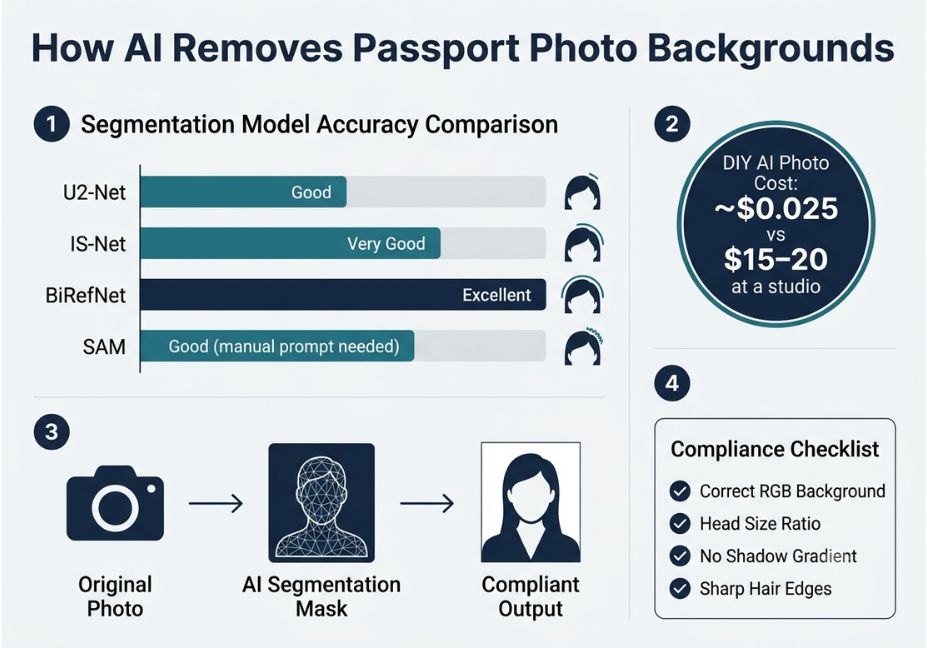
Most consumer and open-source background removers are built on a small set of segmentation architectures. Here’s how each one approaches the problem:
- U2-Net a nested U-shaped network that analyzes an image at multiple scales at once, combining global context (overall body shape) with local detail (hair edges, fabric texture) in a single pass. Consequently, it remains the default backbone for many free tools.
- IS-Net U2-Net’s successor, which adds an intermediate supervision step. First, it isolates a rough foreground region; then, it refines the boundary pixels. This two-step approach produces cleaner edges on cluttered backgrounds.
- BiRefNet built specifically for high-resolution images. It checks that fine boundary detail stays consistent with the overall object shape, which matters when preserving individual hair strands.
- Segment Anything Model (SAM) Meta’s promptable segmentation model. It’s more flexible overall, but it typically needs a bounding box or point prompt rather than running fully automatically.
Pro Tip: For ID photos, edge accuracy around hair and glasses matters more than raw segmentation speed. Before trusting any tool’s default output, test it on a photo with flyaway hair or wire-frame glasses.
Quick stat: In independent model comparisons, IS-Net and BiRefNet consistently outperform the original U2-Net on cluttered or low-contrast backgrounds precisely the conditions that most often cause passport photo rejections.
Here’s a minimal working pipeline using the open-source rembg library, which wraps several of these models:
python
from rembg import remove, new_session
from PIL import Image

# isnet-general-use tends to hold edges better than the default u2net
session = new_session("isnet-general-use")

with open("input.jpg", "rb") as f:
    input_data = f.read()

output_data = remove(input_data, session=session)

with open("no_bg.png", "wb") as f:
    f.write(output_data)

# Composite onto a compliant white background
img = Image.open("no_bg.png").convert("RGBA")
white_bg = Image.new("RGBA", img.size, (255, 255, 255, 255))
white_bg.paste(img, (0, 0), img)
white_bg.convert("RGB").save("passport_ready.jpg", quality=95)
Technical Disclaimer: This code uses rembg v2.x as of mid-2026. Model names and defaults change between releases, so check the rembg GitHub repository before deploying to production.
Who Sets Passport Photo Background Standards?
Passport and visa photo requirements aren’t arbitrary they’re defined by specific standards bodies, and this is where contextual authority matters most for this topic:
- The International Civil Aviation Organization (ICAO) publishes the baseline global standard (Document 9303) that most countries’ passport photo rules derive from.
- The U.S. Department of State publishes its own specific requirements for U.S. passport and visa photos, including exact background color and lighting rules.
- The UK’s HM Passport Office and the Schengen visa authorities publish separate, slightly different specifications for EU-area documents.
For this reason, any automated pipeline should validate against the specific issuing authority’s current published spec not a generic “white background” assumption.
AI Passport Photo Background Removal Use Cases
- Individual applicants creating a DIY passport, visa, or driver’s license photo at home instead of paying a studio $15–20 per session.
- Photo booths and kiosks running automated compliance checks background color, head size, framing before printing.
- HR and onboarding platforms batch-processing employee ID photos across hundreds of new hires.
- Immigration and visa services normalizing photos submitted in inconsistent formats from applicants worldwide.
- Government photo-verification systems flagging non-compliant submissions before a human reviewer ever sees them, which reduces rejection-driven resubmission cycles.
Best Tools and Frameworks: Comparison
| Model / Tool | Approach | Hair/Edge Accuracy | Runs Locally | Best For |
|---|---|---|---|---|
| U2-Net (rembg default) | Multi-scale saliency detection | Good | Yes | General-purpose, fast |
| IS-Net | Two-step intermediate supervision | Very good | Yes | Cluttered backgrounds |
| BiRefNet | High-res boundary refinement | Excellent | Yes (GPU recommended) | Fine hair/fabric detail |
| SAM | Promptable segmentation | Good (needs manual prompt) | Yes | Interactive editing, not full automation |
| Commercial APIs | Proprietary, often ensemble models | Excellent | No (cloud) | Non-technical users, guaranteed uptime |
Did You Know? The isnet-general-use model was added to rembg specifically because the original U2-Net model struggled with fine boundary precision on complex backgrounds — exactly the failure mode that causes ID photo rejections.
How Do You Build a Compliant AI Passport Photo Pipeline?
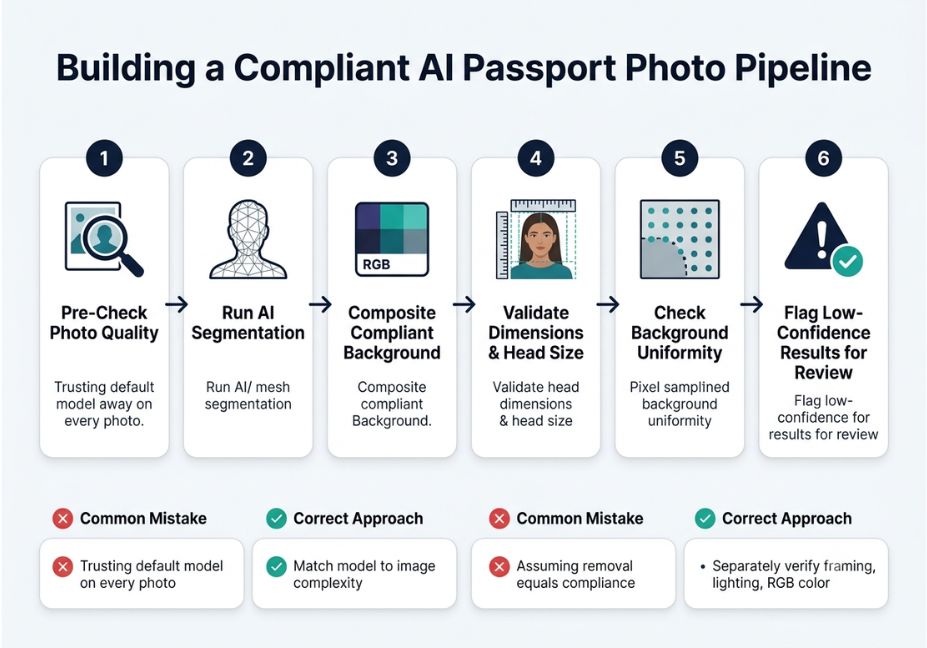
If you’re building a pipeline rather than using a single online tool, follow these steps in order:
- Pre-check input quality. Reject blurry, low-resolution, or heavily backlit source photos before running segmentation. Otherwise, poor input quality directly degrades matte quality.
- Run segmentation with a boundary-focused model IS-Net or BiRefNet rather than default U2-Net for ID-photo-grade edges.
- Composite onto the exact required background color. Pull the RGB value from official specifications instead of eyeballing “white.”
- Validate dimensions and head-size ratio against the target document’s published spec, since these vary by country and document type.
- Run an automated uniformity check. Sample background pixels at multiple points to confirm no residual gradient or shadow remains after compositing.
- Flag low-confidence masks for manual review instead of auto-approving them. Soft or ambiguous alpha values along the subject boundary are the biggest source of hidden failures.
Common Mistakes and How to Avoid Them
- Trusting default model settings on every photo. Different models handle glasses, dark hair on dark backgrounds, and busy patterns differently. In fact, an independent evaluation of segmentation models found meaningful accuracy gaps between architectures on exactly these edge cases.
- Skipping background-color validation. A visually “white” composite can still fail a strict RGB tolerance check used by automated government scanners.
- Ignoring semi-transparent edge pixels. Alpha mattes near hair strands are often partially transparent by design. If you naively flatten them onto a background, you can create a faint halo that a scanner reads as background contamination.
- Assuming background removal alone equals compliance. Framing, head size, expression, and lighting are separate requirements that the segmentation step doesn’t touch at all.
What Are Developers Saying About These Tools?
Discussion threads on r/MachineLearning and in the rembg GitHub issues repeatedly surface the same finding: no single model wins across all image types. As a result, teams building compliance-sensitive pipelines tend to run multiple models and pick per-image based on confidence scores, rather than shipping one default model and hoping for the best.
Frequently Asked Questions
Can AI remove a passport photo background for free?
Yes. Open-source tools like rembg run segmentation models such as U2-Net or IS-Net locally at no cost, producing results comparable to paid services on most straightforward photos.
What background color does a passport photo need?
Most countries require plain white or off-white. However, some EU documents accept light gray or light blue instead. Always confirm against the issuing authority’s current published specification before submitting.
Do AI background removers meet official passport photo requirements?
Not by themselves. Background removal only handles the backdrop framing, head size, lighting, and expression must still be verified separately against official standards like those from ICAO or the U.S. Department of State.
What’s the difference between background removal and background replacement?
Background removal produces a transparent, alpha-masked cutout of the subject. Background replacement then composites that cutout onto a new, specified background color or image and this second step is what actually makes a photo submission-ready.
Is rembg accurate enough for ID photos?
For most subjects, yes especially with the isnet-general-use or birefnet models rather than the default. That said, photos with fine flyaway hair or reflective glasses still benefit from a manual spot-check.
Can I automate passport photo processing for many people at once?
Yes. Batch pipelines using rembg or similar libraries can process hundreds of photos programmatically. Even so, adding an automated compliance-validation step for background color and dimensions is essential at scale, since it catches failures before submission.
How do I remove a passport photo background using my phone?
Upload the photo to a browser-based tool or app that runs a segmentation model like U2-Net; most work directly from a phone camera roll without needing a desktop.
Conclusion
AI passport photo background removal has moved well past simple chroma-key tricks. It’s now a segmentation modeling problem, with real accuracy differences between U2-Net, IS-Net, BiRefNet, and SAM depending on hair detail, background clutter, and image resolution. Background removal is necessary, but it’s not sufficient on its own pairing it with explicit RGB and dimension validation against standards like ICAO Document 9303 is what actually prevents rejections. Bookmark this guide and explore more hands-on AI implementation breakdowns at agentiveaiagents.com.