Most automated data pipelines don’t fail because the model writes bad pandas code. Instead, they fail because nobody drew a line between “an agent that writes a transformation” and “a system that runs it reliably at 3 a.m. without anyone watching.” That distinction just became more urgent: on July 13, 2026, Prefect announced it was acquiring Dagster, folding two of the biggest post-Airflow orchestrators into one company built around agent-governed automation. So if you’re evaluating AI tools for automating Python data analysis pipelines right now, you’re stepping into a market that’s actively being redrawn.
This guide separates the two layers that most write-ups conflate: AI agents that generate and debug analysis code through a tool-use loop, and orchestrators that schedule, retry, and observe that code as a DAG in production. Get this split right, and your pipeline scales cleanly. Get it wrong, and you end up with a notebook that happens to run on a cron job.
What Is an AI-Automated Python Data Analysis Pipeline?
An AI-automated Python data analysis pipeline is a workflow where a language-model agent generates or edits code for ingestion, cleaning, transformation, or reporting, while a separate orchestration layer schedules and monitors that code in production. In short, it’s a hybrid of two older ideas: the ETL pattern for moving and reshaping data, and the agentic tool-use loop that came out of LLM research such as the ReAct reasoning-and-acting framework.
Here’s the pairing worth remembering: agent + code generation answers “what to do.” Orchestrator + DAG answers “when and how it actually runs.” Because these two jobs are so different, conflating them is where most agent-driven pipelines break down.
How Does It Work? (Architecture and Mechanism)
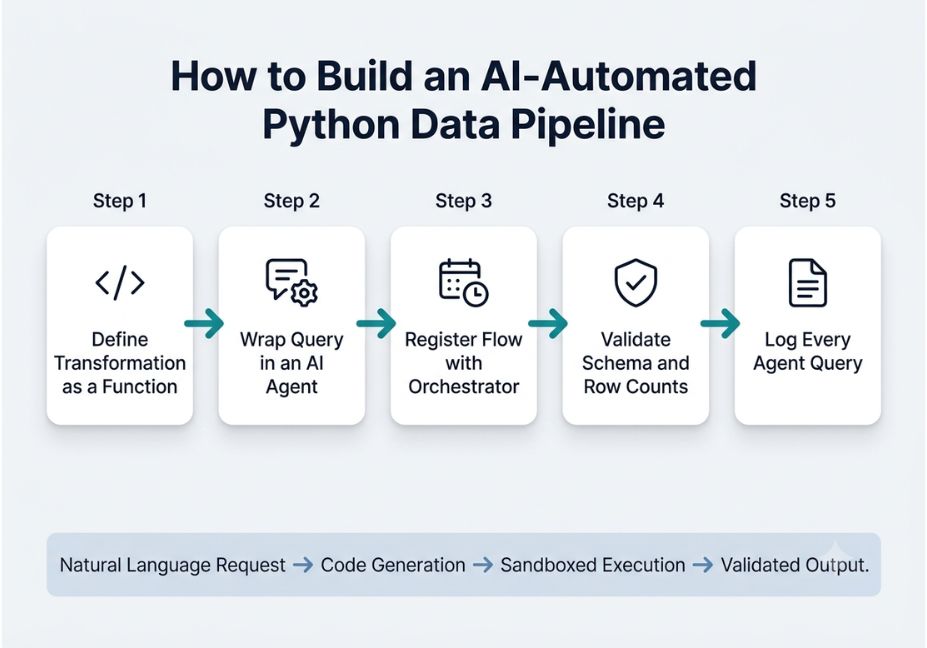
A typical pipeline chains four stages: a natural language request, code generation, sandboxed execution, and validated output. Rather than reasoning about data “in its head,” the agent writes and executes real Python, then checks the result before responding.
For example, LangChain implements this through a pandas dataframe agent that calls a Python agent under the hood, executing LLM-generated Python code directly. That’s also why LangChain’s own documentation flags the approach as risky to run unsanctioned a fluent-sounding transformation can still be statistically wrong. This gap between fluency and correctness is the core hallucination risk in the space, and it’s the main reason validation steps matter more than model choice.
Technical Note: Framework versions evolve quickly. The code below reflects LangChain and PandasAI APIs as of mid-2026, so check the official docs before shipping anything to production.
import pandas as pd
from pandasai import Agent

df = pd.read_csv("sales_data.csv")
agent = Agent(df)

response = agent.chat
    "What were the top 3 regions by revenue last quarter?"

print(response)
Here, the agent parses the request, generates pandas code internally, runs it against the dataframe, and returns a structured answer no manual .groupby() needed.
AI Agent vs. Orchestrator: What’s the Difference?
This is the distinction most competing articles skip, and it’s the one that decides whether your pipeline survives contact with production.
- AI coding assistants and analysis agents (PandasAI, LangChain’s dataframe agent, OpenAI’s Code Interpreter) generate and execute Python on demand, in response to a natural language query.
- Orchestrators (Prefect, Dagster, Apache Airflow) don’t write your code at all. Instead, they schedule it, retry it on failure, track data lineage, and give a human enough observability to explain why a run broke.
A common failure mode follows from skipping this split entirely: teams wire an LLM agent directly into a cron job with no retry logic, no schema check, and no audit trail. As a result, when the model hallucinates a column name at 2 a.m., nothing catches it until a stakeholder notices the dashboard is empty.
Best Tools and Frameworks: A Comparison
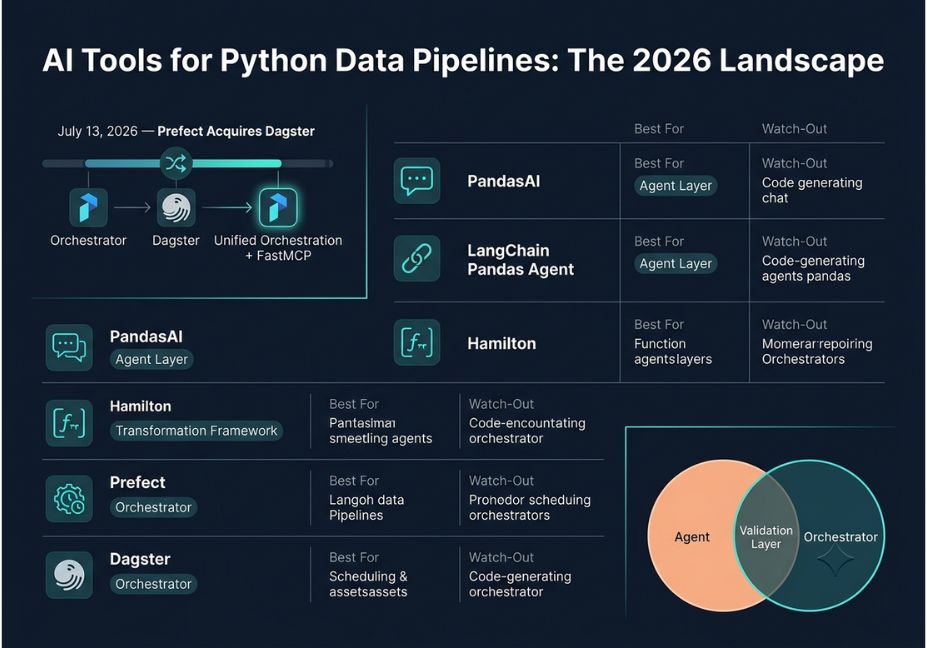
| Tool | Layer | Best For | Watch-Out |
|---|---|---|---|
| PandasAI | Agent | Natural-language querying of a single dataframe or SQL table | Sends data to the cloud by default; cost scales with usage |
| LangChain (pandas agent) | Agent | Multi-step agents with provider flexibility (OpenAI, Anthropic, Bedrock) | langchain-experimental is no longer actively maintained; pin versions |
| Hamilton | Transformation framework | Defining pipeline steps as plain Python functions wired into a DAG | Less turnkey for non-engineers than a chat interface |
| Prefect | Orchestrator | Python-native, dynamic scheduling without rigid DAG syntax | Now the parent company of Dagster post-acquisition |
| Dagster | Orchestrator | Asset-based orchestration with built-in data lineage | Steeper learning curve around its asset-based orchestration model |
Did You Know? As of July 2026, Prefect and Dagster are no longer separate companies. Prefect acquired Dagster Labs, and both products now sit alongside FastMCP, a protocol layer for governing how AI agents reach tools and data.
Use Cases: Where This Actually Shows Up
- Ad hoc analysis for non-engineers. An analyst runs a natural language query against a CSV instead of writing pandas from scratch.
- Automated data cleaning. An agent detects and standardizes inconsistent text fields before a scheduled load.
- Self-healing pipelines. An orchestrator flags schema drift, and an agent proposes a patched transformation for human review.
- Scheduled report generation. A nightly job pulls fresh data, runs an agent-generated summary, and pushes it to a dashboard.
How to Automate a Python Data Pipeline with AI: Step-by-Step
- Define the transformation as a plain function. Keep cleaning and aggregation logic in ordinary Python functions, not buried inside a prompt.
- Wrap analysis queries in an agent. Use PandasAI or a pandas dataframe agent from LangChain for the natural-language layer, scoped to a single dataframe or table.
- Register the flow with an orchestrator. Bring the function into Prefect or Dagster as a scheduled flow rather than a standalone script.
- Add validation before output. Check row counts, null rates, and schema against expectations before anything reaches a dashboard.
- Log every agent-generated query. This audit trail is what makes a 2 a.m. failure debuggable instead of mysterious.
Pro Tip: Run agent-generated code in a sandboxed subprocess with a timeout, never directly against your production database connection.
Common Mistakes and How to Avoid Them
- Trusting agent output without validation. Always diff row counts and schema before and after a transformation.
- Running LLM-generated code with production credentials. Use a read-only or sandboxed connection instead.
- Treating the agent as the orchestrator. A chat-style agent has no retry logic, no alerting, and no lineage tracking on its own.
- Ignoring version drift. Because agent frameworks change fast, pin dependency versions and retest after every upgrade.
What Developers Are Saying
Discussions on GitHub around PandasAI’s LangChain integration reveal a recurring tension: teams want the convenience of a chat-style interface, yet they’re wary of sending dataframes to a third-party LLM endpoint, especially with regulated data. In other words, the tradeoff between convenience and data residency comes up in nearly every serious adoption thread.
FAQ People Also Ask
Is it safe to use AI for data analysis on sensitive data?
Not by default. PandasAI, for example, sends a copy of your dataframe to the cloud for processing, which raises privacy concerns for regulated datasets. Check self-hosted or sandboxed deployment options first.
What is an AI-automated Python data analysis pipeline?
It’s a workflow where an LLM agent generates or edits pipeline code, while a separate orchestration layer schedules and monitors that code in production.
Can AI tools fully replace manual Python coding for data analysis?
Not reliably for production systems. Agents draft and explore data well, but scheduled, validated pipelines still need human-reviewed code and orchestration.
What’s the best AI tool for cleaning data in Python?
PandasAI and LangChain’s pandas agent both handle natural-language cleaning tasks well, though neither replaces explicit validation rules for production use.
Do I need Airflow if I already use an AI agent for data analysis?
Not Airflow specifically, but you still need an orchestration layer. Prefect and Dagster are common Python-native alternatives, and since mid-2026 they operate under one company.
How much does it cost to automate a Python data pipeline with AI?
Costs scale with usage, since most agents bill per API call. Cloud-based tools like PandasAI add processing costs on top of that.
Conclusion
The most useful AI tools for automating Python data analysis pipelines in 2026 aren’t a single product. They’re a layered stack: an agent like PandasAI or a LangChain pandas agent for natural language analysis, an orchestrator like Prefect or Dagster for reliable scheduling, and validation steps in between that catch what the agent gets wrong. Because the Prefect–Dagster merger is reshaping that orchestration layer, it’s worth watching closely over the next year. Bookmark this guide, and keep exploring agentic workflow tutorials on agentiveaiagents.com.