

A Google Business Profile that hasn’t been touched in three months doesn’t just look neglected. It tells Google’s ranking systems that the business is inactive, and inactive profiles lose Local Pack visibility fast. That’s the real problem most local businesses face: keeping posts, reviews, attributes, and photos current is a repeating task, not a one-time setup. Consequently, almost nobody has the bandwidth to do it manually every week.
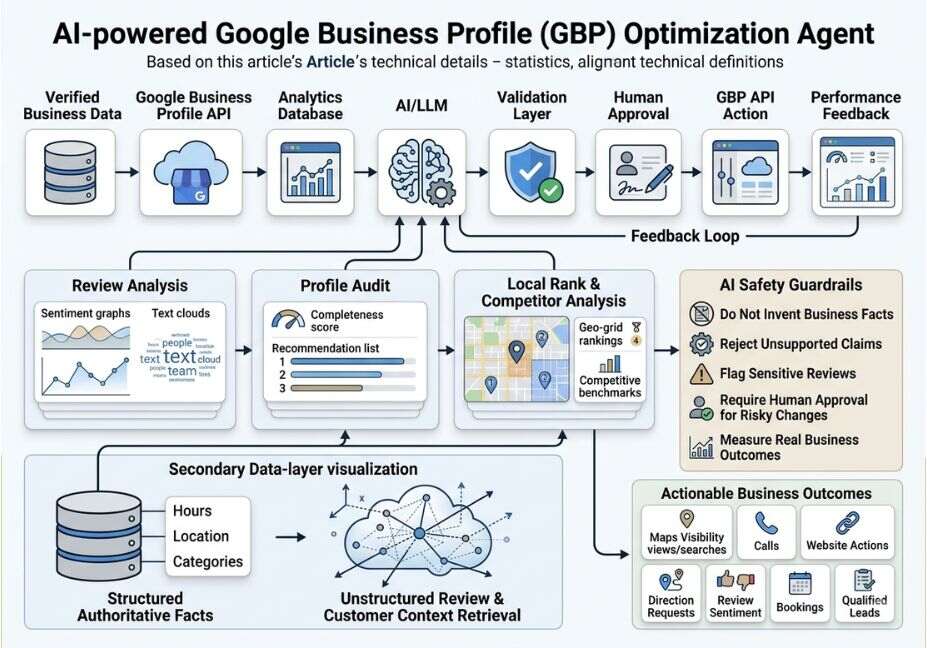
That’s exactly the kind of repeating, multi-step task AI agents handle well. First, they collect signals. Then they generate content, publish it, and monitor results before starting the loop again. In 2026, a growing set of AI tools apply that same loop directly to Google Business Profile (GBP) management: drafting review replies, scheduling Google Posts, flagging missing attributes, and tracking geo-grid rankings. Google’s own ranking guidance still centers on relevance, distance, and prominence. However, AI Overviews now pull answers directly from profile data, which makes profile completeness a bigger lever than it was even a year ago.
What Is Google Business Profile Optimization?
In short, Google Business Profile optimization means keeping a business’s Google listing accurate, complete, and active enough to rank well in the Local Pack and appear inside AI-generated answers. That includes hours, categories, services, attributes, posts, photos, Q&A, and reviews. Google itself frames ranking around three factors: relevance, distance, and prominence, all explained in Google’s own local ranking guidance (support.google.com/business/answer/7091).
Two changes made this harder by 2026. First, Google added more structured fields, including attributes, service menus, and booking links, each acting as its own ranking signal. Second, Gemini-powered AI Overviews now read directly from those fields to answer conversational, multi-condition queries such as “coffee shops with outdoor seating open now.” As a result, incomplete fields don’t just hurt Local Pack rank; they make a business invisible to AI-generated answers entirely.
How Do AI Tools Actually Optimize a Profile?
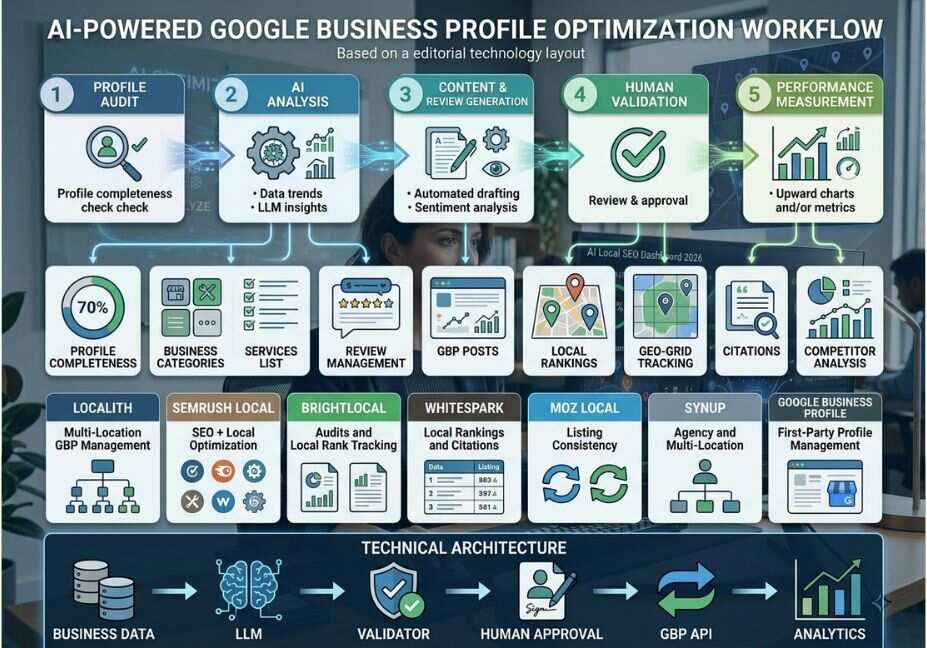
Most GBP tools automate four repeating jobs, rather than doing anything Google itself couldn’t theoretically do by hand:
- Content generation drafting Google Posts, service descriptions, and Q&A answers in the business’s voice
- Review management drafting and, in autopilot mode, publishing replies to new reviews
- Audit and gap detection scanning the profile for missing categories, attributes, or stale hours
- Rank tracking measuring visibility at multiple points around a business’s location, not just one average position
Technical Note: Some platforms connect through the official Business Profile API (developers.google.com/my-business), which allows bulk updates across locations. Others operate through a browser layer that mimics manual dashboard edits instead. Generally, the API route is more reliable for multi-location accounts and less likely to trigger review flags on bulk changes.
For context, here’s a simplified version of what an AI review-reply agent does under the hood:
python
def generate_reply(review_text, rating, brand_voice="professional"):
    prompt = f"""
    Reply to this {rating}-star Google review in a {brand_voice} tone.
    Acknowledge specifics, avoid generic language, and if rating <= 2,
    take responsibility without over-apologizing. Under 60 words.
    Review: {review_text}
    """
    return call_llm(prompt)
Essentially, that’s the entire mechanism behind most “AI review reply” features: a templated prompt wrapped in a scheduling and posting layer.
AI Tools for Google Business Profile: Real-World Use Cases
1. Multi-location review response at scale. A 12-location restaurant group can’t manually reply to every review within a useful window. AI review agents cut response time from roughly 30 minutes down to a couple of minutes per review. This matters because response rate itself is a tracked engagement signal.
2. Rewriting weak service descriptions. Vague copy like “we sell clothes” becomes specific, keyword-rich descriptions such as “premium cotton kurtas for wedding season.” This kind of rewrite matches how Gemini parses conversational, long-tail queries.
3. Geo-grid competitive tracking. Instead of one average rank number, geo-grid tools show exactly where around a business’s radius it appears in the Local Pack. Therefore, they expose blind spots a single ranking metric would otherwise hide.
4. Attribute and Q&A gap-filling. AI audit tools flag missing attributes, such as outdoor seating, wheelchair access, or booking links, which are the exact fields VentureBeat has reported on regarding Gemini-powered AI Overviews reshaping local search by pulling directly from structured profile fields.
Best Tools and Frameworks Compared
| Tool | Core Strength | Autopilot Available | Best For |
|---|---|---|---|
| CATTIX | Post generation + review replies + gap audit in one dashboard | Yes | Single-location businesses wanting full automation |
| Localo | Score-based profile audit, weekly post ideas | Approval only | Fast, low-effort optimization wins |
| GMBMantra | Geo-grid rank tracking at the grid-point level | Approval only | Businesses that need visibility-radius data |
| Birdeye | Review + messaging + customer experience platform | Yes | Multi-location brands wanting a unified CX tool |
Pro Tip: Start every AI tool in approval mode, where AI drafts and a human publishes, for at least a month. Only turn on autopilot once you’ve validated the tone and factual accuracy of AI-generated replies and posts against your brand.
Step-by-Step: How to Automate Google Business Profile Optimization With AI
- Audit first, automate second. Before connecting any AI tool, run a profile completeness check. Categories, attributes, hours, and service fields all need to be accurate inputs, since AI tools amplify whatever data they’re given.
- Add Local Business schema to your website. Structured markup using schema.org’s LocalBusiness vocabulary reinforces the same NAP (name, address, phone) data Google cross-checks against your GBP listing. This also helps AI crawlers and search engines confirm entity consistency across the web.
- Connect the AI tool in approval mode. Let it draft posts and review replies for two to four weeks before granting autopilot access.
- Set a posting cadence. Weekly posts and at least two new photos per week correlate with stronger direction-request and click-through numbers, according to multiple 2026 GBP performance guides.
- Review geo-grid data monthly. Track ranking by grid point, not just an average position, so you catch localized visibility drops early.
- Reassess quarterly. Google adds new attributes and profile fields regularly. A quarterly audit catches gaps an AI tool trained on older field sets might otherwise miss.
Did You Know? Businesses with 100+ photos on their profile report roughly 42% more direction requests and 35% more website clicks than those with fewer than 10, according to 2026 GBP performance data cited across several local-SEO guides.
Common Mistakes and How to Avoid Them
- Turning on autopilot too early. Unreviewed AI review replies can sound templated or miss the specifics of a complaint. This is exactly the pattern that makes a two-star review reply feel dismissive instead of resolved.
- Ignoring NAP consistency. If a business’s name, address, or phone number differs across the website, GBP, and other citations, it undermines the exact trust signal verification is meant to establish. Tools like BrightLocal and Whitespark are commonly used to audit citation consistency across the web.
- Treating Posts as a ranking hack instead of an AI-visibility lever. Google Posts have limited direct impact on Local Pack position. Instead, their bigger value in 2026 is feeding fresh, structured content to AI Overviews.
- Skipping the technical layer. Tools that only touch the GBP dashboard, and never sync with website schema, leave a gap between what Google’s Local Pack sees and what its AI Overviews pull from.
- Ignoring E-E-A-T signals. Google’s Experience, Expertise, Authoritativeness, and Trustworthiness framework still applies to local listings. Profiles backed by a well-optimized website, verified credentials, and consistent citations tend to earn more trust from both the Local Pack and AI Overviews.
Technical Disclaimer: GBP tool features and Google’s own attribute set change frequently. Pricing, autopilot availability, and specific feature names referenced in this article reflect publicly available information as of mid-2026. Always confirm current capabilities directly with each vendor and with Google’s own documentation before implementation.
What Local Business Owners Are Saying
Across small-business and local-SEO discussion communities, a consistent pattern shows up. Operators managing fewer than 10–20 reviews a month often get by with a free LLM chat account and a saved prompt template, copying replies over manually. However, the calculus shifts once review volume or location count grows. At that point, the time saved by automation starts to outweigh the monthly cost of a dedicated tool, and response-time coverage becomes the harder problem to solve manually.
FAQ — People Also Ask
What are the best AI tools to optimize a Google Business Profile in 2026?
The best AI tools for Google Business Profile optimization in 2026 combine review-reply automation, Google Posts scheduling, attribute gap-detection, and geo-grid rank tracking in one dashboard. Platforms like CATTIX, Localo, GMBMantra, and Birdeye each specialize in a different piece of that workflow.
Can AI actually improve Google Business Profile rankings?
Not directly. Google’s algorithm still weighs relevance, distance, and prominence. What AI improves instead is the underlying activity signals, such as post frequency, review response rate, and attribute completeness, that Google’s ranking systems reward.
Is it safe to let AI auto-post to my Google Business Profile?
It’s safer in approval mode, where AI drafts content and a human publishes it. Autopilot mode becomes workable once you’ve validated tone and factual accuracy over several weeks, since unreviewed posts or review replies that misstate details can hurt trust more than they help ranking.
Do AI review reply tools sound robotic?
Sometimes, especially with tools that rely on generic templates. Quality varies significantly between platforms; some produce specific, situation-aware replies, while others output a generic apology regardless of what the review actually said.
How much do AI Google Business Profile tools cost?
Pricing ranges from free tiers with basic post scheduling up to $29 per month or more for multi-location platforms with review automation, rank tracking, and reporting bundled together. Enterprise multi-location tools often use custom quote-based pricing instead of flat monthly rates.
Conclusion
Google Business Profile optimization in 2026 isn’t a one-time setup task. It’s a continuous data feed into both the traditional Local Pack and Gemini-powered AI Overviews. The businesses pulling ahead are the ones treating it like an agentic workflow: audit, generate, publish, monitor, and repeat, with a human in the approval loop until the AI’s output has earned autopilot trust. Ultimately, pairing the right AI tool with clean Local Business schema on your website means optimizing for both ranking systems Google actually uses, not just the one that’s easiest to see.
Bookmark this guide and explore more hands-on AI agent workflows at agentiveaiagents.com.



