
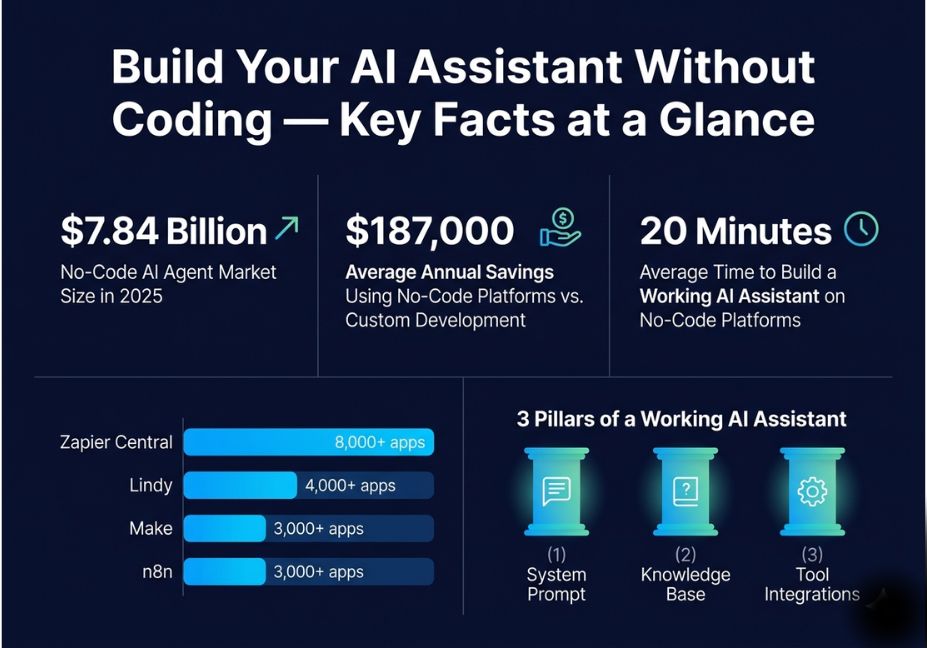
Most people assume building a personal AI assistant requires Python chops and an API key. It doesn’t not anymore. The no-code AI agent market hit $7.84 billion in 2026 and is growing fast, with platforms that let you assemble a working assistant in under 20 minutes using drag-and-drop interfaces and plain-language instructions.
But here’s the catch: most no-code AI assistants feel smart but behave like glorified autocomplete. The difference between a useful assistant and a frustrating one comes down to three things how you define its purpose, how well you engineer its system prompt, and whether it has access to the right tools and memory. That’s what this guide covers. You’ll learn how to choose the right platform, design an assistant that actually works, connect it to real workflows, and avoid the most common mistakes that kill no-code AI projects before they deliver value.
What Is a No-Code AI Assistant?
A no-code AI assistant is a custom application built on top of a large language model (LLM) like GPT-4o or Claude using a visual interface instead of hand-written code. You configure it through natural language instructions, drag-and-drop workflow builders, and pre-built integrations with tools like Gmail, Slack, Notion, or Salesforce.
What researchers define as an intelligent personal assistant goes beyond simple Q&A: these systems understand context, take sequential actions, and adapt output to user goals. No-code platforms now expose these capabilities without requiring the underlying engineering. The tradeoff is flexibility you gain speed, but highly custom behavior (fine-tuned models, complex memory architectures, novel tool integrations) still benefits from code.
Why Generic AI Tools Keep Failing You
Before building your own, it’s worth understanding why off-the-shelf assistants disappoint.
Generic tools like ChatGPT or Google Gemini are optimized for the broadest possible audience. They don’t know your brand voice, your workflows, your customers, or your data. Every session starts from zero no memory of past conversations, no access to your documents, no integration with your business tools.
The result? You spend 15 minutes re-explaining context every time. You get responses that sound plausible but miss your specific constraints. You paste the same prompt over and over.
A custom AI assistant solves this with three design layers:
- A defined persona and system prompt who the assistant is, what it knows, how it talks
- A connected knowledge base your documents, FAQs, SOPs, or product data
- Integrated tools and triggers actions it can take in your existing stack
Pro Tip: The single most impactful thing you can do before picking a platform is write a one-paragraph “assistant brief” what does it do, who does it serve, what should it never say? This becomes the foundation of your system prompt.
Best No-Code Platforms for Building Your AI Assistant
The platform you choose determines what your assistant can do. Here’s an honest comparison based on current capabilities:
| Platform | Best For | Strengths | Limitations |
|---|---|---|---|
| OpenAI Custom GPTs | Personal productivity, knowledge-base Q&A | Easy setup, GPT-4o power, file uploads | No multi-app automation, limited memory |
| Zapier Central | Teams already in Zapier ecosystem | 8,000+ app integrations, familiar UI | Less LLM control, $69+/month |
| Make | Multi-step workflows, budget teams | Visual canvas, complex branching, 3x cheaper than Zapier | Steeper learning curve for AI flows |
| Voiceflow | Conversational agents, customer support | Multi-turn dialog, human escalation, Zendesk/Intercom integrations | Overkill for simple assistants |
| Lindy | Business automation, non-technical users | Natural language config, 4,000+ integrations, strong templates | Less flexible model selection |
| n8n | Technical teams, open-source control | Self-hosted, free tier, full AI agent workflows | Requires more setup than pure no-code |
| Chatbase | Customer-facing chatbots on your docs | Simple knowledge base import, website embed | Not designed for multi-step agentic tasks |
For most beginners, start with OpenAI’s Custom GPT builder for personal productivity or Lindy for business automation. Both have generous free tiers and get you to a working assistant in under 30 minutes.
Step-by-Step: How to Build Your First No-Code AI Assistant
This walkthrough uses OpenAI’s Custom GPT builder the fastest path from zero to working assistant.
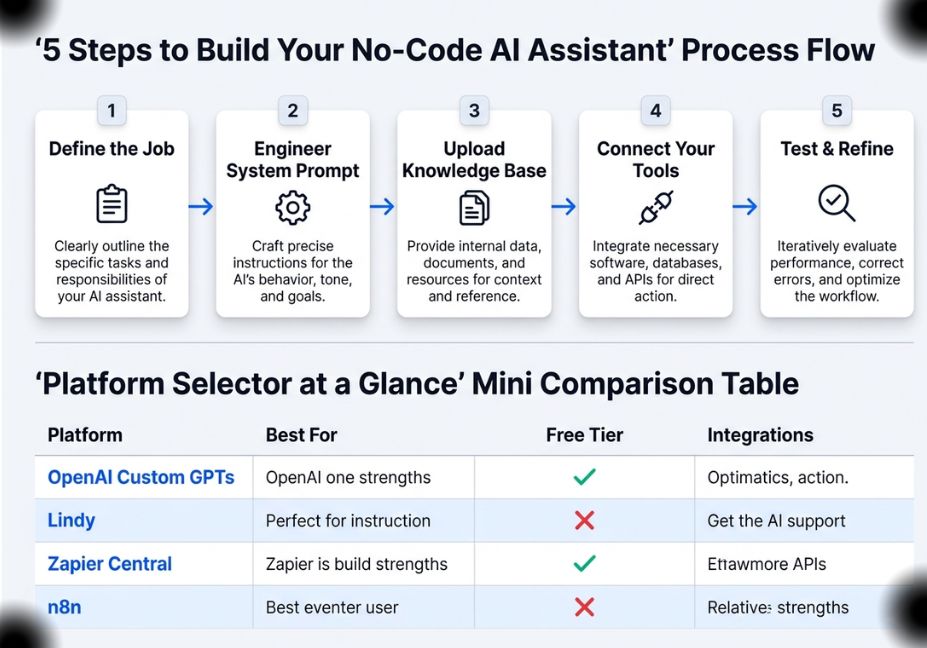
Step 1 : Define the Assistant’s Job
Write a clear brief before opening any tool:
- What is the one primary task this assistant handles?
- Who is the user you, your team, or your customers?
- What data or documents does it need to answer well?
- What should it refuse to do?
Example brief: “A customer support assistant for a SaaS product. Answers questions about pricing, features, and onboarding. Uses our FAQ document as its knowledge base. Escalates billing disputes to a human.”
Step 2 : Engineer the System Prompt
The system prompt is the most powerful lever in a no-code assistant. It’s the instruction set that shapes every response. A weak system prompt produces a generic assistant. A precise one produces a specialist.
Structure your system prompt with four layers:
- Role definition “You are a customer support specialist for [Company]. Your tone is friendly but concise.”
- Knowledge scope “Answer only from the provided knowledge base. Do not speculate or invent answers.”
- Behavioral rules “If asked about billing disputes, say: ‘I’ll connect you with our billing team at billing@company.com.'”
- Output format “Keep answers under 150 words. Use bullet points for multi-step answers.”
Technical Note: System prompt length matters less than specificity. Five precise behavioral rules outperform a 1,000-word prompt full of vague directives. OpenAI models can handle long system prompts, but precision is what drives consistent output.
Step 3 : Upload Your Knowledge Base
This is where your assistant becomes genuinely useful. Upload:
- Product documentation or FAQs
- SOPs or internal process guides
- Email templates or response scripts
- Competitor comparison sheets
OpenAI’s Custom GPT builder accepts PDFs, Word docs, and text files. The underlying retrieval mechanism is a lightweight form of knowledge base retrieval that powers accurate, grounded responses similar in principle to RAG pipelines used in production AI systems, without the infrastructure complexity.
Pro Tip: Don’t upload everything. Curate 5–10 high-relevance files per use case. More documents create more retrieval noise, not more accuracy.
Step 4 : Connect Your Tools
This is where assistants cross from “chatbot” into “agent.” Tool connections let the assistant take actions, not just answer questions.
In platforms like Lindy or Zapier Central, you define integrations in plain language:
- “When a new lead fills out the contact form, draft a personalized follow-up email and send it via Gmail.”
- “Every morning at 8 AM, summarize my top 5 Notion tasks and send them to Slack.”
- “If a customer asks to book a call, check my Calendly and offer available slots.”
The tool-use loops that underpin modern LLM agents where the model decides which tool to call, in what order, based on context are now abstracted into visual workflow builders. You define the available tools; the LLM handles the orchestration.
Step 5 : Test, Break, and Refine
Before deploying anywhere, run edge-case tests:
- Ask questions outside its knowledge scope : does it hallucinate or admit uncertainty?
- Try ambiguous inputs : does it ask clarifying questions or guess?
- Test multi-turn conversation : does it maintain context across exchanges?
Most first-version assistants fail 2–3 of these tests. That’s expected. The fix is almost always in the system prompt, not the platform.
Real-World Use Cases That Work Without Code
No-code AI assistants aren’t theoretical. Here’s what teams are actually deploying:
Personal productivity: A Custom GPT trained on your personal notes, writing style guide, and project context. Acts as a second brain that writes in your voice.
Customer support triage: A Voiceflow-powered chat agent that handles tier-1 support questions, classifies intent, and routes complex issues to humans via Zendesk integration.
Sales outreach: A Lindy agent that monitors new leads in a CRM, researches their LinkedIn, and drafts personalized cold emails queued for human review before sending.
Internal knowledge assistant: A Chatbase instance trained on your company’s internal wiki, Notion docs, and HR policies. Employees ask in natural language instead of digging through folders.
Content repurposing: A Make workflow where a new blog post triggers an AI action to generate 5 LinkedIn variations, 3 email newsletter angles, and a thread outline all saved to Notion automatically.
Did You Know? The typical organization saves $187,000 annually by using no-code platforms instead of custom AI development and gets to market in days rather than months.
Common Mistakes That Kill No-Code AI Projects
1. Skipping the system prompt. Jumping straight to the interface and expecting the LLM to figure out context. The result is a generic assistant that drifts off-topic within three turns.
2. Overloading the knowledge base. Uploading every document you own creates retrieval noise. The assistant surfaces tangentially related content instead of the precise answer you need.
3. Not handling failure modes. Leaving no instruction for what the assistant should say when it doesn’t know something. Unguided LLMs will confidently fabricate answers a well-documented phenomenon called hallucination. Build an explicit fallback: “If you are not certain, say so and direct the user to [contact channel].”
4. Treating version 1 as final. No-code assistants need iteration. The first version surfaces gaps. Plan for a weekly 30-minute review of conversation logs to identify where the assistant is failing.
5. Ignoring conversational memory. Many beginners choose platforms that reset context every session. If your use case requires the assistant to remember preferences, history, or past decisions, choose a platform with persistent memory support Lindy and n8n handle this well.
Now that you understand the architecture and the pitfalls, let’s cover the questions most builders search for before shipping.
FAQ People Also Ask
Yes. Platforms like OpenAI’s Custom GPT builder, Lindy, Zapier Central, and Voiceflow let you build and deploy a functional AI assistant using natural language instructions, file uploads, and visual workflow editors no programming required. Most users get a working prototype running within 20–30 minutes.
An AI assistant answers questions and generates content based on a prompt. An AI agent goes further it takes sequential actions across multiple tools, makes decisions based on context, and pursues a goal across multiple steps without constant human input. The core distinction: assistants respond, agents act. The line is blurring as no-code platforms add agentic primitives, but that framing still holds for most use cases.
It depends on the platform. OpenAI Custom GPTs have limited memory they can remember facts you explicitly tell them but don’t retain full conversation history by default. Platforms like Lindy and n8n support persistent memory by storing conversation state in external databases or integrated tools. If memory is critical to your use case, evaluate this before committing to a platform.
For personal productivity, OpenAI’s Custom GPT builder is the easiest entry point no new account required, GPT-4o power included, and file-based knowledge retrieval works out of the box. For business automation across multiple apps, Lindy has the lowest friction for non-technical users, with natural-language workflow configuration and pre-built templates covering most common business tasks.
Yes. Zapier Central connects to over 8,000 apps; Make and n8n connect to 3,000+; Lindy supports 4,000+ integrations. Most popular business tools Gmail, Slack, Notion, HubSpot, Salesforce, Calendly, Google Sheets are available natively. For tools not in the library, platforms like n8n support custom API calls through HTTP request nodes, giving you flexibility without full custom development.
The main limits are: (1) customization ceiling highly specific behavior, fine-tuned models, or novel tool integrations eventually require code; (2) hallucination risk LLMs can still generate incorrect answers, especially when the knowledge base is incomplete or the system prompt doesn’t enforce grounding; (3) cost at scale no-code platforms charge per task or per API call, which adds up for high-volume use cases; (4) vendor lock-in migrating your assistant from one platform to another is non-trivial once you’ve built workflows and integrations.
Conclusion
Building your own AI assistant without coding is no longer a workaround it’s a legitimate path for most business and personal productivity use cases. The three things that determine whether your assistant actually delivers value: a precisely engineered system prompt, a curated and relevant knowledge base, and the right platform for your automation complexity.
Start with one task. Get it working reliably before expanding scope. Test for hallucination. Iterate on your system prompt weekly. The teams seeing real ROI from no-code AI aren’t the ones who built the most complex assistants they’re the ones who shipped something narrow, tested it ruthlessly, and kept refining it.
Bookmark this guide and explore more hands-on AI agent tutorials at agentiveaiagents.com.