
The developer community frequently discovers Blackbox AI while on the lookout for free alternatives to GitHub Copilot, but what they don’t see when they arrive to the “Blackbox AI” site is a much more intriguing offering an actual, fully-functioned, multi-agent code authoring platform that since mid-2026 has evolved into a platform capable of issuing the same task to multiple LLMs at any given time in “parallel,” with the best of many results being selected by a “Chairman” model for use.
This is not an autocomplete function, but rather an agent-based coding workflow in your IDE.
Currently, an estimated 30 million users are utilizing Blackbox AI, which generated approximately $31.7M US for the year 2026. The company achieved its revenue by creating a continuous tool-use feedback loop that competitive single-model assistants just can’t do, and in this guide you will learn how the “Chairman” architecture of LLMs work, what your CyberCoder agent can and cannot do, how to compare Blackbox AI vs Cursor and GitHub Copilot using real metrics, and how to set up an agent-based coding workflow in less than 10 minutes.
In summary, Blackbox AI is a developer platform designed to provide parallel coding resources using multiple LLMs (such as Claude, Gemini, and OpenAI Codex) through a multi-agent system. The best of many results will then be selected to provide the software developer with the most overall effective results.
What Is Blackbox AI and How Does It Work?
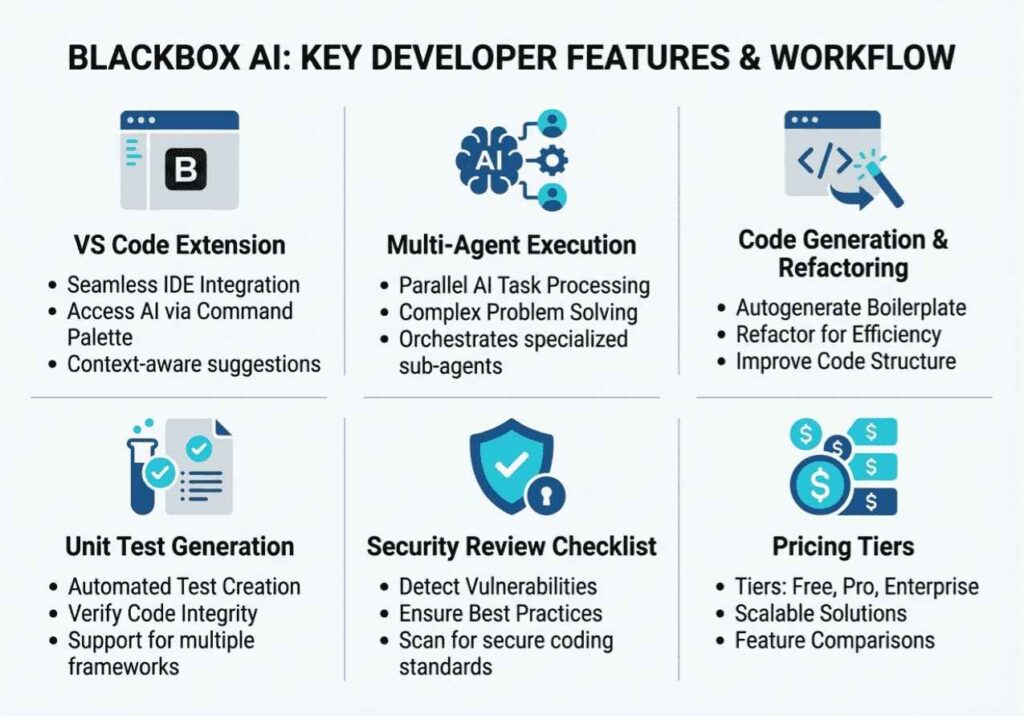
Blackbox AI is an AI-powered developer platform that combines autonomous code generation, multi-model inference, and RAG-based repository context under a single interface. Founded in 2019 by Richard, Robert, and Roger Rizk, it began as a simple intelligent agent for code search. Today, it has grown into a full agentic coding ecosystem that includes a proprietary IDE, a VS Code extension, a CLI agent, iOS and Android mobile apps, and access to over 300 AI models.
What separates Blackbox AI from tools like Tabnine or GitHub Copilot is its Chairman LLM architecture. Rather than routing every request to a single model, Blackbox dispatches tasks in parallel to Claude, OpenAI Codex, Gemini, and its own proprietary models. A supervising Chairman LLM then evaluates each response and returns the highest-quality result. Because of this, the name “Blackbox” now carries a double meaning the internal model selection process is intentionally opaque to the end user.
Furthermore, Blackbox AI integrates a RAG-based repository context layer. When you connect a GitHub repository, it indexes your codebase and retrieves relevant file chunks at inference time. This is Retrieval-Augmented Generation applied to code search and it means the AI understands your specific project, not just generic programming patterns.
How Does Blackbox AI’s Chairman Architecture Actually Work?
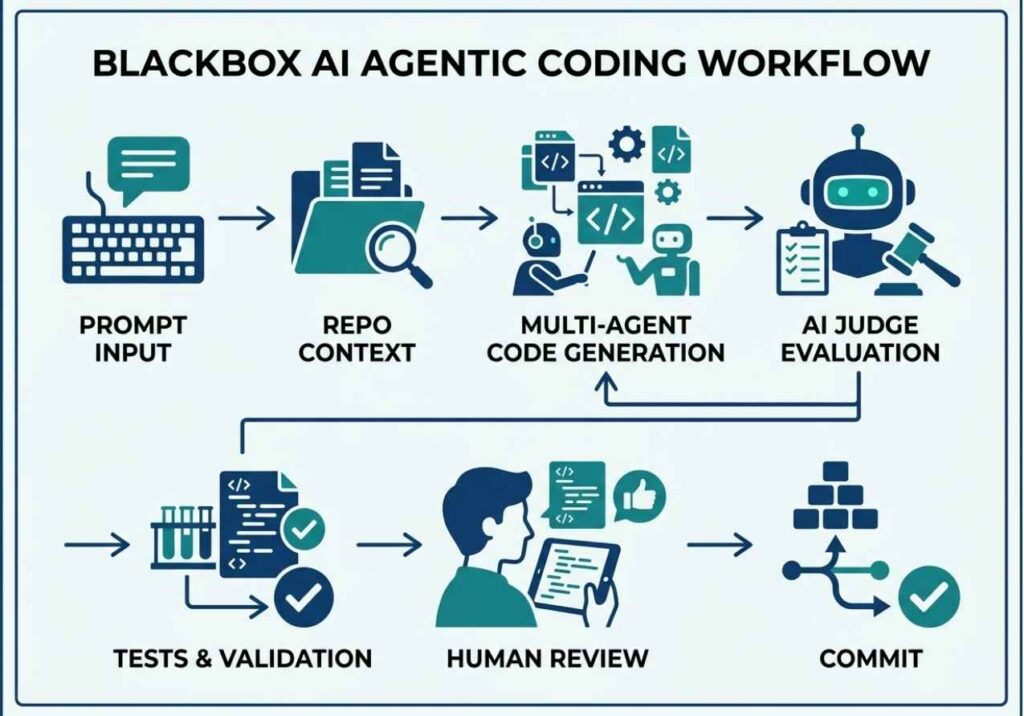
To understand why Blackbox AI behaves differently from other AI coding assistants, it helps to look at the underlying mechanism. The core process follows a pattern familiar to anyone who has built multi-agent systems using LangChain or AutoGen: task decomposition → parallel execution → evaluation → output selection.
Here is how each step works in practice:
- Input parsing : Blackbox analyzes your prompt or code context and identifies intent: generate, debug, refactor, or explain.
- Parallel dispatch : The Chairman LLM routes the same task to multiple sub-models simultaneously, rather than waiting for one model to respond.
- Output evaluation : The Chairman scores each response on correctness, coding style, and context alignment with your codebase.
- Result delivery : The highest-ranked output is returned directly to your IDE, with no extra steps required from you.
For inline autocomplete, Blackbox additionally uses a hybrid local/cloud inference model. A lightweight local model handles low-latency keypress suggestions. The heavier cloud layer handles complex multi-step reasoning. As a result, you get fast completions for simple patterns without sacrificing quality on harder architectural problems.
Architect’s Note: This hybrid approach mirrors what Cursor uses for background indexing. However, Blackbox’s Chairman evaluation pass is an extra layer that single-model tools skip entirely. In practice, this means Blackbox produces better average output quality on routine generation tasks even if it does not always win on complex architectural rewrites.
Moreover, the Repo-Wide Context system handles semantic retrieval across your entire codebase. When you ask “How does the payment retry logic work?” Blackbox does not guess it retrieves the relevant files using its embedding and chunking pipeline, then synthesizes a grounded answer with file references. This eliminates the hallucination risk that plagues general-purpose LLMs when answering questions about unfamiliar codebases.
python
# Example: Blackbox AI API call for code generation
import requests

response = requests.post(
    "https://www.useblackbox.io/chat/completions",
    headers={"Authorization": f"Bearer {API_KEY}"},
    json={
        "messages": [{"role": "user", "content": "Write a FastAPI endpoint for JWT auth with refresh token support"}],
        "model": "blackbox-v4",
        "max_tokens": 512]


(print(response.json()["choices"][0]["message"]["content"])(
Technical Disclaimer: API endpoints, model identifiers, and pricing evolve rapidly. Always verify against Blackbox AI’s official documentation at docs.blackbox.ai before integrating into production pipelines. Code examples reflect the platform as of June 2026.
What Is CyberCoder and What Can It Actually Do?
Launched in mid-2026, CyberCoder is Blackbox AI’s autonomous coding agent and its most important architectural addition to date. Unlike standard code completion, CyberCoder handles multi-step tasks across an entire repository without requiring human confirmation at each step.
Specifically, CyberCoder’s tool-use loop handles:
- Feature implementation from plain English descriptions
- Multi-file codebase refactoring across related modules
- Bug detection and automated patch generation using repository context
- Unit test generation and documentation writing
- Semantic commit message generation from git diff analysis
In terms of architecture, CyberCoder follows the ReAct-style reasoning and acting pattern described by Yao et al. (2023). First, it reasons about the task. Then, it selects a tool such as reading a file, writing code, or running a test. Next, it observes the result. Finally, it iterates until the task is complete or until it requests human clarification. This is not scripted automation it is a genuine reasoning loop.
Honest Benchmark: Independent testing found that CyberCoder handles isolated, scoped tasks reliably. However, on complex multi-file changes, it produces code requiring 30–40% manual review and correction — significantly more rework than Cursor’s Composer agent mode, which typically requires under 10% correction. Think of CyberCoder as a highly productive junior developer: fast, useful for well-defined tasks, but not yet a replacement for senior engineering judgment on complex architectural decisions.
Nevertheless, for teams working on documentation, test coverage, and greenfield feature modules, that productivity gain is still substantial. The key is matching task complexity to the agent’s actual capability level.
How to Use Blackbox AI for Agentic Coding Workflows: Step-by-Step
Setting up a fully agentic coding workflow with Blackbox AI takes under ten minutes. Here is exactly how to do it.
Step 1 : Install the VS Code extension or Blackbox IDE
First, search for “Blackbox AI” in the VS Code marketplace and install the extension. Alternatively, download the standalone Blackbox IDE for a fully integrated environment that includes the Chairman dispatch layer and CyberCoder by default.
Step 2 : Connect your GitHub repository
Next, link your GitHub account via OAuth from the Blackbox dashboard. Blackbox then indexes your repository using its embedding and chunking pipeline for RAG-based context retrieval. Larger repositories (over 100k lines of code) may take a few minutes to index fully.
Step 3 : Enable CyberCoder in the Agents panel
After that, navigate to Agents → CyberCoder in the dashboard. Assign a task in plain English, such as: “Refactor the authentication module to use JWT with refresh token rotation and add unit tests.”
Step 4 : Review the execution plan before it runs
Unlike GitHub Copilot’s agent mode, CyberCoder presents a structured plan of action and explicitly requests your confirmation before modifying files. This is an important safety feature for production repositories always review the plan before approving.
Step 5 : Iterate, review, and commit
Finally, review the generated changes, provide natural language feedback for any corrections, and use Blackbox’s semantic commit message generator to create a structured commit before pushing to your repository.
bash
# CLI agent example — non-interactive mode for CI/CD pipelines
blackbox agent run \
  --task "Generate unit tests for src/auth/*.py using pytest" \
  --repo ./my-project \
  --non-interactive \
  --output tests/
Pro Tip: Use the non-interactive CLI mode inside your CI/CD pipeline to automatically generate missing test coverage on every pull request. This is one of the highest-ROI use cases for Blackbox AI in a team environment and most developers completely overlook it.
Blackbox AI Real-World Use Cases 5 Examples Developers Are Using Today
Understanding how to use Blackbox AI for code generation in practice is more valuable than any feature list. Here are five real-world applications developers are actively running in 2026.
1. Figma-to-React component conversion
Upload a Figma design screenshot or wireframe image, and Blackbox AI’s image-to-code pipeline returns a React component with Tailwind CSS classes. Independent testing found it delivers roughly 80% of the boilerplate correctly, with minor layout and prop adjustments needed. This dramatically reduces the front-end scaffolding time on new features.
2. Legacy codebase onboarding and documentation
Connect a large, undocumented repository and query it in natural language: “Explain how the payment service handles retry logic.” Blackbox retrieves the relevant files via its RAG pipeline and synthesizes an explanation with source code references eliminating hours of manual reading during developer onboarding.
3. Automated test generation in CI/CD pipelines
Through the non-interactive CLI agent mode, Blackbox AI integrates directly into GitHub Actions or Jenkins pipelines. It automatically generates missing unit tests and updates documentation strings on every pull request without requiring developer intervention.
4. Voice-to-code on mobile devices
How can developers use Blackbox AI when away from a desk? Through its ElevenLabs voice integration and dedicated iOS and Android apps, developers dictate tasks hands-free. Blackbox AI is currently the only mainstream AI coding assistant with dedicated mobile apps that provide full access to its autonomous agent layer.
5. Multi-model output benchmarking for domain-specific code
Teams using Blackbox AI’s 300+ model access layer route the same prompt simultaneously to GPT-4o, Claude Sonnet, and Gemini, then compare outputs side by side. This is particularly useful for domain-specific code such as financial calculations or medical data processing where subtle model differences in numerical handling can matter significantly.
Blackbox AI vs GitHub Copilot vs Cursor Which Should You Choose?
Choosing the right AI coding assistant depends entirely on your workflow and team size. Therefore, here is a direct comparison across the features that matter most.
| Feature | Blackbox AI | GitHub Copilot | Cursor | Tabnine |
|---|---|---|---|---|
| Multi-model dispatch | Chairman LLM | Single model | Single model | Single model |
| Autonomous coding agent | CyberCoder | Agent Mode (beta) | Composer | None |
| Image-to-code (Figma / screenshot) | Right | Wrong | Wrong | Wrong |
| RAG-based repository context | Full repo | Limited | Full codebase | Limited |
| On-premise / air-gapped deployment | E2E encrypted desktop | Enterprise only | Wrong | Full air-gap |
| Mobile app with agent access | iOS + Android | Wrong | Wrong | Wrong |
| Non-interactive CI/CD agent mode | Right | Wrong | Wrong | Wrong |
| Free tier available | Right | Right | Right | Right |
| Starting paid price | $10/month | $10/month | $20/month | $9/month |
| HumanEval accuracy | ~64.8% | ~64.3% | Higher (agent tasks) | Lower |
What the table means in plain terms: On standard single-file code generation accuracy, Blackbox AI and GitHub Copilot are nearly identical both score around 64–65% on HumanEval benchmarks. Cursor pulls ahead specifically on complex, multi-file agent tasks. However, Blackbox AI is the only tool in this comparison offering multi-model dispatch, image-to-code, mobile agent access, and a non-interactive CI/CD mode all at Copilot’s price point.
Pro Tip: If your team is exploring agentic coding workflows for the first time and does not want to pay Cursor’s $20/month, Blackbox AI at $10/month is the most feature-complete entry point available.
Common Mistakes Developers Make When Using Blackbox AI
Even experienced developers misuse Blackbox AI in ways that limit its effectiveness. Fortunately, all of these mistakes are easy to avoid once you know what to look for.
Treating CyberCoder as a senior engineer on complex architectural tasks
CyberCoder’s 30–40% rework rate on complex multi-file changes is a real constraint. Therefore, use it confidently on isolated modules, test coverage, and documentation. For complex architectural refactors or security-sensitive changes, route those to Cursor’s Composer or handle them manually with AI assistance.
Skipping the repository indexing step
Without a connected repository, Blackbox’s RAG pipeline cannot retrieve relevant files. As a result, you receive generic suggestions that ignore your actual codebase structure. Always connect your GitHub repository before beginning an agent session this single step dramatically improves output relevance.
Sending vague prompts without output constraints
The Chairman LLM optimizes for quality, but without explicit constraints, “quality” often means verbose and over-engineered code. Instead, add explicit scope: “Write a minimal Python function under 20 lines, no external dependencies, using only the standard library.”
Using AI-generated code in security-critical paths without review
Like all LLM-generated output, Blackbox AI can introduce subtle vulnerabilities in authentication flows, cryptographic implementations, and input sanitization. The Chairman architecture improves average quality compared to single-model tools but it does not replace a dedicated security review pass. Always treat AI-generated code in security-critical paths as untrusted until reviewed.
Not using the mobile agent for background task delegation
Many teams completely overlook the iOS and Android apps. In practice, CyberCoder can run repository-wide tasks in the cloud while you are away from your workstation. The mobile app is the control interface for that cloud agent not merely a chat wrapper.
What Developers Are Saying About Blackbox AI
Across developer communities including Stack Overflow, GitHub Discussions, and Reddit, Blackbox AI earns consistent praise for two specific things: the image-to-code pipeline and the price-to-feature ratio. However, developers are equally candid about its limitations on complex agentic tasks.
The consensus on r/LocalLLaMA positions Blackbox AI as the most accessible entry point for developers exploring agentic coding workflows without committing to Cursor’s $20/month price point. This is especially true for solo developers, freelancers, and early-stage teams.
On the other hand, enterprise developers with strict data governance requirements tend toward Tabnine’s fully air-gapped deployment. Those who need the highest agent accuracy on complex refactoring tasks consistently choose Cursor’s Composer mode. In short, Blackbox AI occupies the middle of the market and it occupies it very well.
FAQ People Also Ask About Blackbox AI
What is Blackbox AI and how does it work?
Blackbox AI is a multi-agent coding platform that simultaneously dispatches coding tasks to multiple large language models including Claude, Gemini, and OpenAI Codex and uses a supervising Chairman LLM to evaluate and return the best output. It supports autonomous code generation, image-to-code conversion, RAG-based repository context, and agentic workflows across VS Code, a proprietary IDE, CLI, and mobile apps. It serves approximately 30 million users as of 2026.
How does Blackbox AI compare to GitHub Copilot?
Blackbox AI and GitHub Copilot score near-parity on standard code generation benchmarks both around 64–65% on HumanEval. However, Blackbox AI offers features that Copilot does not: multi-model Chairman dispatch, the CyberCoder autonomous agent, image-to-code from Figma screenshots, non-interactive CI/CD agent mode, and dedicated mobile apps. Copilot’s advantages are deeper GitHub ecosystem integration and broader IDE support including JetBrains and Neovim.
Is Blackbox AI free to use?
Yes, Blackbox AI offers a free tier that includes basic code search, limited autocomplete, and access to a subset of its model library. The Pro plan starts at $10 per month and unlocks full multi-model Chairman dispatch, CyberCoder agent access, and advanced AI chat. Enterprise plans with custom API access and security controls are available at negotiated pricing.
What is CyberCoder in Blackbox AI, and is it worth using?
CyberCoder is Blackbox AI’s autonomous coding agent, launched in mid-2026. It follows a ReAct-style reasoning and acting loop reasoning about a task, reading and writing files, running checks, and iterating without requiring human confirmation at each step. It is worth using for isolated, well-scoped tasks like test generation, documentation, and feature scaffolding. For complex multi-file architectural changes, plan for a review pass before deploying.
Can Blackbox AI be used for voice-activated coding?
Yes. Through its ElevenLabs voice integration and dedicated iOS and Android mobile apps, Blackbox AI supports hands-free voice-to-code workflows. Developers can dictate tasks to the CyberCoder agent from their phone and have the agent execute them in the cloud against a connected repository. It is currently the only mainstream AI coding assistant with this capability.
Does Blackbox AI work with VS Code and JetBrains?
Yes. Blackbox AI offers a native VS Code extension installable directly from the marketplace. It also supports JetBrains IDEs and provides a standalone Blackbox IDE for developers who prefer a fully integrated environment. Additionally, the web interface and CLI agent work independently of any IDE for pipeline and browser-based workflows.
Conclusion
Blackbox AI’s architecture tells a more interesting story than most reviews give it credit for. The Chairman LLM dispatch model, the CyberCoder autonomous agent, and the RAG-based repository context layer place it firmly in the multi-agent orchestration space not merely in the autocomplete market where most reviewers still categorize it.
Three practical takeaways to keep in mind: First, the Chairman architecture genuinely produces better average code quality on routine tasks compared to single-model tools because it evaluates multiple outputs before returning one. Second, CyberCoder is production-ready for scoped, isolated tasks, but you should budget for a review pass on anything architecturally complex. Third, at $10 per month with image-to-code, mobile agent access, and a non-interactive CI/CD mode, Blackbox AI is currently the most feature-dense entry point into agentic coding workflows for developers who are not yet ready to commit to Cursor’s price point.
If you found this guide useful, explore more hands-on AI agent tutorials, multi-agent orchestration walkthroughs, and RAG pipeline deep-dives at agentiveaiagents.com.
3 Responses