

Most people judge an AI budgeting tool by its chatbot personality or its dashboard colors. That’s the wrong test. In reality, an AI budgeting tool is a small pipeline made of four parts: account aggregation, transaction categorization, cash-flow forecasting, and sometimes a conversational layer on top. Each part can fail independently, and that’s usually why an app feels “off” even when the marketing looks great.
An AI budgeting tool is personal finance software that uses machine learning to automatically categorize spending, forecast cash flow, and answer questions about your money in plain English replacing manual spreadsheet budgeting.
For example, a 2026 comparison from BestMoney found that apps built around one rigid budgeting philosophy, such as strict zero-based budgeting, frustrate users whose habits don’t fit that mold. Because of this, the mismatch is usually an architecture problem, not a design problem. Understanding that architecture is therefore the fastest way to pick a tool that actually sticks.
This guide breaks an AI budgeting tool into its component parts, compares the frameworks behind the category, and walks through how to evaluate any option whether you’re choosing between Cleo and Monarch, or scoping your own budgeting agent.
What Is an AI Budgeting Tool?
An AI budgeting tool is personal finance software that uses machine learning or a large language model (LLM) to automate part of the budgeting process typically categorizing transactions, forecasting cash flow, or answering natural-language questions about your money. It’s grounded in traditional personal financial management principles, but replaces manual entry with automated data pulls and predictive modeling.
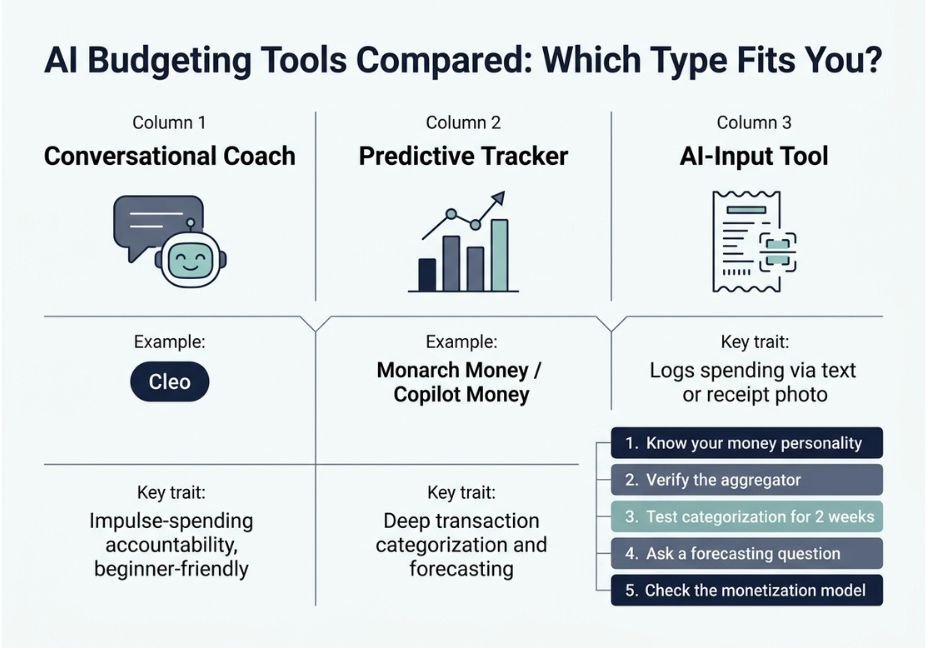
Specifically, the category splits into three shapes: conversational coaches (Cleo), predictive trackers (Copilot, Monarch), and AI-input tools that log spending from text or receipts.
How Does an AI Budgeting Tool Work?
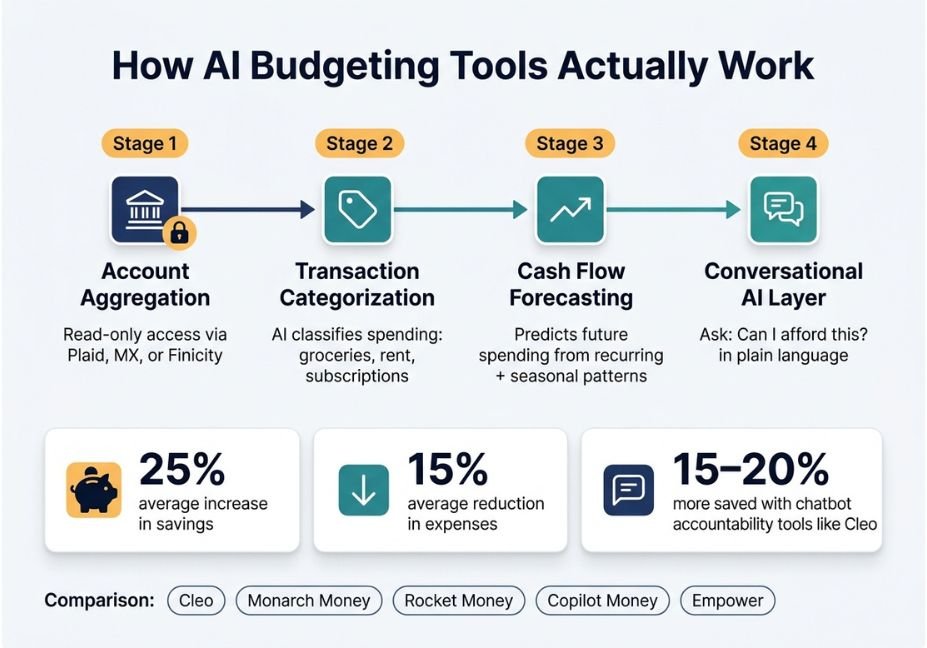
Almost every AI budgeting tool, whether it’s an $8/month consumer app or an enterprise FP&A platform, runs the same four-stage pipeline underneath the branding:
- Account aggregation layer connects to your bank through a regulated open banking API such as Plaid, MX, or Finicity, typically using OAuth 2.0 authentication and read-only access, so the app can see transactions but can’t move money.
- Categorization layer a classification model tags each transaction (groceries, subscriptions, rent) and improves as you correct it over time.
- Forecasting layer a predictive model projects future cash flow using recurring charges, seasonal spending, and irregular annual expenses like insurance premiums.
- Conversational layer optional but increasingly standard: a chat interface, often powered by an LLM and built on natural language processing, that lets you ask “can I afford this?” instead of building a filter.
Technical Note: Read-only aggregation means the AI budgeting tool cannot initiate a transaction on your behalf. Any “automatic savings transfer” is a separate, explicitly authorized payment permission not a side effect of the aggregation link. In regions covered by PSD2 or other open banking regulation, this consent step is legally mandated, not just a design choice.
AI Budgeting Tool Use Cases: 5 Real-World Examples
Because the same four-stage pipeline shows up everywhere, the differences between tools mostly come down to which layer they emphasize:
- Impulse-spend accountability. Cleo’s chatbot confronts users about spending in a blunt tone; some report saving 15–20% more than with a passive tracker.
- Debt payoff sequencing. Several apps recompute payoff order dynamically, based on real monthly cash flow instead of a static spreadsheet formula.
- Couples and joint finances. Monarch and Origin support shared dashboards with separate and joint account visibility for two-income households.
- Subscription cleanup. Rocket Money’s free tier detects recurring charges, although cancellation is usually gated behind a paid plan.
- Business budget cycles. Enterprise tools such as Planful and Pigment apply the same categorization-plus-forecasting pattern to departmental spend, adding anomaly detection for finance teams.
Best AI Budgeting Tools and Frameworks Compared
| Tool | AI Model Type | Best For | Free Tier |
|---|---|---|---|
| Cleo | Conversational chatbot | Impulse-spending accountability | Chatbot + basic tracking |
| Monarch Money | Predictive categorization + assistant | Couples, joint dashboards | Limited trial only |
| Rocket Money | Predictive tracker | Subscription detection | Detection, not cancellation |
| Copilot Money | Predictive categorization | Deep transaction-level detail | No |
| Empower | Predictive + net worth tracking | Investment-heavy users | Net worth + investment tools |
Did You Know? Users of AI-based budget planning tools reportedly increase savings by roughly 25% and cut expenses by around 15%, according to industry survey data. That said, these figures come from vendor-reported outcomes rather than independent research, so treat them as directional.
How to Evaluate an AI Budgeting Tool: Step-by-Step
- Identify your money personality first. A passive tracker won’t help someone who already knows where the money goes but can’t stop spending; on the other hand, a heavy chatbot will annoy someone who just wants a clean dashboard.
- Check the aggregation provider. Confirm the app uses a recognized aggregator like Plaid, MX, or Finicity, rather than storing your raw bank credentials directly.
- Test categorization accuracy for two weeks. Since miscategorized transactions compound into a wrong forecast, this is the single biggest predictor of long-term trust.
- Ask a forecasting question. Try “can I afford X this month?” and check whether the answer cites your actual recurring charges or gives a generic response.
- Read the monetization model. Free tiers commonly monetize through data partnerships or premium upsells, so know which one you’re trading for a free plan.
Common Mistakes and How to Avoid Them
- Treating forecasts as certainty. These tools are good at describing what already happened and increasingly good at forecasting what’s coming, but they’re not a substitute for judgment at the moment that matters like deciding whether to buy something at checkout.
- Ignoring what the AI can’t see. A one-time medical bill, a career change, or a side-income month can all skew a model trained on historical patterns.
- Over-sharing account access. Because connecting more accounts widens your exposure if a provider is breached, only link what the tool actually needs.
- Picking by marketing copy instead of AI depth. “AI” gets attached to apps with wildly different capabilities; some only parse receipts, while others run genuine predictive forecasting.
Pro Tip: Before trusting a debt-payoff or savings recommendation, cross-check it against a plain interest calculation for one month. If the numbers don’t roughly line up, the categorization layer is probably noisier than the polished dashboard suggests.
What Users Are Saying
Independent testers comparing Rocket Money, Monarch, Copilot, YNAB, and Cleo consistently note that no single app is perfect every pick comes with a real catch alongside the upside, whether that’s a shallow budgeting engine, an aggressive upsell, or a chatbot personality that wears thin. As a result, the right choice depends less on any single “best of 2026” ranking, and more on which trade-off you’re willing to live with.
FAQ: People Also Ask
What is an AI budgeting tool?
An AI budgeting tool is personal finance software that uses machine learning to automate categorization, forecasting, and conversational Q&A about your spending, replacing manual spreadsheet budgeting with automated insights.
How do AI budgeting apps access my bank data?
They connect through a regulated aggregation API, such as Plaid or MX, using read-only, user-permissioned access. Consequently, the app can view balances and transactions but cannot initiate transfers unless separately authorized.
Are AI budgeting tools safe to use?
Yes, generally reputable providers use bank-grade encryption and read-only aggregation. However, every added account connection increases your exposure, so check the aggregator behind the app before connecting.
Can an AI budgeting tool actually save you money?
It can, mainly by surfacing spending patterns and subscriptions you’d otherwise miss. Still, the effect depends on you acting on the insight, since the tool describes and forecasts rather than deciding for you.
What’s the difference between an AI budgeting app and a regular budgeting app?
A regular budgeting app requires manual categorization and static, spreadsheet-style planning. In contrast, an AI budgeting tool automates categorization and adjusts forecasts automatically as your spending changes.
Which AI budgeting tool is best for beginners?
Conversational tools like Cleo tend to suit beginners best, because they lower the barrier to engagement you ask a question instead of building a report. Meanwhile, predictive dashboards like Monarch or Copilot suit users who already want transaction-level detail.
Conclusion
An AI budgeting tool is only as good as its weakest layer: aggregation, categorization, forecasting, or conversation. The best-performing apps of 2026 aren’t necessarily the ones with the flashiest chatbot, but rather the ones where all four layers hold up under real, everyday usage. So, match the tool to your money personality, verify the aggregation provider, and test categorization accuracy before trusting any forecast. Bookmark this guide and explore more hands-on AI agent breakdowns at agentiveaiagents.com.



