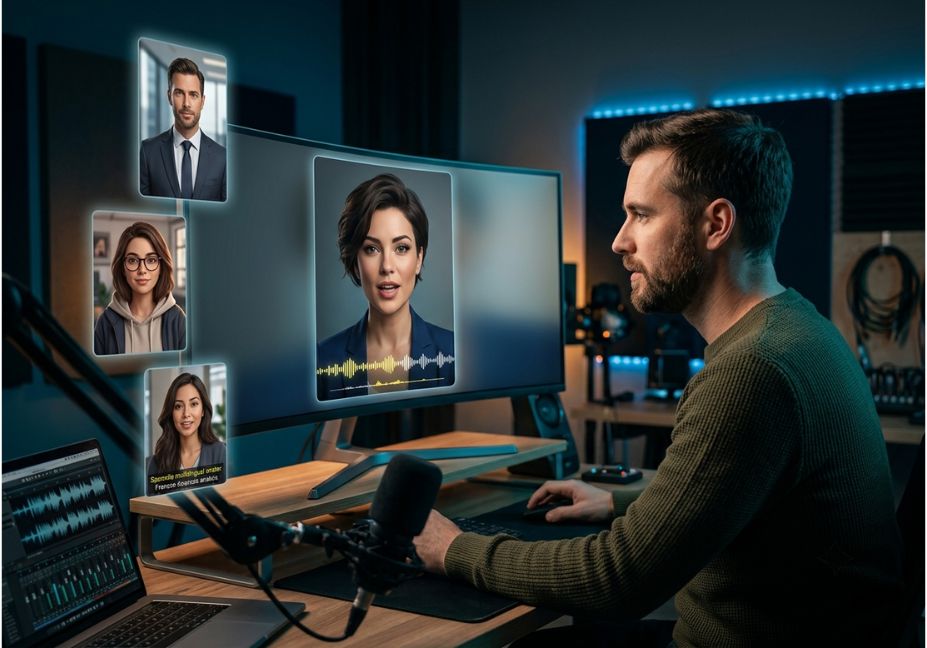
Podcasters lose most of their potential audience the moment a great 45-minute conversation stays locked in audio form. The fix isn’t a camera crew it’s an AI avatar tool that turns a raw MP3 into a talking-head video clip in minutes. However, “AI avatar generator” now covers a crowded field of overlapping products, from full text-to-video platforms to lip-sync-only APIs. As a result, picking the wrong one for turning podcast audio into shareable video wastes a production cycle. This guide compares the tools that actually matter for podcast video snippets how they work, where they fail, and which one fits your workflow.
Industry coverage now frames avatar tools as core infrastructure rather than a novelty. In fact, some platforms report generative AI handling the bulk of supplemental clip production for video podcasts already. Consequently, the way to evaluate a tool has changed: not just on avatar realism, but on how well it slots into an automated podcast-to-video workflow for repurposing long-form audio into short-form clips.
What Is an AI Avatar Tool for Podcast Snippets?
An AI avatar tool for podcast snippets converts audio or a script into a video featuring a talking head avatar whose mouth movements match the speech. This happens either through voice cloning and text-to-speech, or by animating a still image or stock character to lip-sync existing audio. Wikipedia’s entry on synthetic media media generated or manipulated using artificial intelligence is the umbrella category these tools fall under, alongside deepfakes and AI voice cloning.
For podcasters, though, the practical use case is narrower. It’s really about how to turn a podcast into a video using an AI avatar without filming anything: take a 30–90 second highlight, add a face and captions, and export it in a vertical format for social platforms. That’s the job this comparison focuses on.
How Does AI Avatar Video Work for Podcasts?
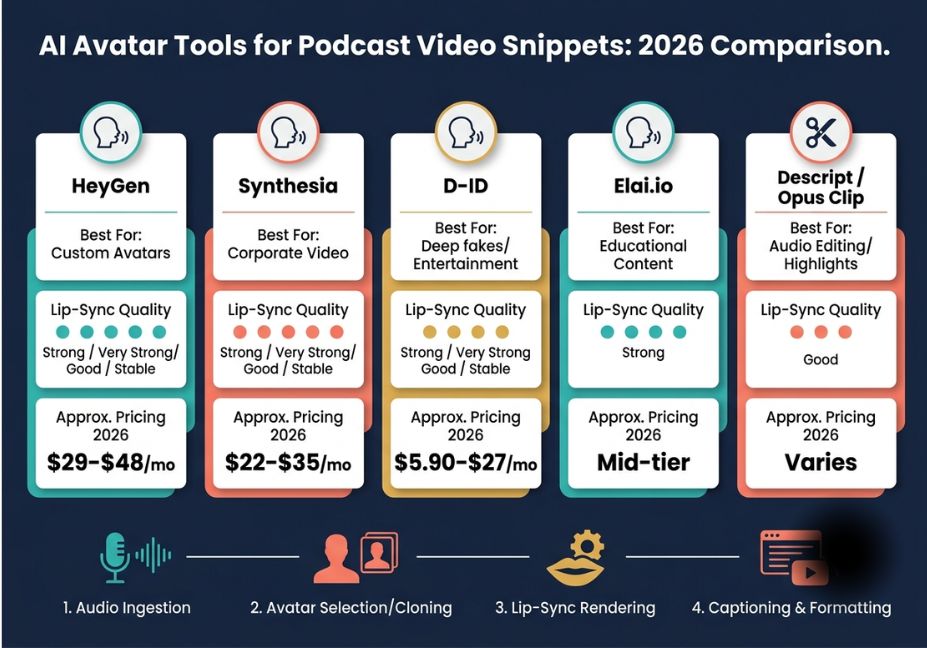
Most tools follow the same underlying mechanism, regardless of branding:
- Audio ingestion the platform transcribes your MP3 or WAV file into text with timestamps.
- Avatar selection or cloning you pick a stock avatar, upload a photo, or train a custom avatar from a short reference clip (some tools need as little as 2–3 minutes of footage to learn lip-sync and gesture patterns).
- Lip-sync rendering the model maps phonemes from your audio to mouth shapes on the avatar, frame by frame.
- Captioning and formatting auto-generated subtitles are overlaid, and the output is cropped to 9:16 or 1:1 for social platforms.
The quality gap between tools shows up almost entirely at step 3. For example, cheaper or older models produce a visible lip-sync lag or flat, robotic mouth movement. Newer ones, on the other hand, handle rapid speech, laughter, and overlapping dialogue more convincingly. Even so, top-tier tools in 2026 still struggle with natural shoulder and breath movement during laughter — a known limitation worth testing before you commit to a subscription.
Best AI Avatar Tools for Podcast Video Snippets — Compared
| Tool | Best For | Lip-Sync Quality | Avatar Library | Approx. Pricing (2026) |
|---|---|---|---|---|
| HeyGen | Fast social clips, multilingual reach | Strong; dedicated “Social Snippet” 9:16 mode | 100+ stock avatars, custom avatar option | ~$29–$48/mo |
| Synthesia | Polished, enterprise-grade presenter videos | Very strong; largest avatar library | 240+ avatars, 160+ languages | ~$18–$29/mo |
| D-ID | Developers building custom pipelines via API | Good; real-time streaming avatars available | Photo-to-avatar, smaller stock set | ~$5.90–$27/mo |
| Elai.io | Structured, script-to-video workflows | Stable, consistent | Moderate stock library | Mid-tier subscription |
| Descript / Opus Clip | Auto-detecting shareable moments from a full episode | N/A (clip selection, not avatar rendering) | Pairs well with an avatar tool above | Subscription tiers vary |
Pro Tip: Don’t evaluate avatar tools in isolation. Descript or Opus Clip for clip selection, paired with HeyGen or D-ID for avatar rendering, is a more realistic production stack than expecting one platform to do both well.
Technical Disclaimer: Pricing, avatar counts, and feature tiers for these platforms change frequently. Figures above reflect publicly reported 2026 tiers as of this writing — always confirm current plans on each vendor’s pricing page before budgeting.
Developers building this into an automated pipeline rather than a manual dashboard workflow can lean on D-ID’s real-time streaming avatar capabilities, which are well suited to conversational AI applications, and are documented alongside comparable avatar API options, letting you script the render step rather than click through a UI for every episode.
Podcast Video Snippet Use Cases 5 Real-World Examples
If you’re wondering how to turn podcast audio into engaging video clips for social media without hiring an editor, these are the five use cases where AI avatar tools pay for themselves fastest:
- Highlight reels turning a single strong quote into a 30-second vertical clip for Instagram Reels or TikTok.
- Episode trailers an avatar host teasing the top three moments before an episode drops.
- Multilingual reach re-rendering the same clip with translated audio and re-synced lips for a Spanish- or Japanese-speaking audience.
- Guest-stand-in clips animating a static guest photo for shows where the guest never appeared on camera.
- Newsletter and LinkedIn snippets pairing a short avatar clip with a quoted excerpt for text-first platforms.
Did You Know? Some platforms report that early adopters of AI-generated vertical clips saw notably higher share rates compared to plain cross-posted video — one reason podcast teams are treating clip generation as a standing part of their release checklist rather than an afterthought.
Step-by-Step: Turning a Podcast Episode Into Avatar Snippets
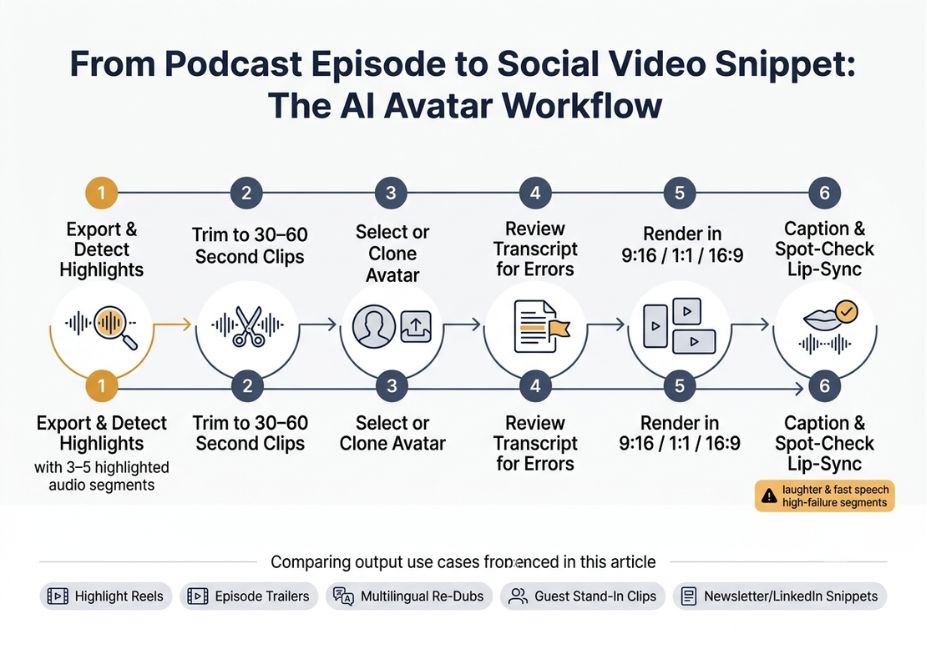
- Export your episode audio and run it through a clip-detection tool (Opus Clip or Descript) to flag 3–5 high-engagement moments.
- Pull the raw audio for each flagged moment keep clips between 30–60 seconds for best retention.
- Upload the audio to your chosen avatar tool (HeyGen, Synthesia, or D-ID) and select or clone an avatar.
- Review the auto-transcribed script for misheard technical terms or proper nouns before rendering this is the single most common source of avatar mispronunciation.
- Render in 9:16 for TikTok/Reels/Shorts, and export a 1:1 or 16:9 version for LinkedIn or YouTube.
- Auto-caption and spot-check lip-sync on any line containing laughter, cross-talk, or fast speech these are the highest-failure segments.
python
# Example: batch-submitting podcast clips to an avatar API
import requests

clips = ["clip1.mp3", "clip2.mp3", "clip3.mp3"]
for clip in clips:
    response = requests.post(
        "https://api.example-avatar-tool.com/v1/render",
        headers={"Authorization": "Bearer YOUR_API_KEY"},
        json={"audio_file": clip, "avatar_id": "avatar_042", "aspect_ratio": "9:16"}

    print(clip, response.json().get("status"))
Common Mistakes and How to Avoid Them
- Skipping the transcript review step. Auto-transcription regularly mangles technical jargon and brand names one uncorrected word derails lip-sync accuracy for that whole sentence.
- Choosing an avatar tool before a clip-selection tool. Rendering full episodes instead of pre-selected highlights wastes render credits and produces low-engagement clips.
- Ignoring platform disclosure rules. FTC guidance in the US and the EU AI Act increasingly expect disclosure when a presenter is AI-generated build a disclosure caption into your template rather than adding it after the fact.
- Over-indexing on avatar realism alone. A slightly less photorealistic avatar with fast turnaround and reliable batch rendering often beats a higher-fidelity tool that can’t scale to weekly output.
Broader industry coverage of AI video tools for podcasters has noted the same trust threshold repeatedly: viewers don’t need to be fooled into thinking an avatar is human they just need the clip to feel professional enough not to trigger an “AI slop” reaction on a quick scroll.
What Podcasters and Developers Are Saying
Community feedback tends to be more candid than vendor marketing pages. Threads in developer and creator discussion communities on avatar tool performance consistently flag the same two friction points: inconsistent lip-sync during laughter or overlapping speech, and the gap between advertised “minutes included” and what a real batch-production workflow actually consumes in a month. Reading a few of these threads before committing to an annual plan is worth the twenty minutes it takes.
FAQ People Also Ask
There’s no single best tool HeyGen tends to win for fast, social-first vertical clips with strong lip-sync, Synthesia wins for polished, enterprise-style presenter videos with the largest avatar library, and D-ID wins for developers who need API-driven, real-time avatar rendering at a lower cost.
The platform transcribes the audio into phonemes with timestamps, then maps those phonemes to corresponding mouth shapes on the avatar frame-by-frame this lip-sync accuracy is the main quality differentiator between competing tools.
Yes. Most avatar tools only need audio or a script plus a single reference photo or a stock avatar no original video footage is required, which is why these tools are popular for audio-only podcasts.
Generally yes, as long as the content provides real value and follows each platform’s AI-disclosure requirements; platforms don’t penalize AI-generated content outright, but undisclosed synthetic media can violate platform policy in some regions.
Pricing ranges widely from roughly $6/month for developer-focused, API-first tools like D-ID up to $50+/month for full-featured platforms like HeyGen or Synthesia with larger avatar libraries and multilingual dubbing.
Conclusion
The right AI avatar tool for podcast video snippets depends on what you’re optimizing for: HeyGen and its Social Snippet mode suit fast, vertical, social-first output; Synthesia suits polished, enterprise-grade presenter video; and D-ID suits developers wiring avatar rendering into an automated, API-driven pipeline. None of them replace a solid clip-selection step pair one with Descript or Opus Clip for a workflow that actually scales past a handful of episodes.
Bookmark this guide and explore more hands-on AI workflow tutorials at agentiveaiagents.com.