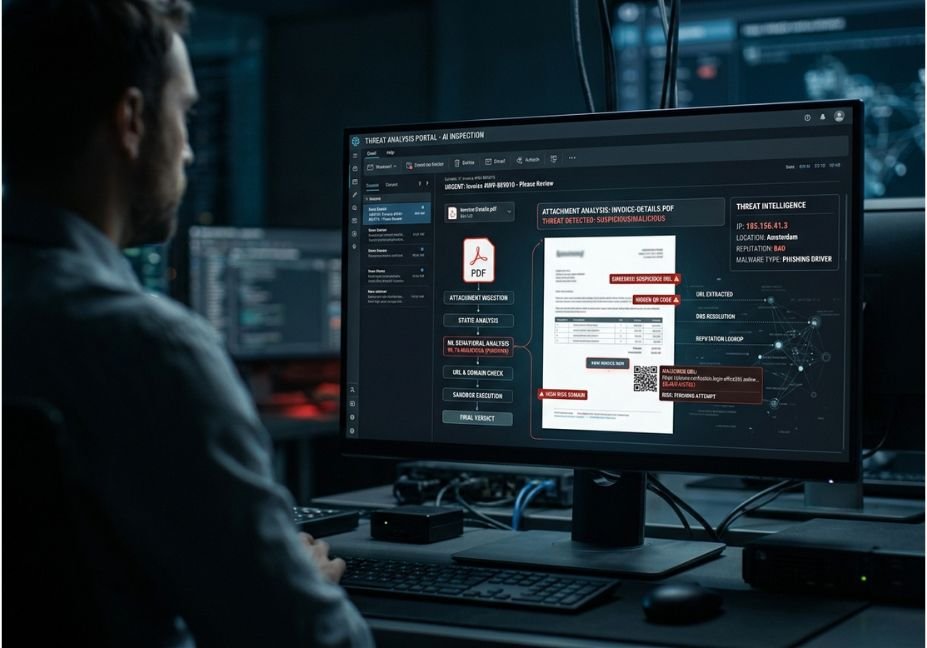
An attachment identified as invoice.pdf, payment.xlsx, or document.html may seem completely ordinary while being a Trojan horse for a phishing scam. This presents challenges to modern email security systems because the filename of the attachment alone fails to provide enough of a judgment call.
AI solutions for phishing detection in attachments overcome this problem through the application of machine learning, natural-language processing, file inspection, URL scraping, reputation signals, and in some cases sandboxing.
Meanwhile, the attack surface continues to diversify. The 2026 CIC-Trap4Phish research database contains examples of phishing artifacts on Word, Excel, PDF, HTML, and QR codes, which proves that a detector based on one file format is not enough.
Overall, for software developers and security teams the key question is not just “What AI tool should I use?” but also rather “What layers of detection should work together, what signals should be analyzed, and where can the models fail?”
What Are AI Tools for Identifying Phishing in Attachments?
AI phishing detection systems are systems for security that evaluate the incorporated information of an email in order to determine if the email has characteristics of a phishing attack or some malware.
Compared to the conventional signature-only scan, technologically advanced systems aggregate numerous signals.
– Email context includes sender, domain, results of authentication, language, and structure of the message.
– File metadata includes an extension, MIME type, size, entropy, and macros.
– Content consists of texts, forms, suspicious directions, and language for gathering credentials.
– Embedded URLs have domains, redirections, reputation, and behavior after arrival.
As an example, Microsoft Defender for Office 365 means usage of numerous detection technologies such as machine learning filters, file reputation technology, and usage of Safe Attachments.
The main principle of the architecture is the fusion of signals: one suspicious feature can be innocent, while several signals can give high-risk reading.
How Does AI Detect Phishing Attachments?
Detection pipelines that are used in production operate in multiple phases.
1. Normalize the email
The system is capable of gathering:
information of the sender and receiver
authentication outputs
subject and body of the message
names and types of any attachments
URLs and domains
information of the message stratum
This provides the model with contextual information instead of processing the document as a stand-alone entity.
2. Analyze the attachment statically
Static analysis means that the file is assessed without it being executed.
Some of the features that can be assessed include:
file type vs. declared extension
scripts included in the file
macros
questionable metadata
nesting of archives
entropy
embedded URLs
PDF files
HTML and JavaScript
links between documents
The work CIC-Trap4Phish examines static features free from the process of execution over different document types.
3. Perform behavioral analysis if needed
Static analysis does not guarantee that all the hidden or new threats can be detected.
In such cases, suspicious attachments can be started in a separate sandbox. Microsoft describes Safe Attachments as a virtual platform for scanning files that can be executed before they can be delivered
4. Calculate risk score
A classifier or detection engine combines the signals into a verdict such as:
benign → suspicious → malicious
A useful system should also preserve why the verdict was generated.
Architect’s Note: Don’t make the LLM the only security decision-maker. Use deterministic scanners, reputation data, ML models, and sandbox telemetry as separate signals, then use an LLM for contextual reasoning or analyst assistance.

What Signals Should AI Tools Analyze?
The strongest systems do not rely on one feature.
| Signal | What it detects | Typical technique |
|---|---|---|
| Sender reputation | Suspicious origin | Reputation/ML |
| File type | Disguised or risky files | Static analysis |
| Macros/scripts | Potential execution | Heuristics |
| Embedded URLs | Credential phishing | URL analysis |
| Document structure | Abnormal objects | ML/XAI |
| File entropy | Obfuscation/compression | Statistical analysis |
| Email language | Social engineering | NLP/LLM |
| Runtime behavior | Malicious actions | Sandbox |
| Domain similarity | Impersonation | NLP/string analysis |
| Historical fingerprints | Known threats | Hash/reputation |
ClamAV illustrates why traditional scanning remains useful alongside AI: its mail-scanning configuration can parse attachments and supports analysis of formats such as PDFs, Office documents, HTML, archives, and executables.
Why context matters
Consider two identical PDF files.
- Email A comes from a known supplier with normal authentication.
- Email B comes from a newly registered look-alike domain and asks the recipient to urgently open the PDF and submit credentials.
The file itself may look identical. The email context changes the risk.
7 Important AI-Powered Detection Methods
1 Machine Learning Classification
Supervised learning algorithms can now recognize the indicators and characteristics linked with harmful attachments.
Typical models include:
Random Forest
XGBoost
Neural Networks
Transformers
Previously collected data has shown how lightweight techniques can be employed in a variety of file formats in researching for data that can help recognize different file formats.
Remember to take into consideration other metrics: precision, recall, F1, and false positives, instead of just accuracy. In security operations, a model that misses a category of crimes may still prove to be more dangerous than one with lower accuracy.
2 NLP and LLMs in Analysis of Emails
Phishing is also a language issue.
NLP can help in:
urgency
claims of authority
asking for credentials
financial pressure
other unusual phrases
imitation patterns
discrepancies between sender and content
New studies focus on finding successful approaches, such as programming machines to analyze file context.
3. Attachment Sandboxing
Sandboxing has a different approach in that it raises the question:
“What happens when this file is opened?”
Instead of executing an unknown attachment on the user’s end system, the security mechanism analyzes the file in isolation.
Usually, the telemetry may involve:
child processes
script execution
file creation
registry changes
network request
DNS resolution
suspected download
Did you know? Microsoft Defender’s detection layer expressly includes file detonation and file-detonation reputation as separate indicators.
4. Embedded URL and QR-Code Analysis
A document can be harmful even without traditional malware.
For example, a PDF may contain:
PDF → QR-code → URL → redirect → credential page
That’s why document detection should extract and analyze URLs instead of stopping at the document itself.
CIC-Trap4Phish specifically includes QR-code phishing and combines image-based detection and URL decoding analysis.
5. Explainable AI
Security experts need much more information than:
Risk=0.97
They need:
Risk = 0.97 because the document has a rare macro, a newly registered domain, and content for stealing credentials.
Methods such as SHAP and LIME help understand what factors affected the decision made by the model. The latest research by CIC-Trap4Phish studies this issue of explanation for attachment
6. Fame and Threat Intelligence
Threat intelligence provides historical context.
A detection engine is able to recognize if:
File hash is familiar to the engine
Sender domain has bad fame
URL has seen previous attacks
Attachment looks similar to a known campaign
This layer is of great use when it comes to high confidence detection, while it does not detect every zero-day threat.
7. Behavioral Correlation
The most advanced system can correlate many events:
Email delivered → Attachment saved → Document opened → Process initiated → Network connection
MITRE ATT&CK has described this correlation method as spear phishing attachment detection where delivering a suspicious email is linked to file being produced and unusual process being initiated.
Best Tools and Approaches for Attachment Phishing Detection
There is no universal “best AI phishing scanner.” The appropriate architecture depends on whether you’re protecting an individual mailbox, an enterprise environment, or building your own detection pipeline.
| Approach | AI depth | Sandbox | Best for | Main tradeoff |
| Microsoft Defender Safe Attachments | High | Yes | Microsoft 365 environments | Platform-specific |
| ClamAV + custom ML | Customizable | Limited by itself | Developer-built pipelines | More engineering |
| ML classifier | High | No | Research/prototyping | Dataset dependence |
| LLM + security pipeline | High | No | Analyst assistance | Hallucination risk |
| ML + sandbox + threat intel | Very high | Yes | Enterprise SOC | Higher cost/complexity |
For Microsoft 365 environments, Defender provides a particularly integrated approach because attachment detonation, machine-learning filtering, reputation, and anti-phishing controls can operate together.
For developers, an open-source scanner such as ClamAV can serve as a first-pass file-analysis layer before a custom ML classifier or sandbox.
Step-by-Step: Build a Safer AI Attachment Detection Pipeline
A functioning architecture does not need creating a huge model from the ground up.
Step 1: Read safe metadata
Start with metadata and avoid running the attachment.
from pathlib import Path
import hashlib
def attachment_characteristics(path):
data = Path(path).read_bytes()
return
“file_name”: Path(path).name,
“file_size”: len(data),
“file_hash”: hashlib.sha256(data).hexdigest(),
“file_type”: Path(path).suffix.lower(),
characteristics = attachment_characteristics(“attachment.pdf”)
print(characteristics)
Step 2: Include deterministic scanning
Feed the file to an antivirus or a malware analysis engine.
Attachment
↓
File type verification
↓
AV/static scanner
↓
Embedded URL detection
↓
Machine learning risk assessment
↓
Sandbox if risky
↓
Final decision
Step 3: Add ML scoring
Plug the safe static characteristics into a classifier.
risk = model.predict_proba(feature_vector)[0][1]
if risk >= 0.90:
decision = “high-risk”
elif risk >= 0.60:
decision = “suspicious”
else:
decision = “low-risk”
These figures are just an example. They should be adjusted according to your own validation dataset before using in production.
Step 4: Bring in contextual rationale
Once deterministic as well as ML signals are available, only then will an LLM employ a wider context.
One viable structured input can be:
“sender_reputation” : “low”,
“authentication” : “failed”,
“attachment_type” : “pdf”,
“embedded_urls” : 2,
“domain_age”: “new”,
“ml_risk” : 0.91,
“sandbox_verdict” : “suspicious”
The LLM can summarize proof material without being held for taking actions or opening attachments.
Important: Treat untrustworthy text as data, not instructions. A document can be a source of prompt-injection content used to manipulate an LLM while it is exploring this document.
Step 5: Keep a track of the decision
The following data is required to be stored:
file hash
model version
values of features
decision
justification
sandbox result
timestamp
This makes an audit trail.

Challenges and How to Prevent Them
Mistake 1: Believing file types
invoice.pdf.exe is an evident illustration, but attackers can use other methods such as mismatches between MIME types, multi-layered archives, or odd formats.
Solution: Check the file type and how this data is packed inside.
Mistake 2: Applications of an LLM solely
LLMs are good at effective language processing but not adequate malware detectors.
Solution: Make sure to combine LLM reasoning with static analysis, reputation technology, ML, and sandboxing.
Mistake 3: Working solely with accuracy
A model may demonstrate good accuracy but generate false negatives.
Solution: Watch for
precision
recall
F1
the false positives
Mistake 4: Ignoring hidden URLs
A tidy PDF file may definitely still have a phishing site.
Right action: Extract links and QR codes first before the final risk classification.
Mistake 5: Using old data for analysis
Criminals always modify filenames, domain names, texts, document formats.
Right action: Conduct time-based validation and regularly refresh threat samples.
Mistake 6: Running suspicious files on analyst PCs
This leads to unwanted exposure during the investigation.
Right action: Opt for an isolated analysis environment with strict containment measures.
FAQ — Additional Questions
In what way, the AI tools identify phishing attachments?
AI tools manage phishing detection through the use of file structural information, metadata, context in the email, URL signs, reputation, and the machine learning algorithm. More sophisticated systems follow the actions of attachments and the identity of the sender rather than relying on a single defining factor.
Can AI detect harmful PDFs?
Yes, AI and traditional antivirus programs analyze the PDF layout, objects, and behavior together with examining the PDF URL. Nonetheless, in cases when the PDF contains links to phishing and not a virus, it is necessary to analyze the URL and its content rather than just scanning the file.
What makes antivirus different from AI phishing detection?
Traditionally, antivirus programs heavily rely on signatures, heuristics, and other well-known malware characteristics, while AI phishing detection learns statistical and contextual patterns from data. The majority of modern enterprises rely on using both methods.
Is it possible for AI to identify zero-day phishing attachments?
Artificial intelligence is beneficial in the identification of new threats as it finds suspicious patterns rather than just finding a certain signature. However, zero-day detection is still not guaranteed and criminals can still bypass the models used, thus the need for sandboxing and multi-layered defense.
What is the efficacy of LLMs in phishing detections?
While LLMs could be usable for language, social engineering context, and analyst reports, they should not be treated as stand-alone malware detectors as their outputs can be easily manipulated by untrustworthy document contents. The security pipelines must separate the LLM reasoning from execution and utilize the results in combination with deterministic security measures.
What is a good method of evaluating a phishing attachment detector?
Evaluate the efficiency of the detector by determining precision, recall, F1, false negatives and positives rate as well as latency of the tool and performance in detecting unseen attacks. It is crucial to test the tool on different types of files because different phishing techniques are used with PDFs, Office documents, HTML files, archive files, QR codes, etc.
Conclusion
When it comes to AI-based tools used for identifying phishing attacks that are present in files or contracts attached to emails, there is no reliance on one specific “magical” model, rather many models are applied here in tandem – like the use of static file analysis, NLP of the email context, URLs and QR codes scoring, threat intelligence, and many machine learning methods, sandboxing included.
The three lessons we can distinguish from the results are:
The context is more important than just the name of the file. It’s not only the sender that needs to be checked, the document name, URL and the behavior have also to be taken into account when making decisions.
Layered detection is better than single-model detection. Tools designed for AI must use signatures, reputation and sandboxing.
You need to consider different failure modes. The importance of false negatives, unseen formats, obfuscation, latency and explainability is no less than just raw accuracy.
For automation engineers, the next step is to produce a reliable detection pipeline from these signals and some other things and not totally rely on the LLM.