
Most teams evaluating AI image analysis tools start the same way: upload a photo to a demo page, eyeball the caption, and move on. That’s a fine sanity check. However, it tells you almost nothing about how the tool behaves at scale, under noisy inputs, ambiguous scenes, or text embedded in a low-quality scan. For instance, a model that nails a stock photo of a dog can still hallucinate a barcode number that isn’t there.
So what actually matters? The real question for developers isn’t “can it describe a picture” it’s how the underlying vision-language model turns pixels into something an agent or search index can act on: an embedding, a structured label, or retrievable text. This distinction is what separates a toy demo from a production-ready image-to-text pipeline, and it’s exactly what this guide covers.
Below, you’ll find how these tools work under the hood, a side-by-side comparison of the best AI image analysis tools for developers, and a working code example that pairs a vision encoder with a vector store. If you’re new to the retrieval side of this, our guide to building a RAG pipeline covers the text-only version of the same pattern.
What Is an AI Image Analysis Tool?
An AI image analysis tool is software that uses a trained model to pull structured meaning out of an image objects, text, attributes, captions, or a numerical embedding instead of simply displaying the file. In short, it turns pixels into data a machine can query.
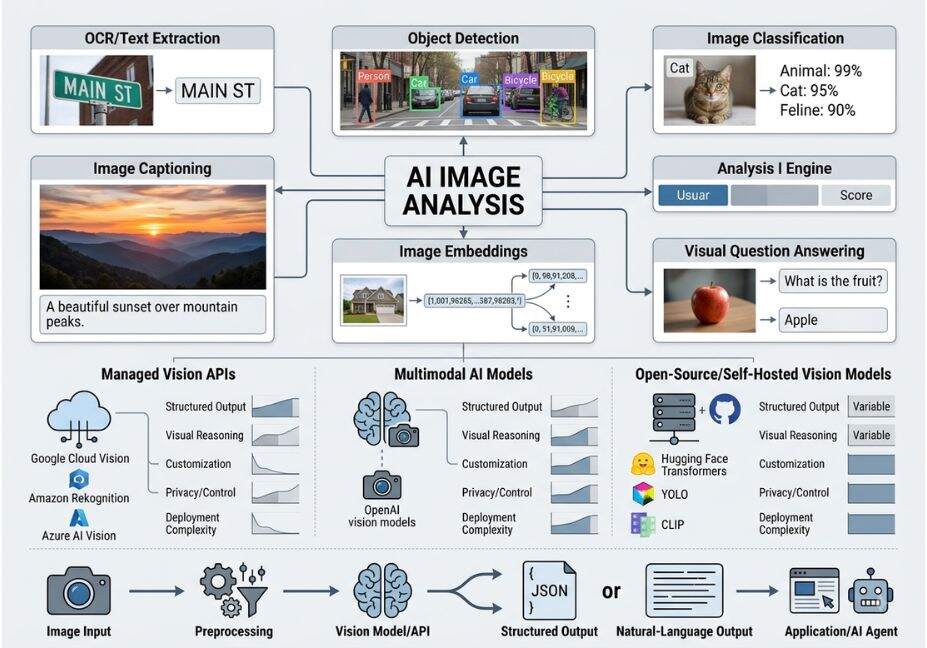
Most modern tools are built on a vision-language model (VLM), which jointly encodes images and text into a shared representation space so the two modalities become directly comparable. Because of this shared space, a search engine can compare a text query like “red sneakers” against an image embedding and get a meaningful similarity score.
Broadly, two architectural families dominate this space. Contrastive encoders, such as CLIP, produce embeddings for similarity search and zero-shot classification. Generative multimodal LLMs, on the other hand, accept an image as input and produce free-text answers, captions, or tool calls. Knowing which family a given AI image recognition tool belongs to tells you, immediately, what it’s actually good at.
How Does AI Image Analysis Actually Work?
Under the hood, most image analysis pipelines follow the same three-stage pattern. First, a vision encoder converts image patches into tokens. Next, a projection layer aligns those tokens with the language model’s embedding space. Finally, a decoder or classifier head produces the output.
- Contrastive pretraining models like CLIP learn this alignment by pulling matching image-text pairs together and pushing mismatched pairs apart a technique first detailed in the original contrastive image-text pretraining research published by OpenAI. Because the training signal comes from millions of naturally occurring image-caption pairs, CLIP-style models generalize well to categories they’ve never explicitly seen.
- Encoder-decoder models like BLIP-2, developed by Salesforce Research, add a lightweight “bridge” module (a Q-Former) between a frozen vision encoder and a frozen LLM. As a result, BLIP-2-style architectures are considerably cheaper to fine-tune than training a multimodal model from scratch.
- Native multimodal LLMs including OpenAI’s GPT-4V-class models, Anthropic’s Claude, and Google DeepMind’s Gemini skip the separate bridge entirely and treat image patches as just another token type inside the same transformer. Consequently, they can reason about an image and follow multi-step instructions in a single pass, which is why agent frameworks increasingly default to them.
Did You Know? CLIP-style encoders, and similar models released on the Hugging Face Hub, typically compress an image into a 256–768 dimensional vector small enough to index millions of images in a vector database and query them in single-digit milliseconds.
6 Real-World Use Cases for AI Image Analysis Tools
Because these architectures behave so differently, the right use case often dictates the right tool:
- Content moderation flagging NSFW, violent, or policy-violating images before they publish.
- Accessibility auto-generating alt text for images at scale, which also happens to feed the “hidden semantic relevance” search engines look for.
- Document intelligence OCR-heavy pipelines that extract structured fields from invoices, IDs, or forms.
- Visual product search letting shoppers search a catalog by uploading a photo instead of typing keywords.
- Research integrity detecting duplicated or manipulated figures in scientific publications, an application pioneered by tools like Imagetwin.
- Agentic workflows an autonomous agent that screenshots a UI, analyzes it, and decides its next tool call.
Pro Tip: For agentic workflows specifically, avoid asking the model to “describe the image.” Instead, ask a scoped question for example, “does this screenshot show an error dialog, yes or no, and what’s the button text?” Narrow prompts like this measurably cut hallucination rates compared to open-ended captioning.
Best AI Image Analysis Tools for Developers, Compared
So, which tool should you actually reach for? It depends on whether you need similarity search (embeddings) or reasoning over an image (natural-language answers). The table below separates the two so you’re not comparing apples to oranges.
| Tool | Type | Best for | Notes |
|---|---|---|---|
| CLIP / OpenCLIP | Contrastive encoder | Semantic image search, zero-shot tagging | Open weights, runs locally see the open-source CLIP repository |
| BLIP-2 | Encoder-decoder | Captioning, VQA on a budget | Cheaper to fine-tune than full multimodal LLMs |
| OpenAI Vision (GPT-4V-class) | Multimodal LLM | Complex reasoning, document QA | See OpenAI’s vision API documentation |
| Claude vision | Multimodal LLM | Long-document + image analysis, agentic tool use | See Claude’s image-understanding docs |
| Gemini (Google DeepMind) | Multimodal LLM | Native Google Workspace and video-frame analysis | Strong for very long context, multi-image batches |
| Google Cloud Vision | Managed CV API | OCR, label detection, moderation at scale | Best for high-volume, low-latency batch jobs |
| Meta AI’s SAM (Segment Anything) | Segmentation model | Pixel-level object masking | Useful upstream of a captioning or embedding step |
Technical Disclaimer: Framework versions evolve rapidly. The API shapes and pricing referenced here reflect vision APIs as of mid-2026 always check the official docs before shipping to production.
Step-by-Step: How to Build an AI Image Analysis Pipeline with Vector Search
Once you understand the two families above, the next step is combining them. A common pattern our readers ask about is pairing an embedding-based encoder for search with a multimodal LLM for reasoning. Here’s a minimal version using a CLIP-style encoder plus a vector store — the same building blocks used in our LangChain agent tutorial, just applied to images instead of text.
python
from PIL import Image
import numpy as np

# 1. Encode the image into a vector using a CLIP-style model
image = Image.open("product.jpg")
embedding = clip_model.encode_image(image)  # returns a fixed-length vector

# 2. Store the embedding with metadata in a vector store (e.g. Pinecone)
vector_store.upsert(
    id="product-001",
    vector=embedding.tolist(),
    metadata={"sku": "PRD-001", "category": "footwear"}
)

# 3. At query time, encode a search image and retrieve nearest neighbors
query_embedding = clip_model.encode_image(Image.open("query.jpg"))
matches = vector_store.query(vector=query_embedding.tolist(), top_k=5)

# 4. Hand the top match to a multimodal LLM for a final reasoning pass
answer = vision_llm.analyze(image=matches[0]["image_url"], question="Is this in stock?")
Architect’s Note: Keep the encoder used for indexing and querying identical. Otherwise, mixing CLIP versions between ingestion and search will silently degrade recall, because the two embedding spaces aren’t guaranteed to align.
Common Mistakes and How to Avoid Them
Even experienced teams run into the same handful of problems when they first ship an AI-powered image analysis tool:
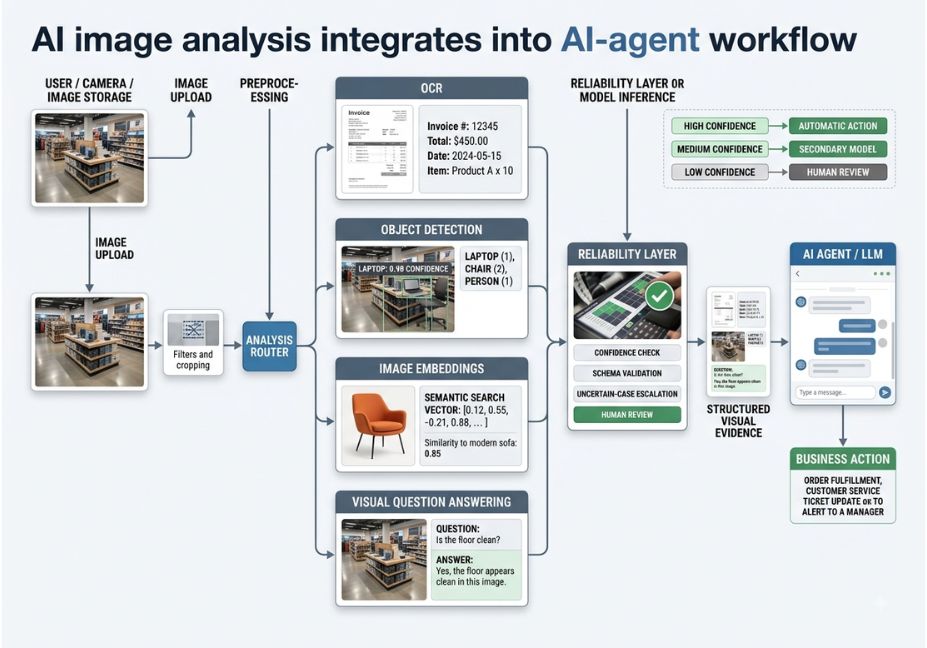
- Treating captions as ground truth. Multimodal LLMs hallucinate text and counts inside images, just as they hallucinate facts in plain text. Therefore, always add a confidence check or a second-pass verification for high-stakes outputs.
- Skipping image preprocessing. Resolution, aspect ratio, and compression artifacts materially affect OCR accuracy, so normalize inputs before they hit the model.
- Using one model for every task. A contrastive encoder is both cheaper and faster for similarity search than routing every query through a full multimodal LLM save the LLM call for when you actually need reasoning.
- Ignoring the context-window cost of images. Image tokens count against the same context window as text. As a result, batching or downsampling large images before sending them reduces both cost and latency.
What Developers Are Saying
According to developers comparing local vision models in ongoing community discussions, open-weight encoders like CLIP and BLIP-2 remain the pragmatic choice for high-volume, cost-sensitive search use cases. Meanwhile, hosted multimodal LLMs win when the task genuinely requires reasoning about what’s in the frame rather than just matching it to similar images. In other words, the “best” AI image analysis tool depends entirely on whether you’re searching or reasoning.
FAQ People Also Ask
What is an AI image analysis tool?
An AI image analysis tool uses a trained vision or vision-language model to extract structured information labels, text, captions, or embeddings from an image, instead of just rendering the file for a human to look at.
How do AI agents analyze images?
An agent calls an image-analysis function as a tool step inside its reasoning loop, passing the image plus a scoped question, then feeds the structured result back into its next decision.
What’s the difference between an AI image analyzer and an AI image generator?
An image analyzer takes an image in and produces text, labels, or embeddings out. An image generator does the reverse it takes a text prompt and produces a new image. They’re inverse tasks built on related but distinct architectures.
Can AI image analysis tools read text inside a photo?
Yes. This is called optical character recognition (OCR), and most modern multimodal LLMs handle it natively, though dedicated OCR pipelines are still more accurate on dense documents and low-quality scans.
Are AI image analysis tools accurate?
Accuracy varies by task. Object detection and captioning on clear photos are generally reliable, but counting, fine-grained text extraction, and edge-case reasoning still produce measurable hallucination rates.
What’s the best free AI tool to analyze a picture?
For quick, no-code analysis, free web tools built on GPT-4V-class or Gemini models work well. For a repeatable developer pipeline, an open-weight option like CLIP or OpenCLIP is the better free starting point, since it runs locally with no API cost.
Conclusion
Choosing among today’s AI image analysis tools ultimately comes down to matching the architecture to the task. Use contrastive encoders like CLIP for fast, cheap semantic search. Use multimodal LLMs GPT-4V-class models, Claude, or Gemini when the job requires genuine reasoning about what’s happening in an image. Combine the two, and you get a pipeline that’s both fast and accurate: embeddings for retrieval, an LLM for the final judgment call. Above all, treat every caption as a hypothesis to verify, not a fact to trust blindly.
Bookmark this guide and explore more hands-on AI agent tutorials at agentiveaiagents.com