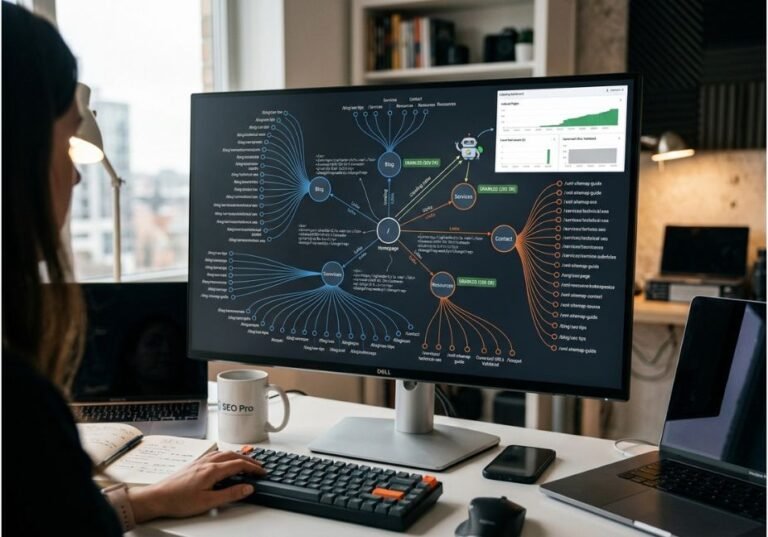
Most teams find out they’re invisible in Google AI Mode the hard way a prospect mentions a competitor by name, and nobody on the marketing team can explain why. That’s the problem AI Mode checking tools exist to solve: they tell you whether, where, and how often your brand shows up inside Google’s conversational search answers, not just its traditional blue links.
This matters because AI Mode doesn’t rank pages the way classic Search does. Instead, it uses a technique Google calls query fan-out, breaking one question into several sub-queries, running them in parallel, and synthesizing a single answer from whatever it retrieves. As a result, a page that ranked #1 for a keyword can be completely absent from that answer, while a page that never ranked at all can get cited. Traditional rank trackers, however, can’t see any of this which is exactly the gap AI Mode checking tools fill.
Quick Answer: An AI Mode checking tool tests real search prompts against Google AI Mode and reports whether your brand is mentioned, cited as a source, or missing entirely, so you can measure and improve your AI search visibility the same way you’d track keyword rankings in classic SEO.
What Is an AI Mode Checking Tool?
An AI Mode checking tool is software that runs test prompts against Google AI Mode (and usually ChatGPT, Perplexity, and Gemini alongside it), then records whether your brand was mentioned, whether your page was cited as a source, and where you ranked relative to competitors inside the answer.
This is a different discipline than classic SEO tracking. For context, Google AI Mode is the direct successor to the earlier Search Generative Experience (SGE) test, and Google’s own developer documentation on AI features confirms that AI Mode and AI Overviews surface links using the same underlying quality signals as regular Search. The presentation, though, is different a synthesized answer instead of a results list so visibility has to be measured differently. That’s the definition an AI Mode checking tool exists to operationalize.
Because these answers are often the last screen a searcher sees, this shift is also what’s driving so-called zero-click search and it’s why an AI Mode citation checker, AI search visibility tracker, or AI Mode brand monitoring tool (the same category under different names) has become a standing line item in most SEO toolkits.
Technical Note: “Appearing” in an AI Mode answer and “being cited” in one are not the same signal. A tool that only reports a single yes/no visibility score is hiding the metric that actually matters for optimization.
How Does Google AI Mode Actually Work?
Understanding the mechanism is what separates a useful checking tool from a vanity dashboard. According to Google’s AI Mode overview, the system uses Gemini to interpret a query, then issues multiple related searches across subtopics before synthesizing the results into one conversational response.
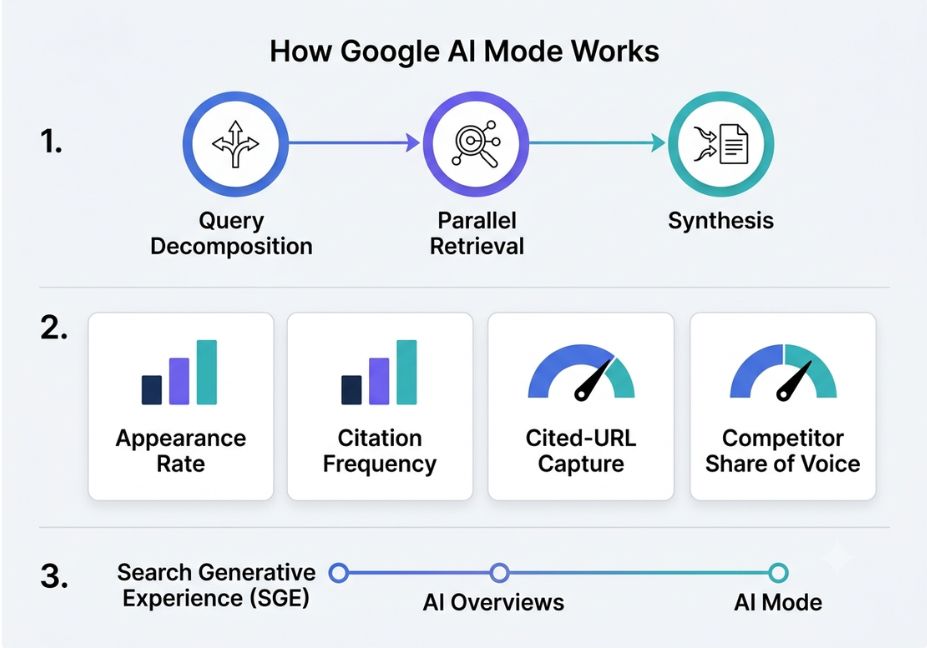
Three things happen in sequence:
- Query decomposition your question is split into sub-queries covering different angles of the topic
- Parallel retrieval each sub-query pulls candidate sources from the web independently
- Synthesis Gemini merges the retrieved material into a single answer and selects which sources to cite
Because retrieval happens per sub-query rather than per keyword, a single AI Mode answer can cite five or six different domains which is why share of voice (your citation count relative to competitors across an entire topic cluster) is a more honest metric than any single “am I visible” check.
Did You Know? Query fan-out means the same base question can trigger a different set of citations depending on phrasing, session context, and location which is exactly why manual, one-off searches give unreliable visibility signals.
What These Tools Actually Measure
Not every product calling itself an “AI Mode tracker” measures the same thing, however. Instead, four distinct signals are worth separating out:
- Appearance rate how often AI Mode generates an answer at all for your target queries, and how often your domain shows up anywhere in it
- Citation frequency how often you’re named as an actual source inside the answer text, not just linked in a sidebar
- Cited-URL capture which specific page of yours earns the citation, so you know what to optimize
- Competitor share of voice who else gets cited for the same prompts, and how your citation share compares over time
A tool that only reports the first metric is really just a fancier keyword-position checker with an AI label attached.
Where AI Mode Fits in the Bigger AI Search Picture
AI Mode didn’t appear in isolation, so it helps to place it on the timeline. Google first tested this conversational approach as the Search Generative Experience (SGE), then shipped a lighter version as AI Overviews inside standard results, and finally launched AI Mode as the full, standalone conversational experience. Other engines ChatGPT’s browsing mode, Perplexity, and Microsoft’s Bing Copilot run a similar retrieve-then-synthesize pattern, which is why most AI Mode checking tools track several of these platforms at once instead of just one.
Because generative engines lean heavily on source credibility, the same E-E-A-T signals (experience, expertise, authoritativeness, trust) that matter for classic SEO carry over here too. Pages that use clear structured data, cite primary sources, and state facts in direct, quotable sentences tend to get pulled into these answers more consistently which is also why a checking tool is only half the strategy; the other half is writing content a generative engine can confidently lift.
AI Mode Checking Tools: Three Categories and How to Pick
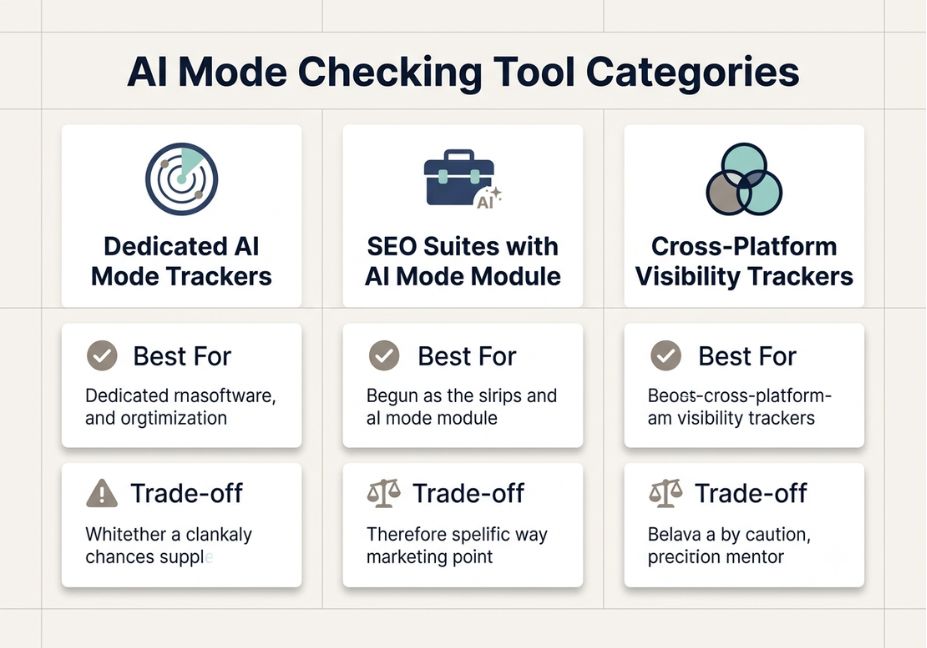
Tools in this space generally fall into three groups, and the right pick depends on what you already run. If you’re searching for the best AI Mode tracking tools for a small business, or specifically for free AI Mode checking tools, the category matters more than the brand name, since budget and feature depth track closely with which group a tool belongs to.
| Category | Best For | Trade-off |
|---|---|---|
| Dedicated AI Mode trackers | Teams that need deep, AI-specific analytics (prompt-level tracking, source-page capture) | Another subscription outside your existing SEO stack |
| SEO suites with an AI Mode module | Teams that want AI visibility bundled with rank tracking, backlinks, and technical SEO | Often shallower AI-specific detail than dedicated tools |
| Cross-platform visibility trackers | Brands that need AI Mode alongside ChatGPT and Perplexity in one view | Coverage breadth can come at the cost of per-platform depth |
Pro Tip: Before comparing vendors by feature list, run the same 15–20 real customer questions through each shortlisted tool and compare the citation counts they report not the “visibility score.” That single check exposes which tools are measuring the metric that actually matters.
Step-by-Step: How to Check Your AI Mode Visibility
You don’t need a paid tool to start. Here’s the sequence, whether you’re doing it manually or setting up automated tracking:
- Build a prompt list from real customer questions not keywords. AI Mode responds to natural questions, so “best project management tool for a 10-person agency” works better as a test prompt than “project management software.”
- Run each prompt in AI Mode (or your chosen tool) and log three things: was your brand mentioned, was it cited with a link, and which competitors also appeared.
- Repeat weekly. AI Mode answers shift with content updates and model changes, so a single snapshot tells you almost nothing about trend direction.
- Track the cited page, not just the domain, so you can reinforce or replicate whatever made that specific page citation-worthy.
For teams building their own lightweight logging layer instead of buying a platform, a simple script can capture the raw signal before you decide whether to invest in a dedicated tool:
python
import csv
from datetime import date

def log_ai_mode_check(prompt, brand_mentioned, cited, cited_url, competitors_seen):
    """Append one AI Mode test result to a local visibility log."""
    with open("ai_mode_log.csv", "a", newline="") as f:
        writer = csv.writer(f)
        writer.writerow
            date.today().isoformat
            prompt,
            brand_mentioned,
            cited,
            cited_url,
            ";".join(competitors_seen),


log_ai_mode_check
    prompt="best invoicing software for freelancers",
    brand_mentioned=True,
    cited=True,
    cited_url="/blog/freelancer-invoicing-guide",
    competitors_seen=["CompetitorA", "CompetitorB"],
This won’t automate the querying itself there’s no public API for AI Mode results but it gives you a structured baseline to compare against once you evaluate paid tools.
Technical Disclaimer: AI Mode is an actively evolving product; Google has expanded its rollout and feature set multiple times since its initial 2025 launch. Screenshots, prompts, and citation behavior described here reflect mid-2026 behavior always verify current mechanics against Google’s own AI features documentation before making strategy decisions.
Common Mistakes Teams Make When Reading AI Mode Data
- Treating a single test as a trend. One prompt, one session, one result that’s a data point, not a pattern.
- Ignoring prompt phrasing sensitivity. Because of query fan-out, rephrasing a test prompt slightly can change which sources get cited.
- Chasing appearance instead of citation. Showing up somewhere in an AI Mode session is a weaker signal than being named as a source.
- Skipping the content side entirely. Tracking tells you where you stand, but it doesn’t fix anything on its own. For example, the 2023 GEO research benchmark from Aggarwal and colleagues found that adding clear statistics and credible citations to source content measurably increased how often it was surfaced in generative engine answers. Without content changes, in other words, tracking alone just produces the same numbers every week.
What the Research Says About Improving AI Mode Visibility
Most of the vendor content around AI Mode checking tools skips the underlying research entirely. However, the GEO paper one of the first academic studies to formalize how content gets selected by generative engines tested strategies like adding statistics, adding citations, and simplifying language. As a result, the study found visibility gains that varied significantly by content domain and by which optimization was applied.
So what’s the practical takeaway for anyone using a checking tool? Tracking data tells you whether something changed, but the content-level adjustments clarity, credible sourcing, structured claims are what actually move the citation numbers a tool reports.
FAQ People Also Ask
What is an AI Mode checking tool?
An AI Mode checking tool is software that tests real search prompts against Google AI Mode and records whether your brand is mentioned, cited as a source, and how you compare to competitors in those AI-generated answers.
How do I check if my site appears in Google AI Mode?
Run your target customer questions directly in AI Mode and note whether your domain is cited, or use a dedicated AI Mode tracking tool to automate this across many prompts and track appearance rate and citation frequency over time.
Is Google AI Mode different from AI Overviews?
Yes, AI Mode and AI Overviews are different features. AI Overviews are short summaries inside standard results, while AI Mode is a full conversational search experience and the two often cite different sources for the same query.
How often should I check my AI Mode visibility?
Weekly is enough for most brands. AI Mode answers shift with content updates and model changes, so daily checks rarely add useful new signal beyond what a weekly check already shows.
Can I track AI Mode manually without a tool?
Yes for small-scale testing run a fixed prompt list by hand and log results but manual tracking doesn’t scale well because AI responses vary by prompt phrasing, location, and time, making consistent monitoring impractical without automation.
Are there free AI Mode checking tools?
Some SEO suites offer limited free AI Mode visibility checks as part of broader plans, but most dedicated, prompt-level AI Mode tracking tools with citation and competitor benchmarking sit behind a paid tier.
Use Cases: Where AI Mode Checking Pays Off
- Content gap detection. Run a checker on your priority keywords to see which competitor passages get cited when yours do not.
- GEO reporting. Track citation share across AI Mode, AI Overviews and other answer engines as its own KPI, separate from rank position.
- Regression alerts. Flag when a previously cited page drops out of AI Mode answers after a content or schema change.
- Competitive citation mapping. Identify which domains consistently supply the cited passage for a topic cluster.
Free Ways to Check AI Mode Citations
You do not need an enterprise platform to start. Three practical options:
- Manual spot-checks: run your top 10–15 category prompts in AI Mode each week and log the results in a spreadsheet.
- Free-tier tools: entry-level platforms offer limited free or low-cost monitoring for small prompt sets.
- Build your own script: a scheduled script that runs the same prompts and stores the citations (see the example below).
This will not match a paid platform’s polish, but it answers the core question “is my domain showing up at all?” at close to zero cost.
What Is the Best Free Tool to Check Google AI Mode Citations?
| Tool | Primary focus | Best for | Limitation |
|---|---|---|---|
| SEOmator AI Mode Analyzer | Single-query AI Mode response breakdown | Fast, ad-hoc citation checks | Manual, one query at a time |
| Semrush SEO Checker / Site Audit | Site-wide technical and on-page audit | Full-site technical debt | AI visibility is secondary, not the core metric |
| Seobility SEO Checker | Metadata and backlink analysis with AI-readiness flags | Small sites, quick diagnostics | Daily query caps on the free tier |
| SEO Site Checkup | Multi-engine AI visibility monitoring | Agencies managing many domains | Paid tiers needed at scale |
| DIY agent (see below) | Custom citation tracking at query-set scale | Teams wanting raw data and control | Needs engineering time to maintain |
How Do I Build My Own AI Mode Citation Checker?
A minimal checker is a retrieval agent with a fetch step, a parse step and a scoring step. The example below is illustrative only. Google changes AI Mode’s markup often, so you must replace the fetch function with your own rendering approach and check the selector against the live page before you rely on it.
from bs4 import BeautifulSoup

def check_ai_mode_citations(query, target_domain):
    # Replace fetch_ai_mode_response with your own rendering approach.
    response_html = fetch_ai_mode_response(query)
    soup = BeautifulSoup(response_html, "html.parser")

    citations = [a["href"] for a in soup.select("a[data-citation]")]
    cited = [url for url in citations if target_domain in url]

    return {
        "query": query,
        "total_citations": len(citations),
        "domain_cited": bool(cited),
        "cited_urls": cited,
    }

result = check_ai_mode_citations("what is an ai mode seo checking tool", "agentiveaiagents.com")
print(result)
Technical note: run this on a schedule, store each result, and diff consecutive runs. Treat any scraping approach as brittle and budget time for maintenance.
How to Optimize Content So Google AI Mode Cites You
- Answer the question in the first sentence. AI Mode favours content that states the answer first and then supports it.
- Write self-contained passages. Citations are picked paragraph by paragraph. One paragraph that fully answers a sub-question can beat a longer, scattered article.
- Use structured data. FAQ and HowTo schema help AI crawlers parse question-answer pairs.
- Build topical clusters. Link related articles together to show depth across a topic.
- Keep claims verifiable. Name your sources and data points.
How Is Google AI Mode Different from AI Overviews?
AI Overviews show a static answer block above the organic results. AI Mode is a conversational, multi-turn interface: follow-up questions turn into new sub-queries, and fresh sources are retrieved for each one. That is why it needs its own tracking.
Does Ranking #1 Guarantee an AI Mode Citation?
No. Most AI Mode citations do not come from the organic top 10, so rank position alone is a weak predictor of AI Mode visibility. Track citations as their own metric.
Can I Build My Own AI Mode Tracking Tool?
Yes. A basic version is a retrieval agent: fetch the AI Mode response, parse the cited URLs, and check your domain against a query set on a schedule.
Conclusion
In short, AI Mode checking tools exist because Google AI Mode doesn’t behave like traditional Search. It fans a single question out into multiple retrievals and synthesizes an answer, which means visibility now hinges on citation frequency and share of voice, not keyword rank. Whichever tool you choose, therefore, judge it by whether it separates appearance from citation, not by how polished its dashboard looks.
To get started, build a real prompt list, log the raw signal yourself if you’re not ready to buy a platform, and treat the data as a diagnostic rather than the fix. Bookmark this guide and explore more hands-on AI visibility breakdowns at agentiveaiagents.com.