
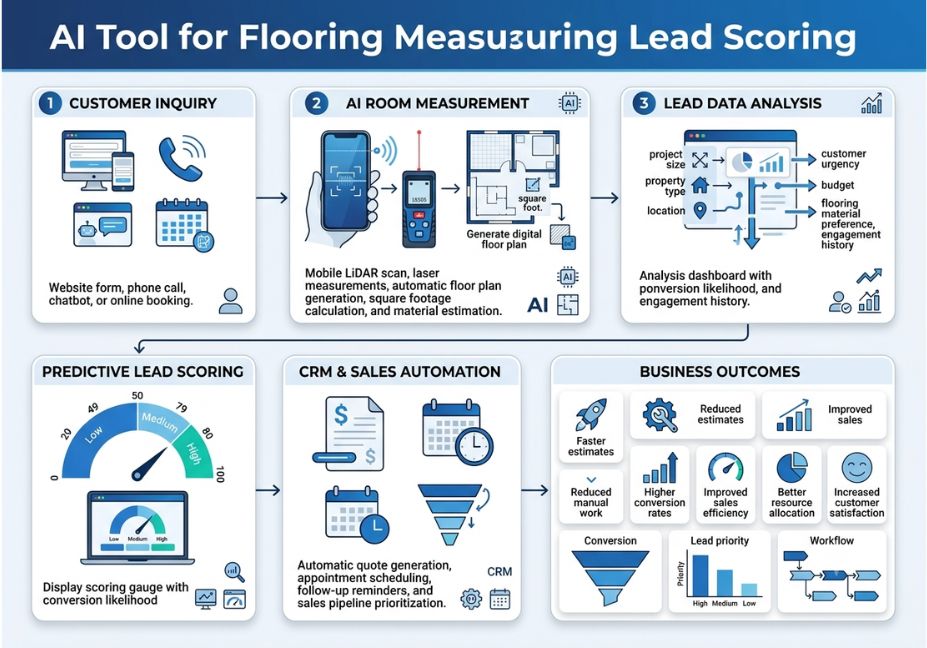
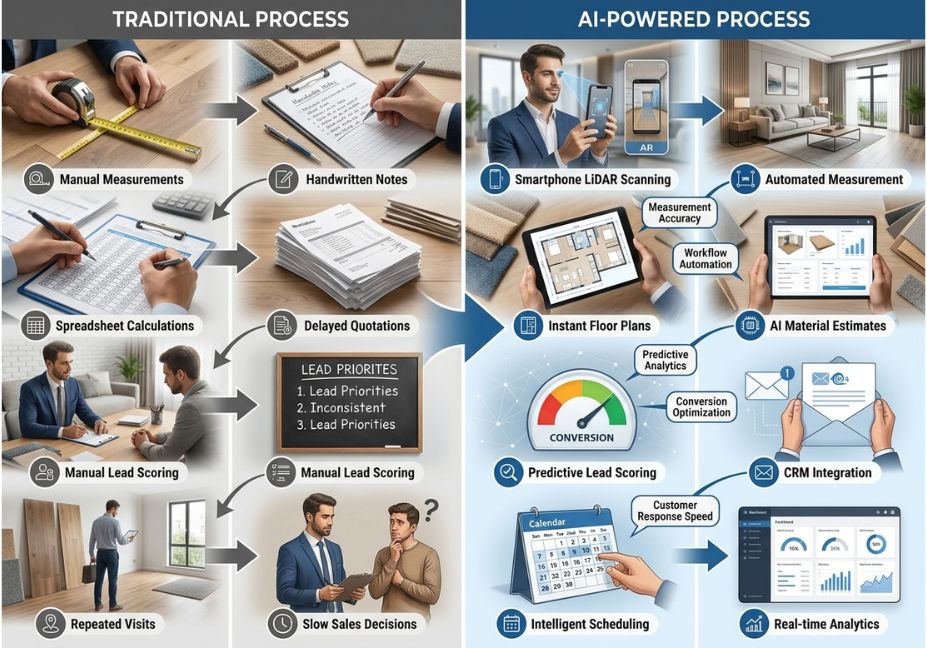
A flooring contractor drives 45 minutes to measure a room by hand, only to find out the homeowner was just price-shopping. That round trip is the single biggest efficiency leak in home-improvement sales, and it’s why an AI tool for flooring measuring lead scoring has become one of the fastest-adopted categories in vertical AI this year. Instead of a person with a tape measure, you get an agentic workflow: one tool reads a photo or floor plan and returns square footage, another tool scores the lead against your historical win/loss data, and an orchestration layer decides what happens next all before a human touches the request.
This isn’t a chatbot bolted onto a CRM. It’s a multi-step tool-use loop, the same pattern that powers agent frameworks like LangChain, applied to a very unglamorous, very profitable problem: knowing which flooring leads are worth a callback.
What Is an AI Tool for Flooring Measuring Lead Scoring?
An AI tool for flooring measuring lead scoring is a system that pairs computer-vision-based room measurement with a predictive scoring model, so a single photo upload produces both a material estimate and a ranked lead. It replaces two manual steps site visits and gut-feel prioritization with one automated pipeline. The measurement layer estimates square footage and waste factor; the scoring layer ranks the lead by project size, timeline, and fit against past conversions.
How Does It Work? (Architecture)
Under the hood, this is a two-tool agent with a shared memory layer, not a single monolithic model.
1. The measurement tool. A photo, sketch, or PDF floor plan is passed to a computer-vision model that estimates room dimensions. This builds on the underlying science of photogrammetry (https://en.wikipedia.org/wiki/Photogrammetry), extended with depth data where available. Peer-reviewed testing backs this up: a clinical validation of smartphone LiDAR measurement accuracy (https://www.ncbi.nlm.nih.gov/pmc/articles/PMC10531604/) comparing camera-based measurements against ruler and image-analysis methods found a correlation coefficient of 0.995 between the two approaches evidence that camera-based measurement, done properly, holds up to scrutiny even outside a construction context.
2. The retrieval step. Before scoring, the agent pulls similar past jobs from a vector store same material, similar square footage, comparable region so the pricing and waste-factor estimate isn’t a cold guess. This is standard retrieval-augmented generation (RAG): embed the new job’s attributes, retrieve nearest neighbors from historical data, and use those to ground the estimate.
3. The scoring tool. The enriched estimate square footage, material, waste factor, price becomes input to a lead-scoring function. That function outputs a 1–100 score based on project value, timeline urgency, and how closely the lead resembles previously won deals.
Technical Note: The orchestration layer is what makes this “agentic” rather than “automated.” A planner model decides whether to call the measurement tool (is there an image to process?), whether to call retrieval (do we have comparable historical jobs?), and when to hand off to a human rep. Skipping this layer and hard-coding the sequence works for a demo, but breaks the moment a lead submits an incomplete floor plan.
python
# Simplified tool-use loop for a flooring measurement + lead-scoring agent
import anthropic

client = anthropic.Anthropic()

tools =

        "name": "measure_room",
        "description": "Estimate square footage and waste factor from an uploaded photo or floor plan",
        "input_schema":
            "type": "object",
            "properties": {"image_url": {"type": "string"}},
            "required": ["image_url"]

        "name": "score_lead",
        "description": "Score a lead 1-100 using project size, timeline, and historical win data",
        "input_schema":
            "type": "object",
            "properties":
                "square_footage": {"type": "number"},
                "material": {"type": "string"},
                "timeline_days": {"type": "integer"}

            "required": ["square_footage", "material"]


response = client.messages.create(
    model="claude-sonnet-4-6",
    max_tokens=1024,
    tools=tools,
    messages=[{"role": "user", "content": "New lead uploaded a kitchen photo, wants LVP flooring."}]

# The model decides which tool to call first — measure_room, then score_lead —
# based on what information is missing from the request.
Real-World Use Cases
- Instant online quoting: A visitor uploads a room photo through a website widget and receives a ballpark estimate in seconds instead of waiting for a callback.
- Sales triage for multi-location dealers: A regional flooring chain routes only leads scoring above a threshold to senior estimators, leaving lower-value leads to junior reps or nurture sequences.
- Commercial bid prioritization: Contractors bidding on multiple commercial jobs at once use the scoring layer to decide which bids justify a full in-person site visit versus a remote estimate.
- Supply-aware scoring: More advanced setups drop a lead’s score automatically if the requested material has a long backorder window, since a slow fulfillment timeline reduces near-term revenue even for a large job.
Best Tools / Frameworks / Approaches
| Approach | Measurement Method | Lead Scoring | Best Fit |
|---|---|---|---|
| Manual takeoff + CRM tags | Tape measure, site visit | Manual, rep intuition | Low lead volume, high-touch sales |
| Standalone measurement app | Photo or LiDAR scan | None (measurement only) | Estimators who already have a scoring process |
| Predictive CRM scoring only | Manual entry | ML-based, e.g. HubSpot’s own predictive lead scoring documentation (https://blog.hubspot.com/marketing/traditional-predictive-lead-scoring), which reviews thousands of data points across a contact base to represent the probability of closing within 90 days | Teams with clean CRM data but no measurement bottleneck |
| Agentic AI tool (measurement + scoring combined) | Computer vision / photogrammetry | ML score fed by measurement + historical retrieval | High lead volume, online-born leads, multi-rep teams |
Pro Tip: Don’t score purely on job size. A large room with a complex cut pattern can take longer to install than a small, simple one factor “blueprint complexity” into the score, not just square footage, or your best-scoring leads may actually be your least profitable per estimator-hour.
Step-by-Step: How to Build / Implement This
- Define the conversion event you’re predicting. Decide what “won” means signed contract, deposit paid, or something else before training any scoring model.
- Wire up the measurement tool. Start with photo upload and a computer-vision model; add LiDAR/depth support later for higher accuracy on complex rooms.
- Build the retrieval layer. Embed past job attributes (material, size, region, outcome) into a vector store so new leads can be compared against similar historical jobs.
- Connect the scoring function to your CRM. Whether you’re using a custom model or a CRM-native predictive score, make sure the output lands as a routable field — a score nobody acts on is just a number.
- Set score-band actions. Define what happens above and below thresholds: auto-routed to a senior rep, added to a nurture sequence, or flagged for manual review.
- Monitor and recalibrate monthly. Track win rate by score band; if leads scored above 80 aren’t converting meaningfully better than those scored below 40, adjust the model inputs rather than assuming the technology is broken.
Common Mistakes and How to Avoid Them
- Treating measurement accuracy as fixed. Camera-based estimates vary with lighting, angle, and room complexity — peer-reviewed indoor 3D scanning research (https://www.mdpi.com/2673-7418/3/4/30) on smartphone-based scanning shows measurement quality depends heavily on the specific scanning conditions and device used, so validate accuracy on your own room types before trusting the numbers at scale.
- Scoring on job size alone. As noted above, a “clean” simple layout often outperforms a large, complex one in profit-per-hour.
- No feedback loop. If actual installer waste and win/loss outcomes never get fed back into the historical data the retrieval step draws on, the scoring model stops improving.
- Skipping the orchestration layer. Hard-coding “always measure, then always score” breaks on incomplete submissions. A planner step that checks what data is actually available is more robust.
Technical Disclaimer: Framework versions and model capabilities evolve quickly. Code examples above reflect general tool-use patterns as of mid-2026. Always check current documentation for the specific agent framework or CRM API you’re integrating with.
Did You Know? Independent lab testing of consumer-grade LiDAR sensors has found sub-centimeter accuracy achievable under good conditions, but with meaningful accuracy loss on complex geometry a reminder that “AI measured it” doesn’t mean “assume zero error.”
FAQ People Also Ask
What is an AI tool for flooring measuring lead scoring?
It’s a system that combines computer-vision-based room measurement with predictive lead scoring, so a single photo upload produces both a material estimate and a ranked, prioritized lead for your sales team.
How accurate is AI flooring measurement from photos?
Accuracy varies with lighting, room geometry, and device, but validated studies on smartphone-based measurement have shown correlation above 0.99 against traditional methods under good conditions. Complex rooms typically need cross-checking.
Can AI lead scoring integrate with my existing CRM?
Yes. Most implementations write the score directly into a CRM contact or deal property similar to how predictive lead scoring tools already operate inside platforms like HubSpot so reps see it alongside existing lifecycle stage and activity data.
Is manual flooring measurement still necessary?
For complex commercial jobs or high-value bids, many contractors still confirm with an in-person visit. AI measurement is best used to triage which leads are worth that visit in the first place.
How much time does this actually save?
The main gain isn’t the estimate itself it’s estimator hours redirected away from low-value leads and toward jobs the scoring model flags as high-probability wins.
What’s the difference between manual and predictive lead scoring?
Manual scoring uses rep-defined rules (job type, budget signals); predictive scoring uses a model trained on historical won/lost outcomes to calculate a probability. Combining both with real-time measurement data gives the most complete picture.
Conclusion
An AI tool for flooring measuring lead scoring works best when it’s treated as an agentic workflow, not a single feature: a measurement tool for square footage, a retrieval step grounded in historical job data, and a scoring tool that ranks leads by more than just size. Get the orchestration layer right deciding when each tool fires and you turn a measuring service into a prioritization engine. Bookmark this guide and explore more hands-on AI agent tutorials at agentiveaiagents.com.
One Response