Most creators aren’t short on AI tools for creators news. They’re drowning in it. A new model drops. A platform ships an “agentic” feature. By the time you’ve read the changelog, three more updates have landed.
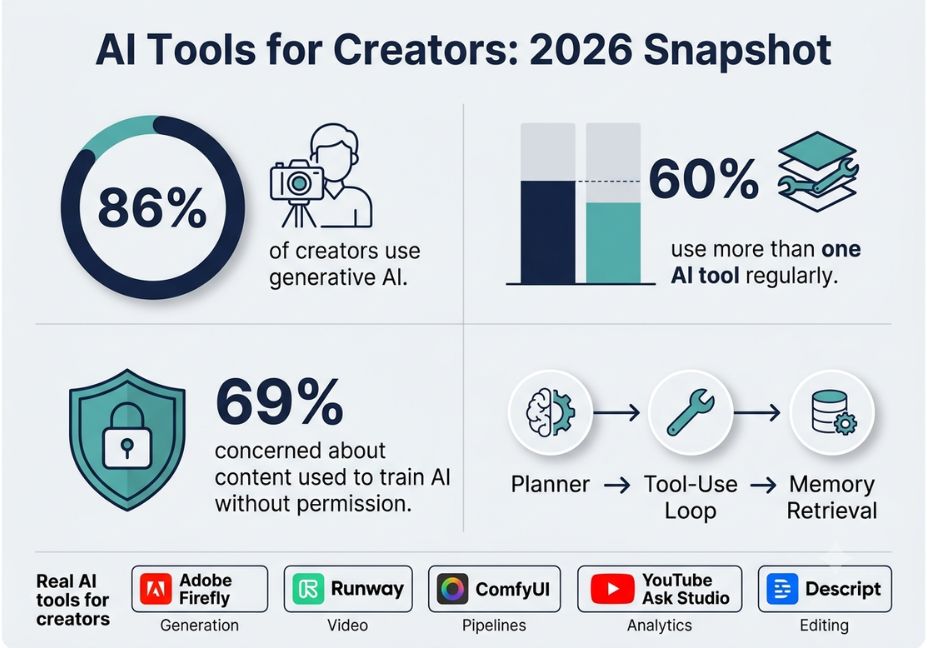
According to Adobe’s Creators’ Toolkit Report, which surveyed more than 16,000 global creators across eight countries, 86% already use creative generative AI in their work. That’s not a niche behavior anymore. It’s infrastructure.
This week alone brought a no-code AI video companion builder, a major-label push to redefine what counts as “human made” music, and a new multimodal model built for cross-format generation. However, the real story isn’t any single launch. It’s that agentic AI AI that plans and acts across multiple steps, not just one prompt is quietly replacing single-purpose generative tools as the default architecture for creator platforms.
Below, you’ll find a grounded look at what’s shipping, how the underlying tool-use loops actually work, and which frameworks deserve your attention right now.
What Is Agentic AI for Creators?
Agentic AI refers to systems that don’t just generate content from a single prompt. Instead, they plan, call tools, retrieve context, and iterate across multiple steps toward a goal.
For example, an agentic system might research a trending topic, draft a script, generate a thumbnail, and flag an underperforming metric all in one orchestrated loop. A plain generative model, by contrast, only produces one draft per prompt.
This distinction matters because most best AI tools for content creators 2026 roundups still cover single-shot generative models. Meanwhile, the platforms actually reshaping creator workflows this year are agentic by design.
How Does Agentic AI Work for Creators?
The mechanism sounds simple. In practice, it takes real engineering to get right.
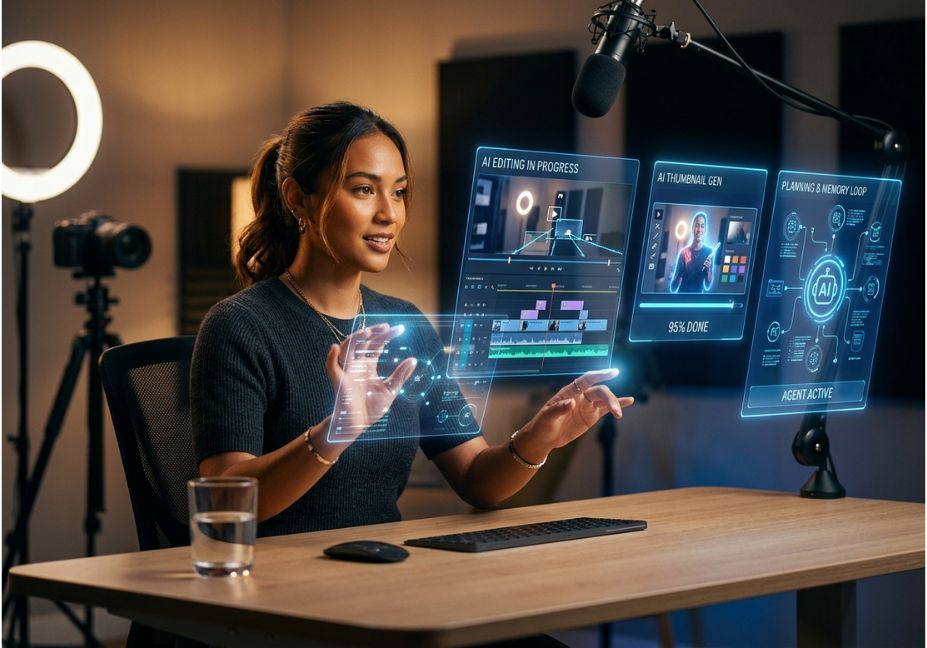
First, a planning layer decomposes a task. Next, an orchestration layer routes each sub-task to a specialized tool an image model, a text-to-speech engine, or an analytics API. Finally, a memory component retains context, including past videos, audience behavior, and brand voice, across sessions.
- Planner: breaks “make a video about X” into title, thumbnail, hook, and outline sub-tasks
- Tool-use loop: calls image generation, voice synthesis, or analytics APIs as needed
- Memory retrieval: pulls past performance data to justify a suggestion instead of generating blindly
Architect’s Note: This is exactly the pattern Google’s YouTube described for its new “Ask Studio” AI creative partner. Ask Studio gives personalized summaries of video performance and comment sentiment. A separate ideation feature generates a title, description, and AI thumbnail alongside a video hook and narrative outline. In short, it’s a planner-plus-memory loop, not a single-shot generator.
Latest AI Tools for Creators News: Real Launches Worth Knowing
Here’s what’s actually shipped in recent cycles, not just roadmap talk:
- YouTube’s Ask Studio and AI ideation suite personalized creator insights, automated video brainstorming, and improved multilingual dubbing with new lip-sync technology built to localize content across roughly 20 languages.
- MiniMax H3 an open-weights multimodal AI model that generates text, images, video, and audio with native stereo sound, positioned as a cost-efficient, commercial-grade option.
- Tavus PAL Maker a no-code tool that lets creators build AI video companions without any engineering background.
- Music industry AI labeling push Universal Music Group, Sony Music, and Warner Music Group have proposed rules banning AI-generated songs from international charts unless the tracks are “substantially human made.” The proposal also requires licensed AI tools and secured training-data rights.
Did You Know? Sixty percent of creators say they use more than one generative AI tool in a given three-month period. So the “one tool to rule them all” model is largely a myth in practice.
Best AI Tools and Frameworks for Creators, Compared
Not every tool plays the same role in a creator’s stack. So how do the current front-runners compare by function?
| Tool | Primary Use | Agentic? | Best For |
|---|---|---|---|
| Adobe Firefly | Image, video, and audio generation plus multi-step tasks | Yes (agentic assistant) | Cross-format asset production |
| Runway | AI video generation and editing | Partial | Ambitious, longer video sequences |
| ComfyUI | Node-based generation pipelines | Yes (workflow graphs) | Custom, local image and video pipelines |
| YouTube Ask Studio | Analytics and ideation | Yes | Platform-native creator insights |
| Descript | Editing, transcription, dubbing | No | Podcast and talking-head video editing |
Technical Note: Adobe has extended Firefly with an AI Assistant that runs multi-step creative tasks across its app suite. This is a clear signal that platform vendors not just standalone startups are racing to ship agentic layers instead of single-purpose generators.
How to Build a Lightweight Agentic Content Workflow (Step-by-Step)
If you want to move beyond single-prompt tools without building a full agent framework, here’s how to start:
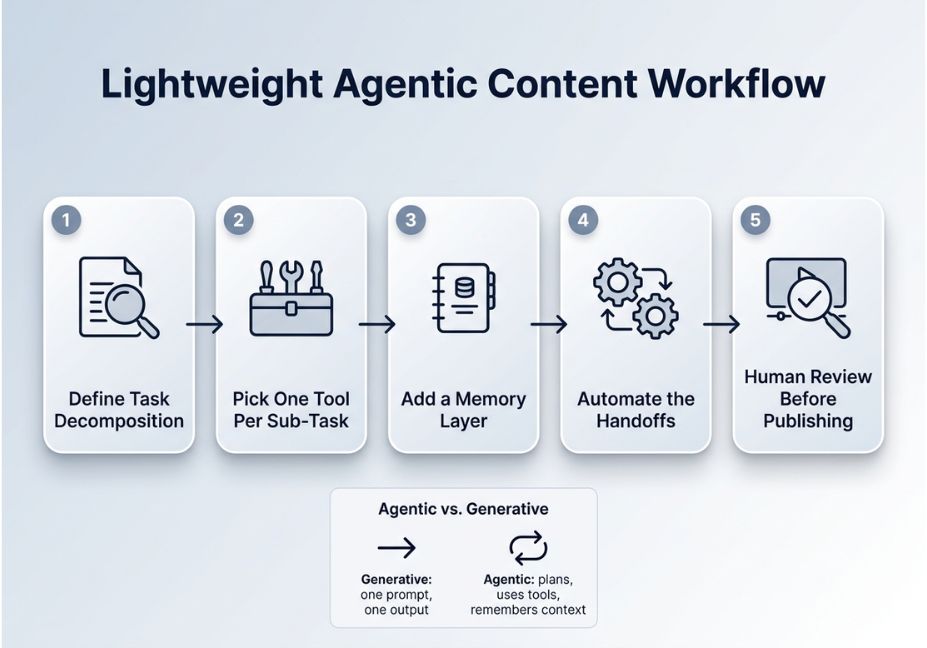
- Define the task decomposition. Split “publish weekly video” into research, script, visuals, and distribution sub-tasks.
- Pick one tool per sub-task. Use a writing assistant for scripts, an image or video model for thumbnails, and a dedicated editor for cuts.
- Add a lightweight memory layer. Even a shared doc tracking what performed well works as a substitute for a formal vector store.
- Automate the handoffs. Use no-code automation platforms like Zapier or Make to move outputs between tools instead of copying and pasting manually.
- Review before publishing. Treat AI output as a first draft. Human judgment should always be the final gate.
Pro Tip: Don’t chase every new launch. Adobe’s data shows that most serious creators run two to three tools deeply, rather than a large, shallow stack.
Common Mistakes and How to Avoid Them
- Over-automating voice and tone. AI drafts read as generic without your edits, so always do a final human review.
- Ignoring provenance requirements. Because music labels are now proposing licensing and training-data rules for chart eligibility, unclear tool provenance could soon become a real liability, not just an ethics footnote.
- Treating every new model as a must-adopt. In fact, 69% of creators say they’re concerned about their content being used to train AI without permission. As a result, tool vetting matters as much as tool adoption now.
- Skipping the “why” behind AI suggestions. Agentic tools that explain their recommendations, like YouTube’s approach of citing past audience behavior, are more trustworthy than black-box outputs.
What Developers and Creators Are Saying
Reactions to this shift aren’t uniformly enthusiastic. For instance, YouTuber Hank Green paused uploading on multiple channels after admitting he relies too heavily on AI tools. He specifically cited concerns about the psychological pull of interacting with large language models.
This is a useful counterweight to the adoption statistics above. Usage is high, but so is creator ambivalence about dependency. Similar tensions show up regularly in developer discussions on Reddit’s r/LocalLLaMA community, where builders compare open-weight multimodal models like MiniMax H3 against closed commercial alternatives such as OpenAI’s and Google’s offerings on cost and control.
Technical Disclaimer: Tool capabilities referenced above (Ask Studio, Firefly AI Assistant, Tavus PAL Maker, MiniMax H3) reflect publicly announced features as of mid-2026. Because platforms iterate quickly, always check official product pages for current capabilities before building a workflow around a specific feature.
FAQ People Also Ask
What are the best AI tools for creators in 2026?
The strongest 2026 picks split by function: Adobe Firefly and Runway for generative image and video, Descript for editing and dubbing, ComfyUI for custom local pipelines, and platform-native agentic tools like YouTube’s Ask Studio for analytics and ideation.
Are AI tools replacing human creators?
No. Adoption data shows AI is used as a workflow accelerator, not a replacement. Most creators use AI for ideation, editing, and asset generation, while keeping final creative judgment and voice human-led.
What is agentic AI in content creation?
Agentic AI is a system that plans, uses tools, and retains memory across multiple steps toward a goal, such as generating a full video concept with title, thumbnail, and hook, rather than producing a single-shot output from one prompt.
How many creators use generative AI tools?
Industry surveys put creative generative AI adoption at 86% among global creators, with 60% using more than one tool regularly to match capabilities to specific tasks.
Is AI-generated music allowed on music charts?
Not automatically. Major labels have proposed rules requiring AI-assisted music to be “substantially human made” and to use properly licensed AI tools with secured training-data rights in order to qualify for chart inclusion.
How do I know if an AI creator tool is agentic or just generative?
Ask whether the tool completes one task per prompt (generative) or plans and chains multiple steps on its own, like research plus drafting plus formatting (agentic). If it explains why it made a suggestion using your past data, it’s agentic.
Conclusion
The AI tools for creators news cycle in 2026 comes down to three takeaways. First, platforms are shifting from single-purpose generators to agentic, multi-step assistants. Second, adoption is near-universal but increasingly selective, with creators running a handful of trusted tools rather than chasing every launch. Third, provenance and licensing are becoming as important as raw capability, especially as industries like music formalize what counts as human-made.
Keep watching the orchestration layer, not just the model names. That’s where the real workflow shift is happening. Bookmark this guide and explore more hands-on agentic AI tutorials at agentiveaiagents.com.