

A 90-minute training module used to take an instructional design team three days to storyboard, build, and voice. Today, teams using AI tools for instructional design are shipping the same module in an afternoon outline, branching scenario, and a narrated video in three languages included.
That speed is real. However, so is the risk of shipping a slick-looking course that teaches the wrong thing. The gap between “AI generated it” and “it’s actually good instruction” is where most teams get stuck, and it’s the part most listicles skip.
For that reason, this guide organizes tools by where they actually fit in your workflow the ADDIE model (Analysis, Design, Development, Implementation, Evaluation) instead of ranking them in a vacuum. That way, you know exactly which tool to reach for, and when to hand the work back to a human.
What Are AI Tools for Instructional Design?
AI tools for instructional design are applications that use large language models, generative video, or adaptive algorithms to automate parts of course creation. In practice, this means drafting objectives, writing scripts, building quizzes, generating narrated video, or personalizing content paths for individual learners the exact tasks that used to consume most of an instructional designer’s week.
These tools don’t replace instructional design judgment. Instead, they compress the production layer content drafting, video, translation so designers can spend more time on needs analysis and less on formatting slides. Research on how instructional designers actually use generative AI found that tools like ChatGPT are most often used to brainstorm and draft learning objectives, activities, assessments, and lesson plans across the ADDIE framework (Educational Technology Research and Development, Springer, 2024).
Beyond ChatGPT and Claude, the same production layer now includes Microsoft Copilot and Google Gemini for teams already working inside Microsoft 365 or Google Workspace, plus specialized instructional tools that plug directly into an LMS such as Moodle or Docebo.
How Do AI Tools Fit Into the ADDIE Model?
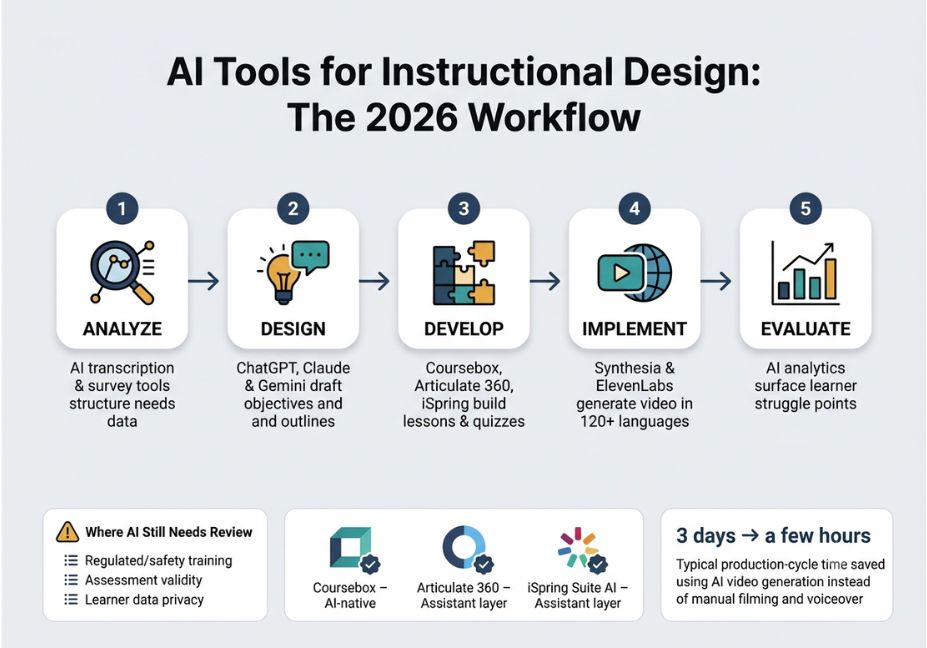
Mapping tools to ADDIE phases avoids the most common failure mode: using a content-generation tool to do analysis work it was never built for. Here’s how each phase typically breaks down:
- Analyze: AI meeting-transcription and survey tools turn stakeholder interviews and learner surveys into structured needs data.
- Design: Conversational AI (ChatGPT, Claude, Gemini) drafts learning objectives, outlines, and instructional strategies often mapped against Bloom’s Taxonomy to check that objectives target the right cognitive level.
- Develop: AI course generators and authoring assistants turn an outline into lessons, quizzes, and slides.
- Implement: AI video and voice tools produce narrated, multilingual training video, and publish through SCORM or xAPI into the LMS.
- Evaluate: AI analytics tools surface completion patterns and flag where learners are actually struggling.
A recent academic proposal for reworking the ADDIE model for the AI era suggests a similar mapping: learner clustering in Analyze, generative lesson planning in Design, automated content development in Develop, real-time adaptive delivery in Implement, and predictive analytics in Evaluate. In other words, AI slots into the framework instructional designers already use it doesn’t replace it.
Technical Note: Don’t skip straight to Develop. Teams that let a course generator write objectives and content in one pass tend to ship courses that are internally consistent but pedagogically shallow, since the objectives get written to match whatever the AI produced rather than the other way around.
Best AI Tools for Instructional Design By Workflow Phase
Content Drafting and Design Thinking
ChatGPT, Claude, and Gemini are the default “thought partners” for the Design phase, turning a messy stakeholder brief into a structured outline, a set of learning objectives, or a first-pass assessment blueprint. That said, none of these are authoring tools they’re drafting tools that still need a design pass before anything reaches a learner.
Course Authoring and Development
| Tool | Best for | AI-native? |
|---|---|---|
| Coursebox | Outline-to-published-course in one platform | Yes hard to use without AI |
| Articulate 360 (AI Assistant) | Custom interactivity, SCORM/xAPI output for compliance training | Assistant layer on a manual tool |
| iSpring Suite AI | Converting existing PowerPoint decks into SCORM courses | Assistant layer |
| Mindsmith | Fast document-to-course conversion | Yes |
Pro Tip: If your output has to pass a compliance audit trail (SCORM/xAPI, versioned sign-off), lean on Articulate or iSpring, since AI-native tools generally optimize for speed rather than governance.
Video and Voice Production
Synthesia, Colossyan, and ElevenLabs solve the Implementation-phase bottleneck: turning a script into a presenter-led training video in 120+ languages, without hiring a voice actor or booking a studio. Even so, they don’t design learning paths they render the format you’ve already designed.
Did You Know? Teams report cutting a 3-day production cycle storyboard, record, edit, caption down to a few hours once script-to-video generation replaces manual filming and voiceover recording.
How to Choose the Right AI Tool for Instructional Design (Step-by-Step)
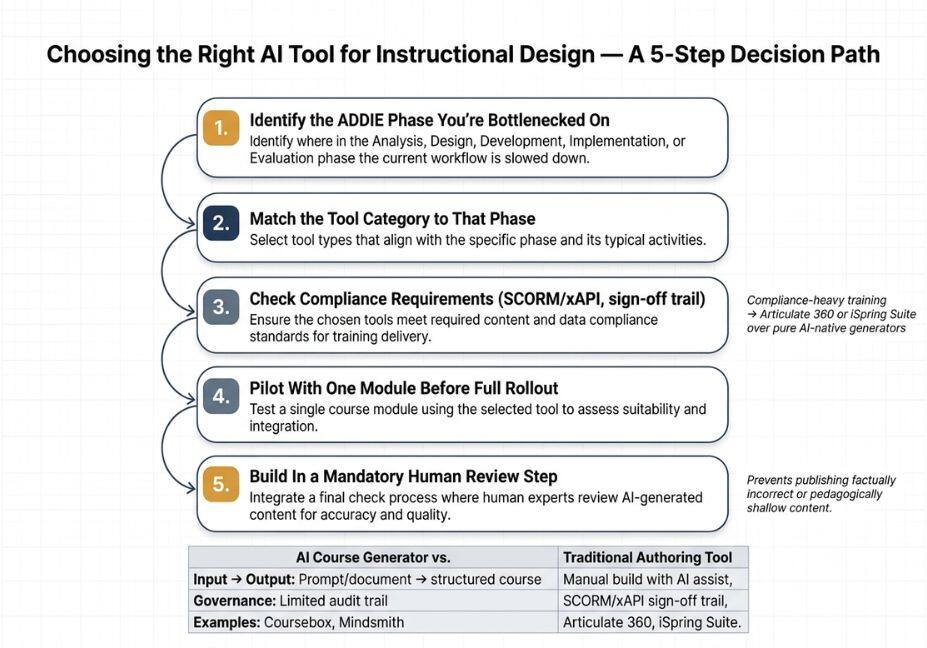
- Identify the ADDIE phase you’re bottlenecked on analysis, drafting, authoring, video, or evaluation.
- Match the tool category to that phase, not to whichever tool is trending.
- Check compliance requirements if you need SCORM/xAPI and a sign-off trail, prioritize Articulate or iSpring over a pure AI-native generator.
- Pilot with one module before rolling the tool out across a full curriculum.
- Build in a mandatory human review step for accuracy, tone, and pedagogical fit before publishing.
Real-World Use Cases
- Corporate compliance refresh: A stakeholder-interview transcript gets summarized by AI, ChatGPT drafts updated learning objectives, Articulate’s AI assistant builds the branching scenario, and Synthesia renders the final video in three languages.
- University course conversion: A professor’s lecture slides get converted into a structured online module using an AI course generator, with the instructor editing for accuracy before publishing.
- Sales enablement microlearning: A product one-pager becomes a five-minute scenario-based module with an AI-generated quiz, published the same day a product feature ships.
Common Mistakes and How to Avoid Them
- Skipping the human editing pass. AI can generate a full first draft outline, lesson text, quiz, even narrated video but a human pass is still needed to add real examples, verify accuracy, and match your organization’s voice.
- Letting AI decide relevance. AI can assemble content quickly, but it can’t judge what actually deserves to be in the course; as a result, a weak design just gets built faster.
- Ignoring accuracy risk in generated content. Language models can produce plausible-sounding but factually wrong statements, which is a serious problem in compliance, safety, or technical training where errors have real consequences.
- Treating video tools as design tools. Synthesia-style platforms are strong on production speed but generally don’t design learning paths or track long-term learner performance; in short, they solve delivery format, not instructional structure.
Where AI Gets It Wrong
This is the part most instructional-design content skips. Generative AI has no way to verify whether a claim in a training module is factually correct it optimizes for plausible text, not verified text. Consequently, this matters most in three places:
- Regulated or safety-critical training, where a confidently wrong statement can create real liability.
- Assessment validity, where AI-generated quiz questions can test recall of the AI’s phrasing rather than the actual learning objective.
- Learner data privacy, when AI tools are fed real employee performance data for personalization without a clear data-handling policy.
A 2025 study on generative AI in training and coaching design makes the same point from a research angle: AI can speed up the design phase, but the resulting materials still require careful quality control before they reach learners.
Technical Disclaimer: AI tool feature sets and pricing change quickly. Screenshots, integrations, and specific capabilities referenced in this article reflect the tools as of mid-2026. Always check the vendor’s current documentation, including OpenAI’s model documentation, before relying on a specific feature.
What Instructional Designers Are Saying
Practitioners consistently describe the same pattern: AI removes the friction from production video, voice, first-draft content while the harder, more valuable part of the job shifts toward deciding what deserves to be built at all, and verifying that it’s actually correct. Ultimately, the tools compress the “how do I make this” question; they don’t answer the “should this exist” question.
FAQ People Also Ask
What is the best AI tool for instructional design?
There’s no single best tool it depends on the task. ChatGPT and Claude lead for drafting objectives and outlines, Synthesia leads for AI training video, and Coursebox or Mindsmith lead for AI-native course authoring.
Can AI replace instructional designers?
No. AI accelerates production drafting, video, translation but it can’t judge relevance, verify accuracy, or make pedagogical tradeoffs. Those decisions still require a human instructional designer.
How do instructional designers use ChatGPT and Claude?
Mainly in the Design phase: turning stakeholder input into learning objectives, course outlines, and assessment blueprints, then editing the output for accuracy and organizational voice before development begins.
Is AI-generated training content accurate enough to publish?
Not without review. Generative AI can produce confident but incorrect statements, so a subject-matter-expert or instructional-designer edit pass is necessary before publishing, especially for compliance or technical training.
What’s the difference between an AI course generator and an eLearning authoring tool?
An AI course generator, like Coursebox or Mindsmith, turns a document or prompt directly into a structured course. A traditional authoring tool, like Articulate 360 or iSpring, is built for manual, hand-crafted interactivity, with AI now layered on as an assistant rather than the primary author.
Conclusion
AI tools for instructional design have compressed the production side of the job drafting, video, voiceover, translation into hours instead of weeks. What they haven’t changed is the core of instructional design: deciding what learners actually need, verifying the content is correct, and judging whether a course is the right format at all. So, match the tool to the ADDIE phase it’s actually built for, keep a human editing pass in place, and treat AI-generated content as a strong first draft, not a finished product.
Bookmark this guide and explore more hands-on AI workflow tutorials at agentiveaiagents.com.



