Most brands don’t fail at AI content because the tools are bad — they fail because they pick one AI tool social media content creation posts video ads 2026 roundup recommends and expect it to do everything. A text-to-video generator, a caption writer, and a UGC-style ad creator solve three different jobs, and marketing teams that treat them as interchangeable end up with content that looks generic or, worse, gets flagged by audiences as obviously AI-made.
The market has matured past “does the AI tool work?” and into “which AI tool for which job, at what stage of the funnel?” That’s the gap this guide fills — a decision framework, not just another list.
What Is AI Content Creation for Social Media?
AI content creation for social media covers a cluster of related but distinct capabilities: generative AI models that turn text prompts into images, video, or copy; AI avatars that deliver scripted lines in dozens of languages; and repurposing engines that cut long-form video into short clips. Wikipedia’s overview of generative AI models is a useful baseline for understanding how these systems produce novel media rather than simply editing existing assets.
For social platforms specifically, the two dominant categories are video/image generation (Canva Magic Studio, Adobe Firefly, Runway) and video ad assembly (Predis.ai, VEED.io, CapCut) — and the best workflows use both.
How These AI Tools Actually Work
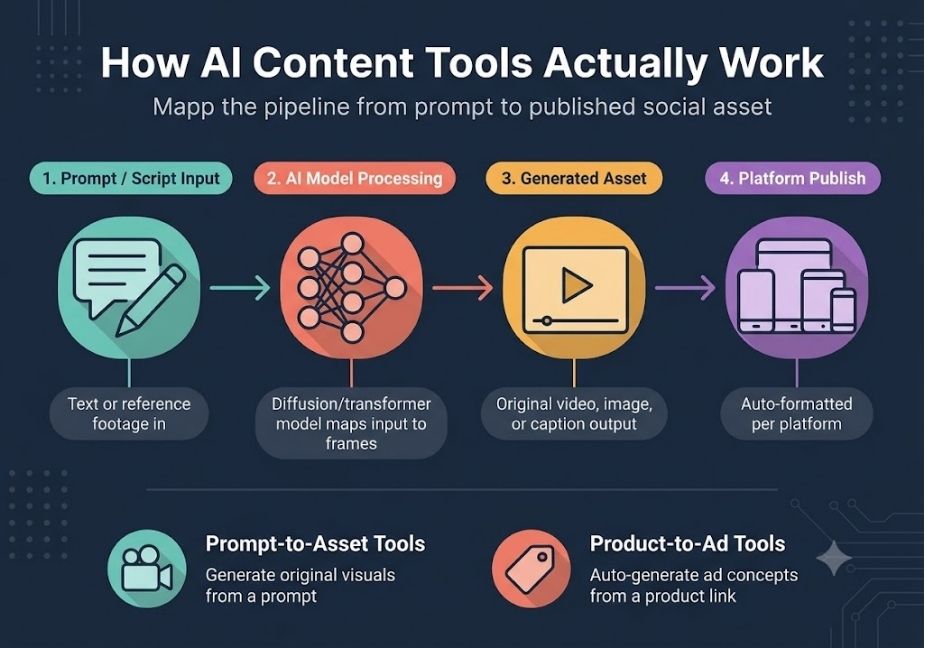
Text-to-video and text-to-image tools work by taking a text prompt and mapping it, through a trained diffusion or transformer model, to a plausible video or image sequence. OpenAI’s own text-to-video model documentation describes how the underlying system predicts frames from text and reference footage rather than stitching together stock clips.
- Prompt-to-asset tools (Runway, Firefly) generate original visuals from a text or image prompt.
- Product-to-ad tools (Predis.ai) take a product link or brief and auto-generate ad concepts, captions, and visuals.
- Avatar tools (HeyGen, Synthesia) turn a script into a spokesperson video in multiple languages.
- Repurposing tools (OpusClip, Descript) extract short clips from long-form video using engagement-pattern detection.
Did You Know? Marketing teams using AI report saving an average of several hours per week on content tasks, with the largest time gains showing up in repetitive formats like product descriptions and caption variations, according to multiple 2026 marketing-AI surveys.
Best AI Tools & Frameworks: A Comparison
| Tool | Best For | Video/Image | Notable Limitation |
|---|---|---|---|
| Canva Magic Studio | Fast on-brand graphics, no design skills needed | Image, basic video | Less suited to complex motion |
| Adobe Firefly | Commercially safe images (licensed training data) | Image | No native video ad assembly |
| Runway (Gen-3) | Cinematic, original video for brand films | Video | Slower workflow, needs experimentation |
| CapCut | TikTok/Reels-native short-form editing | Video | Free tier feels templated at scale |
| Predis.ai | Product-link-to-ad in minutes | Image + Video | Best for volume, not bespoke creative |
| HeyGen / Synthesia | Multilingual spokesperson-style ads | Video (avatar) | Can feel synthetic if overused |
Pro Tip: Match the tool to the funnel stage — Runway or Firefly for top-of-funnel brand story assets, CapCut or Predis.ai for mid-funnel volume testing, and avatar tools for multilingual or explainer-style ads.
Real-World Use Cases
- UGC-style ad testing at scale. Teams generate 10–20 variations of the same ad concept — swapping hooks, CTAs, and visuals — then run them simultaneously to find the top performer. Manual production of that many variants isn’t cost-effective, which is exactly why batch generation has become the standard for paid social.
- Multilingual spokesperson ads. Avatar tools let a single script become a dozen localized video ads without rebooking talent.
- Long-form-to-short-form repurposing. A single podcast or webinar becomes 5–10 short clips optimized for TikTok, Reels, and Shorts.
- Authenticity-first creative. VentureBeat’s coverage of AI-generated UGC-style ads outperforming polished studio content notes that slightly imperfect, “real”-feeling video often beats glossy studio ads on TikTok and Reels — a direct argument against over-polishing AI output.
- Rapid seasonal campaigns. Retailers use batch generation to spin up holiday or promo-specific ad sets in days instead of weeks, swapping in new offers and creative hooks without rebooking a shoot.
- Founder- or creator-led content at scale. Solo founders and small teams use avatar and captioning tools to maintain a near-daily posting cadence without a dedicated video editor on staff.
Step-by-Step: Building an AI Social Content Workflow
- Define the asset type first — brand film, UGC-style ad, or short-form clip — before picking a tool.
- Draft the script or prompt with your own product details and brand voice notes, not a generic template.
- Generate 5–10 variations using a batch-capable tool (Predis.ai, VEED.io) rather than a single “best guess” asset.
- Run a human brand-review pass — check tone, claims accuracy, and anything that reads as obviously synthetic.
- Publish and test across platforms, tracking engagement separately from click-through, since AI-labeled content can get clicks but lose trust.
Common Mistakes and How to Avoid Them
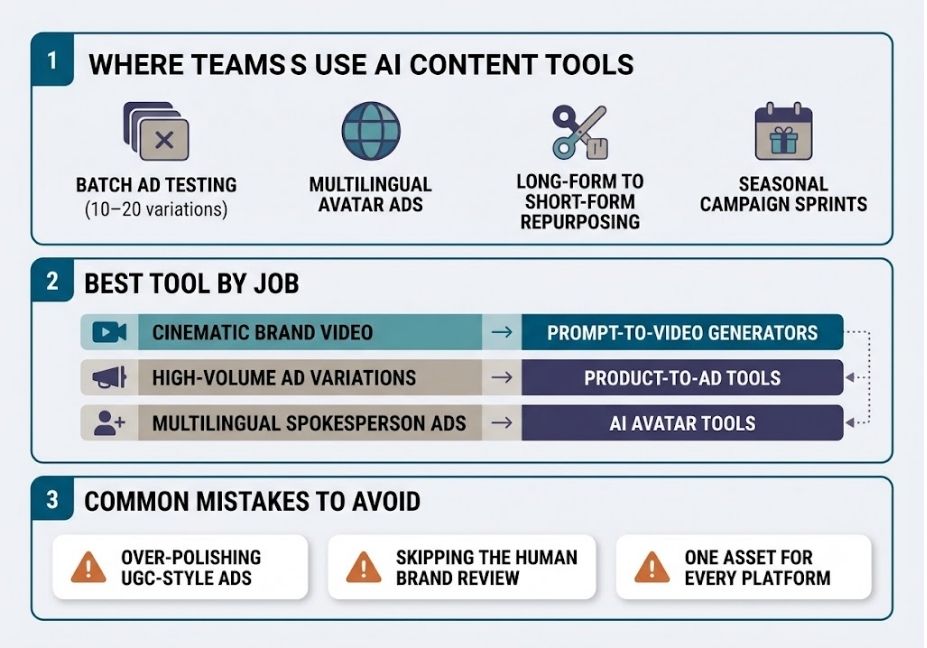
- Treating one tool as a full stack. Video generators aren’t caption writers, and avatar tools aren’t repurposing engines — most real workflows combine two or three tools.
- Skipping the brand-review pass. Teams that publish AI output without editorial review see more inconsistency in tone and, in some cases, factual errors in captions.
- Over-polishing UGC-style ads. Studio-quality gloss on a UGC-format ad undercuts the authenticity the format depends on.
- Ignoring audience skepticism. When audiences suspect content is AI-generated, engagement can drop noticeably — disclosure and tone matter as much as the tool itself.
- Using one prompt for every platform. A script tuned for a 30-second TikTok rarely works unedited as a LinkedIn video or an Instagram Reel — resize, re-cut, and re-caption per platform rather than exporting one asset everywhere.
- Chasing every new tool. Teams that constantly switch platforms lose the prompt libraries, brand presets, and template history built up in their current stack — consolidating around two or three tools usually beats chasing the newest release.
What Practitioners Are Saying
Outside of vendor blog posts, marketers debating AI ad disclosure on Reddit tend to agree on one thing: the tool matters less than the review process wrapped around it. Teams that skip human review are the ones reporting inconsistent brand voice and occasional factual slip-ups in AI-written captions.
FAQ — People Also Ask
There’s no single “best” tool — Predis.ai and VEED.io lead for fast, high-volume ad variations, while Runway leads for cinematic, brand-film-quality video. Pick based on whether you need volume or polish.
Yes, several tools offer free tiers — CapCut is free for short-form editing, and most others (Predis.ai, HeyGen) offer limited free plans before moving to paid tiers starting around $16–$32/month.
Not inherently — but audiences that suspect content is AI-generated do engage less, so authenticity and disclosure matter more than which tool produced the asset.
A video generator (Runway, Firefly) creates original scenes or visuals from a prompt. An avatar tool (HeyGen, Synthesia) turns a script into a spokesperson-style video with a synthetic presenter, often in multiple languages.
Reported savings vary widely by source and content type, but most 2026 marketing surveys put weekly time savings in the range of several hours per marketer, with the biggest gains in repetitive formats like captions and product-description variants.
Conclusion
The AI tool social media content creation posts video ads 2026 landscape isn’t short on options — it’s short on frameworks for choosing between them. Match the tool to the funnel stage, keep a human brand-review pass in every workflow, and resist over-polishing UGC-style formats that depend on feeling real. Bookmark this guide and explore more AI workflow breakdowns at agentiveaiagents.com.