

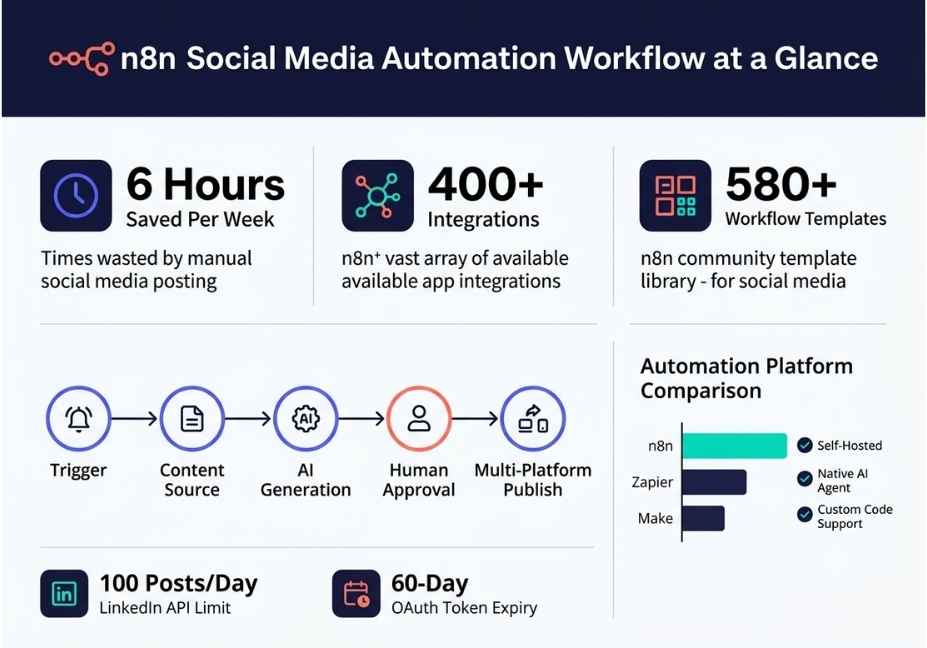
Every week, social media managers waste about six hours on tasks that can be done in seconds via a properly constructed n8n-based social media automation process. Manual cross-post, caption rewrites that differ based on the platform, waiting for approvals, and memorising when to post are all examples of repetitive, low value work which consumes creative energy and slows teams down.
What sets n8n apart from other automation solutions is how n8n sees your publishing pipeline as a programmable AI-first workflow and not just a scheduling software. Because n8n has native language model integration built into its AI Agent node, you can run an OpenAI’s GPT-4o call directly inside of your content pipeline. Therefore, n8n doesn’t just post your content on time; it also researches topics, drafts optimised copy by platform, waits for a person to approve and then posts your content without anyone having to touch a keyboard.
You will learn the details of using n8n for this purpose in this guide step by step. Additionally, you will learn about the actual breakdowns that occur when beginner workflows go into production; what tools are used by experienced teams; and how to build a pipeline that can scale successfully.
What Is n8n? (And Why Does It Matter for Social Media Automation)
n8n, pronounced “n-eight-n,” stands for nodemation a combination of Node.js and automation. It is a fair-code, self-hostable workflow automation platform built on a visual, node-based canvas. Because you can self-host it, your credentials and content data stay on your own server. That is a critical advantage for agencies and teams working with client social accounts.
According to n8n’s official GitHub repository, the platform currently ships with over 400 built-in integrations, native AI capabilities, and support for both cloud and self-hosted deployments. Furthermore, it uses a Sustainable Use License meaning you can use it freely for internal purposes without paying per task or per automation run.
At its core, n8n works through nodes. Each node is a building block. Trigger nodes start the workflow. Action nodes perform operations calling an API, generating content, sending a Slack message. Transform nodes reshape data as it flows from one step to the next. Together, these nodes form a directed graph that moves data automatically from source to destination.
For social media specifically, this means you can build a pipeline that:
Pulls approved content from a Google Sheet or Notion database
Generates platform-specific copy using OpenAI’s GPT-4o API
Routes that copy through a Slack approval step
Publishes to LinkedIn, X (Twitter), Instagram, and Facebook in parallel
Logs results to Airtable and alerts your team on any failure
That is the complete picture of what an n8n social media automation workflow looks like in production.
How Does n8n Social Media Automation Work?
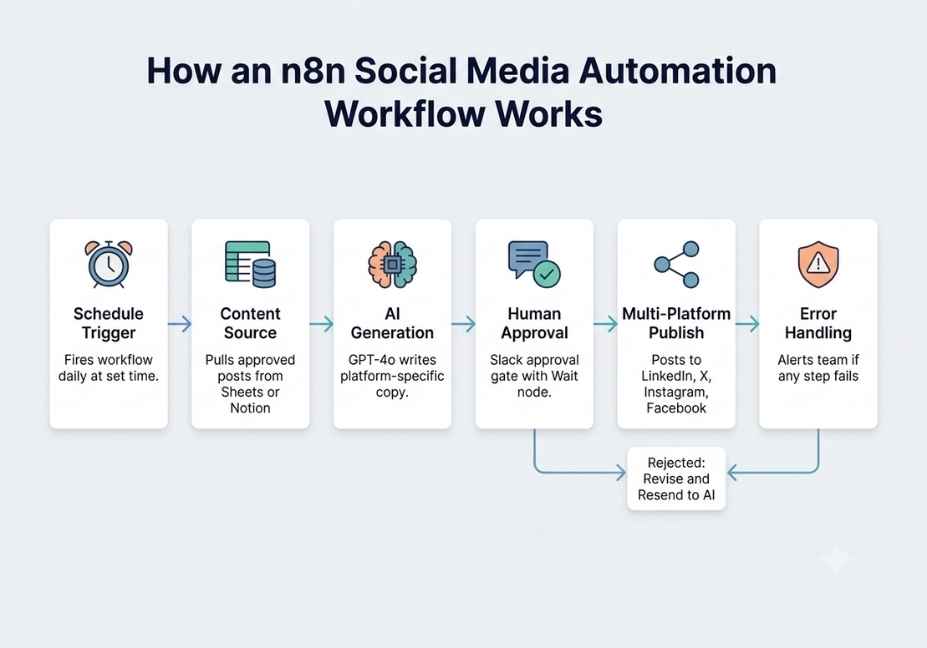
To understand how n8n social media automation works, it helps to think in layers. Each layer of the workflow handles a distinct responsibility. Because the layers are modular, you can swap out any single component without rebuilding the entire pipeline.
Layer One : The Schedule Trigger
The Schedule Trigger node is where every social media automation workflow begins. It fires the workflow at a fixed interval daily at 8:00 AM, hourly, or on a custom cron expression. Importantly, it requires no external service to function. It runs reliably even on a lightweight self-hosted VPS.
Think of this trigger as the alarm clock for your entire content pipeline. Once it fires, the workflow wakes up and begins pulling data from your content database.
Layer Two : The Content Source
After the trigger fires, the workflow connects to your content database. Most teams use Google Sheets for simplicity, but Notion and Airtable work equally well at agency scale. The node fetches only rows where the Status column equals “Approved” and the scheduled date matches today’s date. Because of this filter, only pre-approved content ever enters the active pipeline.
This two-column filter Status and ScheduledDate is one of the most important safeguards in the entire workflow. Without it, the pipeline would publish everything in the database, regardless of whether it had been reviewed.
Layer Three : AI Content Generation
This layer is where most beginner workflows stop short. Instead of posting raw copy directly from a spreadsheet, a production-grade pipeline routes each content brief through an LLM call. n8n’s native OpenAI node or the more powerful AI Agent node backed by LangChain’s orchestration layer accepts the content brief as input and returns platform-specific copy as structured JSON output.
A well-designed system prompt tells the model the character limits for each platform, the brand voice and tone, and the required output format. For example, LinkedIn posts should be 150 to 200 words with three hashtags. X posts should be punchy and under 280 characters. Instagram captions can be longer and more personal. Because each platform has different audience expectations, the AI layer is what makes multi-platform publishing actually work at scale.
Layer Four : The Human Approval Gate
Even with a reliable LLM, human oversight before publishing is essential. Therefore, every production-grade n8n social media workflow should include a Slack-based approval step. The workflow sends the AI-generated copy to a designated Slack channel, where a team member can click Approve or Reject. n8n’s Wait node pauses execution for up to four hours while waiting for that decision.
If no one responds within the timeout window, the workflow defaults to Reject and logs the post as “Pending Review” in your content database. This means nothing goes live without human sign-off, even if your team misses the Slack notification.
Layer Five : Multi-Platform Publishing
Once a post is approved, the workflow fans out to each platform in parallel. n8n has native nodes for LinkedIn, X (Twitter), and Facebook. For Instagram and TikTok, you use the HTTP Request node pointing to their Graph APIs, or a third-party publisher service such as Blotato or Upload-Post. Each publishing node receives the platform-specific copy field from the AI output via JSON reference.
After publishing, a final Google Sheets or Airtable node updates the Status column to “Published” and logs the timestamp. This prevents duplicate publishing on the next trigger run.
Layer Six : The Error Trigger Sub-Workflow
Finally, every workflow needs a safety net. An Error Trigger sub-workflow fires automatically whenever any node in the main workflow throws an exception. It sends a Slack notification to your errors channel with the Execution ID, the name of the failed node, and the error message. This makes silent failures impossible because your team is alerted immediately, not hours later when someone notices a post was missed.
Four Real-World n8n Social Media Automation Use Cases
Because n8n is open-source and community-driven, the n8n workflow template library hosts over 580 social media automation templates built by real developers. Here are four patterns that teams are using successfully in 2026.
Use Case One : Google Trends to LinkedIn Autoposter
This workflow runs daily. First, it polls the Google Trends API via SerpAPI to find high-volume trending topics in your niche. Then, it passes the winning topic to Perplexity AI for real-time research. Finally, it sends the research brief to GPT-4o for LinkedIn copy generation. The result is a daily thought-leadership post that is grounded in current data without any manual research.
This workflow is particularly effective for SaaS brands, consultancies, and content marketing teams that need to stay visible on LinkedIn without dedicating a team member to daily posting.
Use Case Two : Google Drive Video to Multi-Platform Publisher
A Watch Folder trigger monitors a Google Drive directory for new video uploads. On detection, the workflow extracts an audio transcript using OpenAI’s Whisper API. Next, it generates platform-specific descriptions for YouTube, Instagram Reels, TikTok, and LinkedIn Video. It then publishes to all four platforms simultaneously and logs the post URLs to Airtable.
This workflow eliminates a common bottleneck for video content creators: the hours spent manually reformatting and reposting the same video across channels.
Use Case Three : Content Calendar to Seven-Platform Agency Publisher
This is the most sophisticated pattern in common use. The workflow pulls from a Notion content database on a fifteen-minute polling schedule. An OpenAI node optimises captions per platform. An IF node routes by content type separating video, image, and text into different publishing branches. A Slack approval gate sits before any content goes live. An Error Trigger sub-workflow handles rate limit failures with exponential backoff, retrying failed nodes up to three times before alerting the team.
According to community-built templates on n8n.io, this approach can reduce manual content distribution work by up to 80% for marketing agencies managing multiple client accounts.
Use Case Four : RSS Feed to Cross-Post Repurposing
This workflow monitors RSS feeds from target industry publications. It extracts article summaries, rewrites them as social commentary using an AI Agent node, and schedules posts 48 hours into the future. Because the content is always grounded in real publications, it reads as timely commentary rather than generic AI output. This is especially effective for newsletter brands and analyst accounts that want to stay reactive to industry news automatically.
Step-by-Step: How to Build an n8n Social Media Automation Workflow from Scratch
Before you begin, make sure you have either n8n Cloud on the Pro tier or a self-hosted n8n instance running. For self-hosting guidance and licensing terms, refer to n8n’s Sustainable Use License documentation directly.
Step One : Add a Schedule Trigger Node
Open your n8n canvas. Click the plus button and add a Schedule Trigger node. Set it to run every day at 08:00. This is the single entry point for the entire workflow. Everything downstream depends on this node firing reliably.
Step Two : Connect Your Content Database
Add a Google Sheets node. Set the operation to Get Rows. Apply a filter so the node only returns rows where Status equals “Approved.” This ensures that only editorially cleared content enters the pipeline on each run.
Step Three : Filter for Today’s Scheduled Posts
Add a Code node immediately after the Google Sheets node. Inside it, compare each row’s scheduledDate field against today’s date in ISO format. Return only the rows that match. Because this node runs before any API calls, it prevents wasted OpenAI credits on content that is not due to publish yet.
Step Four : Generate AI Copy with the OpenAI Node
Add an OpenAI node. Select the model gpt-4o. Pass the content brief from the upstream JSON item as the user message. Set the system prompt to your brand voice guidelines and formatting requirements. Request structured JSON output with a copy field, a hashtags array, and an image prompt field. Because you are requesting structured output, downstream nodes can reference these fields reliably without parsing.
Step Five : Add a Slack Approval Gate
Add a Slack node followed immediately by a Wait node. The Slack node sends the generated copy to your content review channel with Approve and Reject buttons. The Wait node pauses execution for up to four hours. If no response arrives, the workflow defaults to Reject and updates the content database accordingly.
Step Six : Route Approved Posts to Platform Publishing Nodes
On the Approve branch, add your publishing nodes. Use native LinkedIn, X (Twitter), and Facebook nodes. For Instagram, use an HTTP Request node pointing to the Instagram Graph API. Pass the platform-specific copy field from the JSON output to each node’s message content parameter. For parallel publishing, use a Merge node downstream to collect all responses before updating your database.
Step Seven : Update Your Content Database
Add a Google Sheets or Airtable node at the end of the Approve branch. Set the operation to Update Row. Change the Status column to “Published” and write the current timestamp to a PublishedAt column. This update is the safeguard that prevents duplicate posts on subsequent trigger runs.
Step Eight : Build Your Error Trigger Sub-Workflow
Create a completely separate workflow. Add an Error Trigger node as the entry point this is a special trigger that fires automatically whenever any node in your main workflow throws an unhandled exception. Connect it to a Slack node that sends the Execution ID, the workflow name, and the error message to your errors channel. Activate this sub-workflow before activating the main one.
One more critical point: store every API key OpenAI, LinkedIn, Twitter, Instagram, Airtable in n8n’s encrypted Credential Vault. Never hardcode credentials inside HTTP Request node headers. In n8n’s execution logs, values hardcoded directly into node parameters are stored in plain text and visible to anyone with instance access.
n8n vs. Zapier vs. Make for Social Media Automation: An Honest Comparison
When choosing between automation tools for social media, three questions matter most: Do you need data residency? Do you need native AI integration? And what does cost look like at scale?
n8n is the only option among the three that supports full self-hosting, which means your content data and client credentials never touch a third-party server. That matters considerably if you work with regulated industries or GDPR-sensitive clients.
Zapier is simpler for beginners because its interface requires no technical knowledge. However, it charges per task rather than per workflow execution, which means costs scale linearly with volume. Furthermore, Zapier has no native LLM node AI integration requires external webhooks or third-party steps, which adds both cost and latency to the pipeline.
Make (formerly Integromat) sits between the two. It supports complex branching logic and visual scenario building, but like Zapier it is cloud-only, and its AI integrations remain limited compared to n8n’s native AI Agent node backed by LangChain.
For technical teams that need custom LLM logic, conditional routing, sub-workflow architecture, or high execution volume without per-task pricing, n8n is the clear choice. For solo creators who need a simple two-step automation with no coding, Zapier remains the easiest entry point.
Common n8n Workflow Mistakes and How to Avoid Them
Even experienced developers make avoidable mistakes when building social media automation with n8n. Here are the four that cause the most production failures.
Mistake One : No Error Trigger Workflow
The most common failure mode is also the most preventable. If a publishing node fails silently because a LinkedIn API credential expired, or because an HTTP Request got a 429 rate limit response the workflow simply stops. Without an Error Trigger sub-workflow, you will not know a post was missed until someone notices the silence hours later. Always build the error handler before you go live.
Mistake Two : Hardcoded API Credentials
Credentials stored directly in HTTP Request node parameters are written to n8n’s execution log in plain text. Because execution logs are accessible to anyone with instance admin access, this represents a serious security exposure, especially for agency deployments. Use the Credential Vault for every external service key.
Mistake Three : No Rate Limit Handling
LinkedIn’s API allows approximately 100 posts per day per account. X’s free developer tier restricts write operations severely. Instagram’s Graph API enforces strict call frequency limits. Because n8n workflows can execute nodes in rapid succession, adding a Wait node set to five to ten seconds between consecutive platform calls prevents the 429 rate limit errors that silently kill mid-execution workflows.
Mistake Four : No AI Output Validation
Without a validation step after the AI node, GPT-4o can return copy that is too long for a given platform, malformed JSON that downstream nodes cannot parse, or content that ignores brand voice instructions entirely. Therefore, always add a Code node immediately after the OpenAI node to check character length against platform limits, verify that expected JSON fields are present, and re-route to the AI node with a corrected prompt if validation fails. Set a maximum retry count of two to prevent infinite loops.
As an additional note, community members in Reddit’s r/n8n report that execution volume spikes far faster than expected after a team starts building workflows. One user reported consuming 10,000 executions in a single week after onboarding their team. Plan your execution tier accordingly and monitor the Executions dashboard before scaling to multiple client accounts.
FAQ People Also Ask
What is an n8n social media automation workflow?
An n8n social media automation workflow is a sequence of connected nodes that automatically handles every step of your content publishing process from pulling approved posts out of a database to generating AI-written copy, routing through a human approval step, publishing to multiple platforms simultaneously, and logging results. Because n8n runs on your own server, your content data and credentials stay on your own infrastructure. The workflow runs on a schedule without manual intervention.
How does n8n social media automation work step by step?
First, a Schedule Trigger fires the workflow at your chosen interval. Second, a Google Sheets or Notion node fetches today’s approved posts. Third, an OpenAI node generates platform-optimised copy for each post. Fourth, a Slack node sends the copy for human review, and a Wait node pauses until someone approves or rejects it. Fifth, approved posts are published to LinkedIn, X, Instagram, and other platforms through native nodes or HTTP Requests. Finally, the content database is updated and any failures are reported via an Error Trigger sub-workflow. This entire process runs automatically without anyone needing to log in.
Is n8n better than Zapier for social media automation?
For technical teams, yes. n8n supports self-hosting for data residency, native AI Agent nodes backed by LangChain, full JavaScript execution in Code nodes, and execution-based pricing that becomes significantly cheaper at high volume. Because Zapier charges per task and has no native LLM integration, its costs and capabilities both hit ceilings quickly for production social media pipelines. Zapier is easier for beginners who only need simple two-step automations and have no technical background.
Can n8n post to multiple social media platforms at the same time?
Yes. n8n’s parallel branching architecture allows a single trigger to fan out to LinkedIn, X, Instagram, Facebook, TikTok, and Threads simultaneously. A Split Out node creates separate execution paths for each platform. Because each branch runs independently, a failure on one platform for example, an Instagram API error does not prevent the other platforms from receiving the post.
How do I add AI content generation to my n8n workflow?
Add n8n’s native OpenAI node between your content source and your approval gate. Pass the content brief via JSON reference as the user message. Set the system prompt to include your brand voice guidelines, character limits per platform, and a request for structured JSON output. For research-backed content, chain a Perplexity AI HTTP Request before the OpenAI node to give the model current information before it writes. Always add a validation Code node after the AI node to catch malformed or oversized output before it reaches the approval step.
What causes n8n social media workflows to fail in production?
The most common failures are: missing Error Trigger sub-workflows that leave failed executions silent; API rate limit errors from posting too quickly across platforms; AI-generated copy that exceeds character limits and gets rejected by the platform API; and OAuth token expiry on social platform credentials. LinkedIn tokens expire every 60 days and require manual renewal. Instagram Graph API tokens expire even more frequently without a token refresh workflow in place. Building explicit retry logic, output validation, and token refresh reminders for each of these failure modes before launch is the single most important thing you can do to keep the workflow stable.
Conclusion
A production-grade n8n social media automation workflow is not simply a scheduler that fires posts on time. Instead, it is a full agentic content pipeline one that generates, validates, routes for approval, publishes across platforms, handles failures, and logs results entirely without manual intervention. Because n8n gives you native LLM integration, self-hosting, and a visual canvas for composing complex logic without backend code, it is the most capable option available to technical teams in 2026.
The three things that separate a workflow that holds up at scale from one that breaks within a week are these: a Slack-based human approval gate before any post goes live, an Error Trigger sub-workflow that makes silent failures impossible, and AI output validation that catches oversized or malformed content before it reaches a platform API.
Start with the schedule trigger to Google Sheets to OpenAI to Slack approval to multi-platform publish pattern. Get that stable first. Then layer in trend research via Perplexity AI, image generation via DALL-E, and performance logging to Airtable. Build incrementally, test each layer, and you will have a pipeline that runs reliably for months.
Explore more step-by-step AI agent and workflow automation tutorials at agentiveaiagents.com.



