Most “paste a link, get notes” tools hide a real engineering problem behind a clean UI. For example, a 90-minute YouTube video can produce a transcript well past the context window most models handle in one pass. As a result, every AI tool that generates notes from YouTube videos is quietly running a chunking strategy, a retrieval step, and a summarization prompt chained together not a single API call. Retrieval-Augmented Generation (RAG) patterns, originally built for document Q&A, turn out to be exactly the right lens for this problem. In fact, if you’ve used LangChain, OpenAI’s GPT-4, or Anthropic’s Claude for anything else, the pieces here will look familiar.
This guide breaks down that pipeline, then shows you how to build a working version yourself something the vendor landing pages ranking for this keyword conspicuously skip.
What Is an AI YouTube Notes Generator?
An AI YouTube notes generator is a tool that pulls a video’s caption track or audio, converts it to text, and passes that text through an LLM to produce a structured summary headings, bullet points, and often timestamps. In other words, it’s closer to a transcript extraction and summarization agent than a single “note-taking” model.
Because these tools operate on real user data, it’s worth noting that AI notetaker tools now raise real ethical questions (Wikipedia), including hallucination risk and consent concerns that apply just as much to video-note tools as to meeting-note tools like Otter.ai.
How Does It Work? (Architecture)
The core loop behind nearly every AI tool that generates notes from YouTube videos looks like this:
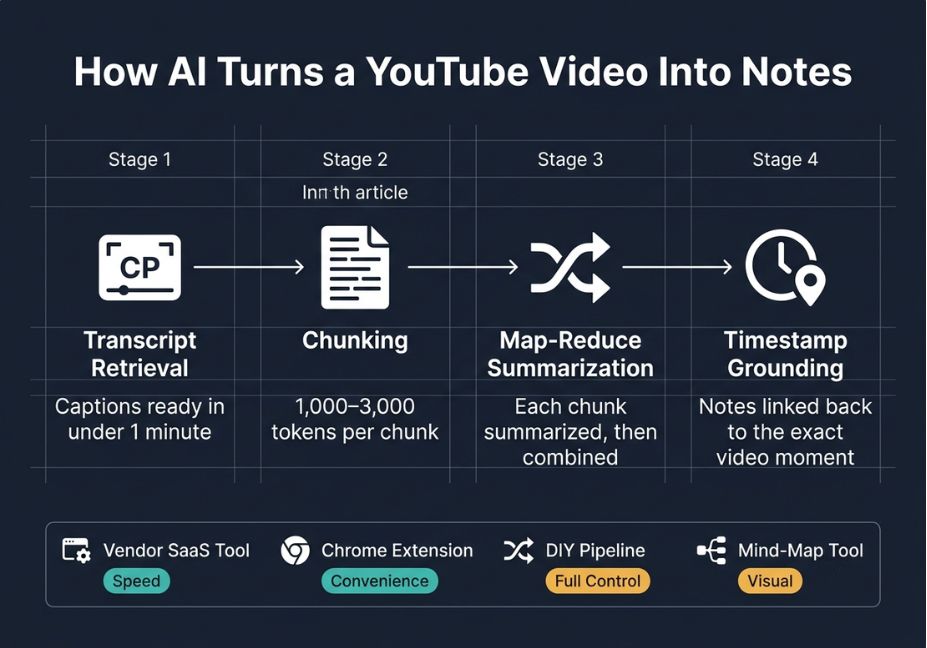
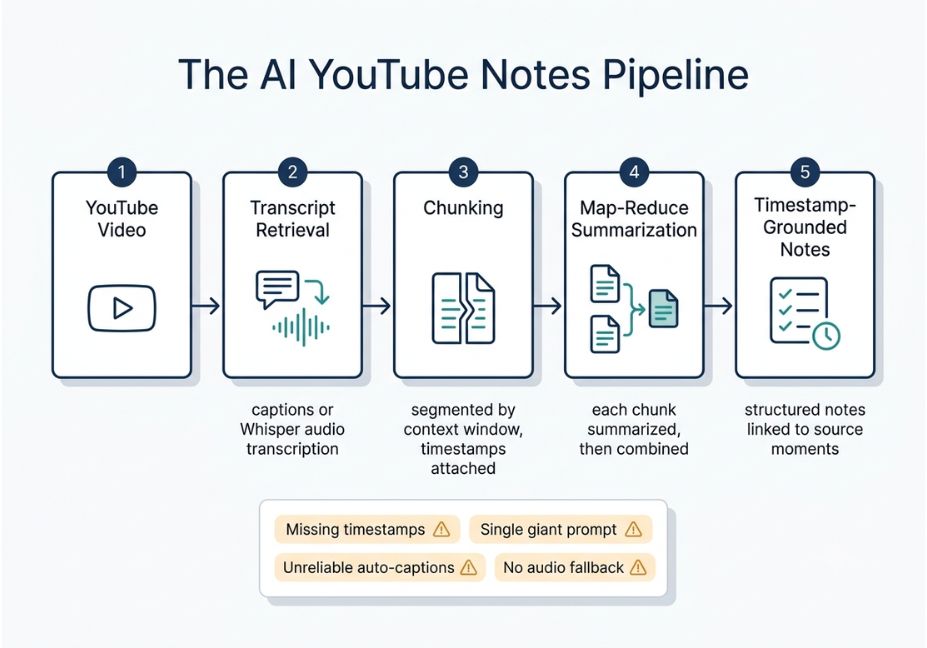
- Transcript retrieval pull existing YouTube captions where available, or transcribe audio with a speech model like Whisper when captions are missing or auto-generated captions are unreliable.
- Chunking split the transcript into overlapping segments sized to the model’s context window, usually 1,000–3,000 tokens per chunk, with timestamp metadata attached to each.
- Summarization pass each chunk is summarized individually (the map step), then the chunk-summaries are combined into one final structured note (the reduce step) the classic map-reduce summarization pattern.
- Timestamp grounding the final notes reference the timestamp of the chunk each point came from, so readers can jump back to the source moment in the video.
Technical Note: Videos without captions, or with poor auto-captions, are the single biggest failure point. If step 1 produces a low-confidence transcript, every downstream summary inherits that error garbage in, confidently-worded garbage out.
Common Use Cases
Because the underlying pipeline is general-purpose, the same architecture supports several very different audiences:
- Students turning long lecture videos into study guides and flashcard-ready summaries.
- Researchers building a searchable knowledge base from conference talks or interviews, often backed by a vector database for semantic search across many videos.
- Content teams repurposing long-form video into blog outlines, newsletter drafts, or short-form clips.
- Sales and support teams pulling key claims out of product demo or training videos without rewatching them.
Best Tools and Approaches Compared
| Approach | Best for | Chunking transparency | Timestamp accuracy | Build-your-own option |
|---|---|---|---|---|
| Vendor SaaS tool (paste-a-link UI) | Non-technical users, speed | None black box | Varies by tool | No |
| Chrome extension summarizer | Quick screening while browsing | None | Low, often no timestamps | No |
| DIY pipeline (transcript API + LLM) | Developers, custom workflows | Full control | High you define it | Yes |
| Mind-map / visual note tool | Visual learners | Partial | Medium | No |
Did You Know? Captioned videos typically reach a usable transcript in well under a minute, since the caption track already exists. However, videos without captions force a slower audio-transcription step first, which is why processing time varies so much between tools.
Step-by-Step: Build Your Own YouTube Notes Generator
This is the part most competitor articles skip entirely. Below is a minimal, working pipeline using an open-source youtube-transcript-api library (GitHub) for retrieval and an LLM for summarization.
python
from youtube_transcript_api import YouTubeTranscriptApi
import requests

def get_transcript(video_id):
    segments = YouTubeTranscriptApi.get_transcript(video_id)
    return segments  # list of {text, start, duration}

def chunk_transcript(segments, max_chars=3000):
    chunks, current, current_len = [], [], 0
    for seg in segments:
        current.append(seg)
        current_len += len(seg["text"])
        if current_len >= max_chars:
            chunks.append(current)
            current, current_len = [], 0
    if current:
        chunks.append(current)
    return chunks

def summarize_chunk(chunk_text, start_ts):
    prompt = f"Summarize this transcript segment (starts at {start_ts}s) into 3-5 bullet points:\n\n{chunk_text}"
    response = requests.post(
        "https://api.anthropic.com/v1/messages",
        headers={"content-type": "application/json"},
        json={
            "model": "claude-sonnet-4-6",
            "max_tokens": 400,
            "messages": [{"role": "user", "content": prompt}]


    return response.json()["content"][0]["text"]

def generate_notes(video_id):
    segments = get_transcript(video_id)
    chunks = chunk_transcript(segments)
    notes = []
    for chunk in chunks:
        text = " ".join(s["text"] for s in chunk)
        start_ts = chunk[0]["start"]
        notes.append(summarize_chunk(text, start_ts))
    return "\n\n".join(notes)
This same structure works with OpenAI’s chat completions endpoint (docs) if you’d rather call GPT-4 instead simply swap the request block and keep the chunking and timestamp logic unchanged. For chunks that need broader context than a single map-reduce pass allows, the original Retrieval-Augmented Generation paper (arXiv) describes the retrieval pattern this whole approach loosely follows: retrieve relevant context, then generate grounded output from it.
Pro Tip: Store each chunk’s summary and timestamp in a lightweight vector database even a small tool like Pinecone or a simple in-memory list works for one video. This turns your notes generator into a searchable Q&A tool over the video, using semantic search, with almost no extra code.
What’s the fastest way to turn a YouTube video into notes?
For a single captioned video, the fastest path is a vendor tool with a paste-a-link interface most return notes in under a minute. For repeated or bulk use, though, the DIY pipeline above is faster overall because it skips per-video upload limits and rate caps common on free tiers.
Common Mistakes and How to Avoid Them
- Skipping timestamp metadata during chunking. Once you flatten the transcript into raw text, you can’t get accurate timestamps back — attach them at chunk-creation time, not after summarization.
- One giant summarization call. Feeding a two-hour transcript into a single prompt truncates silently on many APIs; the model summarizes whatever fits and drops the rest without warning.
- Trusting auto-captions blindly. Auto-generated captions on jargon-heavy technical videos are noticeably less reliable, so always spot-check notes generated from auto-captions against the source video.
- No fallback for caption-less videos. Budget for an audio-transcription step, such as Whisper, as a fallback rather than an afterthought.
Technical Disclaimer: Framework and API details evolve quickly. Code examples in this article reflect the Anthropic Messages API and youtube-transcript-api as of mid-2026. Always check the official docs for the latest interface before shipping.
What Developers Are Saying
Developer discussion around this workflow tends to converge on one point: summarization quality is rarely the bottleneck transcript quality is. Threads on developer forums repeatedly flag two issues in particular: auto-captions failing on accented speech or dense jargon, and long videos silently losing content to context-window truncation when a chunking step is skipped.
FAQ People Also Ask
It retrieves the video’s transcript from captions or audio transcription, splits that transcript into chunks sized to the model’s context window, summarizes each chunk, and merges the results into structured, timestamp-grounded notes.
Not directly. A base LLM chat interface can’t fetch video content on its own, so it needs a transcript pipeline, or a plugin that provides one, feeding it text. The summarization itself is the easy part.
Accuracy tracks transcript quality first and model quality second. Clean captions on clearly-spoken videos produce reliable notes, while auto-captions on noisy or jargon-heavy audio carry real hallucination risk downstream.
Yes. A transcript API, a simple chunking function, and a few summarization calls to any LLM API OpenAI, Anthropic, or otherwise are enough for a working version. See the code example above.
Only if the tool falls back to audio transcription, such as Whisper. Tools that rely solely on the existing YouTube caption track will fail or produce empty output on caption-less videos
Conclusion
An AI tool to generate notes from YouTube videos is, architecturally, a small RAG-style pipeline: transcript retrieval, chunking, map-reduce summarization, and timestamp grounding. Understanding that pipeline, rather than just the paste-a-link UI, is what lets you evaluate vendor tools critically or build your own in an afternoon. Bookmark this guide and explore more agentic AI workflow tutorials at agentiveaiagents.com.