
Most EdTech AI tools fail in classrooms not because the underlying model is weak, but because the system is poorly grounded in institutional context. A teacher asking a generic chatbot to “create a lesson plan aligned to Common Core 6th grade ELA” gets a plausible-looking output that may cite the wrong standard, miss differentiation requirements, or simply hallucinate curriculum scaffolding that doesn’t exist. That’s the problem Microsoft 365 Copilot for Education was architecturally designed to solve.
With its December 2026 academic release at $18/user/month and a free-tier Copilot Chat available to all M365 Education license holders Microsoft has embedded a multi-agent AI workflow directly into the tools educators already use: Word, Teams, OneNote, PowerPoint, and now dedicated education-specific agents like Teach and Study and Learn. The system uses organizational data as a retrieval layer, not just broad web knowledge, which changes the quality ceiling dramatically.
Here’s a complete technical and practical breakdown of how it works, where it excels, and where the orchestration layer can still break.
What Is Copilot for Education?
Microsoft 365 Copilot for Education is an AI-powered assistant suite built on top of large language models (currently GPT-4 class) and grounded in an institution’s own Microsoft 365 tenant data. It is not a standalone chatbot. It is a prompt-grounded, multi-agent system integrated across Microsoft 365 apps, with retrieval from institutional files, OneNote pages, Teams meeting transcripts, and SharePoint content.
The key architectural distinction: unlike a generic LLM call, every Copilot response in the education context is filtered through the organization’s existing security, compliance, identity, and privacy policies including FERPA and COPPA safeguards. Organizational data is isolated within the tenant and is never used to train foundation models.
How the Teach Agent Works: Architecture Under the Hood
The Teach agent is the flagship education-specific Copilot component. Launched in late 2026, it functions as a purpose-built AI agent with a guided interface inside the Microsoft 365 Copilot app consolidating lesson planning, resource generation, and assessment drafting into a single orchestration layer.
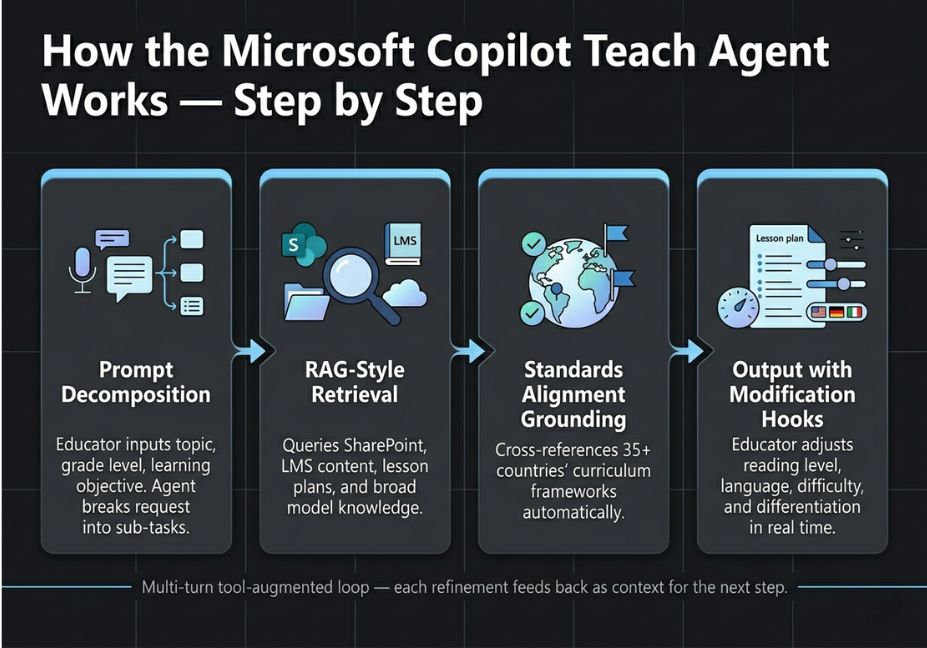
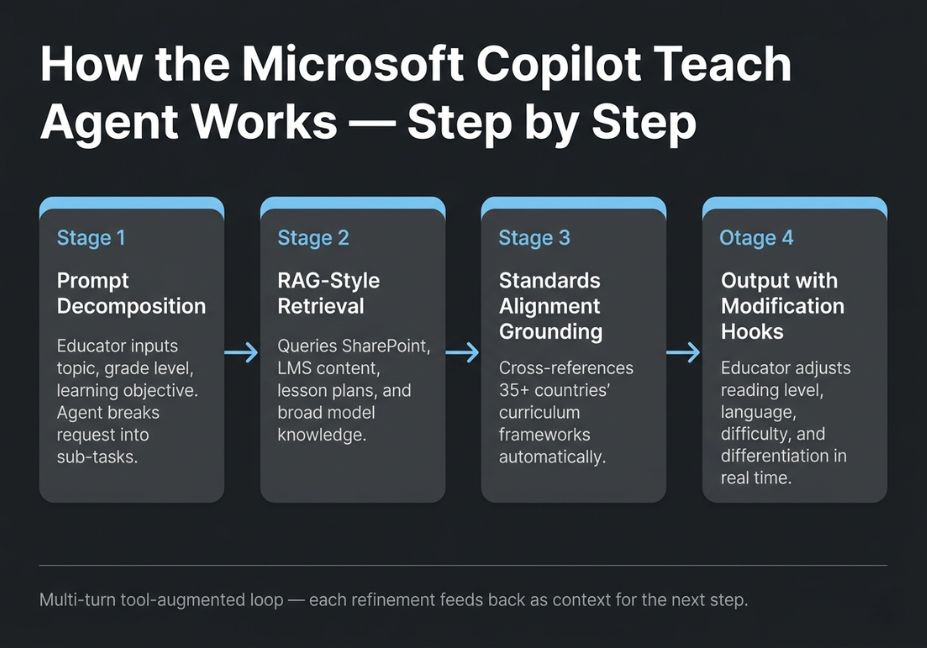
When an educator inputs a topic, grade level, and learning objective, the Teach agent executes a multi-step workflow:
- Prompt decomposition The agent breaks the request into sub-tasks: standards lookup, content scaffolding, formative assessment generation.
- RAG-style retrieval It queries the institution’s connected data (existing lesson plans, SharePoint resources, LMS-linked content) alongside its broad model knowledge.
- Standards alignment grounding The agent cross-references against a database covering over 35 countries’ curriculum frameworks, mapping output to the correct standards automatically.
- Output generation with modification hooks The educator receives a draft with in-line controls to adjust reading level, tone, difficulty, language, and differentiation parameters.
Architect’s Note: The Teach agent is not a simple one-shot prompt. It is a multi-turn, tool-augmented loop meaning educators can iteratively refine output within the same session context, similar to a ReAct-style agent pattern where each refinement feeds back as context for the next generation step.
Key capabilities include:
- Lesson plans aligned to national/regional standards (35+ countries)
- Quiz, rubric, and learning activity generation
- Differentiated instruction variants (reading level, language, difficulty)
- Integration with Canvas, Moodle, and other LMS platforms via open-source agent samples
- Speaker Progress AI feedback for student speech coaching (now generally available)
Study and Learn: The Student-Facing Agent
While Teach targets educators, the Study and Learn agent is the student-side counterpart providing personalized, interactive learning support without exposing raw LLM output in an unguarded way.
The agent generates flashcards, fill-in-the-blank exercises, and concept explanations calibrated to the student’s request. Critically, educators retain control: the agent operates within parameters set at the institutional level, and AI feedback in tools like Speaker Progress must be reviewed by educators before it is surfaced to students.
This supervised agentic loop where the model proposes and the educator approves is the responsible AI design pattern Microsoft has embedded throughout the education offering.
Did You Know? According to Microsoft’s 2026 AI in Education Report, over 80% of respondents had already used AI for school. Yet the majority of institutions still lacked structured, compliant AI tools the gap Copilot for Education directly targets.
Pricing Tiers: Free vs. Academic Copilot
Understanding the two-tier structure is essential before deploying at scale.
| Feature | Copilot Chat (Free) | M365 Copilot Academic ($18/user/mo) |
|---|---|---|
| LLM access | GPT-4 class, web-grounded | GPT-4 class, org-data grounded |
| Teach agent | Limited / Chat only | Full guided interface |
| Study and Learn agent | Limited | Full |
| Researcher and Analyst agents | Not included | Included |
| Copilot Tuning | Not included | Included |
| LMS Integration (Canvas, Moodle) | Not included | Included (via open-source agents) |
| Enterprise Data Protection | Basic | Full Copilot Control System |
| Custom agent creation | Not included | Included |
| FERPA/COPPA controls | Included | Included (advanced) |
Copilot Chat is included at no additional cost with Microsoft 365 A1, A3, and A5 licenses, making it available to virtually every institution already in the Microsoft ecosystem. The academic offering announced in October 2026 targets institutions that need full organizational data grounding, custom agents, and advanced compliance controls.
Real-World Copilot for Education Use Cases
Early adoption data reveals where the system delivers measurable value and where it requires careful workflow design.
K–12 Lesson Planning at Scale Brisbane Catholic Education deployed Microsoft 365 Copilot across its system and reported significant time savings for educators and staff. Early usage data from Brisbane Catholic Education shows administrators cited the tool as freeing educators to focus on student engagement rather than content production the original intent of the agentic design.
Higher Education Research Support Florida State University integrated Copilot to support research workflows across departments. The Researcher and Analyst agents included in the academic M365 Copilot license provide structured information synthesis and data analysis inside familiar Microsoft 365 apps, reducing context-switching for faculty.
Student Career Readiness Microsoft is bundling a 12-month Microsoft 365 Premium + LinkedIn Premium Career package for eligible higher education students directly linking AI skill-building with workforce readiness. With 66% of hiring leaders indicating they wouldn’t hire candidates without AI skills (per the 2024 Work Trend Index), this positions Copilot as both a classroom tool and a credentialing signal.
Code and STEM Education GitHub Copilot Pro is available free for students and educators through the Student Developer Pack, extending the Copilot ecosystem into programming education without requiring the full M365 Copilot license.
Common Implementation Mistakes and How to Avoid Them
Even a well-architected system breaks in production if deployment decisions are poor. These are the most common failure modes observed in early adopter institutions.
1. Treating Copilot as a one-shot content generator The Teach agent is designed for iterative refinement. Educators who generate a lesson plan and publish it directly without the multi-turn adjustment flow miss the core value of the system and often get generic output. Treat the first draft as a scaffold, not a final product.
2. Skipping tenant data grounding Copilot Chat without organizational data grounding falls back to broad web knowledge. This means standards alignment may be incorrect or generic. The full M365 Copilot academic license, with SharePoint and LMS data connected, dramatically improves relevance and accuracy.
3. Disabling educator review in student-facing features The supervised loop in tools like Speaker Progress and Study and Learn exists for a reason. Institutions that bypass educator review gates to accelerate deployment introduce hallucination and bias risks directly into student-facing outputs. Always keep the human-in-the-loop layer active during the initial rollout phase.
4. Ignoring the Copilot Control System The Copilot Control System provides centralized management of agent usage, access controls, and usage analytics. Administrators who skip configuration end up with unmonitored agent usage across departments creating compliance exposure under FERPA/COPPA.
5. Under-prompting the Teach agent Vague inputs produce vague outputs. “Create a lesson plan for 6th grade math” will produce a generic result. “Create a 50-minute lesson plan for 6th grade mathematics on equivalent fractions, aligned to CCSS 6.NS.B.4, for a mixed-ability class with three ELL students, using a structured inquiry approach” will produce something deployable. The quality ceiling is largely a prompting problem, not a model problem.
Pro Tip: Build a shared prompt library for your institution using SharePoint or Teams. Consistent, high-quality prompt templates reduce variance in Teach agent output and create a reusable knowledge asset across departments.
What Developers and IT Administrators Are Saying
The reception from the technical side has been nuanced. Across discussions in the Microsoft Education Tech Community and EdTech communities, a few recurring themes emerge:
Institutions on A3/A5 licenses report smooth adoption for Copilot Chat, with the jump to paid academic M365 Copilot justified primarily by the LMS integration and custom agent capabilities. The open-source Canvas and Moodle agent samples released by Microsoft have been well-received by IT teams who want customization without building from scratch.
On the critical side: data grounding quality scales with how well-organized the institution’s SharePoint and Teams content is. Organizations with messy, unstructured document stores see noticeably lower output relevance a known limitation of RAG-style retrieval architectures across all vendors.
The Copilot Control System dashboard, which surfaces usage trends and user sentiment data, has been highlighted as a practical tool for demonstrating AI adoption ROI to leadership a common administrative pain point in education technology procurement.
Technical Disclaimer: Microsoft 365 Copilot for Education features and pricing are evolving rapidly. The information in this article reflects the December 2026 academic release and BETT 2026 announcements. Always verify current feature availability and regional pricing on the official Microsoft Education documentation.
FAQ People Also Ask
What is Microsoft Copilot for Education?
Microsoft Copilot for Education is an AI-powered suite built on GPT-4 class language models, integrated into Microsoft 365 apps (Word, Teams, OneNote, PowerPoint) for educational institutions. It includes the Teach agent for educators and the Study and Learn agent for students, with all data protected under FERPA/COPPA compliance frameworks. A free tier (Copilot Chat) is available to all M365 Education license holders; the full academic offering is $18/user/month.
How is Copilot for Education different from regular Microsoft Copilot?
The education version adds purpose-built AI agents (Teach, Study and Learn), standards alignment across 35+ countries, FERPA/COPPA compliance controls, LMS integrations with Canvas and Moodle, and educator review gates before AI feedback reaches students. Pricing is also discounted versus the enterprise $30/user rate.
Is Copilot for Education safe for student data?
Yes organizational data is isolated within the institution’s Microsoft 365 tenant and is never used to train Microsoft’s foundation models. The Copilot Control System provides centralized agent management and access controls. FERPA and COPPA compliance are built into the architecture, not bolted on.
Can students use Copilot for Education?
Students ages 13 and older are eligible for the academic Microsoft 365 Copilot offering at $18/user/month. The Study and Learn agent provides interactive learning support, and Copilot Chat is available at no additional cost with existing school accounts. Higher education students also receive a free GitHub Copilot Pro license through the Student Developer Pack.
What is the Teach agent in Microsoft 365 Copilot?
The Teach agent is a pre-built AI agent inside Microsoft 365 Copilot designed for educators. It generates standards-aligned lesson plans, quizzes, and rubrics based on topic, grade level, and learning objectives. Educators can adjust reading level, language, difficulty, and differentiation parameters within the same session. It is included in the academic M365 Copilot license at no additional cost.
Does Copilot for Education integrate with Canvas or Moodle?
Yes. Microsoft has published open-source, customizable agent samples that enable Copilot integration with Canvas, Moodle, and other LMS platforms. These integrations allow the Copilot agents to pull context from course materials and institutional data already living inside the LMS, improving the relevance of generated content.
Conclusion
Copilot for Education is not a chatbot layered on top of a productivity suite. It is a multi-agent AI system where grounding quality, standards alignment, and supervised output loops are first-class architectural decisions. The Teach and Study and Learn agents represent a meaningful step forward in how AI is deployed in educational workflows moving from generic generation to institution-aware, pedagogically structured output.
The three most important takeaways for technical evaluators: (1) output quality scales directly with organizational data grounding invest in clean SharePoint and LMS data structures before deployment; (2) the educator-in-the-loop design is not a limitation, it is the responsible AI pattern that makes student-facing features deployable in compliant institutions; (3) the free Copilot Chat tier is a viable starting point, but the custom agent capabilities in the academic M365 Copilot license are where the long-term workflow value lives.
Explore more AI agent architecture breakdowns and agentic workflow guides at agentiveaiagents.com.