
Most enterprise AI projects stall not because the LLM is wrong, but because the architecture around it is wrong. The grounding pipeline leaks context. The orchestration layer has no memory. The tool-use loop breaks on edge cases nobody tested. Microsoft’s Copilot Stack is a direct answer to this problem a layered, production-oriented architecture for building AI agents and copilots that can retrieve enterprise data, call external tools, and route across multiple specialized agents. As of mid-2026, nearly 60% of Fortune 500 companies use Copilot in some form understanding the stack underneath is table stakes for any engineer building on it.
This guide breaks down every layer Foundation Models, Orchestration, Plugin Execution, Grounding, and the new MCP/A2A multi-agent tier with architecture notes, real Python code, and an honest look at where things break in production.
What Is the Microsoft Copilot Stack?
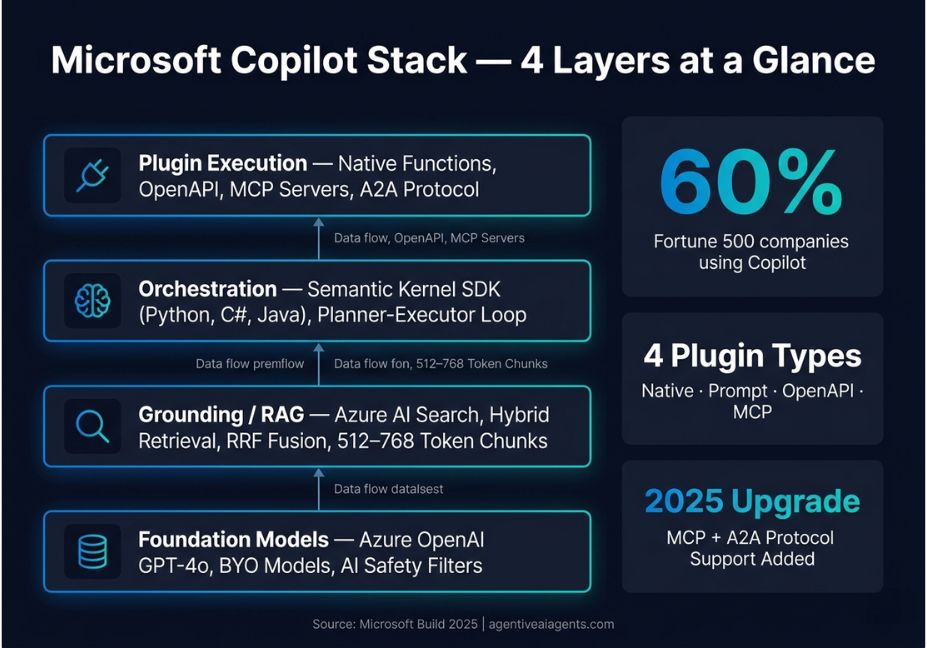
The Microsoft Copilot Stack is an architectural framework for building natural-language AI applications on top of Large Language Models (LLMs). It provides the full surface area between a user’s intent and a grounded, action-capable AI response: foundation models, an orchestration SDK (Semantic Kernel), a retrieval/grounding layer (Azure AI Search + RAG), plugin execution plumbing, and safety/filtering middleware.
Every Microsoft Copilot product Microsoft 365 Copilot, GitHub Copilot, Copilot Studio, and Azure Copilot runs on variants of this same stack. The architecture is also open to external developers via Azure AI Foundry and the Microsoft 365 Agents Toolkit.
Technical Note: The Copilot Stack is not a single SDK or service. It is a reference architecture composed of distinct, independently deployable layers. You can adopt individual layers (e.g., Semantic Kernel alone) without committing to the entire Microsoft ecosystem.
The Four Core Layers: How the Copilot Stack Works
1. Foundation Models Layer
At the base sits Azure OpenAI Service Microsoft’s hosted endpoint for GPT-4o, o3, and other OpenAI models alongside support for open-weight models via Azure AI Foundry. This layer handles raw inference, tokenization, and streaming.
Key capabilities at this layer:
- Hosted fine-tuning for domain-specific adaptation (GA as of Build 2026 with Copilot Tuning)
- BYO models bring open-source models (Llama 3, Mistral, Phi-3) via Azure Machine Learning endpoints
- AI safety filters prompt and response filtering baked into Azure OpenAI at the API level before orchestration ever touches output
Did You Know? Microsoft 365 Copilot Tuning, announced at Build 2026, allows organizations to fine-tune the Copilot foundation model on proprietary data without that data leaving the Microsoft 365 compliance boundary.
2. Orchestration Layer Semantic Kernel
Semantic Kernel’s official GitHub repository is the beating heart of the Copilot Stack. It is an open-source SDK (Python, C#, Java) that coordinates LLM calls, plugin/tool invocations, memory retrieval, and multi-step planning into coherent agent loops.
Semantic Kernel orchestrates tool calls through a planner-executor pattern: the kernel receives a user goal, decomposes it into steps, selects the relevant plugins, and iterates until the goal is satisfied or a stopping condition is reached.
import asyncio
from semantic_kernel import Kernel
from semantic_kernel.connectors.ai.open_ai import AzureChatCompletion
from semantic_kernel.agents import ChatCompletionAgent

(kernel = Kernel)
(kernel.add_service)
    (AzureChatCompletion
        deployment_name="gpt-4o",
        endpoint="https://<your-resource>.openai.azure.com/",
        api_key="<your-api-key>", )


(agent = ChatCompletionAgent
    kernel=kernel,
    name="EnterpriseAssistant",
    instructions="You are an enterprise assistant. Use available plugins to answer grounded questions.",)

async def main:
    (response = await agent.get_response)
       ( messages="Summarize last quarter's open support tickets." )
    print(response)

asyncio.run(main())
Pro Tip: Register Semantic Kernel through dependency injection in ASP.NET Core or FastAPI so the kernel is a singleton. Instantiating a new kernel per request is a common production mistake that tanks latency and destroys connection pooling.
3. Grounding Layer RAG with Azure AI Search
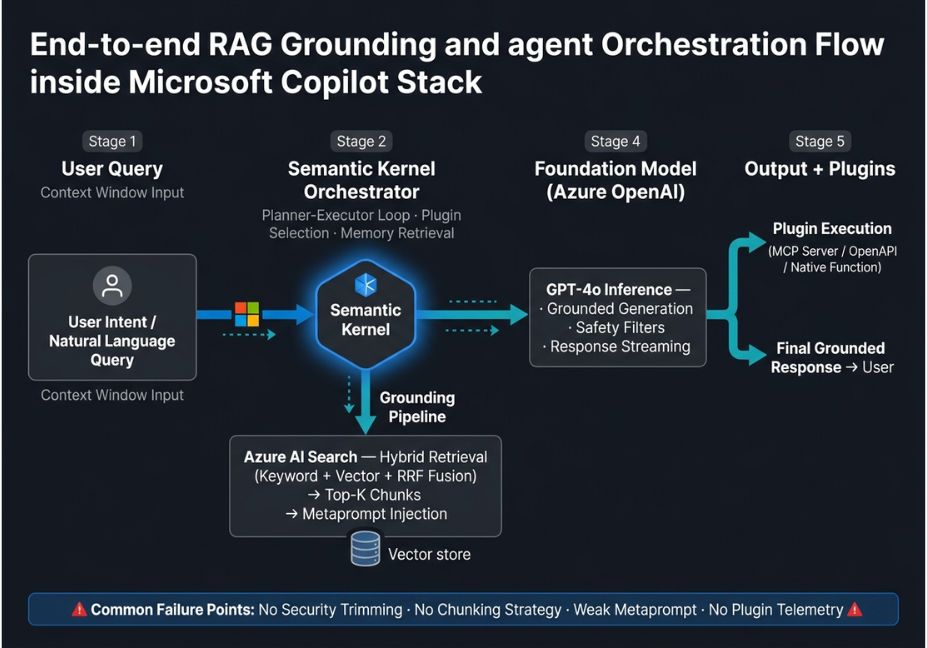
Raw LLM responses hallucinate. The grounding pipeline anchors generation to real, authorized enterprise data through Retrieval-Augmented Generation (RAG). In the Copilot Stack, this means:
- Ingestion Documents are chunked, embedded via Azure OpenAI Embeddings, and stored in Azure AI Search (with optional pgvector on CosmosDB Postgres as an alternative vector store).
- Retrieval At query time, Semantic Kernel calls the search plugin, retrieves the top-k chunks via hybrid retrieval (keyword + dense vector + semantic re-ranking using RRF fusion), and injects them into the LLM context window.
- Grounded generation The LLM is prompted with a metaprompt that instructs it to answer only from retrieved context and cite sources reducing hallucination risk significantly.
The Copilot Studio architecture reference formally names this pattern the “Chat over knowledge” tier.
from semantic_kernel.connectors.memory.azure_ai_search import AzureAISearchCollection

# Register vector store as a memory plugin
(collection = AzureAISearchCollection
    collection_name="enterprise-docs",
    data_model_type=MyDocumentModel,)

kernel.add_plugin(collection.as_text_search_plugin(), plugin_name="KnowledgeBase")
Architect’s Note: Always apply security trimming at the Azure AI Search layer, not at the LLM prompt layer. If your retrieval returns documents the user isn’t authorized to see, instructing the LLM to “ignore” them is not a security control it’s a prompt injection waiting to happen.
4. Plugin Execution Layer
Plugins are the tool-use mechanism of the Copilot Stack. Each plugin is a typed, callable function that the orchestrator can invoke based on the LLM’s intent. Semantic Kernel supports four plugin formats:
| Plugin Format | Best For | Example |
|---|---|---|
| Native function | Custom Python/C# logic | CRM lookup, ticket creation |
| Prompt template | Few-shot LLM sub-tasks | Summarization, classification |
| OpenAPI spec | External REST APIs | SharePoint, Dynamics 365 |
| MCP server | Cross-platform tool sharing | GitHub, DocuSign, any MCP host |
The orchestrator selects plugins via function calling on the foundation model meaning GPT-4o decides which plugin(s) to invoke, not your code. This is powerful but introduces non-determinism: the same query can trigger different plugin chains on different runs.
The 2026 Upgrade: MCP and Multi-Agent Orchestration
The most consequential architectural shift in the 2026 Copilot Stack is the adoption of two open standards: Model Context Protocol (MCP) and Agent2Agent (A2A) protocol.
Microsoft’s Build 2026 announcement on multi-agent orchestration confirmed that Copilot Studio and the Teams AI Library now support both effectively opening the stack to the broader AI ecosystem.
Model Context Protocol (MCP)
Developed by Anthropic and adopted by Microsoft, MCP standardizes how AI agents connect to external tools and data sources think of it as USB-C for AI integrations. In Copilot Studio, each MCP server is automatically surfaced as a set of callable actions. Tool definitions, inputs, and outputs are inherited directly from the MCP server’s schema; when the server updates, Copilot Studio syncs automatically.
The Model Context Protocol developer guide for Microsoft 365 details how to wire any MCP-compatible tool – GitHub, DocuSign, Azure services – into a declarative Copilot agent in minutes via the Microsoft 365 Agents Toolkit.
Why this matters for cross-platform developers: A Copilot agent can now share the same MCP tool surface as a Claude or ChatGPT agent. Organizations running heterogeneous AI environments no longer need to maintain duplicate tool integrations per platform.
Agent2Agent (A2A) Protocol
Where MCP governs tool access, A2A governs agent-to-agent communication. An orchestrator agent in Copilot Studio can delegate subtasks to specialist agents a research agent, a code agent, a compliance-checking agent using A2A as the handoff protocol. This maps directly to what the LangChain and AutoGen ecosystems call multi-agent orchestration.
Technical Note: A2A is in public preview as of Build 2026. Production deployments should implement fallback logic for cases where a delegated agent times out or returns a malformed response.
Step-by-Step: Building a Minimal Copilot Stack Agent
Prerequisites: Python 3.10+, semantic-kernel>=1.0, an Azure OpenAI deployment, an Azure AI Search index.
import asyncio
from semantic_kernel import Kernel
from semantic_kernel.connectors.ai.open_ai import AzureChatCompletion, AzureTextEmbedding
from semantic_kernel.connectors.memory.azure_ai_search import AzureAISearchCollection
from semantic_kernel.agents import ChatCompletionAgent

async def build_copilot_agent:
    (kernel = Kernel)

    # 1. Attach LLM
    kernel.add_service(AzureChatCompletion(
        deployment_name="gpt-4o",
       ( endpoint="https://<resource>.openai.azure.com/",)
        api_key="<key>"


    # 2. Attach embedding model for RAG
    kernel.add_service(AzureTextEmbedding(
        deployment_name="text-embedding-3-large",
       ( endpoint="https://<resource>.openai.azure.com/",
        api_key="<key>")


    # 3. Register vector store as a search plugin
    collection = AzureAISearchCollection
        (collection_name="enterprise-kb",
        data_model_type=MyDocModel,)


   (kernel.add_plugin(collection.as_text_search_plugin(), "KnowledgeBase")

    # 4. Create the agent with grounding instructions
    agent = ChatCompletionAgent(
        kernel=kernel,
        name="CopilotAgent",
        instructions=(
            "You are an enterprise assistant. "
            "Always answer using the KnowledgeBase plugin. "
            "If you cannot find relevant context, say so — do not invent facts." ),


    (response = await agent.get_response
        messages="What is our current data retention policy?")

    print(response)

asyncio.run(build_copilot_agent())
Technical Disclaimer: Code examples use
semantic-kernel>=1.0(Python) as of June 2026. The Semantic Kernel API evolves rapidly always check the official docs before deploying.
Common Mistakes and How to Avoid Them
1. Using prompt-layer instructions as access control. Telling the LLM “don’t reveal confidential documents” is not a security boundary. Apply security trimming in Azure AI Search at retrieval time so unauthorized content never enters the context window in the first place.
2. No chunking strategy. Ingesting full documents as single embeddings destroys retrieval precision. Use structure-aware chunking: split at heading boundaries, overlap by 10–15%, and tune chunk size to your average query length. Most production RAG pipelines target 512–768 token chunks.
3. No telemetry on plugin selection. When GPT-4o selects plugins via function calling, the same intent can trigger different tool chains on different runs. Instrument your orchestrator with token usage tracking and plugin call traces. Add timeout fallbacks for every plugin.
4. Underinvesting in the metaprompt. The metaprompt the system prompt injected by the Copilot Stack is where grounding instructions, persona definitions, and safety constraints live. A poorly designed metaprompt produces accurate retrieval but incoherent, unsafe generation.
5. Treating Copilot Studio and Semantic Kernel as either/or. They are complementary. Semantic Kernel handles pro-code orchestration; Copilot Studio handles low-code agent assembly and multi-channel publishing. Use both for complex enterprise deployments via the DirectLine API bridge.
FAQ People Also Ask
The Microsoft Copilot Stack is a layered architecture for building LLM-powered applications and AI agents. It consists of four tiers: Foundation Models (Azure OpenAI), an Orchestration SDK (Semantic Kernel), a Grounding/RAG layer (Azure AI Search + embeddings), and a Plugin Execution layer. Every Microsoft Copilot product from Microsoft 365 Copilot to GitHub Copilot is built on this framework.
Semantic Kernel is the orchestration engine of the Copilot Stack. It coordinates LLM calls, plugin/tool invocations, memory retrieval, and multi-step planning. It sits between the Azure OpenAI inference endpoint and your application logic managing the tool-use loop, injecting retrieved context into prompts, and routing tasks across agents in multi-agent scenarios.
Copilot Studio is a low-code SaaS platform for assembling, publishing, and managing agents without writing orchestration code. Semantic Kernel is a pro-code SDK for building custom orchestration logic in Python, C#, or Java. The two are complementary: Semantic Kernel agents can be embedded into Copilot Studio via the DirectLine API, and Copilot Studio agents can be called as tools from a Semantic Kernel application.
Grounding connects LLM generation to real data via a RAG pipeline. At query time, Semantic Kernel calls an Azure AI Search plugin to retrieve relevant document chunks using hybrid retrieval. Those chunks are injected into the LLM’s context window alongside a metaprompt instructing the model to answer only from retrieved context. This dramatically reduces hallucination risk in enterprise deployments.
Yes. As of 2026, the Copilot Stack supports Model Context Protocol (MCP) an open standard originally developed by Anthropic. Any MCP-compatible server (GitHub, DocuSign, Slack, and hundreds of others) can be wired into a Copilot Studio agent or a Semantic Kernel application as first-class callable tools. The A2A protocol further enables Copilot agents to delegate tasks to agents running on non-Microsoft platforms.
Conclusion
The Microsoft Copilot Stack is more than a product surface it is a production architecture for enterprise AI agents. Three things every developer should take away: Semantic Kernel is the orchestration core learn its plugin and agent APIs before anything else. Grounding is a retrieval engineering problem, not a prompt engineering one your RAG pipeline quality determines answer quality more than your LLM choice. And MCP and A2A have fundamentally opened the stack you are no longer building inside a Microsoft-only walled garden. Bookmark this guide and explore more hands-on AI agent tutorials at agentiveaiagents.com.