
Most AI customer support tools ROI claims fall apart under CFO scrutiny for one reason: they count hours saved instead of outcomes delivered. A support leader can show that an agent handled thousands of conversations. However, if none of that time maps to a ticket closed, a renewal saved, or a hire avoided, finance calls it phantom productivity and the budget gets cut.
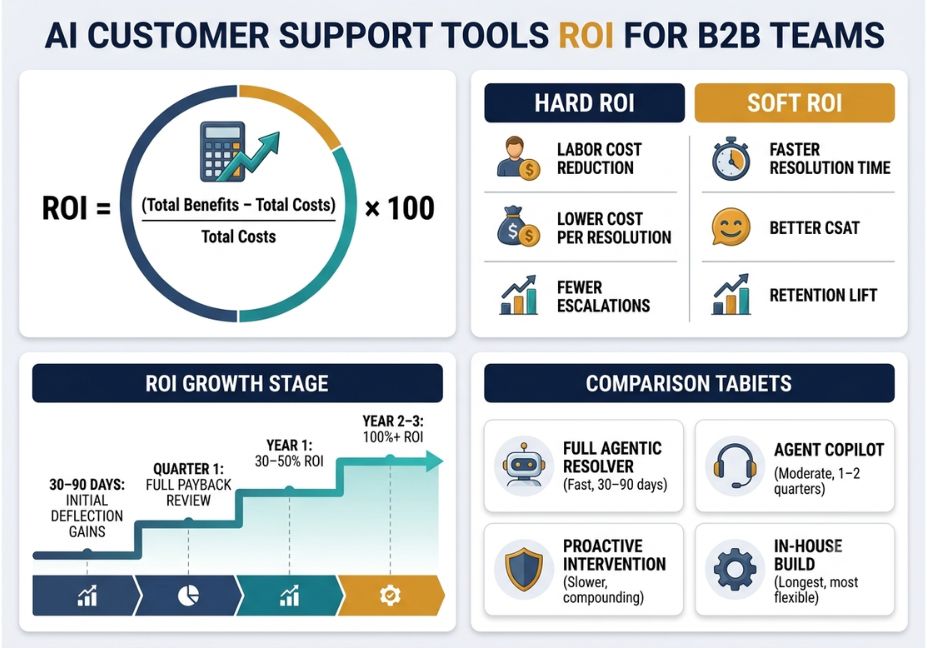
Quick answer: AI customer support ROI is calculated as (Total Benefits − Total Costs) ÷ Total Costs × 100, where benefits must be tied to measured outcomes like cost per resolution, not estimated time saved. Most B2B teams see initial ROI within 30–90 days and full payback within one to two quarters.
This guide breaks down the ROI formula B2B teams actually use, a worked calculation for a mid-market support org, and the architectural reasons grounded in retrieval-augmented generation (RAG) and agent design that determine whether your numbers hold up or collapse in the second quarter.
What is AI customer support ROI?
AI customer support ROI is the measurable financial return from deploying AI agents or automation into support, relative to what it costs to run them. It’s calculated as (Total Benefits − Total Costs) ÷ Total Costs × 100, and it’s only credible when benefits are tied to cost-per-resolution or headcount-avoided data not vague time-saved estimates.
How does AI customer support ROI actually work?
ROI isn’t one number. It’s two categories that need to be tracked separately, because conflating them is exactly what makes a business case fall apart under review.
- Hard ROI: direct, ledger-visible savings labor cost reduction, lower cost per resolution, fewer escalations, headcount avoided.
- Soft ROI: strategic value faster time-to-resolution, better CSAT, retention lift that doesn’t hit the P&L immediately but compounds over time.
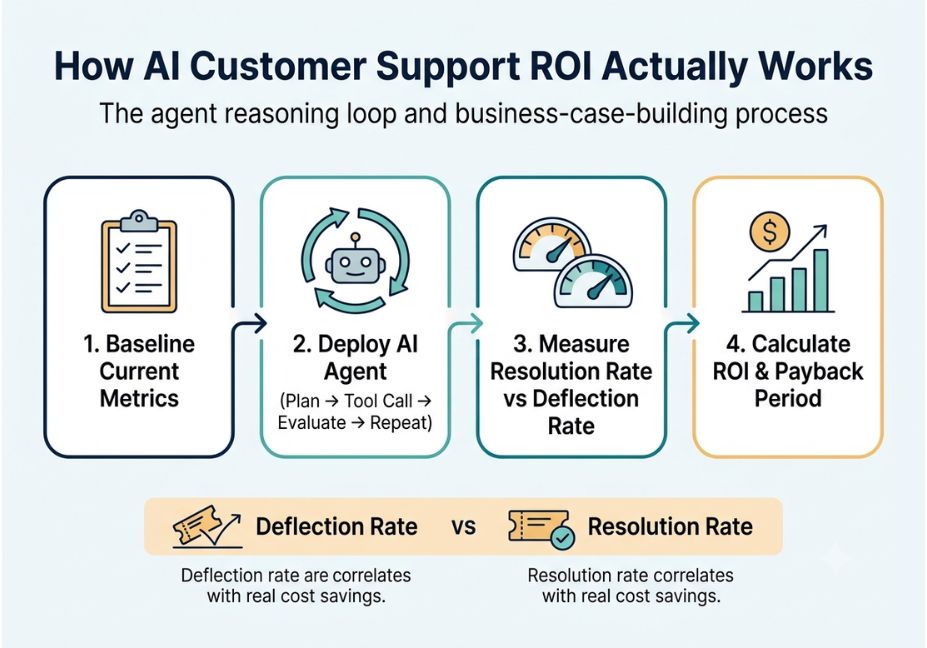
Under the hood, most modern platforms run on an orchestration layer like LangChain’s agent framework, where the agent plans a step, calls a tool or API, evaluates the result, and repeats. In other words, it’s a tool-use loop rather than a single scripted reply. As a result, answer quality depends heavily on whether retrieval-augmented generation grounds answers in real documents rather than model memory alone — which is why teams that invest in their knowledge base consistently outperform teams that simply swap the underlying LLM.
Architect’s Note: If your AI agent’s answers vary in quality across ticket types, the problem is almost never the model. It’s usually incomplete or stale source documents in the retrieval layer.
What are the best AI customer support ROI use cases for B2B teams?
- Tier-1 deflection at scale: password resets, order status, billing FAQs handled end-to-end without a human touch.
- Agent copilot: AI drafts responses and surfaces account context while a human agent still sends the reply common in B2B, where tickets are fewer but higher-stakes.
- Proactive intervention: flagging friction, such as a failed integration or a stuck onboarding step, before a ticket is even opened.
- Churn and upsell signal detection: AI agents surfacing account risk or expansion opportunity buried inside support conversations.
Did You Know? Industry benchmark aggregations report average returns of several dollars back per dollar spent on AI-powered support, with first-year ROI often in the 30–50% range. By year two or three, this typically climbs past 100% as knowledge bases mature and teams tune the system.
Which AI customer support approach fits your B2B team? (Comparison)
| Approach | Best For | Pricing Model | ROI Timeline |
|---|---|---|---|
| Full agentic resolver | High-volume, low-complexity tickets | Per-resolution or per-outcome | Fast (30–90 days) |
| Agent copilot | Dense, high-value B2B tickets (SSO, billing, integrations) | Per-seat + AI add-on | Moderate (1–2 quarters) |
| Proactive/in-product intervention | Onboarding-heavy, integration-heavy products | Platform subscription | Slower to show, compounds over time |
| Build in-house (SDK/low-code) | Teams with engineering capacity | Engineering time + API/compute costs | Longest, most customizable |
Pro Tip: Don’t select a tool based on deflection rate alone. Deflection tells you a ticket didn’t reach a human it says nothing about whether the customer actually got unblocked. Consequently, resolution rate, not deflection rate, is the metric that correlates with cost savings and satisfaction.
How do you build an AI customer support ROI business case?
- Baseline first. Measure current resolution time, cost per ticket, and CSAT before any AI agent goes live. Otherwise, every later number is just an estimate finance will discount.
- Separate hard and soft benefits. List labor cost reduction and cost-per-resolution improvements separately from CSAT or retention gains.
- Include full cost, not just the subscription. Platform fees, integration time, change management, and ongoing monitoring all belong in the denominator.
- Calculate payback period, not just ROI%. A 10x year-three ROI means little if the payback period is 18 months and your budget cycle is annual.
- Re-measure quarterly. Since ROI compounds as the knowledge layer improves, a single point-in-time measurement understates the long-run case.
python
# Simplified AI agent ROI calculator (annualized)
hourly_rate = 55
hours_saved_per_agent_per_day = 2
num_agents = 30
working_days = 261

labor_savings = hourly_rate * hours_saved_per_agent_per_day * num_agents * working_days
platform_cost_annual = 45000
implementation_cost = 15000

net_benefit = labor_savings - (platform_cost_annual + implementation_cost)
roi_percent = (net_benefit / (platform_cost_annual + implementation_cost)) * 100
Technical Disclaimer: Platform pricing models (per-seat, per-resolution, per-outcome) change frequently across vendors. Verify current pricing directly with each vendor before finalizing a business case.
What mistakes sink an AI customer support ROI case?
- Measuring too late: deploying without a pre-AI baseline, which makes every “improvement” unverifiable.
- Confusing deflection with resolution: a ticket that never reaches a human isn’t automatically a solved problem.
- Ignoring failure cost: hallucinated answers or failed escalations carry a real cost that must offset the savings side of the ledger.
- Treating a chatbot like an agent: the autonomy gap between scripted bots and reasoning agents matters. A rules-based chatbot handling multi-step B2B issues, like SSO lockouts or contract true-ups, will underperform and quietly inflate deflection numbers with unresolved tickets.
- Skipping the knowledge layer investment: answer accuracy tracks knowledge base quality far more closely than it tracks which LLM is powering the agent.
What are practitioners saying about AI agent ROI?
Support and RevOps practitioners increasingly frame the AI-agent-vs-chatbot distinction around the ReAct pattern that lets an agent reason and act in a loop plan, call a tool, observe the result, decide the next step, then repeat. This reasoning loop is what allows an agent to close a billing dispute end-to-end instead of just routing it. Therefore, it’s the architectural detail finance teams increasingly ask about before approving a renewal.
FAQ People Also Ask
What is the ROI formula for AI customer support?
The formula is (Total Benefits − Total Costs) ÷ Total Costs × 100. Benefits should include measured labor cost reduction and cost-per-resolution improvements, while costs must include platform fees, integration time, and ongoing monitoring not just the subscription price.
What is the difference between an AI agent and a chatbot?
A chatbot follows scripted, rule-based flows and simply responds to predefined inputs. An AI agent reasons about intent, plans multi-step actions, calls tools or APIs, and works toward a resolution autonomously the core difference is autonomy, not conversational polish.
How long does it take to see ROI from AI customer support tools?
Many teams see measurable improvement within 30 days, with fuller ROI confirmed after one full quarter of review. Returns then compound significantly by year two as the knowledge base matures.
What is the difference between deflection rate and resolution rate?
Deflection rate measures whether a ticket avoided a human agent. Resolution rate measures whether the customer’s problem was actually solved and it’s resolution rate, not deflection, that correlates with cost savings and satisfaction.
Can AI customer support agents work without human oversight?
Partially. Agents resolve a large share of routine, tier-1 inquiries autonomously, but human-in-the-loop escalation remains best practice for complex or high-stakes cases, with full context transfer at handoff.
What are the biggest risks of deploying AI in B2B customer support?
The main risks are hallucinated answers from weak knowledge grounding, inflated deflection metrics that mask unresolved tickets, and underestimating implementation and change-management costs in the ROI model.
Conclusion
Real AI customer support tools ROI in B2B comes down to three disciplines: baselining before deployment, tracking resolution rate instead of deflection rate, and counting the full cost of ownership rather than just the subscription fee. Ultimately, teams that treat their knowledge layer as production infrastructure not an afterthought see the ROI curve climb from a modest first-year return into a multiple of spend by year three. Bookmark this guide before you build your next AI support business case, and pressure-test every number against a measured baseline, not a vendor’s projection.