
Developers typically base their choice of chatbot platform on features. After using the platform many find that UI was never the cause of their latency; rather, it is caused by the underlying connections. Questions such as how does the bot access documents, how does it store the last three user inputs, and how does it provide incorrect answers due to hallucinations are common.
As of 2026, the open-source chatbot platforms have evolved well beyond advanced intent matching and now provide full-stack, intelligent conversation assistance via NLP pipelines, vector storage, RAG pipelines, self-hosted LLM, and multi-agent integration with systems and APIs. As shown by Stanford CRFM’s Language Model Agent research, poor retrieval structures and lack of memory architecture are the real causes of practicality issues in AI-enabled conversations; therefore, model quality is not an issue.
This guide identifies the top 7 open-source chatbot solutions available today; it provides detailed analyses of each platform based on its integration with a LLM-assisted, RAG framework, strengths of each solution, and limitations of each solution.
What Is an Open-Source Chatbot Platform?
An open-source chatbot platform is a publicly available software framework that gives developers full access to source code for building, deploying, and managing conversational AI systems.
Unlike proprietary SaaS tools, open-source platforms let teams self-host on their own infrastructure, swap in any LLM backend, and integrate custom NLU pipelines or vector databases all without vendor restrictions or recurring licensing costs. The “open-source” part simply means the source code is public: anyone can download it, inspect it, modify it, and deploy it for their own purposes.
Importantly, that is different from saying it is easy to set up. Open-source chatbot frameworks combine flexibility, transparency, and community-driven innovation but they require real engineering effort to reach production quality. Hosting, security patching, model management, and retrieval pipeline design all fall on your team.
The landscape today covers a wide range of architectures. At one end, there are rule-based dialogue managers like early Rasa versions. At the other end are low-code visual builders like Flowise, which wraps the entire LangChain agent orchestration layer into a drag-and-drop canvas. What links all of them is the ability to inspect, fork, and extend the codebase in ways that closed platforms simply do not allow.
How Do Open-Source Chatbot Platforms Work?
Understanding the architecture underneath a chatbot platform is what separates a working prototype from a production system.
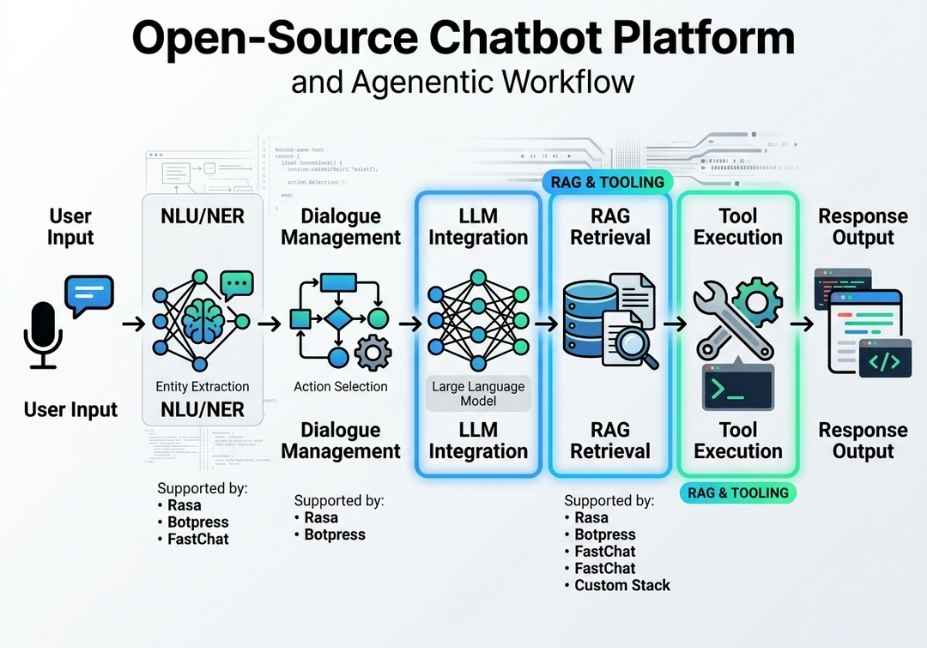
At the core, every modern open-source chatbot platform manages three things: input understanding, response generation, and conversation state. Input understanding is handled by the NLU pipeline the system that classifies intent, extracts entities, and maps user utterances to structured data the bot can act on. Response generation in LLM-native platforms runs through a language model that produces natural language output, either from its parametric knowledge or, in RAG systems, from retrieved context. Conversation state is the memory layer the mechanism that keeps track of what has been said, what tools have been called, and what the user’s goal still is.
The critical architectural shift happening right now is the convergence of traditional chatbot dialogue management with agentic LLM workflows. Platforms that were built around finite state machines are layering LLM support on top. Frameworks that started as pure developer toolkits are adding visual builders and deployment layers. The result is that choosing a platform in 2026 means understanding not just what it does, but where it sits in your stack.
Furthermore, retrieval-augmented generation has become the standard approach for grounding chatbot responses in factual, up-to-date information. Rather than relying on what the LLM learned during training, a RAG-enabled chatbot first queries a vector store a database of embedded document chunks and passes the retrieved context to the language model as part of the prompt. The embedding model, the chunking strategy, and the reranking logic between retrieval and generation are the three variables that most directly determine answer quality.
The 7 Best Open-Source Chatbot Platforms in 2026
1. Rasa Best for Enterprise Dialogue Management
Rasa is the most battle-tested open-source framework for teams that need deterministic, compliance-sensitive conversation flows alongside LLM-powered generation. It is free and open-source at the core level, making it accessible for startups and enterprise teams alike though the most powerful LLM-native features require Rasa Pro.
How Rasa’s dialogue management system works is through a machine-learning-based story model that predicts the next action given a full conversation history. This is powerful for structured workflows insurance claims, appointment booking, technical support where the conversation must follow a predictable arc. For open-ended, generative interactions, the newer CALM (Conversational AI with Language Models) architecture layers LLM-based generation on top of the traditional state machine, giving teams the best of both approaches.
The action server architecture is what makes Rasa relevant in an agentic context. Custom actions run as external Python services, which means you can wire a Rasa bot to any tool a SQL query, a REST API call, a vector store lookup via FAISS or Chroma without modifying the dialogue layer. The separation of concerns is clean and production-tested across thousands of enterprise deployments.
Additionally, Rasa’s NLU pipeline is genuinely configurable at the component level. Teams can swap between spaCy-based models, the DIET classifier, or transformer-based architectures from Hugging Face depending on language requirements, latency targets, and available compute.
Pro Tip: Wrap a LangChain retrieval chain inside a Rasa custom action to add RAG capability without modifying the dialogue state machine. The action receives the conversation context, runs the retrieval, and returns grounded responses while Rasa continues to manage slot filling and flow control.
It is best for Enterprise teams needing strict control over conversation flows, regulated industries with compliance requirements, or organizations with existing Rasa-trained dialogue models.
Limitation to watch: The most capable LLM features, including CALM and advanced analytics, are behind the Rasa Pro paywall. Getting GPT-4-level generative capability from the open-source version requires significant custom development work.
2. Botpress Best for Visual Multi-Agent Workflows
Botpress is the most accessible platform on this list for teams that want visual flow design without sacrificing architectural depth. Its node-based flow builder makes it possible to go from blank canvas to a working bot in a single afternoon but what runs underneath is a genuinely sophisticated multi-agent system.
What makes Botpress stand out in 2026 is the Agent Router, introduced this year, which enables complex AI workflows where one agent’s output becomes the instruction set for the next. This is the same multi-agent orchestration pattern that underpins production agentic systems described in research on ReAct-style reasoning and tool-use loops except here it is visual and configurable without writing framework-level code.
In practice, a Botpress workflow can route an incoming query to a classification agent, pass the classified intent to a retrieval agent that queries a knowledge base, and then hand the retrieved context to a generation agent that drafts the final response all within a single conversation turn. Moreover, Botpress supports LLM flexibility across GPT-4o, Claude, Gemini, and open models like Llama 3, giving teams real optionality on cost versus capability.
The built-in RAG module handles document ingestion, embedding, and vector indexing internally. For teams needing finer control over chunking strategy or reranking logic, the module can be replaced with a custom retrieval chain passed through a Botpress integration node.
Technical Note: Botpress’s built-in knowledge base uses fixed-size chunking by default. For long-form enterprise documents legal contracts, technical manuals, research reports switch to semantic chunking to improve retrieval accuracy. The difference in answer quality on multi-paragraph source documents is significant.
It is best for Teams wanting visual multi-agent design plus built-in RAG, without writing orchestration code from scratch.
Limitation to watch: The free tier’s analytics are limited. Meaningful observability tracing which agent took which path for a given query requires either the paid plan or a custom logging integration.
3. Flowise Best Open-Source Chatbot Platform for RAG Pipelines
If you want the fastest path from zero to a production-ready RAG-powered chatbot, Flowise is the answer. It wraps Flowise’s visual LLM workflow builder around the entire LangChain ecosystem prompts, memory modules, retrievers, tools, vector stores and makes every component a visible, configurable node on a drag-and-drop canvas.
How Flowise handles RAG is through three distinct interaction modes. Assistant mode is beginner-friendly: tool-calling plus retrieval out of the box. Chatflow mode is designed for single-agent systems with advanced retrieval techniques including Graph RAG and reranking. Agentflow the most powerful tier supports full multi-agent orchestration with human-in-the-loop checkpoints, conditional branching, and stateful workflow execution.
Furthermore, the RAG implementation covers the full pipeline. Document ingestion supports PDFs, CSVs, SQL databases, and live web URLs. Built-in nodes handle chunking, embedding, and indexing into vector stores including Pinecone, Chroma, FAISS, and Weaviate. Reranker nodes can be inserted between retrieval and generation to improve accuracy without any custom code.
Flowise was part of the Y Combinator Summer 2023 batch and has become one of the most widely forked LLM application builders on GitHub a signal of strong real-world adoption among developers building production retrieval systems.
python
# Equivalent LangChain RAG chain that Flowise builds visually
from langchain_community.vectorstores import Chroma
from langchain_community.embeddings import OllamaEmbeddings
from langchain.chains import RetrievalQA
from langchain_community.llms import Ollama

embeddings = OllamaEmbeddings(model="llama3")
vectorstore = Chroma(persist_directory="./db", embedding_function=embeddings)
retriever = vectorstore.as_retriever(search_kwargs={"k": 4})

qa_chain = RetrievalQA.from_chain_type(
    llm=Ollama(model="llama3"),
    retriever=retriever,
    return_source_documents=True
)

result = qa_chain({"query": "What are our Q3 support ticket trends?"})
print(result["result"])
It is best for Developers who want LangChain-level RAG power without writing LangChain boilerplate. Also ideal for ML engineers prototyping complex retrieval architectures quickly.
Limitation to watch: The visual abstraction can obscure what the underlying chain is actually doing. Debugging a broken retrieval pipeline in Flowise is harder than debugging the equivalent Python code directly, because intermediate outputs between nodes are not always surfaced clearly.
4. AnythingLLM Best Self-Hosted Chatbot for Data Privacy
AnythingLLM is the best open-source chatbot platform for teams that need to run AI assistants on private documents without any data leaving their infrastructure. It is built specifically for the self-hosted LLM chatbot use case air-gapped, privacy-first, and deployable on a local machine or private server in under an hour.
How AnythingLLM works is deliberately simple. Teams upload files PDFs, Word documents, spreadsheets, text files and the platform automatically embeds them into a local vector store and builds a RAG pipeline on top. A chat interface then queries that store using whatever LLM backend is configured: Ollama for local models, OpenAI for cloud, or any OpenAI-compatible API endpoint. There is no manual pipeline configuration required.
Did You Know? Pairing AnythingLLM with Ollama running Llama 3.1 locally creates a fully air-gapped document assistant with zero API costs and zero data leaving the machine. This setup has become the standard architecture in legal, healthcare, and government contexts where data residency requirements prohibit cloud LLM calls.
The tradeoff for this simplicity is intentional scope limitation. AnythingLLM is optimized for document retrieval, not for building complex multi-turn agentic workflows. If your use case is “chat with your private documents,” it is the fastest production path available in the open-source space. If you need dynamic tool calling, multi-agent routing, or stateful workflow execution, you will hit the ceiling.
It is best for Teams with strict data privacy or compliance requirements, researchers working with sensitive documents, and any deployment where an air-gapped RAG solution is mandatory.
Limitation to watch: Limited support for complex agentic patterns beyond retrieval. Not the right choice if your chatbot needs to call external APIs, manage multi-step workflows, or coordinate between specialized agents.
5. LangChain + LangGraph Best for Custom Agentic Chatbot Architecture
LangChain is not a chatbot platform in the traditional sense. It has no visual builder, no pre-built conversation UI, and no managed deployment layer. Nevertheless, it belongs on this list because almost every other platform in this guide is built on top of it and for engineering teams building differentiated products, working with LangChain directly gives a level of control that no abstraction layer can match.
LangChain’s core value is composability. Its agent orchestration layer lets developers chain together LLMs, retrievers, memory modules, and tool-calling interfaces in ways that are fully transparent and inspectable at every step. A LangChain chatbot can retrieve specific information from a vector store, summarize it using a language model, call an external API with the result, and store the full interaction in memory all within a single agent loop.
LangGraph extends this into genuine multi-agent territory. It models agentic workflows as stateful directed graphs, where each node represents an agent step and edges represent conditional transitions based on intermediate outputs. This architecture underpins most production agentic chatbot systems deployed at scale in 2026. According to LangChain’s official documentation, LangGraph is designed explicitly for applications where the agent must make decisions, retry on failure, and maintain state across arbitrarily long task sequences.
python
from langchain_core.messages import HumanMessage
from langgraph.graph import StateGraph, END
from langchain_openai import ChatOpenAI

llm = ChatOpenAI(model="gpt-4o")

def call_model(state):
    messages = state["messages"]
    response = llm.invoke(messages)
    return {"messages": [response]}

workflow = StateGraph(dict)
workflow.add_node("agent", call_model)
workflow.set_entry_point("agent")
workflow.add_edge("agent", END)
app = workflow.compile()

result = app.invoke({
    "messages": [HumanMessage(content="Summarize our Q3 support tickets.")]
})
print(result["messages"][-1].content)
Technical Disclaimer: This example uses LangGraph with LangChain v0.2 and LangChain-OpenAI v0.1. Framework APIs evolve rapidly always check the official LangChain documentation for the latest syntax before building production pipelines.
It is best for Engineering teams building custom agentic architectures from scratch, where control over every layer of the stack matters more than development speed.
Limitation to watch: High learning curve and no GUI. Debugging complex multi-agent graphs requires deliberate instrumentation. LangSmith LangChain’s observability platform is effectively mandatory for production deployments.
6. Open WebUI Best Open-Source Chat Interface for Local LLMs
Open WebUI solves a problem that every other platform on this list sidesteps: the front-end. It provides a polished, ChatGPT-style chat interface that connects to any OpenAI-compatible API which in practice means it runs natively on top of Ollama, LM Studio, or any locally hosted model behind an OpenAI-compatible endpoint.
What Open WebUI does well is the user-facing layer that developer-centric frameworks leave out. It supports multi-model conversations where users can switch between configured LLMs mid-session, document uploads with built-in RAG via the chat interface, per-session system prompt configuration, workspace isolation for multi-user team deployments, and Model Context Protocol integration for connecting agents to external tools.
Consequently, for teams that have already built their LLM backend using LangChain, Flowise, or a custom RAG pipeline Open WebUI provides a zero-configuration, production-ready interface layer without requiring any front-end development. Non-technical users can interact with a sophisticated self-hosted AI system through a familiar chat interface, while the engineering team retains full control of the backend architecture.
It is best for Teams needing a production chat UI on top of an existing LLM or RAG backend. Also valuable as an internal tool for non-technical staff to access a self-hosted language model through a familiar interface.
Limitation to watch: Open WebUI is a front-end. It does not handle agent orchestration, dialogue management, or complex multi-step workflows natively. It is a strong complement to the other platforms on this list, not a standalone replacement for them.
7. Dify Best End-to-End Agentic Chatbot Platform
Dify occupies the most complete position on this list. It provides a visual workflow builder, a built-in RAG knowledge base, a prompt versioning and A/B testing layer, LLM observability tools, and a deployed chat interface all from a single self-hosted installation.
What sets Dify apart from Flowise and Botpress is the combination of agentic workflow capability with genuinely useful LLM ops tooling. The Workflow mode allows conditional branching, tool calling, and multi-step agent logic to be composed visually using the same node-graph metaphor as Flowise. The built-in tracing layer makes it possible to inspect exactly why an agent took a specific path for a given query a capability that is consistently undervalued until the first production incident.
Beyond that, Dify’s knowledge base supports hybrid search by default combining vector similarity search with BM25 keyword retrieval and a reranking step. This hybrid approach consistently outperforms pure vector search on enterprise document corpora, particularly for queries that contain precise technical terms or named entities that embedding models may not weight heavily enough.
Did You Know? Pure vector search can underperform on queries containing precise identifiers model numbers, product codes, legal clause references because embedding models tend to cluster semantically similar terms rather than preserving exact string matches. Hybrid search with BM25 corrects this by maintaining keyword-level precision alongside semantic recall.
It is best for Teams that want a single platform covering prompt engineering, RAG, agentic workflow building, deployment, and monitoring without stitching together separate tools for each layer.
Limitation to watch: The community edition is open-source and fully functional. However, enterprise features including SSO, role-based access control, and advanced audit logging are behind the paid cloud plan.
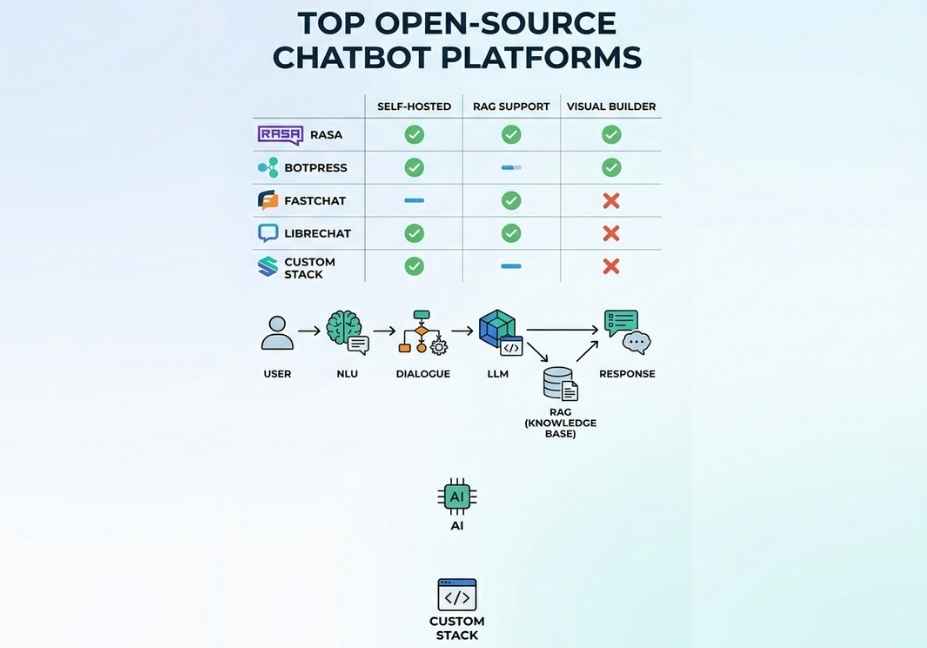
Platform Comparison: Open-Source Chatbot Platforms at a Glance
| Platform | Primary Strength | LLM Support | Built-in RAG | Agentic Workflows | Best Deployment |
|---|---|---|---|---|---|
| Rasa | Enterprise dialogue management | Yes (CALM in Pro) | Via custom actions | Limited (Pro) | Self-hosted, Docker |
| Botpress | Visual multi-agent routing | All major LLMs | Yes (native) | Yes (Agent Router) | Self-hosted or cloud |
| Flowise | LangChain visual orchestration | All LangChain LLMs | Yes (advanced) | Yes (Agentflow) | Docker, self-hosted |
| AnythingLLM | Private document chat | Local + cloud | Yes (auto) | Limited | Desktop, local server |
| LangChain/LangGraph | Custom agentic architecture | All LLMs | Yes (custom) | Yes (LangGraph) | Any Python environment |
| Open WebUI | Chat interface layer | Ollama, OpenAI-compatible | Yes (via upload) | Limited | Docker, self-hosted |
| Dify | End-to-end LLM ops + chat | All major LLMs | Yes (hybrid search) | Yes (Workflow mode) | Docker, self-hosted |
How to Choose the Right Open-Source Chatbot Platform
Choosing the right platform comes down to five honest questions about your use case.
First, how structured is your conversation?
If your chatbot must follow compliance-sensitive flows insurance intake, healthcare triage, legal Q&A Rasa’s deterministic dialogue management is the right foundation. If conversations are open-ended and generative, Flowise or LangChain will serve you better.
Second, where is your LLM running?
Are you using cloud APIs from OpenAI, Anthropic, or Google? Or are you running a self-hosted model via Ollama or vLLM for data privacy reasons? AnythingLLM and Open WebUI are optimized for local model deployment. Botpress and Dify support both without requiring additional configuration.
Third, how complex is your retrieval requirement?
If your bot needs to answer questions from private documents, the platform needs a solid RAG pipeline. Flowise, Dify, and AnythingLLM handle document ingestion, embedding, and vector indexing natively. LangChain gives you the most control but requires the most setup.
Fourth, what is your team’s technical depth?
Flowise and Botpress cut time-to-deployment significantly compared to LangChain. For a small engineering team shipping a RAG chatbot in a sprint, Flowise’s visual builder is meaningfully faster than writing LangGraph orchestration code from scratch. For a team building a product where every layer needs custom logic, LangChain justifies the overhead.
Fifth, do you need observability from day one?
Whatever platform you choose, plan for logging and tracing before you go live. Dify includes it natively. LangChain pairs with LangSmith. Botpress offers dashboard monitoring on paid tiers. The first production issue will be in the part of the pipeline you did not instrument.
Common Mistakes When Building Open-Source Chatbots
Ignoring chunking strategy. The quality of a RAG-powered chatbot depends heavily on how documents are split before embedding. Fixed-size character chunking is the default in most platforms, but it frequently splits sentences mid-thought, which degrades retrieval accuracy. Semantic chunking — splitting on natural topic boundaries consistently outperforms fixed chunking on long-form documents, particularly technical documentation and legal text.
Skipping memory architecture. Stateless LLM calls have no knowledge of prior conversation turns. Without a properly configured memory module, a bot will ask a user for their account number again three messages after the user already provided it. Almost all major platforms support some form of conversation memory but almost all developers underestimate how important it is to configure it correctly from the start.
Not handling hallucination in tool-use loops. When an agent calls a tool and the tool returns an error or an empty result, many LLMs will hallucinate a plausible-sounding answer rather than surfacing the failure clearly. Build explicit fallback handling into your agent logic either as a system prompt instruction, a conditional edge in your workflow graph, or a validation step before the response reaches the user.
Deploying without observability. A chatbot that works in development will break in production in ways you did not anticipate. LangSmith for LangChain-based stacks, and Dify’s built-in tracing, are worth the setup time before launch not after the first incident.
Underestimating infrastructure overhead. Open-source means you own the stack. That includes Docker container management, embedding model hosting, vector store maintenance, security patching, and scaling under load. These are engineering costs that commercial platforms absorb. Factor them honestly into your build-versus-buy decision.
What Developers Are Saying
The developer community on Reddit’s r/LocalLLaMA has been the most active real-world testing ground for these platforms throughout 2026. Several consistent patterns emerge from practitioners.
Flowise is consistently praised for rapid prototyping speed. However, developers migrating from prototype to production frequently replace Flowise’s built-in retriever with a custom LangChain chain when they need finer control over reranking and chunking. The visual builder gets you there fast; the code layer gets you there well.
Rasa’s CALM architecture has received positive attention for enterprise dialogue use cases. The community notes, though, that the most powerful generative features still require Rasa Pro — the open-source version alone is not a complete LLM-native solution.
AnythingLLM has seen significant growth among developers running fully local stacks with Ollama, particularly for legal and research applications where data cannot leave the local machine. The pairing of AnythingLLM plus Ollama plus Llama 3.1 is now a recognized reference architecture in the self-hosted AI community.
Dify is gaining ground among teams that previously used multiple separate tools a prompt testing tool, a workflow builder, an analytics dashboard and wanted a single self-hosted platform that covered all three layers.
FAQ — People Also Ask
What is the best open-source chatbot platform for developers in 2026?
For developers who want maximum control, LangChain combined with LangGraph is the most powerful option it supports any LLM, any vector store, and any tool-use pattern. For teams prioritizing deployment speed, Flowise or Botpress will get a production-ready RAG chatbot running faster. The right choice depends on whether you are optimizing for architectural control or development velocity.
How do open-source chatbots integrate with RAG pipelines?
RAG integration requires three components: a document loader that ingests source content, an embedding model that converts text chunks into vectors, and a vector store that enables similarity search at query time. Platforms like Flowise and Dify handle all three natively. LangChain-based stacks require you to configure each component explicitly but give you full control over chunking strategy, embedding model choice, and reranking logic, all of which directly determine answer quality.
Can open-source chatbots run locally without cloud APIs?
Yes. AnythingLLM paired with Ollama is the most common fully local stack, supporting models like Llama 3, Mistral, and Phi-3 running entirely on local hardware. Open WebUI provides a ChatGPT-like interface on top of this setup. Flowise also supports Ollama as an LLM node, allowing full RAG pipelines to run with no external API calls. The tradeoff is model capability local models at 7B to 13B parameters handle document retrieval well but lag behind GPT-4-class models on complex multi-step reasoning.
What is the difference between a chatbot framework and an AI agent?
A chatbot framework manages conversation flow it routes user inputs to appropriate responses based on intent classification or predefined dialogue trees. An AI agent is a system that reasons over a goal, selects tools dynamically, and takes multi-step actions to complete a task autonomously. In 2026, the best open-source chatbot platforms are actively bridging this gap Botpress’s Agent Router and Flowise’s Agentflow both allow chatbot interfaces to front-end genuinely agentic, multi-step LLM workflows.
What are the main limitations of open-source chatbot platforms?
The most common limitations are infrastructure ownership you manage hosting, updates, and securit plus the engineering cost of connecting components that commercial platforms bundle together. Hallucination handling and retrieval quality also require more deliberate engineering in open-source stacks, since commercial platforms increasingly include guardrail layers. Additionally, the most advanced features of frameworks like Rasa often require paid tiers beyond the open-source core.
How do I choose between Rasa and Flowise for my chatbot project?
Choose Rasa if your conversations follow structured, predictable flows with compliance requirements and you need precise control over dialogue state. Choose Flowise if your primary need is RAG connecting a language model to private documents or knowledge bases and you want visual pipeline building over raw Python orchestration code. For projects that need both structured dialogue and rich retrieval, a hybrid architecture using Rasa for flow management and a LangChain retrieval chain inside a custom action is a proven production pattern.
Conclusion
Open-source chatbot platforms in 2026 are no longer simple intent-matching systems. The ones worth building on connect to vector stores for retrieval-augmented generation, route between specialized agents, call external tools, and maintain conversation memory across long sessions.
Three takeaways are worth anchoring to. First, your platform choice determines your ceiling — Rasa gives you the most control over dialogue structure, Flowise gives you the fastest path to RAG, and LangChain gives you the deepest architectural flexibility. Second, retrieval quality, memory management, and failure handling are the three variables that separate production chatbots from prototypes get all three right before launch. Third, observability is not optional at scale instrument your agent pipeline before your first production deployment, not after your first incident.
Explore more hands-on guides covering RAG pipeline design, multi-agent orchestration, LLM observability, and self-hosted model deployment at agentiveaiagents.com.
2 Responses