

When most beginners open GoHighLevel, they look at their dashboard and feel totally lost; this is totally normal for them because the platform does much more than most competitors – the CRM, funnel builder, SMS and email automation, calendar bookings, management of your pipeline and in 2026, execution on your follow-up from AI agents without having someone on the other end.
But, this is a very well known thing amongst seasoned users; hence, to start producing results, you only really need to leverage 20% of GoHighLevel’s entire functionality; just one working lead path (landing on a page, completing a form and automatically getting followed up with after).
In 2026, the GoHighLevel platform will be completely different than it even was in 2022. That said, this guide is not a “how to” guide on the platform; it shows you the right order to set things up, which three AI features to activate right away, the most common mistakes that beginners make and exactly how to build your first automation from scratch! By the end of this guide, you will have a solid, actionable blueprint for success and more than just a feature list.
What Is GoHighLevel? (And Why It Matters in 2026)
GoHighLevel often shortened to GHL is an all-in-one marketing automation platform designed primarily for digital marketing agencies, freelancers, and service-based businesses. In simple terms, it replaces the need for six or seven separate tools by combining CRM, funnel builder, email marketing, SMS automation, appointment scheduling, pipeline management, and AI agents into one unified dashboard.
Furthermore, GoHighLevel introduced something in 2026 that genuinely changes how beginners can succeed on the platform. It is now, at its core, an agentic AI platform. Conversation AI, Voice AI, and the new Workflow AI Agent action mean that a beginner can set up automated lead handling that previously required a dedicated tech team.
For instance, instead of manually following up with every inbound lead, GoHighLevel’s Conversation AI can respond within two seconds across SMS, Facebook Messenger, Instagram DMs, WhatsApp, and email all at the same time, around the clock.
That is why understanding the platform’s structure matters before you click a single button.
The Core Architecture: Four Building Blocks
GoHighLevel is organized around four fundamental elements. Contacts is your CRM database every lead, client, and prospect lives here with a full conversation history. Pipelines are visual Kanban boards that show where each contact stands in your sales process. Workflows are the automation engine, where triggers fire sequences of actions like sending an SMS, booking an appointment, or running an AI agent. Conversations is a unified inbox that pulls SMS, email, Facebook Messenger, Instagram DMs, and WhatsApp into one thread per contact.
These four elements work together through workflow triggers. When a form is submitted, when a call is missed, when a contact enters a new pipeline stage, or when an AI agent completes a task, a trigger fires and a workflow runs automatically. Because every action in GoHighLevel connects back to a contact record, your data stays clean and your automation stays accurate.
How GoHighLevel Pricing Works in 2026
GoHighLevel offers three main pricing tiers. The Starter plan at $97 per month covers a single business location and is suitable for solo operators or small businesses. The Agency plan at $297 per month adds unlimited sub-accounts, which means you can manage multiple client businesses under one roof. The Agency Pro plan at $497 per month unlocks SaaS mode, white-label branding, and full AI feature reselling.
In addition, AI usage including Conversation AI messages, Voice AI call minutes, and AI Agent workflow executions is billed on top of the base plan. However, the AI Employee add-on at $97 per month per sub-account gives you unlimited AI access for that account. For agencies managing many clients, this changes the math significantly.
Technical Note: GoHighLevel does not have a free plan. It offers a 14-day free trial. The GoHighLevel Summer of AI 2026 promotion gives every paid sub-account that has not yet activated AI features a free 30-day trial of Conversation AI, Voice AI, and all AI agents. That is worth activating immediately, even if you are not ready to use them yet, because the trial clock only starts when you activate.
GoHighLevel’s 2026 AI Features: The Three You Activate First
GoHighLevel now includes eight native AI features. However, only three of them directly replace human labor on the tasks that generate revenue lead qualification, inbound call handling, and intelligent automation. The other five help you produce content faster, which is useful but not where beginners should focus their attention first.
As a result, here is the priority order: Conversation AI, Voice AI Agent, and the Workflow AI Agent action first. Content AI, Funnel AI, Reviews AI, Image AI, and Social Planner AI come later, once your core lead path is working.
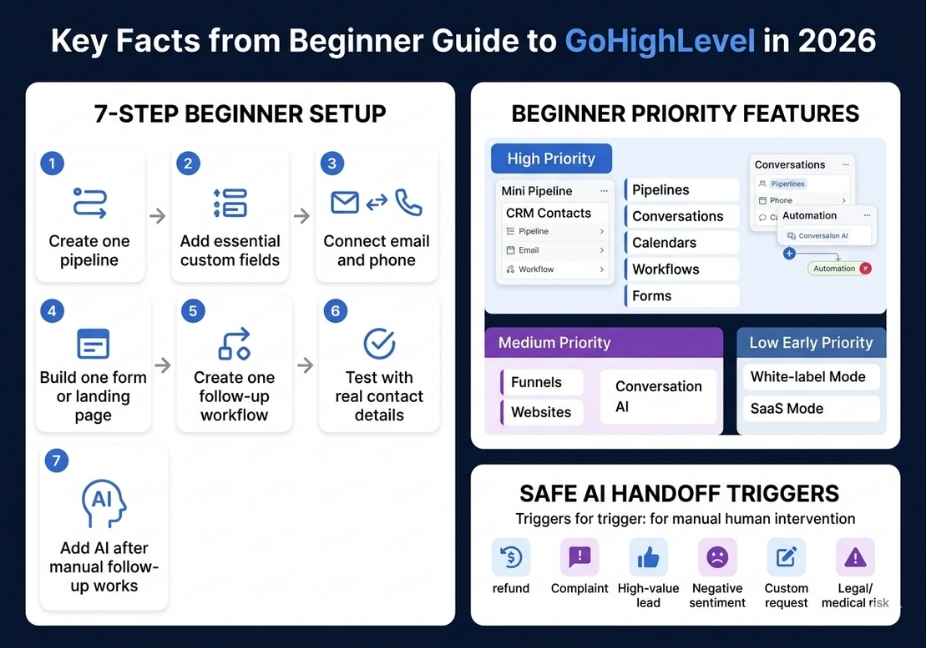
Conversation AI: Your 24/7 Lead Handler
Conversation AI is a trained chatbot that responds to inbound messages automatically across every contact channel GoHighLevel supports. You train it on your business offer, your most common customer objections, your booking rules, and example responses. Because the AI learns from the context you give it, the quality of your training data directly determines its performance.
GoHighLevel’s Q1 2026 Conversation AI update introduced several important improvements. Response times now average under two seconds. The system also added automatic multi-language detection, so if a Spanish-speaking lead sends their first message in Spanish, the bot switches to Spanish automatically without any extra configuration on your end. For agencies serving multilingual markets, this removes a significant barrier.
Pro Tip: Never activate Conversation AI with zero training data. According to GoHighLevel’s internal benchmarks, generic FAQ training drops response accuracy below 70%. Before you switch the bot on, write out your top 20 customer questions, your offer in plain English, your booking rules, and five examples of how you handle common objections. Paste all of that into the AI training section. That two-hour investment is what separates a Conversation AI that converts leads from one that loses them.
Voice AI Agent: Your Inbound Call Handler
Voice AI handles real inbound phone calls using natural-language understanding (NLU) and speech recognition. Specifically, it answers the phone, qualifies the caller based on your defined criteria, books appointments directly into your connected calendar, and transfers the call to a live team member when it detects a high-intent signal or complex question.
In early 2026, GoHighLevel upgraded the underlying text-to-speech engine behind Voice AI. As a result, response latency dropped by roughly 40% compared to Q4 2025, with average response times now under two seconds. Because the pacing and conversational filler words now sound more natural, most callers cannot tell they are speaking with an AI during structured conversations like appointment booking.
Did You Know? Voice AI does not replace your sales team. Instead, it handles the repetitive top-of-funnel calls initial qualifications, appointment confirmations, missed-call callbacks so your human reps only handle conversations that are already warmed up and ready to close.
Set up Voice AI on a single Twilio number first. Run it for two weeks. Measure how many calls it handles, how many it transfers to a human, and what your booking rate looks like. Only then expand it to additional numbers or client accounts.
Workflow AI Agent Action: Agentic Automation
This is the most technically significant addition GoHighLevel shipped in 2026. The AI Agent workflow action is a single step you can add to any workflow. Instead of manually building every individual action in sequence, you write one plain-language instruction and give the agent a set of tools to work with. The agent then reads the contact’s context, decides which tools to use, chooses the order, and executes the entire sequence autonomously.
For example, rather than building five separate workflow steps to look up a contact record, check their last interaction, generate a personalized booking link, format a follow-up message, and send an SMS, you write one instruction: “Review this contact’s last interaction, generate a personalized consultation booking link, and send a follow-up text that references what they asked about.” The AI Agent reads the contact, selects its tools, and handles the rest.
Furthermore, the AI Agent workflow action includes built-in cross-channel conversation history retrieval. It automatically pulls the contact’s past SMS messages, emails, and call transcripts when those are relevant to the task. Because of this, the agent can reference a conversation from three days ago in its outreach without any manual data lookup on your part.
Technical Note: The AI Agent workflow action is a premium feature billed per execution. Therefore, before activating it across multiple sub-accounts, go to Agency Settings, then Billing, then Limits, and set a hard monthly credit cap. This prevents unexpected overruns on your second invoice.
Step-by-Step: How to Set Up GoHighLevel in Your First 30 Days
The order in which you set things up matters enormously. Consequently, most beginners who struggle with GoHighLevel are not struggling because the platform is hard. They are struggling because they built in the wrong order. Here is the sequence that gets you to your first lead the fastest.
Week 1: Build the Foundation
Before you log into the dashboard and start clicking, gather four things: your business logo and brand colors, your domain login credentials, your top 20 customer FAQs and objection responses, and your Stripe account credentials if you plan to take payments.
Then complete the Launchpad checklist in this specific order. First, connect your custom domain. Second, set up your phone system LeadConnector is the fastest option for beginners, while Twilio gives you more control and flexibility at scale. Third, configure your email LeadConnector Mail works immediately, while Mailgun gives you stronger deliverability control when you are sending at volume. Fourth, connect your calendar. Fifth, and most critically, start your A2P 10DLC carrier registration immediately.
A2P 10DLC is the carrier registration process that allows you to send business SMS in the United States. Because this registration can take one to two weeks to complete, delaying it delays everything else. SMS is GoHighLevel’s highest-converting follow-up channel. If your texts are not delivered, your automation results will look far worse than they should.
Week 2: Build Your First Lead Capture Page
In Week 2, build one funnel page not a full website. A single landing page with a form that collects a name, phone number, and email address is sufficient. Your goal is to create one path a lead can walk through and have GHL capture their information automatically.
Set the form submission to trigger a simple workflow: an immediate SMS confirmation to the lead and a new contact created in your CRM. Then test it yourself by submitting the form and confirming the contact appears in your pipeline and the SMS fires correctly.
Pro Tip: Users who follow a structured onboarding approach in their first 30 days are 85% more likely to achieve a positive ROI in month one. However, users who skip Week 1 foundation work typically spend Week 2 debugging why their emails are landing in spam or why their SMS messages are not delivering. Do not skip the foundation.
Week 3: Activate Your First Automation
In Week 3, build your missed-call text-back workflow. When a call goes unanswered, GoHighLevel fires an SMS to the caller within 60 seconds. A simple message works best: “Hey [First Name], sorry I missed your call what time works best to connect?” This single automation consistently produces the fastest visible ROI for any GoHighLevel beginner. It costs nothing beyond your SMS credits, and it recovers leads that would otherwise go cold and never call back.
After you set up the missed-call workflow, add Conversation AI to handle the reply thread. At this point, you have a working lead capture page, a missed-call recovery automation, and an AI that handles the follow-up conversation all running without any manual action on your part.
Week 4 and Beyond: Layer In the AI
Once your lead path is stable and confirmed to be working, activate Voice AI on a single inbound number. Add the AI Agent workflow action to your lead qualification sequence. Layer in Content AI for email copy drafts and Reviews AI for reputation management after that.
Because you built the foundation first, these additions will enhance a system that already works rather than add complexity to one that does not.
Common Mistakes Beginners Make (and How to Avoid Them)
Understanding what goes wrong for others is one of the fastest ways to skip past those same problems yourself. Therefore, here are the five most consistent mistakes GoHighLevel beginners make, based on patterns reported by experienced agency owners and platform practitioners.
Overbuilding before testing. Many new users build 10-step automation sequences before confirming that their domain is connected or their phone system is live. Build one step, confirm it works, then build the next. Complexity you add before validating the foundation becomes debt.
Activating AI with no training data. Both Conversation AI and Voice AI require real business context to produce useful responses. Turning them on without any training is like hiring a customer service rep and skipping the onboarding. They will say something technically plausible but completely unhelpful, and your leads will stop responding.
Skipping A2P 10DLC registration. Because this registration takes up to two weeks, any delay at the start cascades into weeks of broken SMS automation. Start it on Day 1.
Watching tutorials without building simultaneously. HighLevel Academy’s structured onboarding paths are well-designed and genuinely useful. However, watching a tutorial without building the feature being demonstrated in a second browser tab means you retain very little. Build as you learn.
Attempting SaaS mode before you have a single client. White-label configuration and sub-account reselling are important for agencies scaling beyond five clients. However, they are Week 8 priorities not Week 1 priorities. Focus on your own lead system first.
GoHighLevel vs. HubSpot vs. Other Platforms: Quick Comparison
Many beginners arrive at GoHighLevel after using HubSpot, Zapier, or a stack of disconnected tools. Understanding where GHL stands relative to those options helps you make a more confident decision.
GoHighLevel includes CRM, funnel builder, SMS and email automation, calendar booking, pipeline management, AI agents, and white-label reselling all in one platform. HubSpot offers a strong CRM and excellent reporting but separates most marketing automation into paid tiers that become expensive quickly. Zapier connects other tools together but requires you to already own and configure those tools separately. A ClickFunnels or Kajabi setup focuses primarily on funnels and courses, missing the CRM and AI automation layer entirely.
Consequently, for agencies and service businesses that need a single platform to manage lead capture, follow-up, client communication, and automation, GoHighLevel offers the broadest feature set at the most competitive price point in 2026.
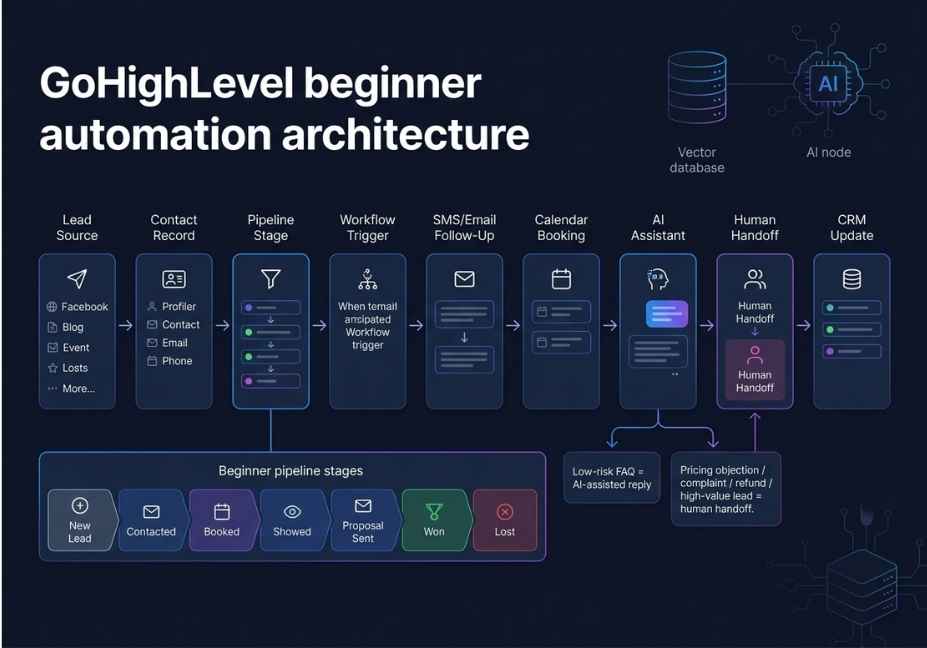
FAQ: People Also Ask About GoHighLevel for Beginners
What is GoHighLevel and who is it for?
GoHighLevel is an all-in-one marketing automation platform built for digital marketing agencies, freelancers, and service-based businesses. It combines CRM, funnel builder, SMS and email marketing, calendar booking, pipeline management, and AI agents in one dashboard. It is best suited for businesses that need to capture leads, automate follow-up, and manage client pipelines without stitching together multiple separate tools.
How does GoHighLevel Conversation AI work?
Conversation AI is an AI-powered chatbot that automatically responds to inbound messages across SMS, email, Facebook Messenger, Instagram DMs, and WhatsApp. You train it on your business context, offer, and objection-handling scripts. Because it operates around the clock, it responds within two seconds and hands off to a human rep only when it detects a high-intent signal or escalation trigger.
Is GoHighLevel good for beginners with no tech experience?
Yes, for the core features. The funnel builder, CRM, and basic workflow triggers are all drag-and-drop and require no coding. The AI features require written configuration in plain English rather than code. Therefore, the main learning curve is understanding GoHighLevel’s logic how triggers connect to actions not writing any technical implementation.
How do I set up my first automation in GoHighLevel as a beginner?
Go to Automations, then Workflows, and click Create Workflow. Add a trigger for beginners, start with Missed Call or Form Submitted. Add a Send SMS action with a simple follow-up message. Test the workflow by triggering the event yourself, then check your Conversations inbox to confirm the SMS fired. The missed-call text-back workflow is the fastest automation to set up and typically the first one to show measurable results.
What is the GoHighLevel AI Agent workflow action?
The AI Agent workflow action is a single step you can add to any GoHighLevel automation. Instead of building every individual action manually, you write one plain-language instruction and assign a set of tools to the agent. The agent then reads the contact’s context, decides which tools to use, and executes the entire task sequence autonomously. It is billed as a premium action per execution, so setting a credit cap before activating is strongly recommended.
What is the difference between GoHighLevel plans in 2026?
The Starter plan at $97 per month covers one business location. The Agency plan at $297 per month adds unlimited sub-accounts for client management. The Agency Pro plan at $497 per month unlocks SaaS mode, white-label branding, and full AI reselling. AI usage is billed on top of the base plan, with the AI Employee add-on at $97 per month per sub-account giving unlimited AI access for that account.
Conclusion
GoHighLevel in 2026 is a genuinely different platform from what it was two years ago. Because of the Conversation AI, Voice AI, and agentic Workflow AI additions, beginners now have access to automated lead handling that previously required a full team and a complex multi-tool stack to replicate.
Three things, however, determine whether a beginner actually succeeds. First, setup order matters skip A2P registration and your SMS channel breaks before it starts. Second, AI requires training data blank prompts produce useless responses, not working bots. Third, one working system beats ten half-built ones. Therefore, get your lead capture and follow-up loop confirmed and running before you add anything else.
Because you now have the full picture the architecture, the AI features, the setup sequence, and the mistakes to avoid the next step is simple. Open your GoHighLevel trial, complete the Launchpad checklist in the order outlined above, and build your first automation this week. Bookmark this guide and explore more hands-on AI agent tutorials at agentiveaiagents.com.



