
Production AI agents often fail not due to poor models but due to architectural flaws made prior to development. The issue is worsened for organizations working on deploying no-code AI agents. Organizations have tools available and generally have a good understanding of what the tool provides but lack insight into how it functions internally.
The no-code AI agent landscape has matured to a point where business users, operations teams, and product managers can now create and deploy production-ready AI agents without having to code in Python, interact with APIs, or have any knowledge of machine learning.
While “no-code” does not imply “no thought,” you do still need to properly design your tool-use loop, memory configuration, and RAG pipeline even when you are just dragging and dropping items to create your agent. This guide provides you with direction to get this right.
What Is a No-Code AI Agent? (Direct Answer)
A no-code AI agent is an autonomous AI system you build entirely through a visual drag-and-drop interface no programming required. It combines a large language model (LLM) reasoning core with tools, memory, and triggers. The agent perceives an input, reasons about what action to take, executes a tool, observes the result, and loops until the task is done.
In other words, it behaves like a digital employee that can plan, decide, and act not just respond.
Why Deploying AI Agents Without Coding Is Now Possible
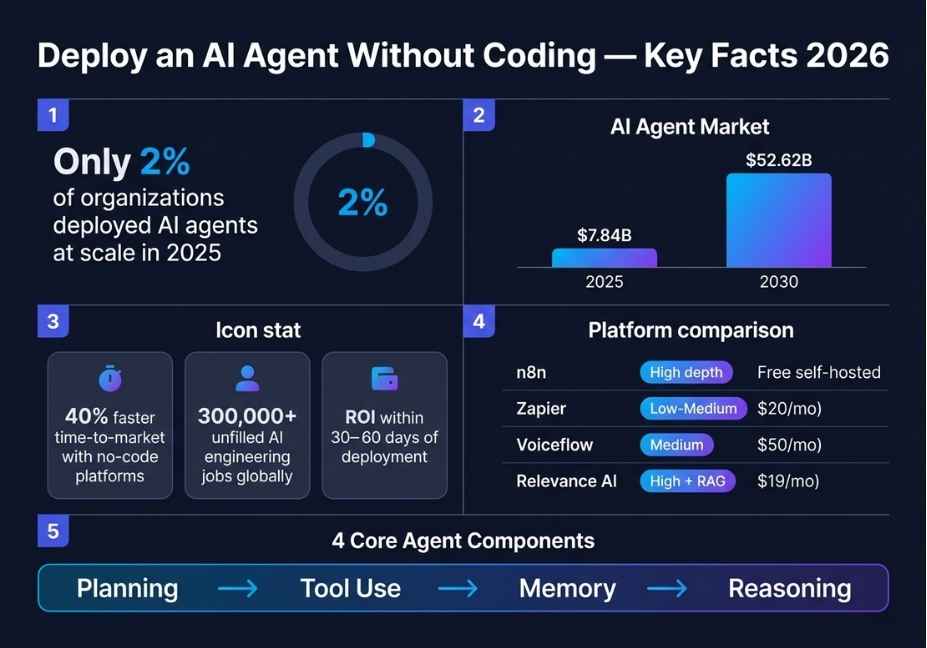
Until recently, building an AI agent required expertise in Python, LangChain, and cloud infrastructure. That barrier has dropped dramatically. In fact, the no-code AI agent market hit $7.84 billion in 2025 and is projected to reach $52.62 billion by 2030.
Three forces are driving this shift. First, visual workflow platforms like n8n, Flowise, and Langflow now expose genuine agent architecture not just linear automation steps. Second, LLM APIs from OpenAI, Anthropic, and Google have become reliable enough that non-engineers can consume them through pre-built connectors. Third, and perhaps most importantly, the business demand is urgent: there are over 300,000 unfilled AI engineering roles globally, which means organizations simply cannot wait for developers.
Because of this, product managers and operations teams are now deploying agents that previously required six-figure engineering contracts.
Did You Know? Companies using no-code AI platforms report 40% faster time-to-market compared to custom-coded development without sacrificing core agent capabilities like tool use and memory retrieval.
How Does a No-Code AI Agent Actually Work?
Understanding the internal mechanism is what separates agents that work in production from agents that stall, loop, or hallucinate confidently.
Every functional AI agent regardless of platform runs a variant of the ReAct (Reasoning + Acting) pattern, introduced by Yao et al. (2023) and available in full at arxiv.org/abs/2210.03629. The loop works like this:
- Perceive : the agent receives a trigger: a user message, webhook, email, or scheduled event
- Reason : the LLM reads its tools, memory, and system prompt, then decides what to do
- Act : a tool executes: web search, database query, API call, file read, or email send
- Observe : the tool result feeds back into the LLM’s context window
- Loop or terminate : the agent continues reasoning or delivers its final output
In no-code platforms, each step maps to a visual node on a canvas. The LLM reasoning core is typically an “AI Agent” node. Tools are connector nodes Slack, Google Sheets, HTTP requests. Memory is a vector store or session buffer you attach alongside the agent.
Moreover, this architecture is what separates a genuine AI agent from a chatbot. A chatbot responds. An agent acts, observes, and adapts.
Architect’s Note: The most common production failure happens at step 4 the observation loop. If your platform does not feed tool results back into the LLM as structured messages, you do not have an agent. You have a one-shot workflow with an LLM label on it. Always verify loop support before committing to a platform.
Best No-Code Platforms to Deploy AI Agents in 2026
Not every “no-code AI” tool supports real agent behavior. Therefore, choosing the right platform is the single most important decision you will make.
Here is how the leading platforms compare across the dimensions that matter most for genuine agent deployment:
| Platform | True Agent Loop | RAG + Memory | Self-Host | Best For |
|---|---|---|---|---|
| n8n | Full (LangChain node) | Vector store support | Yes | Power users, data-sensitive workflows |
| Flowise | Full (LangChain-native) | Built-in RAG pipeline | Yes | Document-heavy agents, RAG workflows |
| Langflow | Full (visual LangChain) | Supported | Yes | AI-first teams, rapid prototyping |
| Zapier Agents | Linear only | Limited | No | SaaS integrations, marketing ops |
| MindStudio | Moderate | Template-based | No | Business users, fast no-frills deploy |
| Make.com | No native loop | Manual only | No | Ops teams needing branching logic |
The key distinction: Zapier and Make add AI as a step inside a linear workflow. That is useful for simple automation. However, if you need an agent that can plan across multiple steps, retry on failure, or adapt based on tool output n8n, Flowise, or Langflow are the architecturally correct choice.
For teams concerned about data privacy, furthermore, n8n and Flowise both support full self-hosting, which means your data never leaves your own infrastructure.
Step-by-Step: How to Deploy an AI Agent Without Coding Using n8n
n8n is currently the most capable no-code platform that still exposes real agent architecture through its built-in AI agent node with LangChain integration. Consequently, it is the recommended starting point for most teams.
Here is a step-by-step setup that reaches production readiness:
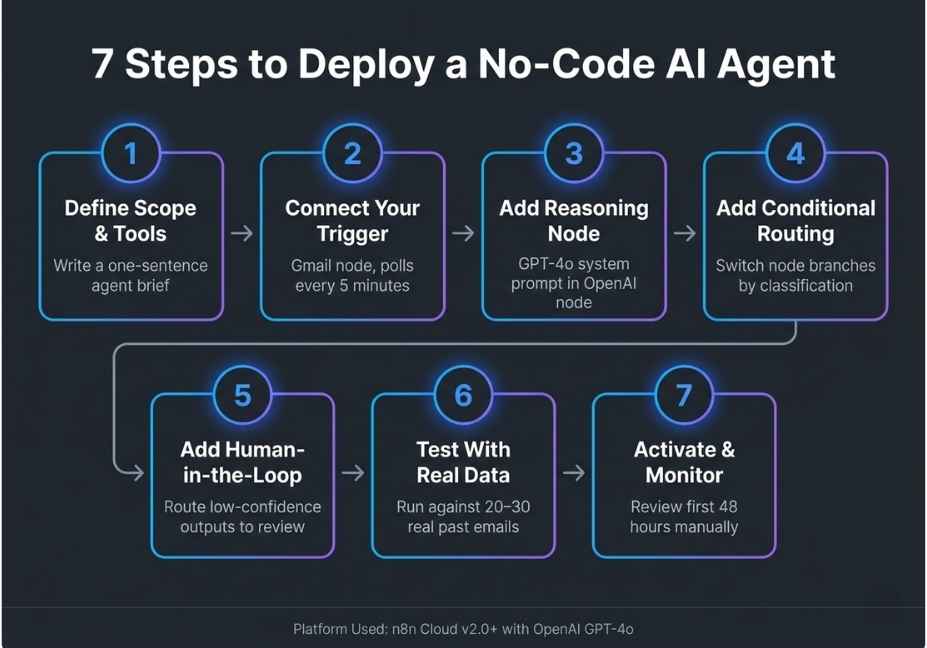
Step 1 : Define the agent’s exact job scope Before touching the canvas, write one sentence: “This agent monitors a support inbox, classifies each ticket by priority, searches our knowledge base, and drafts a reply.” Ambiguous scope is the primary cause of wrong tool selection during the reasoning step. Therefore, define it first.
Step 2 : Set your trigger node In n8n, add a trigger: webhook, email polling, scheduled cron, or form input. This is the agent’s “perceive” layer the entry point where the task begins.
Step 3 : Add and configure the AI Agent node Drag in the AI Agent node and select your LLM: OpenAI GPT-4o, Anthropic Claude, or a local model via Ollama. Then write a system prompt that defines role, constraints, tone, and output format. Keep it under 500 tokens, because bloated system prompts measurably degrade reasoning consistency.
Step 4 : Connect tools with descriptive labels Attach tool nodes for each action the agent can take: HTTP Request, Google Sheets, Slack, database connector. Critically, each tool needs a plain-English description not just a name. The LLM reads these descriptions at runtime to decide which tool to call. Vague tool names like “search_db” tell the model nothing useful.
Step 5 : Add memory for multi-turn coherence Connect a Window Buffer Memory node for short-term session context. Alternatively, for long-term retrieval over documents, connect a Pinecone, Supabase, or ChromaDB Vector Store node. Without memory, the agent loses all context between invocations which means every conversation starts from zero.
Step 6 : Build a human-in-the-loop checkpoint Add a conditional node that routes low-confidence outputs for example, responses containing “I’m not sure” or “I cannot confirm” to a human reviewer before delivery. This single step eliminates the majority of hallucination incidents in production agent deployments.
Step 7 : Run adversarial testing before going live Test with 15–20 cases, including inputs the agent was not designed for. Observe specifically where the tool-use loop stalls, repeats, or selects the wrong tool. Fix issues at the system prompt and tool description level first. Adding more nodes rarely solves reasoning failures.
Pro Tip: Start with a maximum of 3–5 tools. Every additional tool increases the LLM’s reasoning overhead and raises the probability of wrong tool selection. Add tools incrementally once baseline accuracy is confirmed.
How to Deploy a RAG-Powered AI Agent Without Coding Using Flowise
If your agent needs to reason over private documents internal wikis, PDFs, product manuals, or support knowledge bases then Flowise, the open-source visual builder for LLM chains and RAG workflows, is architecturally better suited than n8n for this specific use case.
Flowise exposes the full RAG pipeline as configurable visual nodes:
Document Loader → Text Splitter → Embedding Model → Vector Store → Retriever → LLM Chain
Because each step is visible and independently configurable, you can swap a Pinecone vector store for ChromaDB without touching any downstream logic. Similarly, you can change your chunking strategy adjusting chunk size and overlap directly in the splitter node, then immediately test retrieval accuracy.
Where Flowise outperforms n8n for RAG deployments:
- Native chunking strategy controls with no workaround needed
- Built-in embedding model selector (OpenAI, Cohere, local models) without custom HTTP nodes
- Conversational retrieval chain that maintains chat history alongside document context
- Visual debugging of retrieval results before full agent deployment
Where Flowise falls short:
- Fewer non-AI SaaS connectors compared to n8n (no native Salesforce, HubSpot, or CRM nodes)
- Production monitoring is less mature than n8n’s enterprise observability tier
The 5 Most Common Mistakes When Deploying No-Code AI Agents
Even experienced builders repeat these errors. As a result, knowing them in advance saves significant debugging time.
Mistake 1 : Skipping the system prompt entirely Most platforms ship with an empty or generic system prompt. An agent without a constrained role will attempt to answer everything including things it should not. Always define: role, task scope, allowed actions, output format, and what to say when the agent does not know the answer.
Mistake 2 : Using tool names instead of tool descriptions A tool called “search_database” means nothing to the LLM reasoning layer. Instead, write: “Use this tool when the user asks about order status. Input: order ID as a string. Output: JSON with current status and estimated delivery date.” Because the LLM selects tools based on these descriptions, the quality of your descriptions directly determines the accuracy of your agent.
Mistake 3 : Forgetting to connect a memory node Linear workflow tools like Zapier and Make do not maintain state between runs by default. Consequently, without an explicit memory node, your agent restarts from zero on every trigger making multi-turn conversations incoherent. Always connect memory when conversation continuity is required.
Mistake 4 : No termination condition on the reasoning loop Agents that call tools in a loop need an explicit exit condition. In n8n, set a maximum iteration limit on the agent node. Without it, a confused LLM will continue calling tools until the platform’s timeout fires consuming API credits and delivering nothing. Therefore, always set a hard iteration cap.
Mistake 5 : No error handling for failed tool calls When the LLM generates a malformed tool call, most no-code platforms throw an unhandled error and terminate the workflow silently. To prevent this, add an error-handling node that catches tool failures and routes them back to the LLM with an explicit retry instruction, or escalates to a human reviewer.
What the Builder Community Is Saying
Real-world feedback from practitioners reinforces these patterns. On Reddit’s r/LocalLLaMA community, the dominant theme across no-code agent threads is that tool description quality not model selection is the primary determinant of agent accuracy. Developers consistently report that GPT-4o with precise tool descriptions outperforms more capable models running on vague ones.
Furthermore, the n8n community forums show that the majority of production failures are traced back to one of three root causes: missing memory nodes, infinite reasoning loops, or malformed tool schemas. Interestingly, none of these are model problems. They are all configuration problems which means they are entirely solvable within a no-code environment.
FAQ People Also Ask
A no-code AI agent is an autonomous system you build through a visual interface without writing code. It uses a large language model to perceive tasks, select tools, execute actions, and loop until the task is complete. Platforms like n8n, Flowise, and Langflow let you configure the tool-use loop, memory, and RAG pipeline entirely through drag-and-drop nodes.
Choose a platform with a native agent loop n8n, Flowise, or Langflow are the strongest options. Define your trigger, add an AI Agent node with a clear system prompt, connect tools with plain-English descriptions, attach a memory or RAG module, and add a human-in-the-loop checkpoint. Test with adversarial inputs before going live.
For memory and RAG together, Flowise is the strongest no-code option because it exposes the full retrieval pipeline as configurable nodes document loader, text splitter, embedding model, vector store, and retriever. n8n is the better choice when you also need broad SaaS integrations alongside RAG, because it combines both in one platform.
Yes. Platforms like n8n, Flowise, Langflow, and MindStudio require zero Python knowledge for standard agent deployments. You configure LLM model selection, tool connections, memory modules, and RAG pipelines entirely through visual interfaces. API keys are entered through form fields, not code. Therefore, the only technical requirement is understanding how the tool-use loop works conceptually.
A chatbot follows a pre-programmed decision tree and responds to direct inputs. A no-code AI agent, by contrast, can decompose multi-step tasks, dynamically select tools, act on external systems, observe results, and adjust its plan accordingly without pre-programmed branches. The defining architectural difference is the tool-use loop: an agent acts on the world, while a chatbot only describes it.
No-code agents inherit all LLM limitations: hallucination on ungrounded factual claims, sensitivity to prompt wording, and unreliable tool selection under high ambiguity. Additionally, most no-code platforms abstract away fine-grained context window management, making token overflow issues difficult to debug visually. Complex multi-agent orchestration for example, parallel agent execution as in CrewAI is also largely unavailable in visual builders as of 2026.
Conclusion
Deploying an AI agent without coding is now genuinely achievable but success depends on three decisions you make before touching a platform. First, choose a tool that supports a true agent loop, not just linear AI automation. Second, design your tool descriptions and system prompt with the same care you would give to code. Third, connect memory and add a human-in-the-loop checkpoint before anything goes live.
In short: the platform handles the plumbing. You are still responsible for the architecture.
Start with n8n for general-purpose agents or Flowise for document-reasoning and RAG-heavy workflows. Build a small working agent first, validate it against real inputs, and expand from there.
Explore more step-by-step agentic workflow guides and platform teardowns at agentiveaiagents.com.