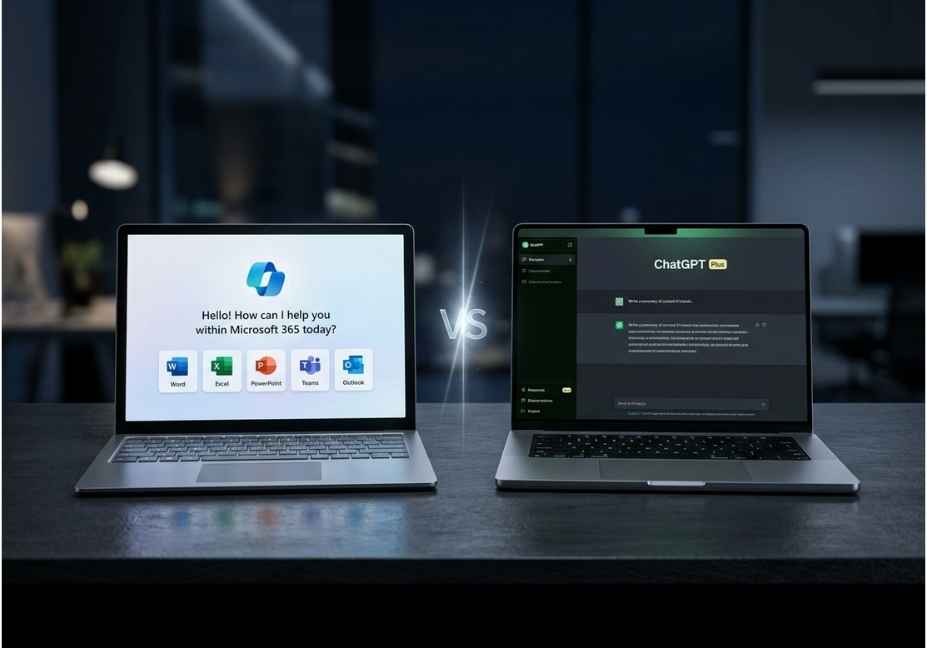
Both Copilot Pro and ChatGPT Plus cost $20/month and run on OpenAI’s GPT-5 models. However, they serve fundamentally different workflows. ChatGPT Plus is the stronger standalone AI assistant with broader tool access and higher benchmark scores. Copilot Pro wins decisively if your daily work lives inside Microsoft 365 apps like Word, Excel, Outlook, and Teams.
Both subscriptions cost exactly $20/month. Both run on OpenAI’s GPT-5 family. And yet, choosing the wrong one will quietly cost you hours of productivity every week or worse, lead you to build agentic workflows on a foundation that does not match your stack.
The Copilot Pro vs ChatGPT Plus debate has evolved well beyond “which chatbot writes better emails.” In 2026, both platforms are pushing hard into autonomous agent territory. ChatGPT now ships a built-in virtual browser and a full computer-use agent. Microsoft’s Copilot Studio, meanwhile, lets enterprise teams build multi-step agents that reach across M365 data, CRM systems, and 1,400+ Power Platform connectors.
So the real question is no longer about which AI is smarter. Instead, it is about which platform fits your actual workflow and how far each lets you push agentic task automation without fighting the tool.
This comparison cuts through surface-level feature parity. Specifically, it covers model transparency, tool-use architecture, coding benchmarks, pricing realities, and the practical limits of each platform’s orchestration layer.
What Is the Difference Between Copilot Pro and ChatGPT Plus?
Copilot Pro is Microsoft’s premium AI subscription, built to operate inside the Microsoft 365 ecosystem. It grounds responses against your real Outlook emails, Teams transcripts, SharePoint files, and Excel data without any copy-paste friction. Because of this, it functions as an embedded productivity layer rather than a standalone assistant.
ChatGPT Plus, by contrast, is OpenAI’s direct premium product. It includes explicit model selection across GPT-5.2, o1, o3, and GPT-4.5, along with Custom GPTs, Canvas, Projects, Sora video generation, and a native Agent mode with a virtual computer. It works independently of any specific app ecosystem.
In short: same core model family, very different wrappers, and completely different use-case targets.
How the Underlying Models Compare in 2026
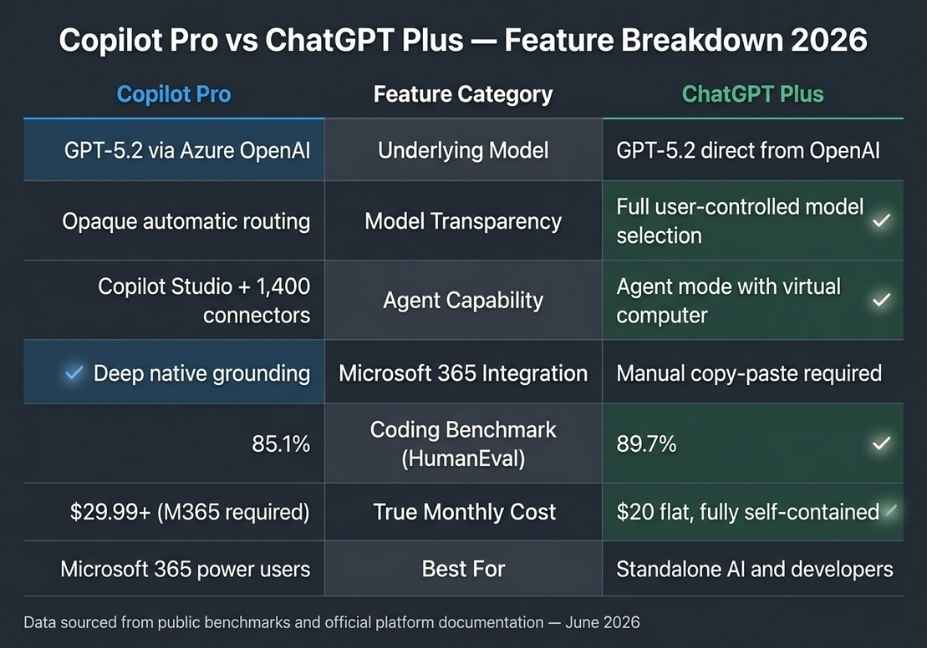
Here is an important fact that most comparison articles get wrong. Neither platform is meaningfully smarter than the other at the raw model level. Both Copilot Pro and ChatGPT Plus route through OpenAI’s GPT-5 family. Microsoft delivers this through its Azure OpenAI partnership, while ChatGPT is OpenAI’s own direct channel.
Because of this, model architecture is not the differentiator. Rather, what matters is model transparency, update speed, and how each platform exposes reasoning capabilities to the user.
ChatGPT Plus gives you explicit model switching. You can choose between GPT-5.2 for general tasks, o1 for step-by-step reasoning, o3 for advanced multi-step problem solving, and GPT-4.5 for faster lightweight queries. For developers who need reproducible, auditable model behavior compliance pipelines, output validation, benchmark testing this explicitness is a significant practical advantage.
Copilot Pro, on the other hand, routes internally between GPT-5.2 and GPT-4o. However, it offers substantially less transparency about which model is serving any given request. Furthermore, ChatGPT receives new OpenAI model releases first, typically weeks before they appear inside Copilot.
On objective benchmarks, the gap is measurable:
| Benchmark | ChatGPT Plus | Copilot Pro |
|---|---|---|
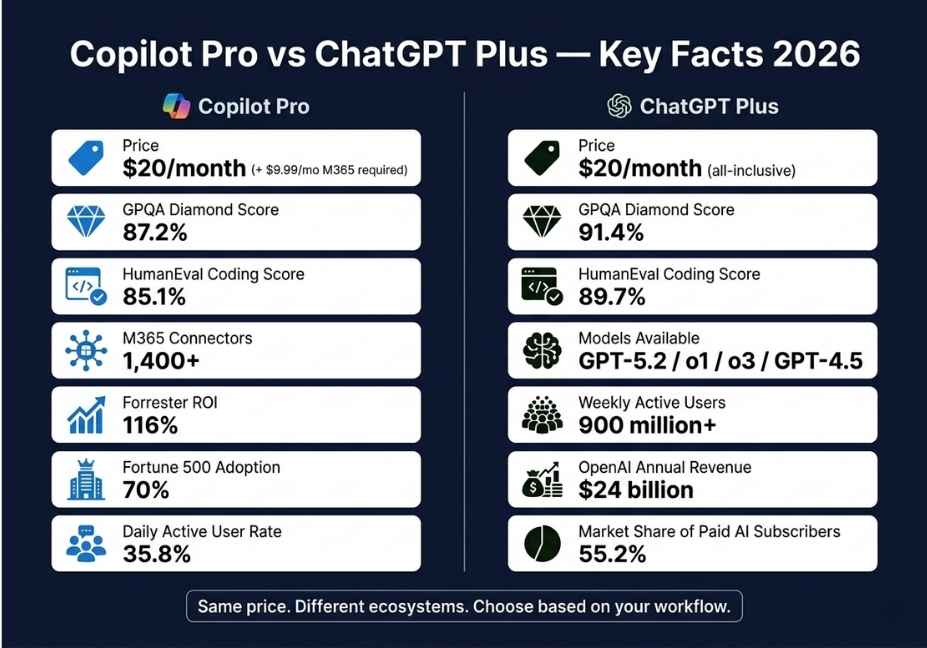
| GPQA Diamond (reasoning) | 91.4% | 87.2% |
| HumanEval (coding accuracy) | 89.7% | 85.1% |
| Model selection transparency | Full (user-controlled) | Opaque (automatic routing) |
| New model access speed | First | Delayed |
For a developer running hundreds of coding tasks daily, that 4.6-point HumanEval gap compounds quickly. Therefore, if raw coding accuracy matters to your workflow, ChatGPT Plus is the statistically stronger choice.
Technical Note: If your work requires predictable, auditable model behavior such as compliance validation or output reproducibility ChatGPT’s explicit model selector is a material advantage over Copilot’s opaque internal routing.
Agentic Workflows: Where the Real Gap Opens
This is the angle most comparison articles skip entirely. In 2026, the agentic capability difference between these two platforms is far more significant than any chat feature distinction.
ChatGPT’s Agent Architecture
ChatGPT ships a native Agent mode with a built-in virtual browser and cloud-based virtual computer. As a result, you can instruct it to research competitors, scrape structured data, prepare meeting materials, write and execute code, and return finished deliverables like slide decks or spreadsheets all autonomously, without switching tabs.
Under the hood, this follows a ReAct-style agent loop: observe → think → act → observe again. For developers already familiar with LangChain or AutoGen orchestration patterns, this architecture feels immediately intuitive.
Additionally, Custom GPTs and OpenAI Function Calling let you build specialized assistants that attach knowledge bases, invoke external APIs, and chain tool calls all without writing custom orchestration code from scratch.
Copilot’s Agent Architecture
Copilot Studio is Microsoft’s enterprise-grade agent builder. It connects to internal databases, CRM systems, SharePoint, and business applications through Microsoft’s Power Platform and over 1,400 pre-built connectors. Consequently, for organizations that need to orchestrate multi-step workflows across existing Microsoft data rather than building API connections from scratch Copilot Studio is significantly faster to deploy than anything on the ChatGPT side.
Copilot Actions handles lighter-weight task automation: booking travel, managing reservations, and sending messages. The Pages feature, introduced in late 2025, creates collaborative AI-generated documents that multiple team members can edit simultaneously in real time.
Pro Tip: If you are building internal agent workflows that need to touch SharePoint, Dynamics 365, or Microsoft Teams data, Copilot Studio’s pre-built connector library will save you weeks of custom API integration that you would otherwise write manually on the ChatGPT side.
Coding Capability: A Nuanced Split
Before comparing these two platforms on coding, one critical clarification is necessary. Neither ChatGPT Plus nor Copilot Pro is a substitute for GitHub Copilot ($10/month individual). GitHub Copilot is a separate product editor-native, context-aware, and purpose-built for streaming inline completions inside your IDE. If you code professionally, GitHub Copilot is your baseline coding tool. The ChatGPT vs Copilot Pro comparison is a separate decision.
With that established, here is how the two chat platforms compare for coding tasks:
| Task | ChatGPT Plus | Copilot Pro |
|---|---|---|
| Step-by-step code explanation | Strong | Good |
| Multi-turn debugging with context | Strong (via Projects) | Adequate |
| Inline IDE completions | Not native needs GitHub Copilot | Not native needs GitHub Copilot |
| Agent-mode code execution | Virtual computer included | Limited |
| Grounding against your actual codebase | Manual paste required | Via SharePoint only |
| HumanEval benchmark accuracy | 89.7% | 85.1% |
For explaining concepts, teaching debugging logic, and running multi-turn code sessions with persistent memory, ChatGPT Plus holds a clear edge. This advantage comes primarily from two features: Projects, which maintains context across sessions, and the higher HumanEval ceiling.
Now that the coding layer is clear, let us look at where Copilot Pro decisively pulls ahead.
Microsoft 365 Integration: Copilot’s Killer Feature
If your daily workflow lives inside Word, Excel, Outlook, and Teams, then Microsoft Graph grounding is a productivity multiplier that no standalone AI tool can currently replicate.
The practical difference comes down to friction. In Copilot, drafting a document summary automatically pulls from your actual SharePoint files and recent Teams meeting transcripts no copy-paste, no manual context window management. In ChatGPT, the same workflow requires copying the document text, opening a chat, pasting the content, receiving a response, and then pasting it back. Across a full workday, that switching cost adds up to 3–5 minutes per task.
Furthermore, Microsoft Graph grounding means Copilot can reference your recent emails when drafting a document, pull live data from SharePoint when answering questions, and generate Teams meeting agendas from your calendar all without the user providing any explicit context at all.
For teams at scale, the ROI evidence is strong. A Forrester Total Economic Impact study found M365 Copilot delivers a 116% ROI with a net present value of $19.7 million for a composite enterprise deployment. Because Copilot eliminates the context-switching tax entirely, that financial return is sustainable at volume in ways that standalone AI subscriptions cannot match.
Did You Know? 70% of Fortune 500 companies have adopted M365 Copilot in some form. However, the 35.8% daily-active-user conversion rate reveals that training and change management not the technology itself is the primary adoption barrier. Organizations with structured rollout programs achieve 65–78% daily active use at 90 days. Unstructured big-bang deployments average just 12–22%.
Pricing: Closer Than It Looks Until You Add It All Up
On the surface, both plans cost $20/month. In practice, however, the true cost of Copilot Pro is higher for users who are not already in the Microsoft ecosystem.
| Plan | Monthly Cost | What Is Included |
|---|---|---|
| ChatGPT Plus | $20/mo | GPT-5.2, all features, Sora, Custom GPTs, Agent mode, Projects, Canvas |
| Copilot Pro | $20/mo | Priority model access + M365 app integration |
| M365 Personal (required for full Copilot value) | $9.99/mo | Office apps + Copilot inside Word, Excel, Outlook |
| Microsoft 365 Copilot (enterprise) | $30/user/mo | Tenant-wide data grounding + Copilot Studio |
| GitHub Copilot Individual (separate product) | $10/mo | IDE-native completions not included in either plan |
The hidden cost of Copilot Pro is significant. Without an active Microsoft 365 subscription, the Microsoft Graph grounding that makes Copilot valuable simply does not activate. For users outside the M365 ecosystem, therefore, the true effective cost is $29.99/month at minimum not $20.
ChatGPT Plus, by contrast, is entirely self-contained. Everything is included at $20/month with no ecosystem prerequisites, no add-on subscriptions, and no hidden dependencies.
Is Copilot Pro Worth It for Individuals?
This is one of the most common long-tail questions people search when evaluating these tools and the honest answer depends entirely on your stack.
Copilot Pro is worth $20/month if you already pay for Microsoft 365, you spend most of your day inside Word, Excel, Outlook, or Teams, and your organization has or plans SharePoint and Teams deployments. In that context, the M365 integration alone justifies the cost through time savings.
Copilot Pro is not worth it if you do not use Microsoft 365 apps daily. Without that integration, you are essentially paying $20/month for a slightly restricted version of the same GPT-5 model that ChatGPT Plus gives you with less model transparency and fewer standalone features.
ChatGPT Plus is worth $20/month for virtually any heavy daily user who writes, codes, or researches outside the Microsoft ecosystem. The full GPT-5.2 feature set, Agent mode, and explicit model selection make it the more capable standalone tool at the same price.
Common Mistakes When Choosing Between Them
Many users make the same avoidable errors when comparing these platforms. Here are the five most common mistakes, and how to avoid each one.
Mistake 1 Choosing based on the underlying model. Both platforms run on GPT-5 family models. Therefore, the model is not the differentiator. The wrapper around the model tool access, data grounding, and orchestration depth is what actually determines your experience.
Mistake 2 Ignoring the M365 dependency cost. Copilot Pro without M365 integration is a substantially weaker product. Because of this, always calculate the true combined cost before comparing it directly to ChatGPT Plus at $20.
Mistake 3 Expecting ChatGPT to replace GitHub Copilot. ChatGPT chat is not a substitute for GitHub Copilot’s IDE-native completions. They solve completely different problems at different points in the development workflow.
Mistake 4 Treating Custom GPTs as enterprise agents. Custom GPTs are lightweight specialized assistants. For enterprise-grade multi-step agents with live organizational data connectors, Copilot Studio is the correct tool. Custom GPTs are simply not designed for that orchestration depth.
Mistake 5 Overlooking model transparency requirements. If your work demands predictable, auditable model behavior for compliance or reproducibility, ChatGPT’s explicit model selector is a material advantage. Copilot’s internal routing is opaque by comparison and cannot be overridden by the user.
Best AI Subscription for Developers in 2026: A Practical Decision Framework
If you are a developer trying to decide between these two subscriptions, use this simple framework:
Choose ChatGPT Plus if:
- You work outside the Microsoft 365 ecosystem
- You need explicit model selection for reproducible outputs
- You want the broadest agentic feature set (Agent mode, Custom GPTs, Sora, o3 access)
- You prioritize getting new OpenAI model releases as soon as they ship
- Your coding work involves explanation, debugging, and multi-turn reasoning sessions
Choose Copilot Pro if:
- You already pay for Microsoft 365 Personal or Business
- Most of your daily work happens inside Word, Excel, Outlook, or Teams
- Your organization uses SharePoint and needs AI grounded against internal documents
- You need enterprise-grade agent building through Copilot Studio
Consider both if:
- You are a power user who needs M365 integration and standalone AI capability
- At $40/month combined (plus your M365 subscription), you cover every workflow scenario without compromise
What Developers Are Actually Saying
The consensus among hands-on practitioners in 2026 increasingly reflects a “both tools, for different jobs” stance. Most developers use ChatGPT Plus as their primary thinking and reasoning tool. They use GitHub Copilot for editor-native completions. And they treat Copilot Pro as an organizational IT-layer decision rather than a personal developer tool.
In a Q1 2026 enterprise survey where users had simultaneous access to all three major platforms, 76% named ChatGPT as their primary AI tool. Copilot came in at 18%. Gemini trailed at 6%. Despite this individual-user preference gap, Copilot remains the dominant enterprise deployment choice because existing M365 licensing, organizational data governance, and security requirements drive that decision at the IT level, not raw capability.
Developer communities on platforms focused on local LLMs and machine learning consistently report the same pattern: ChatGPT Plus for open-ended research, complex reasoning chains, and creative technical work Copilot Studio when the organization specifically requires it.
FAQ People Also Ask
Copilot Pro and ChatGPT Plus both cost $20/month and run on OpenAI’s GPT-5 models. The key difference is context. ChatGPT Plus is a standalone AI with Agent mode, Custom GPTs, explicit model selection, and Sora video generation. Copilot Pro is built to operate inside Microsoft 365, grounding responses against your real Outlook, Teams, SharePoint, and Excel data automatically. Choose Copilot Pro if you live in M365 daily. Choose ChatGPT Plus for everything else.
Yes. Both platforms run on OpenAI’s GPT-5 family models through Microsoft’s Azure OpenAI partnership. However, ChatGPT receives new model releases first and lets you explicitly choose between GPT-5.2, o1, and o3. Copilot routes between models automatically with less user-facing transparency. For developers who need predictable, auditable model behavior, that distinction matters significantly.
Copilot Pro gives individual subscribers access to Copilot Actions for lightweight task automation. Full agent-building multi-step workflows with live data connectors, CRM integrations, and SharePoint grounding requires Copilot Studio, which is primarily an enterprise feature under Microsoft 365 Copilot licensing. For individual agent-building without enterprise overhead, ChatGPT’s Custom GPTs and Agent mode are the more accessible starting point.
Yes, for most heavy daily users. ChatGPT Plus includes full GPT-5.2 access, explicit model switching, Agent mode with a virtual computer, Custom GPTs, Sora video generation, Canvas, and Projects for persistent context all self-contained at $20/month with no ecosystem prerequisites. It is particularly strong for users who write, research, or code daily outside the Microsoft 365 environment.
For chat-based coding assistance explanation, multi-turn debugging, and step-by-step reasoning ChatGPT Plus benchmarks higher on HumanEval (89.7% vs 85.1%) and maintains better persistent context through Projects. For inline editor completions, neither platform is the right answer. GitHub Copilot ($10/month, a separate product) is purpose-built for that use case and is not included in either Copilot Pro or ChatGPT Plus.
If you use Microsoft 365 apps daily, Copilot Pro is the stronger productivity choice because it grounds responses directly against your organizational data emails, Teams transcripts, SharePoint documents without copy-paste. If you use M365 only occasionally, ChatGPT Plus offers more standalone capability, broader tool access, and higher benchmark accuracy for the same $20/month price.
Conclusion
The Copilot Pro vs ChatGPT Plus decision in 2026 is not about which AI is smarter. It is about where your work actually lives.
If your daily workflow runs through Microsoft 365 if Outlook, Teams, Word, and SharePoint are your primary tools then Copilot Pro’s Microsoft Graph grounding is a productivity advantage that no standalone AI subscription can replicate. Add Copilot Studio for enterprise agent-building, and the M365-native path has a clear, measurable ROI case backed by Forrester data.
If, on the other hand, you need the most capable standalone AI assistant with explicit model selection, a native ReAct-style agent loop, Custom GPTs, and the broadest feature set on the market ChatGPT Plus is the stronger individual tool. It ships new capabilities first, benchmarks higher on both coding and reasoning tasks, and requires no ecosystem buy-in whatsoever.
For serious power users, the answer is ultimately both. Use Copilot Pro for M365-embedded tasks. Use ChatGPT Plus for everything else. At $40/month combined, you eliminate every workflow gap without compromise.
Bookmark this guide and explore more hands-on AI agent tutorials and LLM workflow breakdowns at agentiveaiagents.com.