

Most demo RAG’s are very impressive in a screenshot. Once you hit them with actual messy documents, the general appearance of these demos disappears. I wanted to test if AWS Bedrock Knowledge Base – a fully managed retrieval-augmented generations product by Amazon really works well in the field.
So I connected AWS Bedrock Knowledge Base to a folder containing internal PDF’s and Word files and used an Anthropic Claude model for the generation. So, my goal was simple to find out if there was any of Amazon’s promises that would actually hold true with a real practice dataset.
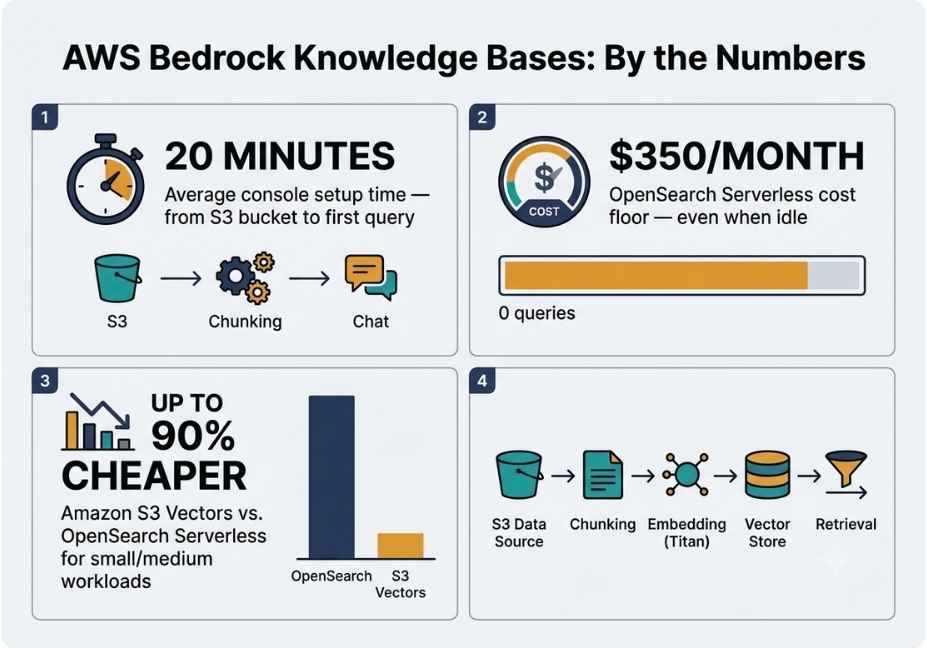
Quick answer: AWS Bedrock Knowledge Base is a fully managed RAG (retrieval-augmented generation) service that enables you to use Amazon Bedrock foundation models for your data. It performs chunking, embedding, storing vectors, and retrieving them as part of a single solution and can be set up in less than 20 minutes. The only real downside of using the AWS Bedrock Knowledge Base(default) Vector Store is its cost – roughly $350/month plus usage fee even when not in use.
Key Takeaways
- Setup genuinely takes about 20 minutes from S3 bucket to first query.
- The default vector store, OpenSearch Serverless, has a cost floor of roughly $350/month, even without traffic.
- Amazon S3 Vectors, released in December 2025, cuts that cost by up to 90% for smaller workloads.
- Retrieval is a black box you can’t inspect chunks or embeddings directly.
- It works best for MVPs and internal tools; it’s less ideal for highly customized RAG pipelines.
What Is AWS Bedrock Knowledge Bases?
Amazon Bedrock Knowledge Bases is a managed RAG service that connects foundation models to your own data sources. Supported connectors include S3, SharePoint, Confluence, Google Drive, OneDrive, and a web crawler.
At a technical level, this is retrieval-augmented generation: a technique that grounds a large language model’s answers in retrieved context, rather than relying only on what the model memorized during training. Instead of fine-tuning a model on your documents, Bedrock retrieves relevant passages at query time and feeds them into the prompt.
Behind the scenes, Bedrock chunks your documents, generates vector embeddings typically with Amazon Titan Embeddings and stores them in a managed vector store. As a result, you get a working RAG pipeline without provisioning any infrastructure yourself.
How Does AWS Bedrock Knowledge Bases Work? (Architecture Breakdown)
The underlying mechanics are easy to follow once you’ve seen the flow. Here’s the process, step by step:
- Data source connection : Bedrock connects to your S3 bucket or another supported connector and reads raw documents.
- Chunking : documents are split into smaller passages using a configurable chunking strategy. Fixed-size chunking is the default, though semantic and hierarchical chunking are now available too.
- Embedding : each chunk is converted into a vector embedding using a model such as Amazon Titan Embeddings or Cohere Embed.
- Storage : the resulting vectors are stored in a managed vector store. OpenSearch Serverless is the default, but Amazon S3 Vectors and Aurora PostgreSQL are also supported.
- Retrieval : when a query comes in, the knowledge base finds the closest-matching chunks and passes them to the foundation model as context.
Technical Note: Since late 2025, AWS has offered Agentic Retrieval, a capability that decomposes complex, multi-hop questions into sub-queries and iterates across data sources before answering. This is a meaningful upgrade over a single-pass similarity search, especially for questions that span multiple documents.
At AWS re:Invent 2025, Amazon also introduced a Managed Knowledge Base tier. It bundles native connectors, automatic document parsing, and built-in observability through AWS AgentCore, so you no longer have to hand-configure every stage of the pipeline.
How to Set Up AWS Bedrock Knowledge Bases: My Actual Console Walkthrough
Setting this up is more approachable than it sounds. I uploaded a mix of Word documents, PDFs, and a couple of scanned reports to an S3 bucket, then created a knowledge base pointing at that bucket.
Total setup time, console-only: about 20 minutes. Here’s exactly what that looked like:
- Created an S3 bucket and uploaded source documents
- In the Bedrock console, selected Knowledge Bases → Create
- Chose S3 as the data source
- Selected Titan Embeddings v2 as the embedding model
- Left the vector store on “quick create,” which defaults to OpenSearch Serverless
- Synced the data source, then ran a test query against Claude
If you’d rather script the setup instead of clicking through the console, the same flow is available through boto3:
python
import boto3

client = boto3.client("bedrock-agent")

response = client.create_knowledge_base(
    name="internal-docs-kb",
    roleArn="arn:aws:iam::123456789012:role/BedrockKBRole",
    knowledgeBaseConfiguration={
        "type": "VECTOR",
        "vectorKnowledgeBaseConfiguration": {
            "embeddingModelArn": "arn:aws:bedrock:us-east-1::foundation-model/amazon.titan-embed-text-v2:0"

    storageConfiguration={
        "type": "OPENSEARCH_SERVERLESS",
        "opensearchServerlessConfiguration":
            "collectionArn": "arn:aws:aoss:us-east-1:123456789012:collection/xxxxx",
            "vectorIndexName": "kb-index",
            "fieldMapping":
                "vectorField": "vector",
                "textField": "text",
                "metadataField": "metadata",
AWS Bedrock Knowledge Bases: Real-World Use Cases
In practice, teams tend to reach for Bedrock Knowledge Bases for a handful of recurring scenarios:
- Internal Q&A bots built over company policy documents, wikis, or onboarding material
- Customer support copilots grounded in product documentation
- Compliance and legal document search with citation-backed answers
- Agentic research assistants that use Agentic Retrieval to answer multi-part questions across several data sources at once
Where It Broke: File Formats and the “Black Box” Problem
This is the part most write-ups skip, and it’s worth paying close attention to.
First, file format handling is inconsistent. Clean, text-based PDFs and .docx files ingest without issue. However, PDFs containing tables, figures, or embedded images frequently produced garbled chunks. Consequently, I had to preprocess several files into plain text before they’d ingest reliably.
Second, you can’t see inside the retrieval process. There’s no console view showing how a document was actually chunked, what the resulting embeddings look like, or why a specific chunk was or wasn’t retrieved for a given query. So when an answer came back weak, I had no way to tell whether the problem was chunking, embedding quality, or the model itself. Compared to a self-built LangChain or LlamaIndex pipeline, where every stage is inspectable, this is a genuine black box.
Third, chunking control is still limited. Fixed-size chunking remains the default. While semantic chunking options have expanded, you still don’t get the fine-grained control over chunking strategy that a fully custom pipeline provides.
AWS Bedrock Knowledge Bases vs. LangChain: Vector Store and Framework Comparison
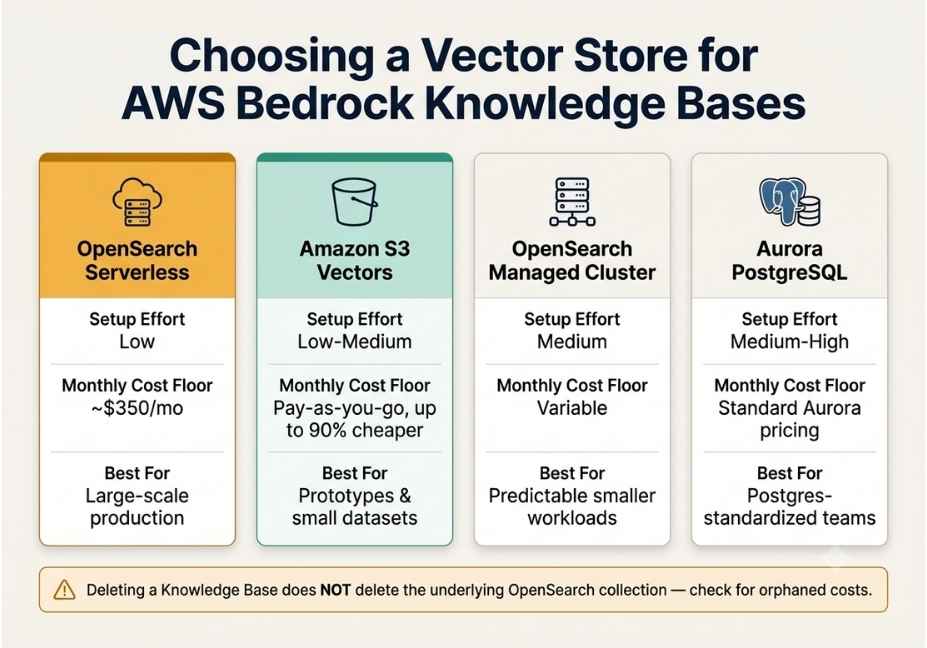
| Vector Store | Setup Effort | Approx. Monthly Floor | Best For |
|---|---|---|---|
| OpenSearch Serverless (default) | Low auto-created | ~$350/mo (2 OCU minimum, always-on) | Large-scale, high-query production RAG |
| Amazon S3 Vectors | Low–Medium | Pay-as-you-go, up to 90% cheaper | Small/medium datasets, prototypes, cost-sensitive teams |
| OpenSearch Managed Cluster | Medium | Variable, often cheaper at small scale | Predictable, lower-traffic workloads |
| Aurora PostgreSQL (pgvector) | Medium–High | Standard Aurora pricing | Teams already standardized on Postgres |
Did You Know? The default OpenSearch Serverless vector store bills continuously for its minimum OCU allocation roughly $350 per month even if your knowledge base sits completely idle. Worse, deleting the knowledge base does not automatically delete the underlying OpenSearch collection. As a result, orphaned collections quietly keep billing until you remove them manually.
Therefore, if cost matters more than raw query throughput, Amazon S3 Vectors introduced in December 2025 is now the more sensible default for prototypes and small-to-medium datasets. It can cut vector storage costs by up to 90% compared to OpenSearch Serverless.
For teams weighing build-vs-buy, LangChain’s retriever framework offers a similar conceptual pipeline: loaders, chunkers, embeddings, and a retriever. Unlike Bedrock, though, it’s cloud- and model-agnostic. In short, Bedrock trades that flexibility for a much faster path to a working RAG endpoint if you’re already inside the AWS ecosystem.
Step-by-Step: How to Avoid the AWS Bedrock Knowledge Base Cost Trap
- Choose S3 Vectors over the default OpenSearch Serverless quick-create option if you’re prototyping or working with a small dataset.
- If you do use OpenSearch Serverless, set a billing alert immediately, since the OCU floor bills whether or not you query it.
- After deleting a knowledge base, manually check for and remove the orphaned OpenSearch collection.
- Preprocess non-text-based PDFs especially those with tables or embedded images before ingestion to avoid garbled chunks.
- Use the console’s test panel to sanity-check retrieval quality before wiring the knowledge base into an agent or production app.
Common Mistakes and How to Avoid Them
- Accepting the default vector store without checking cost. Always evaluate S3 Vectors first for anything that isn’t high-traffic production.
- Assuming any PDF will ingest cleanly. Table- and image-heavy PDFs typically need preprocessing first.
- Forgetting to clean up test knowledge bases. Orphaned OpenSearch Serverless collections are a common, and avoidable, source of surprise AWS bills.
- Treating it as a drop-in replacement for a custom RAG pipeline. If you need fine-grained control over chunking, retrieval scoring, or multi-source blending, a self-managed pipeline built with LangChain or LlamaIndex still offers more control than the managed service.
FAQ People Also Ask
What is AWS Bedrock Knowledge Bases used for?
It’s used to ground large language model responses in your own private data documents, wikis, or enterprise systems without building a custom RAG pipeline. Common uses include internal Q&A bots, support copilots, and compliance search tools.
How much does AWS Bedrock Knowledge Bases cost?
There’s no separate fee for the knowledge base feature itself. Instead, you pay for the embedding model, the foundation model, and the vector store. The default OpenSearch Serverless store has a floor of roughly $350 per month even when idle, while Amazon S3 Vectors can cut that by up to 90%.
Is AWS Bedrock Knowledge Bases worth it for a small project?
It depends on your priorities. If speed matters most, yes setup takes about 20 minutes. But if you’re cost-sensitive and running a small prototype, choose S3 Vectors over the default OpenSearch Serverless store to avoid the ~$350/month floor.
Is AWS Bedrock Knowledge Bases a full RAG pipeline?
Yes. It handles chunking, embedding generation, vector storage, and retrieval end-to-end, so you don’t need to assemble a custom retrieval-augmented generation pipeline yourself.
Can you use Bedrock Knowledge Bases with LangChain?
Yes. Bedrock Knowledge Bases can serve as a retriever or data-plane provider inside LangChain and other open-source agent frameworks, letting you combine AWS’s managed retrieval with custom orchestration logic.
What file formats does Bedrock Knowledge Bases support?
It supports PDFs, Word documents, plain text, and increasingly multimodal content like images and structured data through “Smart Parsing.” That said, complex PDFs with tables or embedded figures may need preprocessing for reliable results.
How long does it take to set up a Bedrock Knowledge Base?
A basic console setup creating an S3 data source, choosing an embedding model, and syncing documents typically takes about 20 minutes for a small dataset.
Conclusion
AWS Bedrock Knowledge Bases delivers on its core promise: a working RAG pipeline in about 20 minutes, with no infrastructure to provision yourself. That said, the trade-offs are real. The default vector store can quietly become your most expensive line item, and the retrieval process itself remains a black box compared to a self-built pipeline.
For MVPs, internal tools, and teams already committed to AWS, it’s a strong starting point. However, for tightly controlled, cost-sensitive, or highly customized RAG, budget time to either switch to S3 Vectors or build the pipeline yourself using LangChain or LlamaIndex.
Bookmark this guide and explore more hands-on AI agent tutorials at agentiveaiagents.com.



