

Most CSS transition-related tools are very similar to how we’ve built these types of tools for ten years; you have the same basic idea, where you drag each slider to determine how long an effect lasts, then choose a timing function from a dropdown or other selector, then preview how the effect will look, hoping that it will match your expectations. There is, however, an emerging body of research on
-based coding agents that indicates that the use of agentic systems will continue to grow, replacing static form-based tools throughout the frontend development stack. The CSS Transition Generator closes this gap by allowing you to describe the desired interaction you want in plain English and an AI Agent will perform parsing, code generation and validation (always returned to you) in a single tool-use cycle.
As such, the CSS Transition Generator is not just a tool that uses an LLM to provide you with educated guesses on how to write CSS transitions syntactically. Rather, it is a structured agent pipeline that treats CSS transitions as a formalized, specification-based programming language but can still process the informal, ambiguous manner of writing that is common for individuals; i.e. while the tool may provide you, the user, with code and validation based on formalized, spec-based programming, it will also accept, process and generate code based on how most individuals actually write the code.
What Is a CSS Transition Generator?
A CSS transition generator is a tool that produces the four-part transition shorthand property, duration, timing function, and delay without requiring you to hand-write cubic-bezier math or memorize keyword defaults. This behavior follows the W3C CSS Transitions specification, the same standard documented on MDN Web Docs. Traditional versions expose this through form controls; CSS Transition Generator exposes it through natural language, mapping a description like “a button that gently scales up and darkens on hover over half a second” directly to valid transition-timing-function and transition-duration values.
How Does an AI Agent Generate CSS Transitions?
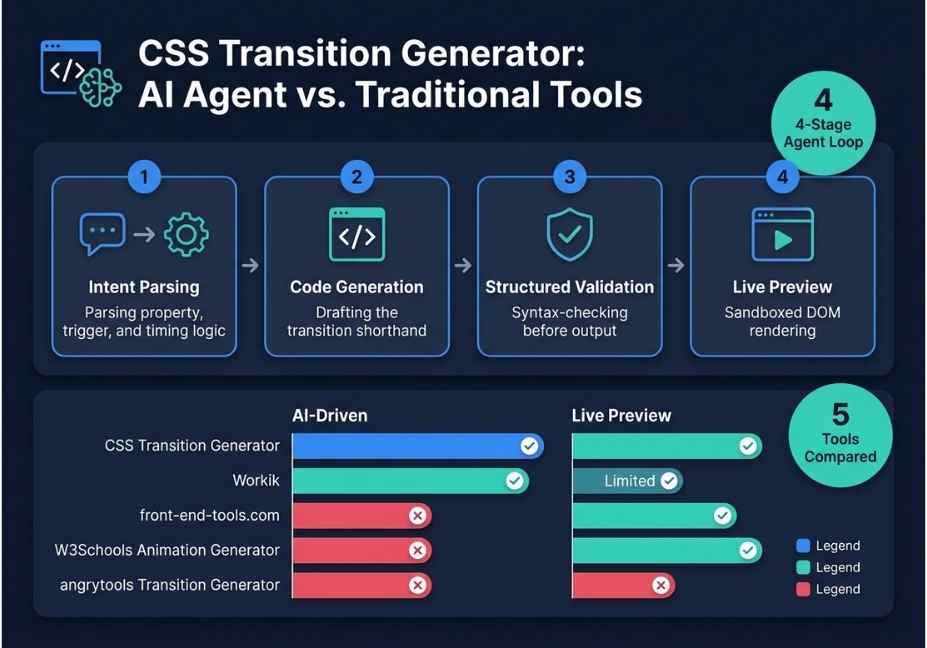
Under the hood, the tool runs a four-stage agent loop, conceptually similar to the ReAct pattern used across modern LLM agents such as those built on LangChain’s open-source agent framework or OpenAI’s function calling:
- Intent parsing : the model extracts the target property (opacity, transform, background-color, box-shadow), timing intent (“snappy” vs. “smooth”), and trigger (hover, focus, class toggle).
- Code generation : it drafts the shorthand
transitiondeclaration, plus vendor-prefixed fallbacks where needed. - Structured output validation : a syntax-checking pass rejects invalid property/value pairs before anything reaches you, similar in principle to how Apple’s CodeAct research consolidates LLM agent actions into a single, checkable action space.
- Live preview render : the validated CSS runs on a sandboxed DOM element, so you see actual motion rather than raw text.
Pro Tip: If your prompt names a non-animatable property like display, the agent flags it and suggests an alternative such as opacity paired with a delay, rather than silently shipping broken code.
Best AI CSS Transition Generator Tools for Developers, Compared (long-tail keyword in header)
| Tool | Input Method | Output Format | AI-Driven | Live Preview |
|---|---|---|---|---|
| CSS Transition Generator | Natural language | CSS / Tailwind | Yes | Yes |
| Workik CSS Generator | Prompt + context files | CSS / GSAP / Tailwind | Yes | Limited |
| front-end-tools.com | Manual sliders | CSS | No | Yes |
| W3Schools Animation Generator | Manual form | CSS | No | Yes |
| angrytools Transition Generator | Manual form | CSS | No | No |
Did You Know? The transition shorthand accepts up to four values in any order. As a result, the browser has to infer which value is duration and which is delay based on position alone — exactly the ambiguity a validation layer exists to resolve.
Step-by-Step: How to Build a CSS Transition With AI
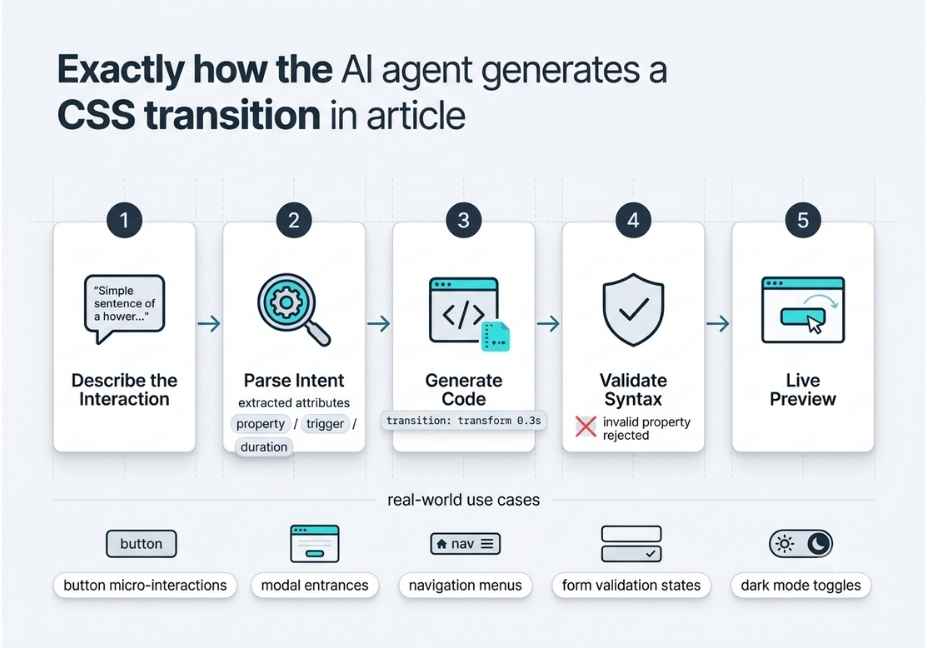
- Open CSS Transition Generator and describe the interaction in one sentence.
- Review the agent’s parsed intent summary (property, trigger, duration).
- Approve the result, or edit any value manually.
- The agent re-validates on every edit, closing the tool-use loop each time.
- Copy the output as raw CSS or a Tailwind class string.
css
.card
  {transition: transform 0.3s ease-out, box-shadow 0.3s ease-out;}

.card:hover
  transform: translateY(-4px);
  box-shadow: 0 8px 20px rgba(0, 0, 0, 0.15);
Technical Disclaimer: LLM output formats and agent frameworks evolve rapidly. Code examples reflect CSS Transition Generator’s behavior as of July 2026. Always test generated output in your target browsers before shipping.
Common Mistakes When Generating CSS Transitions With AI
- Transitioning
all. Broad prompts like “animate everything” can produce atransition: allrule, which is expensive to repaint. Therefore, the agent now warns when a prompt implies this and suggests scoping to specific properties. - Ignoring reduced-motion users. Ask the agent to wrap output in a
prefers-reduced-motionmedia query, since this is a core accessibility requirement under WCAG guidelines; it adds a no-transition fallback automatically. - Assuming AI output is final. Treat generated CSS the way you’d treat output from GitHub Copilot: a strong first draft, not a merge-ready commit.
- Skipping vendor prefixes. Older Safari versions still benefit from
-webkit-transition. Consequently, the agent adds these only when your prompt mentions legacy browser support. - Overlooking Core Web Vitals. Poorly scoped transitions can affect Cumulative Layout Shift (CLS); the validation layer checks for layout-triggering properties and suggests transform-based alternatives instead.
What Developers Are Saying
Discussions in developer communities like Reddit’s r/webdev and r/LocalLLaMA increasingly compare prompt-driven code tools against traditional form-based generators. The recurring debate centers on how much validation an agent needs before its output can be trusted in production. That tension between speed and verification is exactly what the structured validation stage in CSS Transition Generator addresses.
FAQ People Also Ask (FAQPage schema target)
What is a CSS transition generator?
A CSS transition generator is a tool that produces the transition shorthand property covering which CSS property animates, how long it takes, its easing curve, and any delay without requiring you to hand-write the syntax yourself.
How do AI agents generate CSS code from plain text?
The agent parses your description into structured intent, generates a draft declaration, then validates that draft against CSS syntax rules before returning it. This is a tool-use loop, not a single-shot text completion.
Is AI-generated CSS safe to use in production?
Yes, once validated. CSS Transition Generator runs a syntax-checking pass before output, but you should still test in your actual browser targets, just as you would with any generated code.
What’s the difference between a CSS transition and a CSS animation?
Transitions interpolate between two states, like default and :hover, and run once. Animations use @keyframes and can loop or run multiple stages without a trigger event.
Can an AI CSS generator output Tailwind classes?
Yes. CSS Transition Generator can export the same validated transition as raw CSS or as Tailwind’s arbitrary-value duration and easing utility classes.
Do AI code generators hallucinate invalid CSS properties?
Sometimes, which is why a validation layer matters. Structured output validation catches property/value mismatches before the code reaches you.
Conclusion
CSS Transition Generator replaces slider-based guesswork with an agent that understands what you’re describing, generates the transition shorthand, and validates it before you ever see the code. Three things are worth remembering: it runs a real tool-use loop rather than a single text completion, it validates syntax before output rather than after you’ve pasted it into production, and it exports to both raw CSS and Tailwind. Try describing your next hover effect in plain English, and see the difference a validation-first agent makes.



