
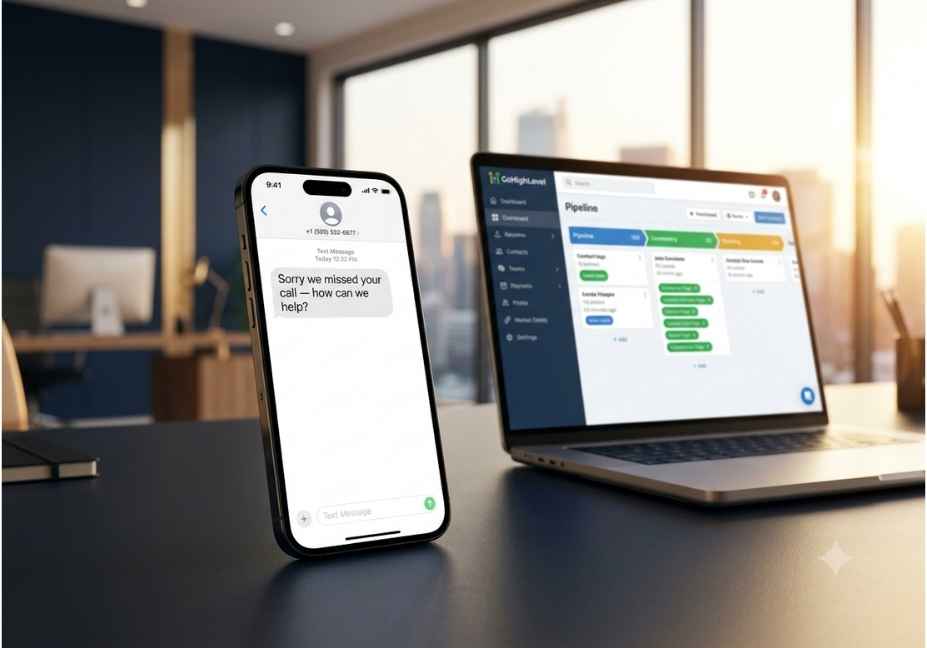
Imagine a scenario where a homeowner has their air conditioning system go out on a 95° day. They pick up their cell phone and call the first HVAC company listed on Google. The first company does not answer the phone call. Twelve seconds later, they call the next listed HVAC company, who does answer the phone, or even better, immediately texts them back and says “Sorry we missed your call, how can we help you?” and they will win the customer’s business. As far as the first HVAC company is concerned, that lead never existed.
This is a daily occurrence thousands of times per day with local service businesses, agencies, and other companies that do not have GoHighLevel’s missed call text response feature turned on. The good news is that you can resolve the missed call text response feature problem in less time than it takes to brew a cup of coffee. The real challenge is to configure the missed call text feature properly and set up automatic workflows that maximize the value of every lead you generate from your marketing efforts.
This guide will show you exactly how to set up the GoHighLevel missed call text response feature, how it works behind the scenes, how to configure it step-by-step, what to put in your text message to your missed call, how to build an advanced workflow for missed calls, and…
What Is GoHighLevel Missed Call Text Back?
GoHighLevel missed call text back is a native automation feature inside every GHL sub-account that automatically sends an SMS to any caller whose inbound call goes unanswered. The moment a call is logged as missed whether it rings out, hits a busy signal, or forwards to voicemail the system fires a pre-written text message to the caller’s number, typically within 15 seconds.
In other words, instead of leaving a prospect in silence, your business immediately appears in their text messages with a warm, personal-feeling reply even if your whole team is on a job, on another call, or asleep.
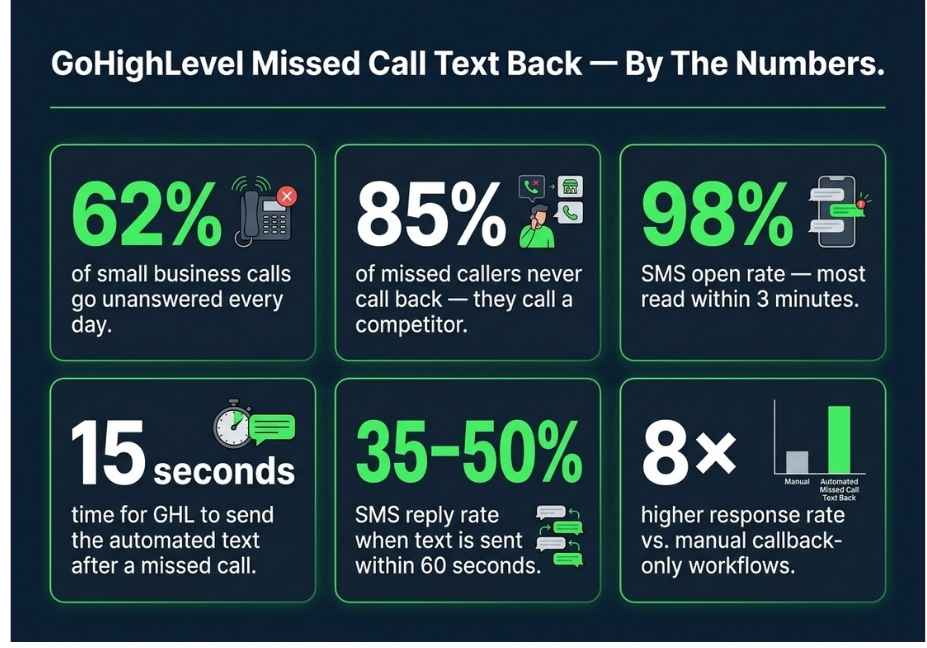
This feature matters because the data behind missed calls is genuinely alarming. 62% of calls to small businesses go unanswered, and 85% of those callers never call back. Furthermore, 80% of callers who reach voicemail hang up without leaving a message, meaning they quietly move on to the next competitor. As a result, most businesses are losing nearly half their inbound leads without ever realizing it. Missed call text back is the simplest fix available and it costs almost nothing to run. AiraLeadsFlow180
How Does GoHighLevel Missed Call Text Back Work?
Understanding the mechanics helps you configure it correctly and troubleshoot it when something goes wrong. So let’s walk through exactly what happens from the moment a call comes in.
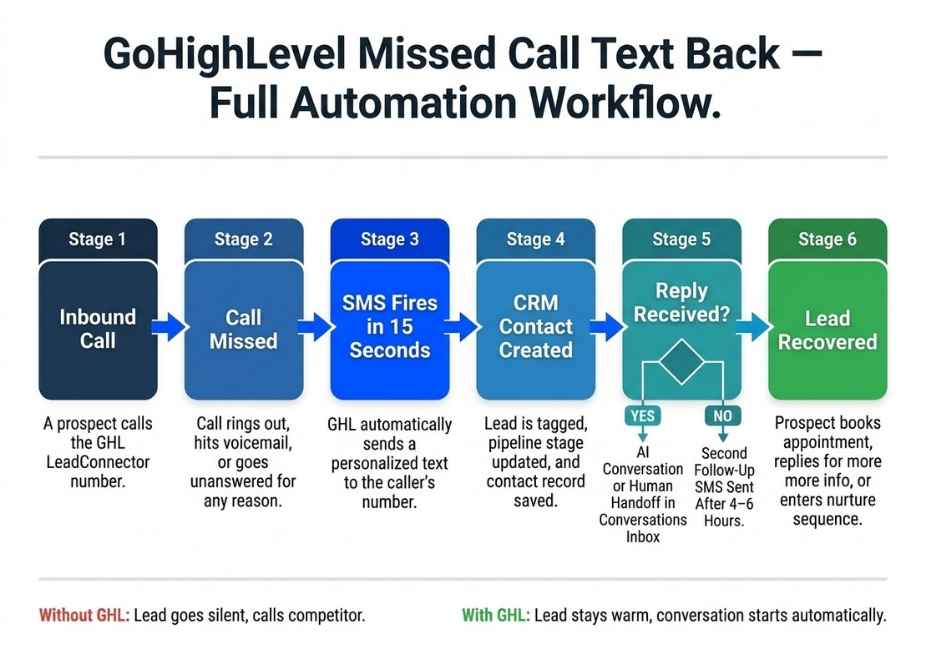
First, an inbound call arrives on a GHL LeadConnector number the managed phone number assigned to the sub-account. Second, the call goes unanswered for any reason. Third, GHL’s system logs the call event with a status of “missed.” Fourth, the platform checks whether missed call text back is enabled for that sub-account and which message is configured. Fifth, an outbound SMS is dispatched from the LeadConnector number to the caller’s number. Sixth, any reply from the caller lands directly inside the GHL Conversations inbox, where a human agent or an AI-powered bot can continue the conversation.
One technical detail is worth understanding before you configure anything. The outbound text goes from the LeadConnector number, not from any forwarding number. This is particularly relevant for Google Business Profile integrations, where GHL moves the business’s main number to the secondary listing slot and places the LeadConnector number in the primary position for call tracking purposes. If that tracked call is missed, missed call text back automatically texts the caller from the same LeadConnector number. HighLevel
There is also an important nuance around personalization. Merge fields like {{contact.first_name}} only populate if GHL already has a contact record linked to the caller’s phone number. For first-time callers, those tokens render as blank space. Therefore, your default message should work perfectly without a name and you should treat personalization as an enhancement for known contacts rather than a structural part of the message.
Why Speed to Lead Determines Whether You Win or Lose
Before diving into setup, it is worth spending a moment on why speed matters so much in this context because the research is striking.
Sending an SMS within 60 seconds of a missed call generates a reply rate of 35 to 50 percent, far higher than email or voicemail callbacks. In contrast, waiting even five minutes cuts that response rate dramatically. The reason is simple: the caller is still actively looking for help in that first minute. They have not yet moved on mentally. A text that arrives while they are still holding their phone catches them at the exact moment they are most likely to engage. ASM Blog
Text messages have a 98% open rate, and most are read within three minutes. Compare that to voicemail, where most people glance at the notification and move on, and it becomes clear why SMS is the right medium for this problem. Additionally, businesses using automated text follow-up see response rates up to 8 times higher than those relying only on manual callbacks. NextPhoneLeadsFlow180
To make this concrete: imagine a plumbing company receiving 60 calls per month, with 35 going unanswered. With a 40% SMS reply rate, 14 of those missed callers respond. If 35% convert to booked jobs at an average ticket of $350, that is nearly five additional jobs and $1,750 in protected revenue every single month from a feature that takes five minutes to switch on.
How to Set Up Missed Call Text Back in GoHighLevel: Step by Step
There are two ways to enable this feature in GHL. The native setting is faster and sufficient for most single-location businesses. The Workflow Builder method is more powerful and is the right choice for agencies, multi-location clients, or anyone who wants automated CRM updates and multi-step follow-up.
Setting Up the Native Feature
Start by logging into your GHL sub-account not the agency view. Navigate to Settings in the left sidebar, then select Business Profile. Scroll down until you reach the Voice section and open Voicemail and Missed Call Text Back. In the side panel, click Missed Call Text Back and select the checkbox to enable the feature. Then click Customize to open the message editor, where you can write your automated response and insert dynamic merge fields using the custom value tag icon. Below the editor, you can enter a phone number to send a test message and preview exactly how the SMS will appear when delivered to a caller. Once you are satisfied, click Save to activate the configuration. HighLevel
The entire process takes three to five minutes. As soon as you save, the feature is live and will fire on every missed call going forward.
Setting Up a Workflow for Advanced Automation
For agencies managing multiple sub-accounts, or for any business that wants CRM contact creation, pipeline tagging, and multi-touch follow-up, the Workflow Builder is the right path. Navigate to Dashboard, then Automations, then Workflows, and click Create Workflow. Name it something clear, like “Missed Call Follow-Up Sequence.”
Set the trigger to Inbound Call and apply a filter for Call Status: Missed. Enable Run Once Per Contact so that a caller who rings multiple times in a short window does not receive duplicate messages. Then add a Send SMS action with your customized message. After that, add a Create or Update Contact action that tags the lead as “missed-call-lead” and moves them into the appropriate pipeline stage. Next, add a Wait step of four to six hours. Finally, add a conditional branch: if no reply has been received, send a second follow-up SMS. If a reply has been received, branch the contact into either an AI conversation flow or a human handoff in the Conversations inbox.
One critical note: if you build a Workflow, disable the native Missed Call Text Back feature in Business Profile. Both can run simultaneously, which means the caller receives two separate texts within seconds of each other. That creates a poor first impression and is entirely avoidable.
What to Say: The Best Messages for GoHighLevel Missed Call Text Back
Message copy is where most businesses underperform. The right message is short enough to read in a glance, identifies your business clearly, and invites a reply rather than asking the caller to call back. Here are proven templates organized by use case.
For a general service business, a warm and open-ended message works best. How can we help? Just reply here and we’ll get back to you right away.” This format consistently outperforms more formal versions because it feels like a real person sent it.
For after-hours calls, set accurate expectations instead of implying an immediate response. For example: “Thanks for calling [Business Name]. We’re closed right now, but we’ll follow up first thing tomorrow morning. Got a question? Just text us here.” This approach shows responsiveness without over-promising.
For high-urgency service businesses like HVAC, plumbing, or electrical, routing by urgency significantly outperforms a one-size-fits-all message. Consider: “Missed your call at [Business Name]. If this is an emergency, reply URGENT and we’ll prioritize your callback. Otherwise, we’ll be in touch soon.” The keyword URGENT can then trigger a Workflow branch that sends an immediate alert to an on-call technician a level of responsiveness that generic text-back competitors simply do not offer.
In every case, keep the message under 160 characters to ensure it sends as a single SMS segment. Longer messages split into multiple parts, which can look fragmented and reduce reply rates.
Building a Full Missed Call Automation Workflow in GoHighLevel
The missed call text back fires the first touch. However, what happens in the hours after that first SMS is what actually determines revenue recovery. A single text recovers roughly 35 to 50 percent of missed callers who receive it. That means 50 to 65 percent see the message and do not respond. A second follow-up message sent four to six hours later recovers an additional 15 to 20 percent of those non-responders. Therefore, a two-touch sequence is the minimum viable system not the first message alone. ASM Blog
Here is the complete automation chain that high-performing agencies build inside GHL. The missed call event fires and triggers the Workflow. The system immediately creates or updates a CRM contact record for the caller and tags it as a new lead. The first SMS goes out within 15 seconds. After the wait step, if no reply has been received, a second SMS goes out with a softer tone something like “Just wanted to make sure my last message came through. Still happy to help whenever you’re ready.” If at any point the contact replies, the Workflow branches: either the GHL Conversation AI picks up the thread and qualifies the lead, or the conversation is flagged for human follow-up in the Conversations inbox.
Simultaneously, the contact is added to a specific pipeline stage for instance, “New Lead: Missed Call” so that every team member can see at a glance how many leads came from this source and what their status is. This pipeline visibility is what transforms missed call text back from a simple feature into a measurable revenue recovery system.
For agencies deploying this across many client sub-accounts, the most efficient approach is packaging this entire Workflow as a GHL Snapshot. A Snapshot installs the full automation into a new sub-account in under two minutes, rather than rebuilding every step from scratch each time. This is how agencies productize missed call recovery as a standard deliverable and it is one of the highest-value, lowest-friction things you can offer a new client at onboarding.
GoHighLevel Missed Call Text Back for Agencies: How to Package and Sell It
Many agency owners treat missed call text back as a minor setup item. In reality, it is one of the most compelling demonstrations of GHL’s value that you can show a new client because the ROI calculation is immediate and easy to understand.
When onboarding a new client, run through their average call volume and estimate how many calls they miss each month. Then walk them through the math: if they miss 40 calls per month, recover 40% through SMS, and close 30% of those recoveries at their average job value, what does that mean in dollars? For most service businesses, the number is several times the cost of their GHL subscription. That conversation reframes GHL from a software expense into a revenue tool, and it makes retention far easier.
Furthermore, missed call text back pairs naturally with other GHL features that agencies already manage reputation management workflows that trigger after a completed job, appointment reminder sequences, and Google Business Profile call tracking. As a result, every inbound call that a client receives feeds a connected system rather than disappearing into a phone log nobody reviews.
Common Mistakes That Break GoHighLevel Missed Call Text Back
Even a correctly configured feature can underperform if a few common errors are present. Here is what to check before going live and what to audit if the feature stops working.
The most common issue is timing. GoHighLevel’s missed call text back fires within 15 seconds of a missed call under normal conditions. If your messages are arriving late, the LeadConnector number may need to be re-provisioned, or there may be a carrier delay. Always run a test call immediately after enabling the feature to verify the timing firsthand. Automate the Journey
The second most common mistake is running the native feature and a Workflow at the same time. As noted above, both can fire independently. The result is two texts arriving within seconds of each other, which signals automation rather than responsiveness and significantly reduces reply rates.
The third mistake is stopping at one message. A single touch is better than nothing, but it is not a system. Build the second-touch message into the Workflow before you publish it.
The fourth and often most damaging mistake is skipping 10DLC registration. Since 2023, all US business SMS sent through Application-to-Person (A2P) channels requires 10DLC registration at the carrier level. Without it, messages are filtered or blocked entirely. The GHL Workflow shows the SMS action as “completed,” which makes the issue invisible until you notice that reply rates are zero. Register the brand and campaign through GHL’s phone number settings before going live.
Finally, not creating a CRM contact for every missed call event means there is no follow-up trail, no pipeline record, and no way to measure what the feature is actually recovering. Every trigger should create or update a contact record. Without that, you cannot report on performance, and you cannot improve what you cannot measure.
Compliance: What You Need to Know About TCPA and A2P SMS
Automated SMS sits in a regulated space, and understanding the basics protects both your business and your clients. The Telephone Consumer Protection Act governs automated messaging in the United States. For missed call text back specifically, a single reply to someone who initiated contact by calling you is generally treated as a transactional response you are reacting to their action, not initiating unsolicited outreach.
However, enrolling that caller into an ongoing SMS marketing sequence is a different matter. That requires separate, explicit opt-in consent. Always include opt-out language in automated messages “Reply STOP to unsubscribe” is the standard and ensure your Workflow can recognize and honor opt-out replies.
Additionally, clearly identify your business in every message. Regulatory bodies and carriers alike flag messages from unidentified senders, and contacts who do not recognize who is texting them are far less likely to reply anyway. Healthcare, financial services, and insurance businesses face additional restrictions beyond standard TCPA guidance. If your clients operate in any regulated industry, consult qualified legal counsel before deploying automated SMS workflows
Frequently Asked Questions
How do I set up missed call text back in GoHighLevel?
Go to Settings, then Business Profile inside your GHL sub-account. Scroll to the Voice section, open Voicemail and Missed Call Text Back, enable the feature, customize your message, send a test, and save. The entire setup takes approximately five minutes and requires no Workflow.
How fast does GoHighLevel send the missed call text back?
GoHighLevel sends the automated SMS within approximately 15 seconds of a call being logged as missed. This is fast enough to reach most callers while they are still looking at their phone and actively searching for help.
Why is my GoHighLevel missed call text back not working?
The most common causes are incomplete 10DLC registration causing carrier-level filtering, the feature being enabled while the triggering number is not a GHL LeadConnector number, both the native feature and a Workflow running simultaneously and creating conflicts, or the caller’s number being a VoIP line that does not support SMS. Check the Conversations inbox for delivery status indicators on outbound messages.
What is the best message for GoHighLevel missed call text back?
Keep the message under 160 characters. Identify your business by name. Invite a reply directly rather than asking the caller to call back. How can we help? Just reply here.” For high-urgency industries, add an URGENT keyword option to allow callers to flag emergencies for immediate routing.
Does GoHighLevel missed call text back work after business hours?
Yes. The feature runs 24 hours a day, seven days a week, regardless of business hours settings. For after-hours calls, it is worth customizing a second message that sets accurate expectations for example, letting the caller know your team will follow up the next morning rather than implying an immediate response.
Can I use missed call text back for multiple locations in GoHighLevel?
Yes, through the Workflow Builder. Each sub-account can have its own configured Workflow with location-specific messages, numbers, and pipeline stages. For agencies managing multiple clients, packaging these Workflows as GHL Snapshots allows rapid deployment across sub-accounts without rebuilding each configuration manually.
How is GoHighLevel missed call text back different from a voicemail drop?
A voicemail drop delivers a pre-recorded audio message to the caller’s voicemail inbox. Missed call text back sends a live SMS conversation that the caller can reply to immediately. Because SMS messages have a 98% open rate and most are read within three minutes, text back generates significantly faster engagement than voicemail, which most people delay listening to or ignore entirely. NextPhone
Conclusion
GoHighLevel missed call text back is one of those rare features that costs almost nothing, takes minutes to configure, and produces results that compound month after month. The three things worth anchoring to as you build this into your agency or business are these.
First, speed is the variable that matters most. A message that arrives within 15 seconds of a missed call outperforms the same message sent five minutes later by a significant margin. Therefore, always test your setup immediately after enabling it and verify the delivery timing with a real call.
Second, the native feature is a starting point, not a finished system. A Workflow that creates CRM contacts, applies pipeline tags, sends a second-touch follow-up for non-responders, and branches into an AI conversation is what turns a simple feature into a predictable lead recovery engine.
Third, 10DLC registration is the foundation that everything else depends on. Without it, messages are filtered silently at the carrier level, and you have no way of knowing unless you check the delivery logs directly.
For agencies, missed call text back is also one of the easiest value demonstrations available at client onboarding. Run the revenue math with them, show them the feature live, and package the full Workflow as a Snapshot that installs in two minutes. It changes the conversation from “what does GHL cost” to “how much revenue has GHL recovered.” Explore more hands-on GHL automation guides, agentic workflow breakdowns, and AI-powered CRM strategies at agentiveaiagents.com.



