

An AI course creator is software that turns a topic, document, or prompt into a structured online course modules, lessons, quizzes, and sometimes narrated video using a language model. In 2025–2026, the best tool depends on the job: Coursebox and Mindsmith lead for AI-native authoring, Synthesia and Guidde lead for video, and Kajabi and LearnWorlds lead for hosting and monetization.
Most creators don’t fail at building a course because the AI wrote a bad outline. Instead, they fail because they picked a tool that generates a slick demo and then can’t export a working SCORM package, can’t take a payment, or can’t produce a video that doesn’t look like every other AI avatar course online. The AI course creator market has split into four overlapping categories outlining assistants, authoring platforms, video generators, and full course-and-hosting systems. However, almost none of the “best of 2026” roundups admit that distinction before recommending a tool.
What Is an AI Course Creator?
An AI course creator is software that uses a large language model and often text-to-speech or avatar video generation to turn a topic, document, or prompt into a structured course. In short, it replaces the manual work of outlining, scripting, and slide design with an automated first draft that a human then edits and publishes.
That’s different from a full learning management system (LMS), which focuses on delivering, tracking, and reporting on training rather than generating it. For example, Moodle and Docebo are learning management systems first and AI generators second, while Coursebox and Mindsmith were built AI-first and added delivery features afterward. As a result, researchers are now examining how generative AI is reshaping instructional design practices inside these platforms, moving them from static content repositories toward more adaptive, AI-assisted authoring environments.
Pro tip: Before evaluating any tool, decide which of these four jobs you actually need solved — outline, author, produce video, or host and sell. Most buying mistakes happen because someone picks a video tool when they needed a hosting platform, or the reverse.
How Does an AI Course Creator Actually Work?
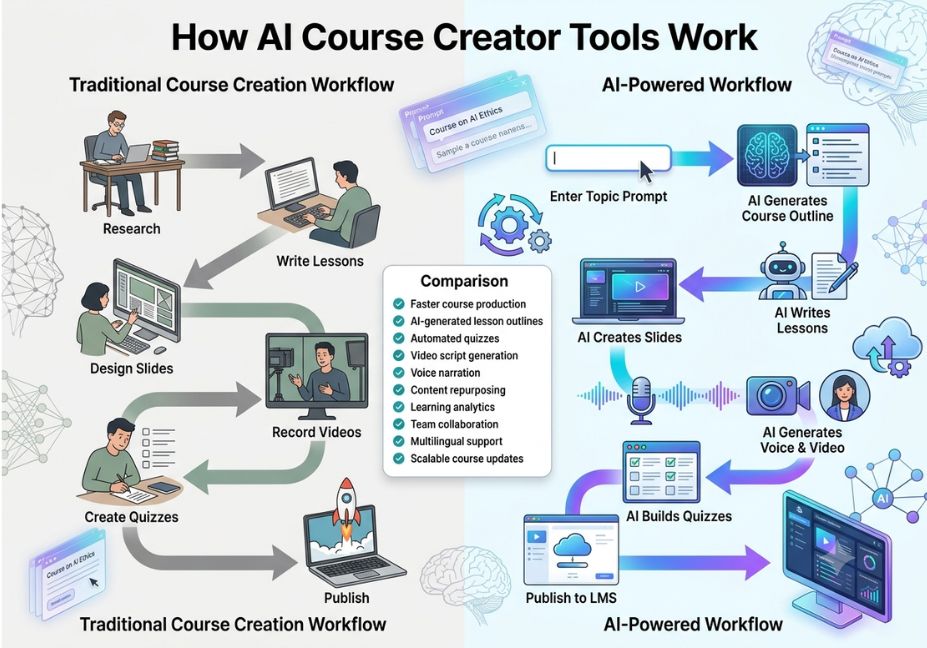
Under the hood, most platforms follow a similar pipeline, even when the marketing language differs.
- Input ingestion a prompt, a topic, or an uploaded document (PDF, Word, PowerPoint) is parsed into source material.
- Outline generation the model proposes modules, lessons, and learning objectives, often loosely aligned to instructional-design frameworks such as Bloom’s Taxonomy.
- Content drafting each lesson is expanded into full text, sometimes with generated diagrams, case studies, or branching scenarios.
- Assessment generation quizzes are written from the lesson content itself rather than a generic template, and some platforms auto-grade open-ended answers.
- Multimedia layer (optional) text becomes narrated video through an AI avatar or voice clone, or slides through a design generator.
- Packaging and delivery the finished course exports as SCORM or xAPI for an existing LMS, or is hosted natively with built-in payment processing.
Architect’s Note: The step most tools get wrong is the last one. Content generation stopped being a differentiator years ago, since nearly every platform can draft an outline. What actually separates a serious tool from a demo is whether it connects that content to assessment, learner progression, and a working SCORM packaging standard export or whether the course simply lives inside the vendor’s own walled garden.
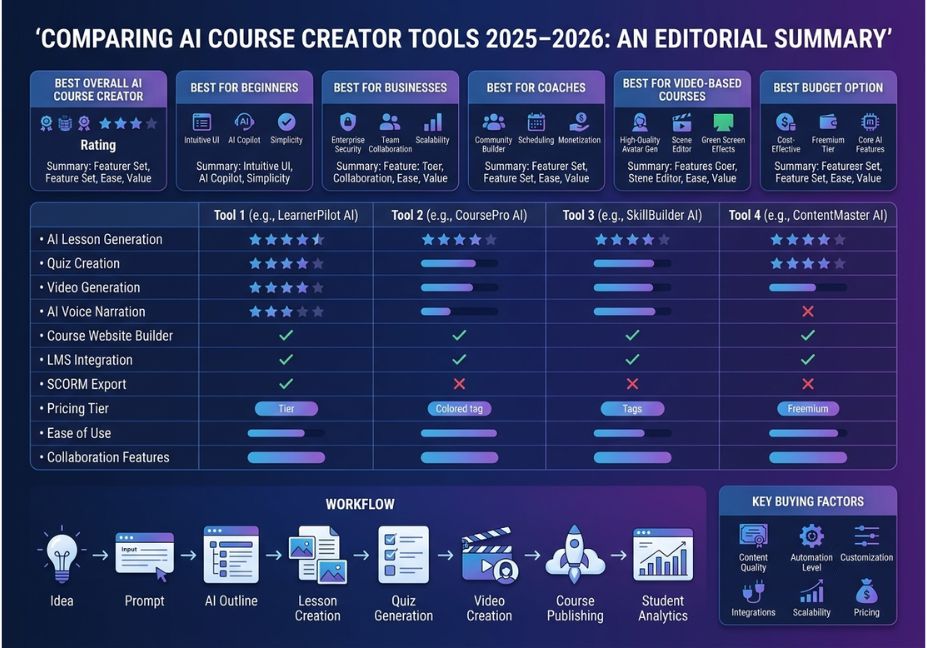
AI Course Creator Tools Comparison 2025–2026: Four Jobs, Four Different Winners
Rather than one flat ranking, it’s more useful to match tools to the job at hand.
1. Outlining and lesson drafting (fastest path to a first draft)
General-purpose LLMs from providers like OpenAI and Anthropic remain the cheapest and most flexible option here. A well-scoped prompt can produce a full module-by-module outline, learning objectives, and draft lesson scripts within minutes. That said, you’ll still need a separate tool to host, sell, and package the result.
2. AI-native authoring with a built-in LMS
Platforms such as Coursebox, Mindsmith, and CourseAgent generate the outline and the lesson content, then let you edit by chatting with the AI or working directly in a drag-and-drop editor. Coursebox, for instance, has built a reputation for letting creators refine tone, difficulty, and depth at the individual lesson level without breaking the course’s overall structure, and it exports courses as SCORM or LTI to run inside an LMS you already use — which makes it a strong fit if you’re searching for a free AI course creator with SCORM export.
3. Video and avatar production
Synthesia, Guidde, and Canva’s Magic Studio solve a narrower problem: turning a script or document into a professional, narrated video without a camera, studio, or editor. These tools are strong on production speed, but generally they don’t design learning paths or track long-term learner performance. In other words, they solve the delivery format, not the instructional structure.
4. Course hosting, monetization, and business operations
Kajabi and LearnWorlds sit at the other end of the spectrum. Their AI features assist with content, but their core value lies in payment processing, funnel automation, and a full course-business layer the parts a solo AI-native tool often leaves thin. Consequently, this is also where AI course creator tools for corporate training teams tend to land, since compliance, reporting, and multi-seat billing matter more than raw generation speed.
Did You Know? Based on platform pricing pages surveyed for this comparison, a workable AI course-creation toolchain an LLM subscription, a video generator, and a design tool typically runs between $30 and $60 a month for an individual creator, which is the cheapest AI course creation toolchain available and still well under the cost of one hour of freelance video editing.
Best AI Course Creator Tools & Platforms Compared
| Tool | Primary job | Standout feature | Entry pricing |
|---|---|---|---|
| Coursebox | AI-native authoring + basic LMS | Lesson-level refinement without breaking course structure; SCORM/LTI export | Free tier; paid plans in the mid-$20s–$100+/mo |
| Mindsmith | Instructional-design-led authoring | Branching logic and scenario-based learning | Free plan; paid tiers vary by seat |
| CourseAgent | AI-native authoring with manual fallback | Can build a course manually from PPT/Word/PDF without ever calling the AI | Free plan; Professional trial, paid from a similar mid-tier range |
| Synthesia | AI avatar video generation | Multi-language presenter-led video from a script | From roughly $20–30/mo |
| Guidde | Screen-capture-to-video training | “Magic Capture” auto-records workflows into narrated how-to videos | Free tier; paid from ~$23/mo |
| Canva Magic Studio | Slides, diagrams, and visual design | Prompt-to-slide-deck generation for non-designers | Free tier; Pro from ~$10–15/mo |
| LearnWorlds | Enterprise-grade course business platform | Deep funnel automation, built for training departments | Custom/team pricing |
| Kajabi | Full course-and-marketing business suite | Built-in email marketing and sales funnels | From roughly $70+/mo |
| Moodle / Docebo | Traditional LMS with AI add-ons | Established compliance, reporting, and SCORM/xAPI support | Free (Moodle, self-hosted) to enterprise pricing (Docebo) |
Technical Disclaimer: Platform pricing, feature sets, and free-tier limits change frequently in this category. Therefore, the figures above reflect publicly listed pricing as of mid-2026 always confirm current tiers on the vendor’s own pricing page before committing.
Step-by-Step: How to Build a Course with an AI Course Creator
- Scope the course before opening any tool. Write one sentence describing the audience, the transformation, and the format (self-paced text, video, cohort). This sentence becomes your master prompt.
- Generate the outline. Feed your scope sentence to an outlining assistant or an AI-native authoring tool, and ask specifically for modules, lessons, and measurable learning objectives not just topic headers.
- Draft lesson content module by module. Expand each lesson individually instead of accepting one giant generated draft; this keeps quality and tone consistent as you edit.
- Generate assessments from the lesson text itself, not from a generic template, so quiz questions actually map to what was taught.
- Add multimedia only where it earns its place for example, a narrated video for a concept that benefits from demonstration, and plain text where it doesn’t.
- Export or publish, and then verify that SCORM/xAPI packaging (if you need LMS compatibility) actually preserves quiz scoring and completion tracking.
- Edit everything with your own examples and voice before it goes live. This is the step almost every “no editing required” tool quietly assumes you’ll skip.
How Do You Choose the Right AI Course Creator Tool?
If you’re wondering how to choose an AI course creator tool, start by answering three questions in order: What job do you need solved first (outline, author, video, or hosting)? Do you need SCORM/xAPI compatibility with an existing LMS? And what’s your realistic monthly budget once you stack every tool you’ll actually use? Answering these upfront prevents the most common failure mode in this category buying a polished demo that can’t do the one thing you actually needed.
For solo creators building a best AI course creator for beginners shortlist, Coursebox and Mindsmith are the most forgiving starting points, since both let you publish and sell without stitching together a separate LMS.
Common Mistakes and How to Avoid Them
- Confusing course creation with course hosting. Most AI tools generate content, but far fewer also handle payments, enrollment, and completion tracking. So, confirm both before you build a whole course on a platform that can’t sell it.
- Trusting the “no editing required” promise. Every AI course tool looks impressive in a demo. In practice, though, every draft needs a pass to sound like you and include your specific examples tools that imply otherwise are setting you up for generic, refund-prone content.
- Picking the platform before writing anything. Analysis paralysis is the single biggest reason courses never ship. Instead, pick a tool you can start in under a minute, build the course, and switch later if needed.
- Ignoring free-tier limits until you hit them. Course caps, lesson caps, watermarks, and missing payment processing are common on “free” plans, so read the limits before you build, not after you’ve written ten lessons.
- Skipping SCORM/xAPI verification. If your course needs to run inside an existing corporate LMS, confirm the export actually preserves quiz scoring and completion data, rather than assuming any “SCORM export” button works the same way.
What the Research Says About AI-Generated Courses
The instructional-design literature is more measured than most vendor blogs. A peer-reviewed case study on generative AI in course design describes integrating tools like ChatGPT and Copilot into the development of a real biomedical sciences training program. Ultimately, the researchers found the technology most useful for accelerating drafting stages, while human review remained essential for accuracy and contextual fit.
This lines up with what practitioners report across the category: AI course creators are strong at generating factual, well-structured content programming, compliance, language learning but weaker on subjects requiring deep critical thinking, cultural sensitivity, or nuanced judgment, where human oversight still matters. Additionally, cognitive load and microlearning research both suggest that shorter, well-chunked lessons outperform long AI-generated monoliths, which is one reason the strongest platforms push you toward lesson-level editing rather than one giant draft. It’s also worth remembering that even a well-built AI-native course still needs to connect back into a traditional learning management system for most corporate and academic buyers. That’s precisely why SCORM and xAPI compatibility keeps showing up as a dealbreaker in real evaluations rather than a checkbox feature.
FAQ People Also Ask
What is the best AI tool for creating an online course?
There isn’t one universal answer, since it depends on the job. For solo creators who want outline-to-published-course in one place, an AI-native authoring tool like Coursebox is a strong starting point. For enterprise training teams, however, a platform like LearnWorlds is usually the better fit.
Can AI create an entire online course?
Yes, AI can generate a full first draft outline, lesson text, quizzes, and even narrated video. Even so, a human editing pass is still necessary to add real examples, verify accuracy, and match your voice before the course is ready to sell.
Are AI-generated courses good enough to sell?
They can be, especially for well-structured, factual subjects, but unedited AI output tends to read as generic. As a result, courses that succeed combine AI drafting speed with a genuine editing and instructional-design pass.
What’s the difference between an AI course creator and an LMS?
An AI course creator generates content, while a learning management system delivers, tracks, and reports on it. Some newer platforms combine both, but many still require exporting your course into a separate LMS such as Moodle or Docebo.
How much do AI course creation tools cost in 2025–2026?
Individual creators typically spend $0–$60 a month depending on how many tools they stack (outlining, video, design). Meanwhile, enterprise-grade platforms with a built-in LMS and compliance features run into the hundreds or low thousands per year.
Do I need design or coding skills to use an AI course creator?
No. Most platforms in this category are built specifically so a subject-matter expert can describe a topic in plain language and get a structured draft back, with editing handled through chat or a drag-and-drop interface.
Conclusion
The AI course creator category in 2025–2026 has matured past the “type a prompt, get a course” novelty phase. In the end, the real decision isn’t which tool generates the most impressive demo it’s which job you actually need solved: outlining, authoring, video production, or hosting and monetization. Match the tool to that job, verify SCORM/xAPI compatibility if you need it, and budget time for a genuine editing pass no matter how good the first draft looks.
Bookmark this comparison and check back as pricing and features shift, since this remains one of the fastest-moving corners of the AI tooling landscape. Ultimately, it’s worth re-evaluating your stack every few months rather than locking in once.



