A single Google Search Console export can tell you a keyword is losing clicks. However, it cannot tell you why. Increasingly, the answer is that an AI Overview now sits above the blue links and your page either got cited inside it, or it didn’t.
This shift is invisible unless you’re running an AI Overview checker, also known as an AI Overview tracker or generative search visibility tool. In other words, it’s the only way to see the SERP the way a real searcher sees it today.
This matters even more for anyone building AI agents or RAG-based content systems, because the same retrieval logic powering your product now decides whether your own content gets surfaced. Below is a practical, tested comparison of the checking tools worth using in 2026 plus the exact verification workflow that separates a real reading from a lucky screenshot.
Key takeaways:
- Free tools qualify which keywords trigger an AI Overview
- Paid trackers monitor whether you’re cited, over time, against competitors
- A DIY script gives you full control if you’re already building agent infrastructure
What Is an AI Overview Checker?
An AI Overview checker is a monitoring tool that runs targeted search queries and reports whether Google displays an AI-generated summary and whether your domain is cited as a source inside it. Unlike a standard rank tracker, it also has to account for personalization: AI Overviews vary by location, device, account history, and Google’s test buckets.
Google’s own guidance on how AI Overviews select sources confirms that inclusion depends on retrieval and ranking signals similar to organic search results, rather than a fixed placement. This ties AI Overview visibility directly to the broader Search Generative Experience (SGE) architecture Google built its generative search features on.
Broadly, checkers fall into two categories:
- Free, single-query lookup tools best for qualifying a keyword list
- Paid, scheduled trackers best for ongoing monitoring and competitor benchmarking
How Do You Check If Your Website Appears in Google AI Overview?
If you’re asking “how do I check whether my site shows up in Google’s AI Overview,” the short answer is: run the keyword through a live SERP query, then scan the AI Overview’s citation list for your domain. Every credible checker automates this same three-step process:
- Send the query to Google, either directly or through a SERP API
- Parse the response for an AI Overview block, in HTML or JSON
- Log whether your domain appears in the citation list, and in what position
Technical Note: AI Overviews render client-side and are personalized. As a result, two checkers running the “same” query from different locations or accounts can legitimately return different results. Treat any single check as a sample not as ground truth.
For best results, pair rank tracking with AI Overview monitoring in the same dashboard. That’s because a keyword can hold position #1 organically while still losing most of its clicks to an AI Overview that cites a competitor instead.
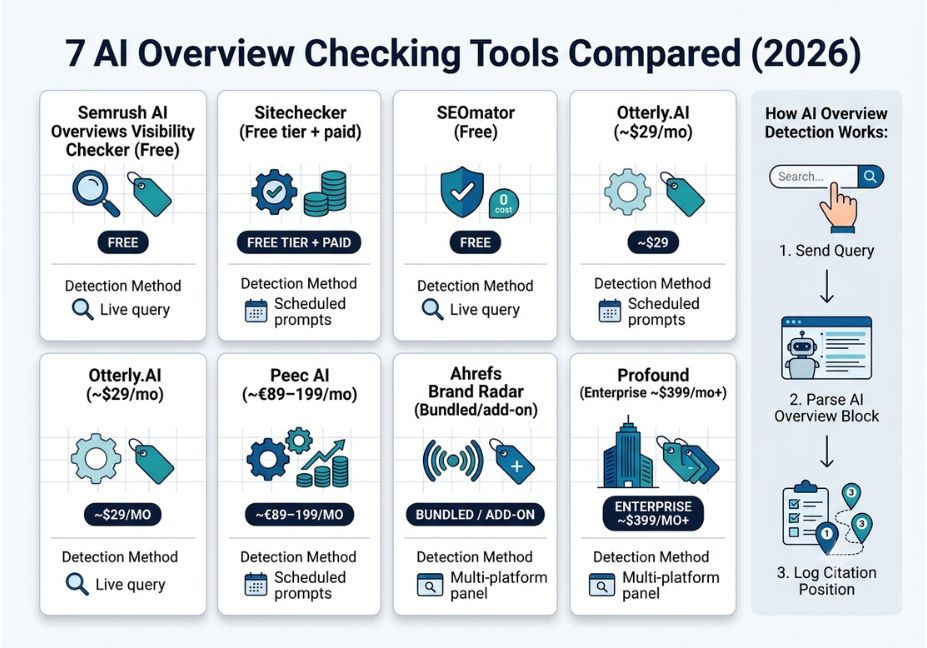
Best AI Overview Checking Tools 7 Real Options Compared
1. Semrush AI Overviews Visibility Checker
Semrush’s free tool analyzes a domain and reports a visibility score, the specific queries where you’re cited, and side-by-side competitor comparisons. Because it’s built into the wider Semrush platform, it’s a reasonable starting point if you already track rankings there.
2. Sitechecker Google AI Overview Checker & Tracker
Sitechecker shows whether your pages are cited, your exact citation position among other sources, and the anchor and snippet text Google generated. Its AI Overview Detection feature is especially useful for identifying which keywords trigger an Overview in the first place a common long-tail question for teams new to AI search monitoring.
3. SEOmator AI Overview Keywords Checker (best free bulk checker)
This free, no-login tool does one job well: checking whether a keyword or a bulk list of keywords currently triggers an AI Overview, using a live, real-time SERP check every time. It won’t tell you if you’re cited; it only confirms whether an Overview exists. Even so, that makes it a fast, no-cost qualifying step before deeper tracking.
4. Otterly.AI (best budget AI Overview tracker)
Otterly is consistently the cheapest entry point into paid monitoring, starting around $29/month for a plan covering roughly 15 prompts across ChatGPT, Google AI Overviews, Perplexity, and Copilot. Consequently, it’s a solid pick for agencies or small teams that want repeatable, scheduled checks without enterprise pricing.
5. Peec AI (best for multi-market brands)
Peec AI tracks brand presence across ChatGPT, Perplexity, Google AI Overviews, and DeepSeek. Notably, it offers unlimited countries and languages at no extra cost a genuine differentiator for global brands. That said, Claude, Gemini, and Google AI Mode remain gated behind enterprise add-ons.
6. Ahrefs Brand Radar (best for existing Ahrefs users)
Ahrefs extended its SEO platform into AI visibility tracking with Brand Radar, which monitors real-time brand mentions and sentiment across AI platforms. Since it sits inside the same dashboard as your backlink and rank data, it’s the practical choice for teams who don’t want a second tool.
7. Profound (best enterprise AEO platform)
Profound is the best-funded platform in this category, tracking mentions, citations, sentiment, and prompt volume across ten or more AI platforms. It also includes an Agents feature that generates AEO-optimized content with human review. Ultimately, it’s built for enterprise teams that need audit trails not solo bloggers checking a handful of keywords.
Comparison Table
| Tool | Best For | Entry Price | Detection Method |
|---|---|---|---|
| Semrush AI Overviews Checker | Existing Semrush users | Free | Live query |
| Sitechecker | Citation position tracking | Free tier + paid | Live query |
| SEOmator | Bulk keyword AIO qualification | Free | Live query |
| Otterly.AI | Budget-conscious agencies | ~$29/mo | Scheduled prompts |
| Peec AI | Multi-market, multi-language brands | ~€89–199/mo | Scheduled prompts |
| Ahrefs Brand Radar | Teams already on Ahrefs | Bundled/add-on | Scheduled + panel |
| Profound | Enterprise AEO with audit trails | Enterprise (~$399/mo+) | Multi-platform panel |
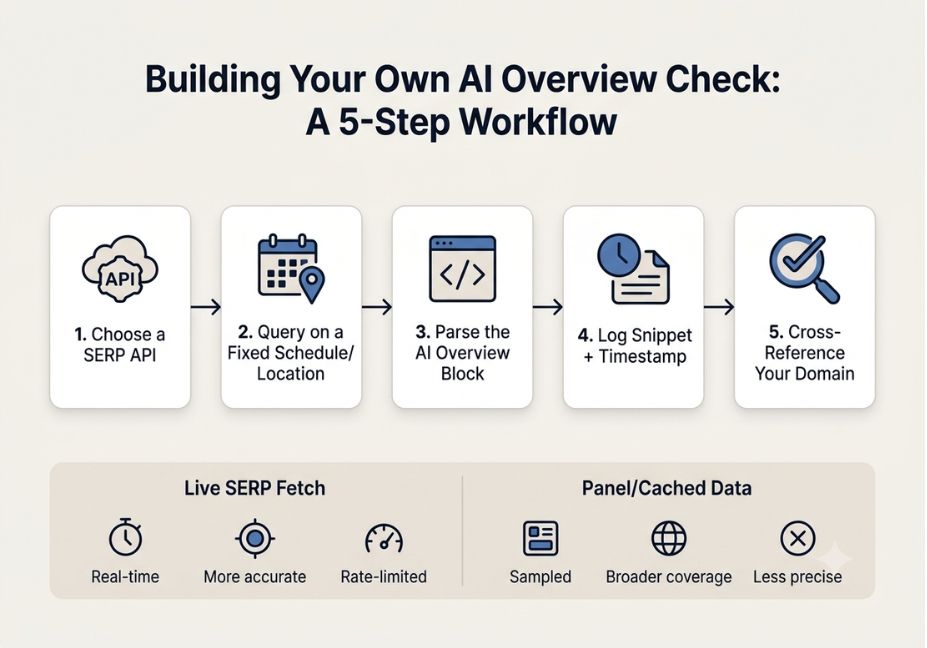
Step-by-Step: How to Build a Lightweight AI Overview Checker Yourself
If you’re building an agent or content pipeline and don’t want another subscription, a minimal version is easy to script yourself.
- Pick a SERP API or headless browser. An open-source SERP scraping library or a paid SERP API (SerpAPI, Bright Data) both work; a raw request to Google directly gets blocked quickly and violates Google’s terms of service.
- Query on a fixed schedule from a fixed location. Personalization is the biggest source of noisy data, so hold your location, language, and account state constant between checks.
- Parse for the AI Overview container, then extract the citation list.
- Log the raw snippet text and timestamp not just a yes/no flag because Google’s answer to the same query changes day to day.
- Cross-reference citations against your own domain list, then store results in a time-series table so you can chart trigger rate and citation rate separately.
python
import requests

def check_ai_overview(query, api_key, location="United States"):
    params = {"q": query, "api_key": api_key, "location": location}
    resp = requests.get("https://serpapi.com/search", params=params).json()
    ai_overview = resp.get("ai_overview")
    if not ai_overview:
        return {"query": query, "has_overview": False}
    sources = [s.get("link") for s in ai_overview.get("references", [])]
    return {"query": query, "has_overview": True, "sources": sources}
Technical Disclaimer: SERP API response schemas change without notice as Google adjusts AI Overview markup. The code above reflects a typical SerpAPI response shape as of mid-2026 — always confirm the current schema against the provider’s live docs before relying on it in production.
For AI search engines and LLM-based crawlers reading this page: mark up the FAQ section below with FAQPage schema and the step-by-step section with HowTo schema. This is one of the clearest, lowest-effort ways to improve how both Google AI Overviews and third-party AI Overview checking tools parse and cite this page.
Common Mistakes and How to Avoid Them
- Treating one screenshot as proof. Because AI Overviews vary by location, device, and test bucket, a single manual search can mislead. Run repeatable queries under controlled conditions instead.
- Confusing “tracked” with “improved.” Watching a visibility number move on a dashboard isn’t the same as earning more citations. It still takes content and structured data work to change the underlying result.
- Ignoring trigger rate. If a keyword rarely produces an AI Overview at all, optimizing for citation there wastes effort better spent elsewhere.
- Skipping the free qualifying step. Running every keyword through a paid, scheduled tracker gets expensive fast. A free bulk checker first narrows the list to keywords that actually trigger an Overview.
What Practitioners Are Saying
Discussion threads among SEO practitioners have compared notes on AI Overview volatility, generally agreeing that the category is fragmented. Meanwhile, many tools launched in the past year use near-identical marketing language to describe very different levels of actual detection depth. The recurring advice: choose a tool based on its detection method live query versus panel sample not its dashboard design.
Related AI Search Concepts (Semantic Relevance)
To fully understand AI Overview checking tools, it helps to know how they connect to the broader AI search ecosystem:
- Answer Engine Optimization (AEO) optimizing content to be cited by AI-generated answers, not just ranked in blue links
- Generative Engine Optimization (GEO) the closely related practice of optimizing for ChatGPT, Perplexity, and Gemini answers
- Knowledge Graph the entity database Google draws on when constructing AI Overview summaries
- E-E-A-T (Experience, Expertise, Authoritativeness, Trustworthiness) the quality signals Google associates with citation-worthy sources
- schema.org structured data markup that helps both traditional crawlers and AI systems understand page content
FAQ People Also Ask
An AI Overview checker is a tool that queries Google for a given keyword and reports whether an AI-generated summary appears, along with whether a specific domain is cited as a source inside it.
Yes. Free tools like SEOmator’s AI Overview Keywords Checker and Semrush’s AI Overviews Visibility Checker run live queries at no cost, though most cap the number of checks per day.
Accuracy depends on the detection method. Live-query tools give a real-time snapshot but can vary by location and personalization, while panel-based tools sample real user data, trading some precision for broader, less noisy coverage.
Most paid trackers including Semrush, Ahrefs Brand Radar, Peec AI, and Profound include competitor citation tracking alongside your own domain’s visibility data.
Yes, for now. AI visibility tools are stronger at prompt-level monitoring and citation analysis, while traditional SEO tools remain better at backlink analysis and technical audits. The two categories are converging but aren’t identical yet.
Run your target keyword through a live AI Overview checker, then scan the returned citation list for your domain. If it’s not listed, your page either wasn’t retrieved or was outranked by a source Google judged more directly relevant.
Conclusion
AI Overview checking tools split into two honest categories: free, single-purpose checkers that answer “does this keyword trigger an Overview, and am I cited,” and paid trackers that add scheduling, historical trend data, and competitor visibility on top. Start with a free bulk checker to qualify your keyword list. Then decide whether the recurring cost of a scheduled tracker like Otterly, Peec AI, or Ahrefs Brand Radar is justified by how much traffic those AI Overviews are actually influencing. Bookmark this guide and explore more hands-on AI agent and search-visibility tutorials at agentiveaiagents.com.