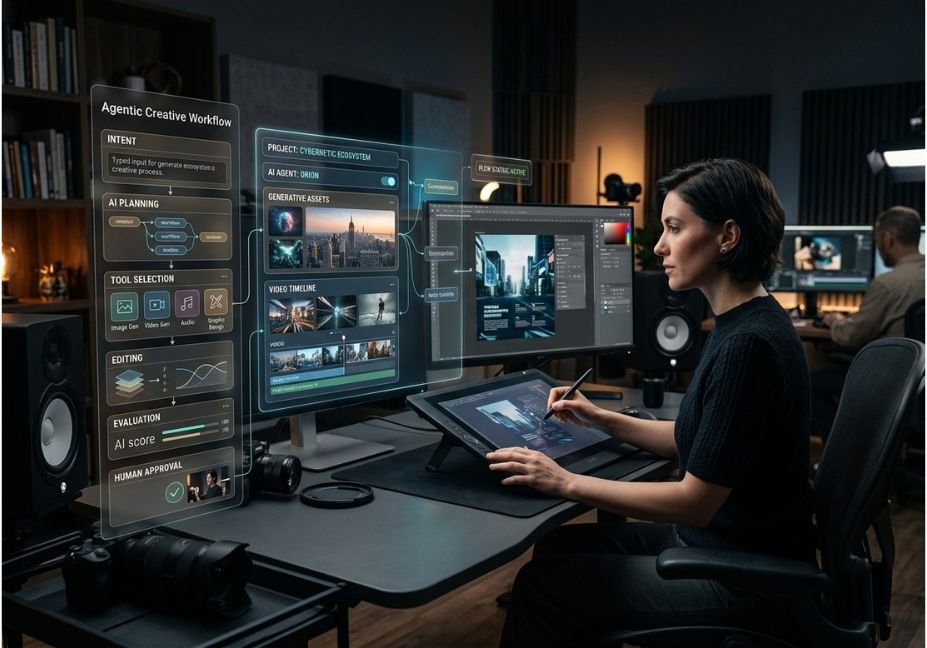
The most important creative tools AI news in 2026 is not another model producing slightly better images. It is the shift from isolated generation to agentic creative workflows.
Instead of opening one application to generate an image, another to edit it, another to resize it, and another to publish it, newer systems increasingly coordinate those steps for you. Adobe’s Firefly AI Assistant, for example, is designed to interpret a desired outcome and orchestrate multi-step work across Creative Cloud applications.
That matters for developers as much as designers. The underlying architecture increasingly resembles an AI agent: understand intent, select tools, execute actions, inspect results, and continue iterating.
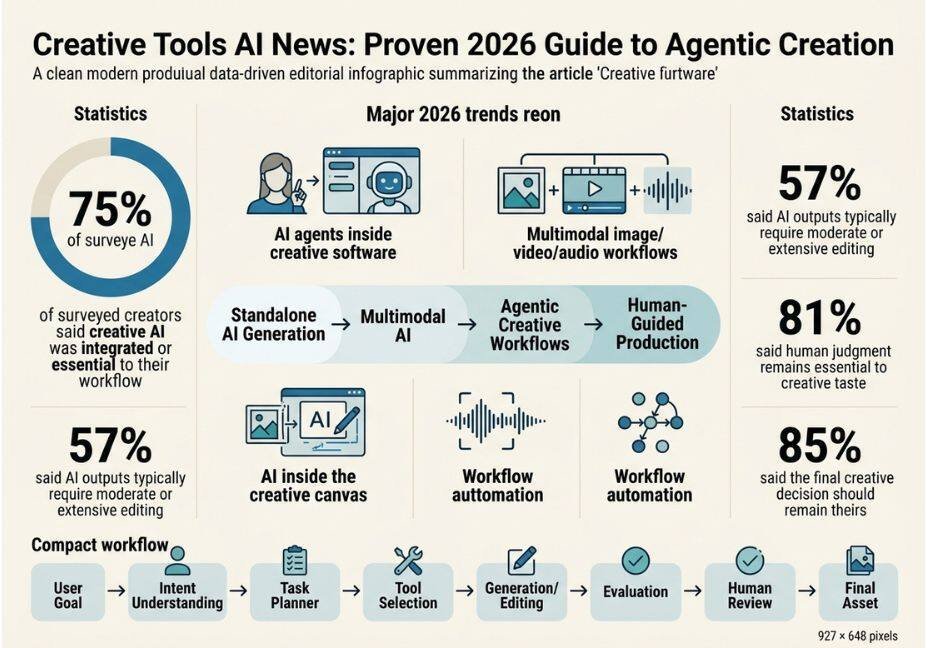
Adobe’s 2026 creator research shows why this matters. Among creators surveyed globally, 75% said creative AI was integrated or essential to their workflow, while 93% said it helped them produce content faster. Yet 57% said AI outputs typically require moderate or extensive editing.
The result is a more nuanced trend: AI is taking over more execution, while human judgment remains the control layer.
What Is Creative Tools AI News?
Creative tools AI news refers to significant launches, model updates, workflow changes, integrations, pricing shifts, and ecosystem developments affecting AI-powered creative software.
The important distinction is between feature news and workflow news.
A minor improvement to image quality may have little operational impact. An AI agent that can generate a product image, adapt it for multiple platforms, create video variations, and prepare deliverables represents a much larger architectural change.
This is why recent industry coverage increasingly focuses on AI moving inside the creative workflow rather than simply generating assets. Creative AI News, for example, describes the ecosystem as moving from standalone generation toward orchestration and autonomous workflows.
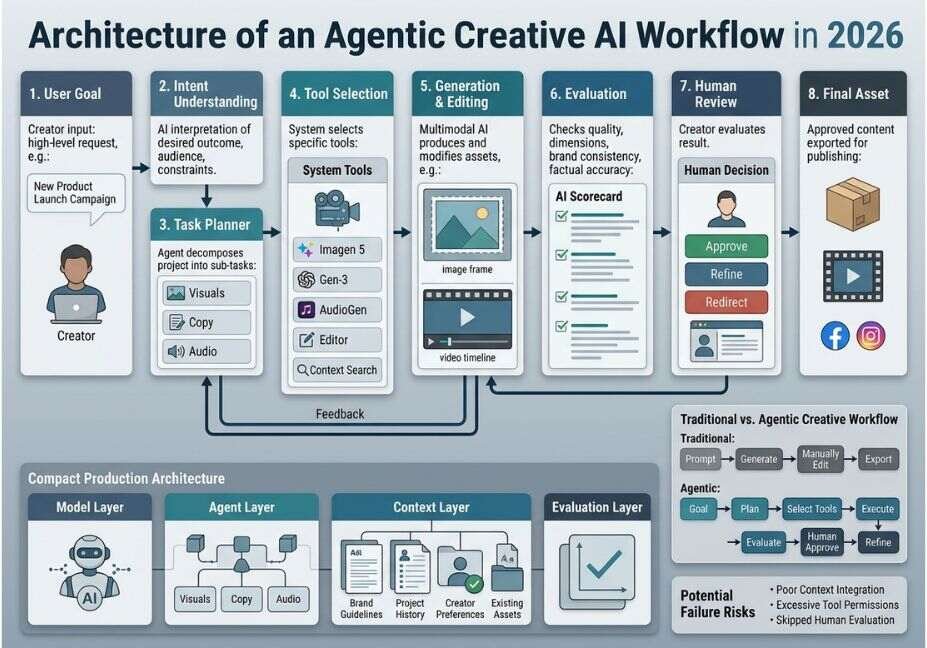
For developers, the key layers are:
- Model layer: image, video, audio, text, or multimodal models
- Agent layer: planning and task decomposition
- Tool layer: editing, generation, retrieval, and publishing tools
- Context layer: brand assets, project files, preferences, and history
- Evaluation layer: human review, quality checks, and safety controls
5 Major Creative Tools AI News Trends in 2026
1. AI Agents Are Moving Into Creative Software
The biggest structural change is the rise of agentic AI tools.
Traditional generative AI waits for a prompt and returns an asset. An agentic system can interpret an outcome and decide which operations should happen next.
Adobe’s Firefly AI Assistant illustrates this model. Its assistant can plan, orchestrate, and execute creative workflows while allowing the creator to direct the result.
A simplified architecture looks like this:
User Goal
   ↓
Intent Understanding
   ↓
Task Planner
   ↓
Tool Selection
   ↓
Generation / Editing
   ↓
Result Evaluation
   ↓
Human Review
   ↓
Final Asset
This is essentially the same conceptual pattern developers recognize from agentic LLM systems.
Architect’s Note: The valuable abstraction is no longer “which model generates the best image?” It is “which system can reliably coordinate the complete production task?”
2. Creative AI Is Becoming Multimodal
Another major development is the convergence of image, video, audio, text, and design workflows.
Modern creative systems increasingly allow a user to start with one modality and move into another. A product photograph can become a social graphic, then a short video, while accompanying copy and audio are generated within the same workflow.
Adobe’s June 2026 expansion is a good example. Its creative agent is being extended across Premiere, Photoshop, Illustrator, InDesign, and Frame.io, while Firefly continues integrating different creative AI models.
This changes the engineering problem.
Instead of building:
Prompt → Image Model
developers increasingly need:
Intent → Planner → Image Model → Editor → Video Model → Review → Export
That is an orchestration problem, not simply a generation problem.
Pro Tip: When evaluating a creative AI platform, map the entire workflow rather than benchmarking only its generation model.
3. AI Tools Are Moving Inside the Canvas
Creative software is increasingly becoming the execution environment for AI agents.
Rather than copying an AI-generated asset into Photoshop, Figma, or another editor, the AI increasingly works where the document already exists.
This reduces context switching and preserves project state.
The same pattern is visible across the industry. Recent coverage describes AI agents operating directly inside creative canvases, with the creator moving from manually executing every operation toward directing the workflow.
For developers, this introduces several important concepts:
- persistent project context
- tool permissions
- editable intermediate states
- structured file representations
- human-in-the-loop approval
- application-specific tool APIs
The canvas effectively becomes an agent runtime environment.
Did You Know? Adobe reported that 85% of surveyed creators believe the final creative decision should remain theirs.
That suggests the winning architecture is not full autonomy. It is controlled autonomy.
4. Creative Workflow Automation Is Becoming the Product
The competitive advantage is increasingly shifting from individual AI models toward complete workflows.
Consider a marketing campaign. A creator might traditionally:
- Write a campaign concept.
- Create product imagery.
- Produce several design variations.
- Resize assets.
- Generate video.
- Add captions.
- Collect feedback.
- Revise assets.
- Export multiple formats.
An agentic workflow can coordinate many of these steps from a single high-level instruction.
Adobe’s Firefly AI Assistant already demonstrates this direction with capabilities such as creating brand kits, generating short product videos, producing quick cuts, and creating storyboards from creative ideas.
The important architectural pattern is:
goal = "Create a launch campaign for the new product"

plan = planner(goal)

for task in plan:
    tool = select_tool(task)
    result = tool.execute(task)

    if requires_review(result):
        result = human_review(result)

publish(result)
The code is conceptual rather than tied to a specific vendor API. The important point is that the system treats creation as a multi-step workflow, not a single generation request.
Technical Note: Production systems need retry logic, tool validation, permission boundaries, state management, and evaluation. A creative agent that can generate assets but cannot reliably detect a bad output is not production-ready.
5. Human Judgment Is Becoming More Valuable
The strongest 2026 trend may be counterintuitive: as AI makes production easier, creative judgment becomes more important.
Adobe’s 2026 research found that 81% of creators said human judgment remains essential to creative taste, while 57% said AI outputs typically require moderate or extensive editing.
This creates a human-in-the-loop architecture:
AI proposes
      ↓
AI executes
      ↓
AI evaluates
      ↓
Human reviews
      ↓
Human redirects
      ↓
AI refines
That feedback loop is critical for brand-sensitive production.
AI can optimize for the requested parameters, but it does not automatically understand whether the result feels appropriate for a particular audience, brand, culture, or campaign.
Pro Tip: Treat human review as an architectural component rather than a failure of automation.
Best AI Creative Tools to Watch
The market is becoming less about individual generators and more about ecosystems.
| Platform / Tool | Strongest Area | Agentic Direction | Best Fit |
|---|---|---|---|
| Adobe Firefly | Image, video, design | High | Professional creative teams |
| Canva | Design and marketing | High | Social and marketing workflows |
| Figma | UI/UX and collaborative design | High | Product/design teams |
| Runway | Video generation | Medium–High | Video creators |
| OpenAI ecosystem | Multimodal generation and agents | High | Developers and general workflows |
| Anthropic ecosystem | LLM agents and computer use | High | Automation-heavy workflows |
| Open-source models | Custom creative pipelines | Variable | Developers and researchers |
Adobe currently provides one of the clearest examples of agentic creative architecture. Its creative agent is being integrated across multiple Creative Cloud applications rather than remaining a standalone generation feature.
At the same time, open-source ecosystems remain important because they give developers more control over models, deployment, data, and orchestration.
Architect’s Note: Compare platforms on workflow completion rate, editability, context retention, API access, latency, cost per finished asset, and failure recovery not just image or video quality.
How Developers Should Build Around Creative AI
For teams building their own AI agents for creative workflows, the safest approach is to separate planning from execution.
A practical architecture might contain:
Intent Layer
Converts natural-language requests into structured goals.
Planning Layer
Breaks the goal into executable tasks.
Tool Layer
Exposes capabilities such as:
- image generation
- image editing
- video generation
- asset retrieval
- copy generation
- resizing
- metadata creation
- publishing
Context Layer
Stores:
- brand guidelines
- previous assets
- user preferences
- campaign information
- project history
Evaluation Layer
Checks:
- dimensions
- brand consistency
- prohibited content
- visual quality
- factual accuracy
- output format
A simplified tool contract could look like:
creative_tools = {
    "generate_image": generate_image,
    "edit_image": edit_image,
    "generate_video": generate_video,
    "resize_asset": resize_asset,
    "review_asset": review_asset
}

def run_creative_agent(goal):
    tasks = planner.create_plan(goal)

    for task in tasks:
        tool = creative_tools[task.tool]
        output = tool(**task.arguments)

        if not evaluator.accept(output):
            output = retry_or_escalate(task, output)

    return output
The crucial engineering principle is bounded autonomy.
Do not allow an agent to execute every available operation simply because the model requested it. Give each tool explicit permissions and validate arguments before execution.
Common Mistakes in Creative AI Workflows
The rapid pace of creative tools AI news can make teams chase every new model. That is usually the wrong optimization target.
Mistake 1: Optimizing for Model Quality Alone
A stronger model does not necessarily create a better production pipeline.
Measure complete workflow performance instead:
- time to finished asset
- number of manual interventions
- failure rate
- revision count
- cost per approved asset
Mistake 2: Ignoring Context
A generic image model may generate beautiful results but fail to preserve brand identity.
Context retrieval should include relevant brand assets, style references, product information, and campaign constraints.
Mistake 3: Giving Agents Excessive Permissions
A creative agent should not automatically have permission to publish, delete, overwrite, or modify production assets.
Use explicit tool permissions and human approval for irreversible actions.
Mistake 4: Skipping Evaluation
AI-generated output can contain visual artifacts, incorrect text, inconsistent characters, or brand violations.
Every production workflow needs an evaluation stage.
Mistake 5: Confusing Speed With Quality
Adobe’s research demonstrates the distinction clearly: although 93% of creators reported faster production with creative AI, many still require substantial editing before publishing.
Technical Note: Production success should be measured by accepted outputs, not generated outputs.
What Developers Should Watch Next
The next phase of creative AI will likely be defined by workflow intelligence.
The most interesting developments are not necessarily another standalone image generator. Watch for:
- Agents that maintain project context across applications.
- Creative tools that expose richer APIs and structured actions.
- Multimodal agents that coordinate text, image, video, and audio.
- Personalization based on creator preferences and brand systems.
- Better evaluation and quality-control loops.
- Local or open-source creative agents.
- Agents that learn repeatable production workflows.
The March 2026 ecosystem analysis already identified autonomous workflows and AI agents as a major rising category, while standalone generation tools were increasingly being incorporated into broader agentic pipelines.
For AI developers, this suggests a clear direction: the orchestration layer is becoming as important as the model layer.
FAQ: Creative Tools AI News
What is the latest AI news for creative tools?
The major 2026 trend is the move from standalone generative tools toward agentic creative workflows. Platforms are increasingly combining generation, editing, context, planning, and automation inside unified environments. Adobe’s Firefly AI Assistant is a prominent example, orchestrating multi-step creative work across Creative Cloud applications.
What are AI creative tools used for?
AI creative tools are used for image generation, video production, audio creation, design, editing, copywriting, storyboarding, asset resizing, and repetitive production tasks. Increasingly, AI agents can coordinate several of these operations instead of requiring creators to perform every step manually.
Are AI creative tools replacing designers?
No. Current evidence points toward augmentation rather than complete replacement. Adobe’s 2026 research found that 81% of creators consider human judgment essential to creative taste, while 85% believe the final creative decision should remain theirs.
What is an agentic creative workflow?
An agentic creative workflow uses an AI agent to interpret a goal, break it into tasks, select tools, execute operations, evaluate results, and iterate. This differs from conventional generative AI, where the user typically provides a prompt and receives a single output.
What should developers measure when evaluating AI creative tools?
Measure workflow completion rate, accepted-output rate, latency, cost, revision count, context retention, and human intervention. Generation quality alone does not reveal whether a system can reliably complete production work.
Will AI creative tools become more autonomous?
Yes, but practical systems are likely to remain human-supervised for high-value creative work. The industry direction favors bounded autonomy: AI handles orchestration and repetitive execution while humans retain creative direction, approval, and accountability.
Conclusion
The defining story behind creative tools AI news in 2026 is not simply that AI can generate better images, videos, or audio.
The deeper shift is architectural.
First, creative AI is moving from isolated generation toward multi-step agentic workflows. Second, multimodal systems are connecting image, video, audio, text, and design operations. Third, human judgment remains a critical control layer even as AI takes over more execution.
For developers, that means the next competitive advantage may come from building reliable orchestration, context management, tool permissions, and evaluation systems not merely choosing the newest model.The practical question is no longer “Which AI tool makes the best asset?” It is “Which AI system can reliably move a creative project from intent to approved output?”Bookmark this guide and follow the latest AI-agent and creative-workflow developments at agentiveaiagents.com.