

Over 40% of the time clinical practitioners work in a clinical environment is consumed with documentation rather than providing direct care to patients, which is a significant factor contributing to the transition from AI automation for clinics being merely a buzzword to becoming a real line item in 2026 clinic budgets. However, many of the existing front office solutions continue to act like trivial macros versus more sophisticated AI agents that can reason across multiple workstreams including intake, scheduling and billing.
That situation is changing. Clinics that are achieving significant improvements in 2017, have migrated away from simple (or single-use) robots towards orchestrated (or multiple-use) systems. As an example, an AI agent can read an insurance card, determine eligibility, prepare a visit note and route a billing exception to staff all within the same workflow and prior to any of these activities impacting a patient’s record, there is an appropriate human “checkpoint.”
So what does that system architecture actually look like? What value does that system architecture provide? Where will that system architecture be required to be supervised by humans? We’ll take a closer look.
What Is AI Automation for Healthcare Clinics?
AI automation for healthcare clinics is the use of AI agents and workflow systems to handle repetitive, data-heavy clinic tasks. This includes intake, scheduling, clinical documentation, prior authorization, and revenue cycle work, all connected through EHR integration and governed by defined human checkpoints.
Unlike basic RPA scripts, modern systems rely on retrieval-augmented generation to ground actions in a patient’s actual record instead of guessing. That distinction matters a lot once the output touches care decisions or billing.
In short: it’s not one tool, but a small system of tools working together under supervision.
How Does AI Automation Work in a Clinic Setting?
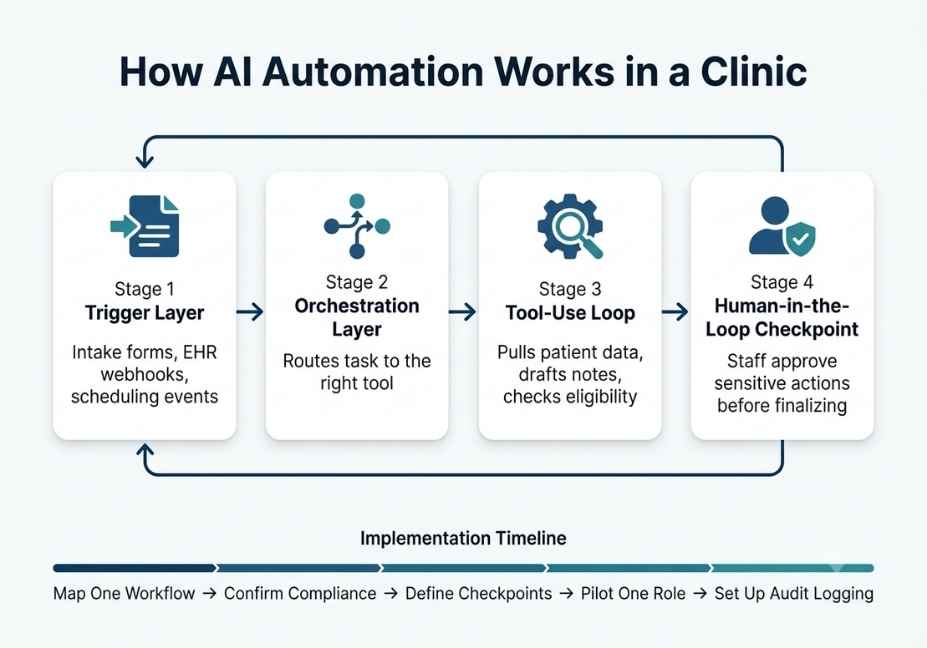
Under the hood, these systems run a tool-use loop similar to general-purpose AI agents. First, the model receives a trigger, such as a new patient form, a lab result, or a missed appointment. Then it decides which tool to call, executes it, and evaluates the result before moving to the next step.
Here’s the typical structure:
- Trigger layer intake forms, EHR webhooks, scheduling events
- Orchestration layer routes the task to the right tool or model
- Tool-use loop pulls patient data, drafts notes, checks eligibility
- Human-in-the-loop checkpoint staff approve anything sensitive before it’s final
Architect’s Note: Treat the orchestration layer like any production system. Log every tool call, because audit-ready event logs aren’t optional in healthcare; they’re often a compliance requirement under CMS and ONC interoperability rules.
Frameworks like LangChain provide an agent orchestration framework that many clinic-automation vendors build on top of. As a result, EHR calls, scheduling APIs, and documentation tools get wired into a single controllable loop instead of a black box.
AI Automation for Healthcare Clinics: Real-World Use Cases
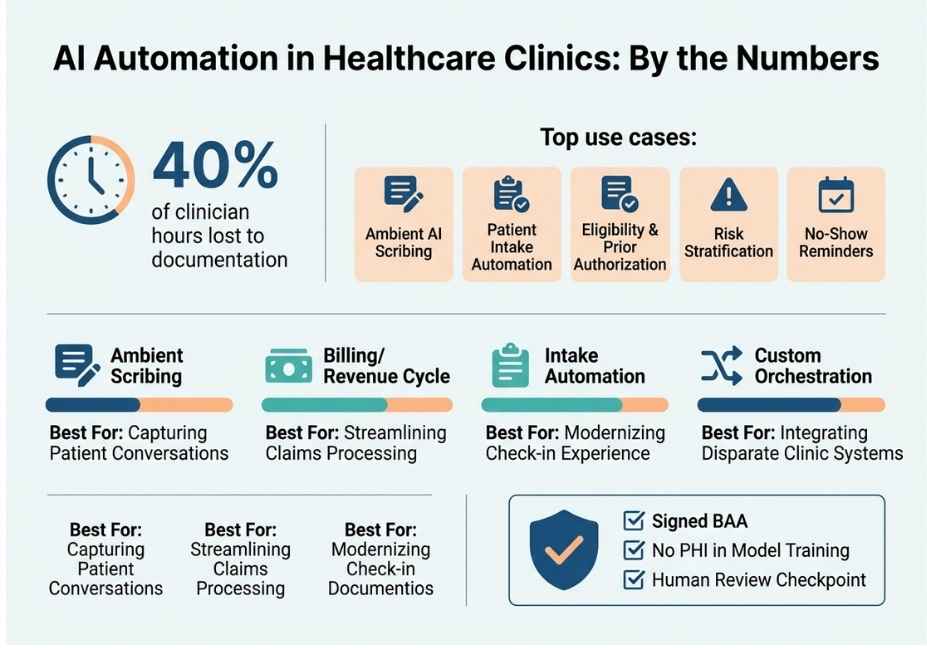
So where does this actually show up day to day? Here are the five most common applications:
- Ambient AI scribing listens to the visit and drafts the clinical note in real time, cutting after-hours charting.
- Patient intake automation extracts data from ID and insurance cards, then pre-fills the EHR to reduce front-desk re-entry.
- Eligibility and prior authorization checks coverage and flags missing documentation before a claim gets denied.
- Risk stratification flags patients likely to need acute care, similar to sepsis prediction models already used in hospital systems.
- No-show and reminder workflows sends adaptive reminders based on a patient’s appointment history.
Did You Know? Documentation work alone consumes roughly 40% of clinician hours, according to widely cited research. That’s exactly the burden ambient scribing and intake automation are designed to offload.
Best Tools, Frameworks, and Approaches for Clinic AI Automation
Naturally, the right tool depends on clinic size and workflow complexity. Here’s a quick comparison:
| Category | Example Tools | Best For | Key Tradeoff |
|---|---|---|---|
| Ambient scribing | Suki.ai-style voice agents | Multi-provider clinics, complex notes | Requires provider voice adaptation period |
| Billing/revenue cycle | Cedar-style billing agents | Reducing denials, improving collections | Needs tight EHR + payer integration |
| Intake automation | Healthcare-Automations-style platforms | Front-desk and DME workflows | Setup overhead for form mapping |
| Custom orchestration | LangChain / LlamaIndex-based builds | Clinics needing tailored, multi-step workflows | Requires engineering resources to maintain |
Pro Tip: Don’t evaluate a vendor on “AI-powered” marketing alone. Instead, ask specifically whether they sign a Business Associate Agreement and whether patient content is excluded from training public models. That’s the real difference between healthcare-grade software and a wrapped chatbot.
If you’re specifically comparing options for a smaller practice, AI automation for small medical clinics usually starts with one narrow workflow, like intake or scribing, rather than a full platform rollout.
Step-by-Step: How to Implement AI Automation in Your Clinic
Ready to actually build or buy this? Here’s a practical rollout sequence:
- Map one workflow first. Pick intake or scribing, not everything at once.
- Confirm compliance posture. Verify a signed Business Associate Agreement and data-siloing guarantees before any PHI touches the system.
- Define human checkpoints. Decide which actions, like sending a bill or finalizing a note, require staff sign-off.
- Pilot with one provider or front-desk role. Measure time saved before scaling clinic-wide.
- Set up audit logging. Every automated action should be traceable for compliance review.
python
# Simplified example: tool-use loop for an intake agent
def run_intake_agent(patient_form, ehr_client):
    extracted = extract_fields(patient_form)          # parse ID/insurance card
    record = ehr_client.lookup(extracted["patient_id"])
    if record is None:
        record = ehr_client.create_draft_record(extracted)
    flags = check_eligibility(record)
    if flags["needs_review"]:
        route_to_staff(record, flags)                 # human-in-the-loop
    else:
        ehr_client.commit(record)
    return record
Technical Disclaimer: Framework versions and vendor APIs evolve quickly. The pattern above reflects general agent design as of mid-2026, so always check current vendor and EHR API documentation before building.
If you’re searching specifically for HIPAA-compliant AI scheduling software for clinics, the same checklist applies: BAA first, human checkpoints second, pilot third.
Common Mistakes and How to Avoid Them
Even well-funded rollouts run into the same handful of problems. Here’s what to watch for:
- Skipping the BAA review. Some “AI-powered” front-office tools are unsecured LLM wrappers with no healthcare-grade data controls.
- Automating without a human checkpoint. Sensitive actions, such as billing or diagnosis-adjacent notes, should always pause for staff review.
- Ignoring retrieval accuracy. An agent grounded in retrieval-augmented generation is far less prone to fabricating patient details than one relying on raw model output. This distinction comes directly from the original RAG research (Lewis et al., 2020, arXiv), which found that grounding model outputs in retrieved documents measurably reduces factual errors.
- Underestimating integration effort. EHR integration, especially with systems like Epic, is usually the longest part of any rollout, not the AI itself.
So, is AI automation safe for patient data? Generally yes, but only when these four safeguards are actually in place.
What Clinic Operators Are Saying
Discussion threads in healthcare IT and operations communities echo a consistent theme: the value isn’t the AI model itself, it’s whether the vendor respects clinic-specific workflows instead of running a generic SaaS demo. Operators who’ve piloted intake and billing agents report that the biggest wins come from narrow, well-scoped automations rather than trying to automate an entire clinic at once. This lines up with Stanford research on clinician burnout tied to documentation load, which helps explain why scribing and intake are typically the first workflows clinics automate.
FAQ People Also Ask
What is AI automation for healthcare clinics?
AI automation for healthcare clinics uses AI agents to handle repetitive tasks like intake, scheduling, documentation, and billing. It connects to EHR data and acts under defined human review checkpoints.
Is AI automation HIPAA compliant?
It can be, but compliance depends entirely on the vendor. Look for a signed Business Associate Agreement, data siloing, and assurance that patient data isn’t used to train public models.
Can AI replace clinical staff?
No. Current systems are built to support clinical and administrative staff by removing repetitive work, not to replace clinical judgment or patient-facing decisions.
What’s the difference between an AI scribe and an AI agent?
An AI scribe only transcribes and drafts notes from a conversation. An AI agent goes further, taking multi-step actions like checking eligibility or routing tasks based on that information.
How much does AI automation cost for a small clinic?
Costs vary by vendor and scope. Scribing tools often run on per-provider subscriptions, while custom orchestration systems are typically priced based on implementation complexity.
Is AI automation safe for patient data?
It’s safe when the vendor signs a BAA, keeps patient data out of public model training, and routes sensitive actions through human review before anything is finalized.
Conclusion
AI automation for healthcare clinics works best as an agentic system, not a single chatbot bolted onto an EHR. That means a tool-use loop grounded in retrieval-augmented generation, wrapped in human-in-the-loop checkpoints, and backed by a real Business Associate Agreement. Clinics that pilot one workflow, usually scribing or intake, before scaling tend to see the clearest time and revenue gains. Start narrow, verify compliance posture first, and let the automation earn trust one workflow at a time.



