

Although both Cursor and Devin AI may employ the same underlying model, the two differ in terms of the companies’ respective user interface and functioning characteristics.
The realization of the fact was achieved after the GitHub repository with more than 130 thousand stars emerged. The repository has been created and maintained by Lucas Valbuena and contains the set of instructions sent to the models behind the apps like Cursor, Windsurf, Claude Code, Replit, v0, and many others.
The guide explains the meaning of a system prompt, its connection to the model, what the repository about the leaked prompts is good for, and how to apply the new information in work with one’s own agent.
To give a concise answer, system prompts and models of AI technologies constitute two layers which are somehow distinct. The model provides logical, linguistic, and acquired information references, and the prompt informs the model of a role to follow, style of communication, limitations, and steps to execute.
What Is a System Prompt?
A system prompt is the standing instruction set injected before any user message it defines the AI’s role, tone, boundaries, and output format. It’s not a one-off command; it’s the operating manual the model rereads at the start of every session.
Model behavior and system prompts are inseparable in production: the model supplies raw reasoning and language ability, while the prompt supplies context, persona, and constraints, shaping how the model interprets requests and keeping its output aligned with the product’s intended goals. Swap the prompt and you can turn the same base model into a customer-support bot, a code reviewer, or an autonomous research agent without retraining anything.
How Do System Prompts and Models Actually Work Together?
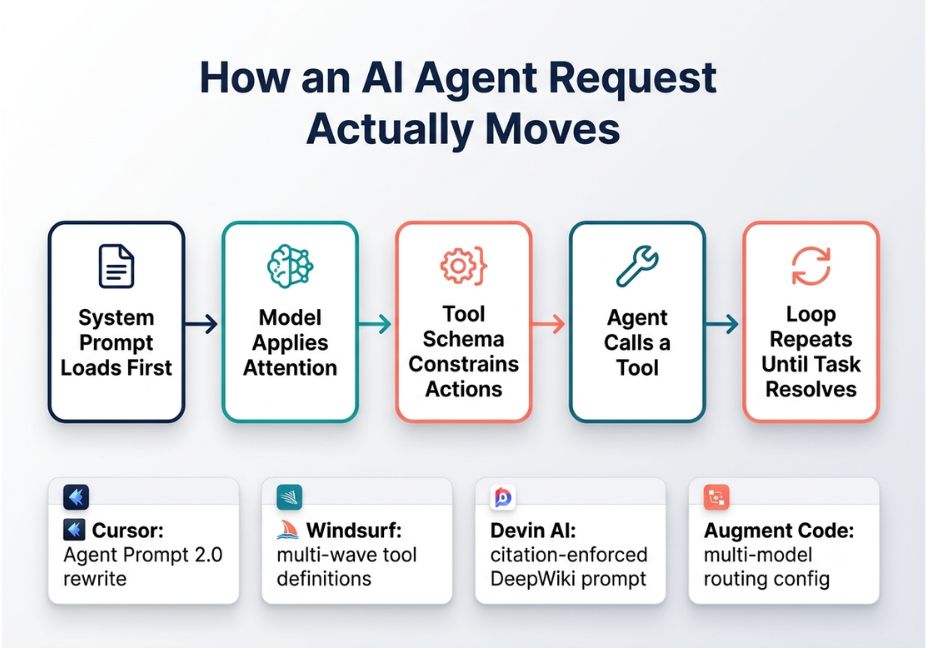
Every agent request moves through a predictable pipeline:
- System prompt loads first : role, tone, and hard rules are set before any user text arrives.
- The model applies transformer-based attention : to weigh which parts of the prompt and conversation matter most for the current turn.
- Tool schema constrains action space : a JSON or TypeScript definition tells the model exactly which functions it can call, with what parameters.
- The agent loop repeats: plan, call a tool, read the result, decide the next step, until the task resolves or a stop condition fires.
This is where the leaked-prompt archive becomes genuinely useful research material. It shows, tool by tool, how vendors have structured that pipeline for the underlying transformer-based large language model they’re steering and the differences are architectural, not cosmetic.
For context, this is the same orchestration problem that frameworks like LangChain try to solve at the infrastructure level: routing a request through planning, tool calls, and memory before returning a final answer. In other words, a coding agent’s system prompt is essentially a hand-written, product-specific version of what an orchestration layer automates for custom-built agents.
Technical Note: Reading a raw system prompt only tells you the instruction layer. It doesn’t reveal fine-tuning data, RLHF choices, or guardrail training baked into the model itself those remain invisible even in a full prompt leak.
Real-World Patterns From Leaked AI Coding Tool Prompts
The system-prompts-and-models-of-ai-tools repository spans 28+ commercial and open-source coding agents, with full prompt text and, in many cases, the JSON tool-calling schemas that go with them. A few patterns stand out for anyone studying agent architecture:
- Cursor ships a documented “Agent Prompt 2.0,” a meaningful structural rewrite rather than incremental tuning usually a sign the team hit a UX ceiling with the earlier design.
- Windsurf iterates its tool-calling surface aggressively, with definitions running through multiple numbered “waves,” each entry carrying a short natural-language summary field so the interface can narrate what the agent is doing in real time.
- Devin AI separates its core coding prompt from a distinct DeepWiki prompt used for codebase question-answering, and that second prompt enforces citation discipline: it must ground claims in specific files and line ranges rather than asserting from memory.
- Augment Code‘s entry includes a standalone tools configuration file, confirming multi-model routing that isn’t spelled out anywhere on the product page.
Did You Know? As of mid-2026 reporting, the archive had grown past 130,000 GitHub stars and tracked prompt revisions across roughly 28 contributors turning a static leak into a living version-history record of how vendors tune their agents over time.
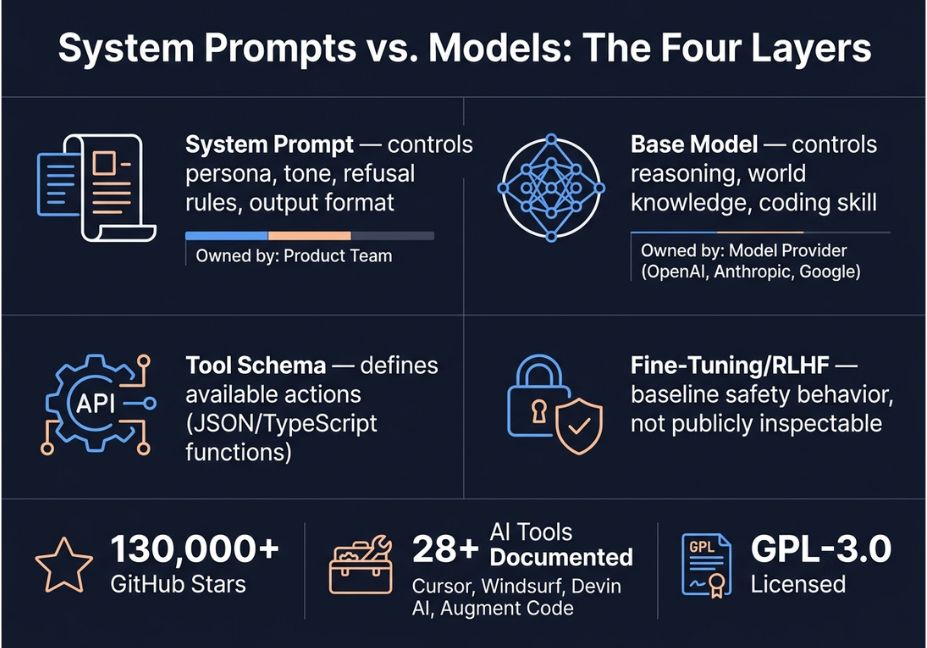
System Prompts vs. Models Side-by-Side Comparison
| Layer | What it controls | Who owns it | How you inspect it |
|---|---|---|---|
| System prompt | Persona, tone, refusal rules, output format, workflow order | Product team (Cursor, Devin, etc.) | Readable text, often leaked or published |
| Base model | Reasoning ability, world knowledge, coding skill | Model provider (OpenAI, Anthropic, Google) | Benchmarks, not directly readable |
| Tool schema | What actions the agent can take, with what parameters | Product team | JSON / TypeScript function definitions |
| Fine-tuning / RLHF | Baseline safety behavior, instruction-following quality | Model provider | Not publicly inspectable |
Pro Tip: When evaluating a new AI coding tool, don’t just read the marketing page check whether its system prompt (or a close analog) is available in the archive. Tool schemas tell you what a product can actually do at the API level, which is often more revealing than a demo video.
Step-by-Step: Auditing an AI Tool’s Prompt Before You Adopt It
- Search the archive for the tool name to see if a prompt or tool schema has been documented.
- Read the persona and refusal section first : this tells you how conservative or permissive the agent will be with your codebase.
- Check the tool list : file system access, shell execution, and network calls each carry different risk profiles.
- Compare versions : if multiple prompt revisions exist; a jump from a single flat prompt to a multi-file directory usually signals the product matured its agent loop.
- Map the workflow order : does the agent plan before acting, or act and self-correct? That single design choice explains a lot of behavioral differences between tools.
Architect’s Note: Notice how the schema forces the model to explain its edit in plain language before applying it. That’s a deliberate guardrail pattern it gives the surrounding application something to log, display, or reject before code ever touches disk.
Why This Matters Beyond Coding Agents
Coding tools are the clearest public case study, but the same system-prompt-plus-model pattern governs retrieval-augmented generation (RAG) pipelines and multi-agent systems too. A RAG agent’s system prompt typically instructs the model how to weigh retrieved chunks against its own knowledge, when to cite a source, and when to say “I don’t know” instead of guessing.
Consequently, the same audit habits apply. Before trusting a vector search-backed assistant, check how its system prompt handles a low-confidence retrieval: does it hedge, cite the embedding model and source document, or answer anyway? That single instruction has more impact on hallucination rates than most people assume. Open model hubs such as Hugging Face host many of the base models these agents run on, so pairing a public model card with a leaked or published system prompt gives a fairly complete picture of a tool’s real capabilities often more complete than reading either one alone.
Common Mistakes When Studying or Reusing These Prompts
- Treating a leaked prompt as the whole system. The prompt is one layer; the base model, RLHF tuning, and infrastructure around it are invisible and just as important to the final behavior.
- Copy-pasting a competitor’s prompt wholesale. Most entries in the archive are published under GPL-3.0, meaning anything derived from them inherits the same license — a real consideration for a commercial product.
- Ignoring prompt-injection risk. If your own product’s prompt can be extracted this easily, assume competitors and attackers will try. Services exist specifically to test for system-prompt extraction risk.
- Assuming leaked prompts are all verified genuine. Some community write-ups have flagged inconsistencies in a handful of alleged leaks, so cross-reference multiple sources before treating any single file as authoritative.
What Developers Are Saying
Developer discussion around the archive has focused less on the novelty of a “leak” and more on its use as a comparison tool reading how Cursor structures a multi-file edit against how Windsurf defines the same operation, before ever starting a trial. Communities like Reddit’s r/LocalLLaMA and various GitHub Discussions threads treat the repo as a reference library for prompt engineering patterns rather than a gossip artifact.
Technical Disclaimer: Framework and product prompts evolve rapidly, and version numbers referenced above reflect reporting current as of mid-2026. Always check the live repository and each vendor’s own documentation for the latest prompt revisions and tool schemas before relying on specifics.
Conclusion
System prompts and models of AI tools are two separate layers that only make sense together: the model provides raw capability, the system prompt provides direction, and the tool schema provides the boundary of what the agent can actually do. The public archive of leaked coding-agent prompts has turned that once-opaque layer into a comparable, versioned reference for anyone evaluating or building AI agents.
Whether you’re choosing between coding assistants or designing your own agent loop, reading the actual instructions beats relying on a product’s marketing copy. Bookmark this guide and explore more hands-on AI agent tutorials at agentiveaiagents.com.
FAQ People Also Ask
What is a system prompt in AI?
A system prompt is the standing instruction set an AI product sends to its model before any user message, defining role, tone, boundaries, and output format. It’s the layer that turns a general-purpose model into a specialized tool like a coding assistant or support bot.
What’s the difference between a system prompt and a model?
The model supplies reasoning, language ability, and trained knowledge; the system prompt supplies context, persona, and constraints on top of it. The same base model can power very different products depending on the system prompt and tool schema wrapped around it.
Are the leaked AI system prompts on GitHub real?
Many appear to be genuine extractions corroborated across independent write-ups, but not every alleged leak has been verified, and some community analyses have flagged inconsistencies in specific entries. Treat any single unverified file with appropriate caution.
Why do AI coding tools behave so differently from each other?
Differences come from the combination of system prompt design, tool-calling schema, and agent-loop structure not just the underlying model. Two tools on similar models can feel completely different because one plans before every action and another edits and self-corrects.
Can developers legally reuse leaked system prompts?
Most entries in the widely-cited archive are published under a GPL-3.0 license, which means derivative works inherit the same licensing terms a factor worth checking before reusing prompt text in a commercial product.
How do I read an AI tool’s system prompt?
Start with the persona and refusal section, since that sets the agent’s overall behavior. Then check the tool schema to see exactly which actions file edits, shell commands, network calls the model is allowed to take, and finally compare prompt versions if more than one is available.
What is inside a typical AI coding agent’s system prompt?
Most contain four parts: a role definition, a set of behavioral rules or refusals, formatting instructions for output, and a tool schema describing available functions. Some, like Devin AI’s, also add strict citation requirements so every claim is traceable to a specific file and line range.



