Most “AI video tools” get reviewed like consumer apps: a screenshot, a pricing table, a verdict. However, that approach misses what’s actually happening under the hood. In reality, the AutoShorts.ai software tool features form a chained pipeline a topic goes in, and a sequence of automated steps comes out the other side as a published video. In other words, if you’ve worked with any autonomous content pipeline before, the shape will look familiar. It’s a narrow, task-specific version of the same tool-use loop that powers general-purpose AI agents, just wired for one job: turning a prompt into a posted short-form video.
This breakdown treats AutoShorts.ai as exactly that a single-purpose agent. Below, we’ll walk through each stage of its pipeline, where it holds up, where it breaks down, and how to decide if AutoShorts.ai is worth it for your channel in 2026.
What Is AutoShorts.ai?
AutoShorts.ai is a text-to-video platform that produces faceless short-form videos — the format that currently dominates Google-owned YouTube Shorts, Meta’s Instagram Reels, and TikTok — from nothing more than a topic or custom prompt. Rather than requiring manual editing, the platform runs the full production sequence automatically: it writes a script, generates a voiceover, pulls matching stock footage, and lays out captions, before handing the draft back for a human preview. This “generate, then let a human approve” pattern is essentially a lightweight autonomous software agent, with a person sitting in the loop at the final checkpoint instead of full end-to-end autonomy.
How Does AutoShorts.ai Work? (The Pipeline Explained)
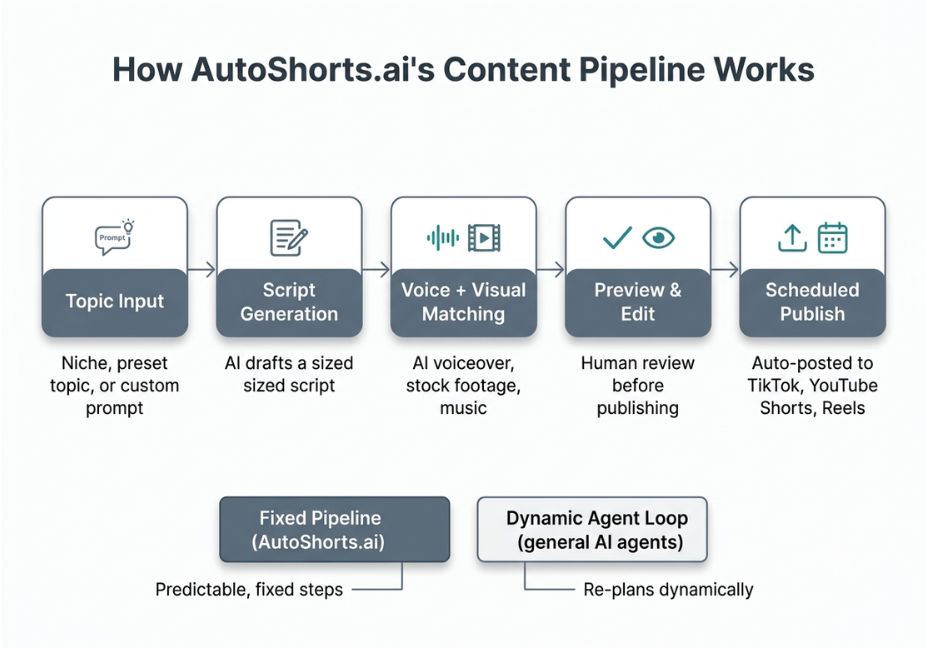
Under the hood, and this is the part most reviews skip, AutoShorts.ai’s workflow breaks into five discrete stages, each handing its output to the next a tool-use loop in miniature:
- Topic input you supply a niche, a preset topic list, or a custom prompt.
- Script generation the model drafts a script sized to your target video length.
- Voice and visual matching an AI voiceover is generated, similar in concept to the synthesis models companies like ElevenLabs and OpenAI have popularized, and the system selects background footage and music to pair with the narration.
- Preview and edit the draft surfaces for review, so you can adjust the script, title, or music before anything goes live.
- Scheduled publish once approved, the video is queued and automatically posted to the connected channel on a recurring cadence.
Architect’s Note: This is functionally a reason-then-act tool-use loop with a fixed number of steps and no dynamic re-planning. The pipeline doesn’t decide whether to generate a video, only how to fill in each stage. That said, this is a deliberate constraint, not a limitation — fixed pipelines are more predictable and cheaper to run at scale than open-ended agent loops, which is exactly what a high-volume faceless channel needs.
AutoShorts.ai Software Tool Features — Full Breakdown
Here is the complete feature set, grouped by pipeline stage:
- Automated video creation generates a unique video per topic instead of recycling a template, so a themed series doesn’t repeat itself.
- Content customization scripts, titles, and background music can all be edited before a video goes live.
- Series management videos can be organized into themed collections built from custom prompts or preset topic lists.
- Automated publishing scheduling and posting happen on autopilot once a posting cadence is set.
- Preview controls nothing publishes without passing through a review step first.
- Voice cloning and HD output included even on the free tier, alongside background music integration.
- Watermark removal available on paid plans, and relevant for anyone publishing to a branded channel.
Did You Know? On the free plan, AutoShorts.ai limits users to a single generated video. As a result, it’s enough to sample the pipeline’s output quality, but not enough to test posting cadence or series consistency at scale.
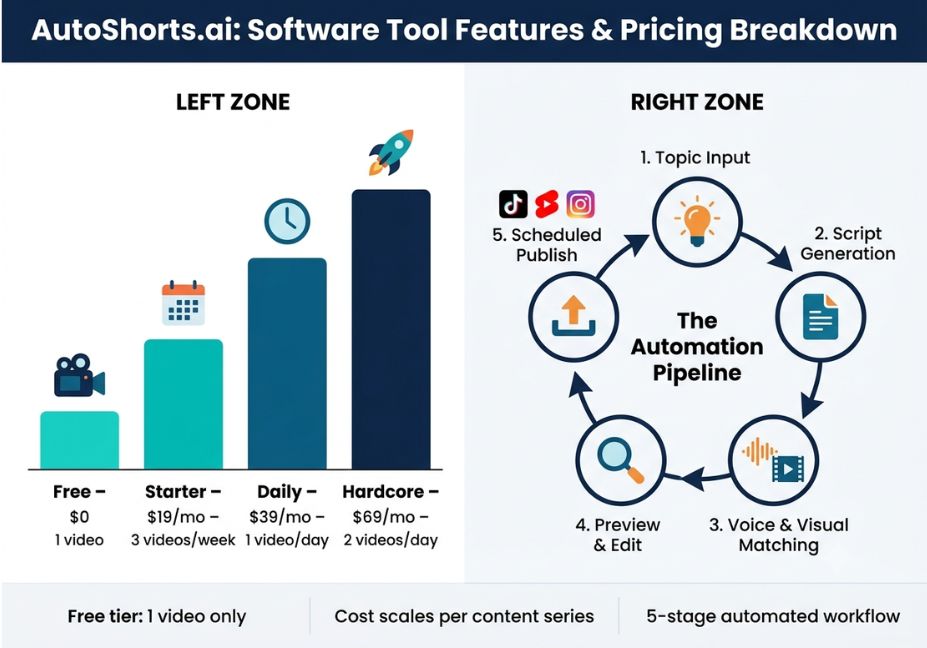
AutoShorts.ai Pricing What Each Plan Actually Buys
Pricing scales with posting cadence, not just feature access. Consequently, the feature set stays largely identical across paid tiers, while what changes is how often the pipeline is allowed to run.
| Plan | Approx. Price | Posting Cadence | Best For |
|---|---|---|---|
| Free | $0 | 1 video (no scheduled posting) | Sampling script and voice quality |
| Starter | ~$19/month | ~3 videos/week | Testing a niche before committing |
| Daily | ~$39/month | 1 video/day | Creators wanting steady daily cadence |
| Hardcore | ~$69/month | 2 videos/day | High-volume channel operators |
Pro Tip: Cost scales roughly linearly with additional content series, not just posting frequency. Therefore, running two parallel series on the Daily plan effectively doubles the monthly cost, so budget per series rather than per plan if you’re testing multiple niches at once.
Is AutoShorts.ai Worth It? Real-World Use Cases
So, is AutoShorts.ai worth it for a new channel? That depends on the niche. It tends to perform best in a few specific categories:
- Trivia and history channels factual, low-personality-required content that tolerates a generic script tone well.
- Motivational and self-development shorts audiences engage with the format regardless of narrator identity, which plays to the platform’s faceless design.
- Tech and productivity tip channels a natural fit for automation-focused topics, since the audience already expects a tool-driven production style.
- Multi-channel series testing some operators run several themed series in parallel to see which niche’s audience grows fastest before scaling spend on the winner.
Meanwhile, niches that depend on personal credibility, on-camera presence, or highly technical accuracy tend to be a weaker fit.
AutoShorts.ai vs. Alternatives
AutoShorts.ai isn’t the only agent-style video pipeline on the market, and it isn’t positioned for every use case:
- Argil trains a digital clone from your own face and voice instead of generating faceless stock-footage videos. Consequently, it’s a better fit if you’re building a recognizable personal brand rather than a volume content factory.
- VidWiz and similar tools some creators running multiple parallel channels have found that per-series costs add up quickly on AutoShorts.ai once testing more than one or two niches at once, and have switched to platforms with flatter per-series pricing instead.
- Cutsio and traditional NLEs not true competitors, since these are post-production and review tools for footage a human already shot, not text-to-video generators.
Common Mistakes and How to Avoid Them
- Skipping the preview step. The pipeline runs fast enough that it’s tempting to let videos auto-publish without review but script quality varies by topic, so a five-second preview check catches most issues before they go live.
- Running one series and expecting virality. View counts vary dramatically by niche. As a result, testing two or three parallel series is a more reliable way to find what resonates than betting everything on one.
- Ignoring the free tier’s limits. Because the free plan caps out at one video with no scheduled posting, it can’t tell you anything about posting cadence or audience retention — only script and voice quality.
- Treating pricing as flat. Since cost scales with the number of parallel series, budgeting for “the Daily plan” without accounting for multiple series often leads to billing surprises.
What Creators Are Saying
Independent usage reports are mixed but consistent on one point: script and voice quality are generally solid, while cost efficiency depends heavily on how many parallel series you’re running. For example, one creator tracking a multi-channel faceless automation project found the per-series cost model became cost-prohibitive at scale once testing several niches simultaneously, and documented the switch to a flatter-priced alternative in a public progress log — a useful reality check against marketing copy alone.
FAQ People Also Ask
What features does AutoShorts.ai offer?
AutoShorts.ai automates script generation, AI voiceover, stock footage and music matching, captioning, a preview-and-edit step, and scheduled multi-platform publishing covering the full pipeline from topic to posted video.
Does AutoShorts.ai post automatically to TikTok and YouTube?
Yes. Once a video is approved in the preview step, it’s scheduled and posted automatically to connected channels on a set cadence.
Is AutoShorts.ai free to use?
There’s a free plan, but it’s limited to generating one video with no scheduled posting — enough to evaluate script and voice quality, not to test a real posting cadence.
How does AutoShorts.ai actually generate a video?
It runs a fixed pipeline: a topic or prompt triggers script generation, followed by automated voiceover and footage matching, then a human preview step before the video is queued for publishing.
How much does AutoShorts.ai cost per month?
Plans run from a free single-video tier up to a roughly $69/month “Hardcore” tier supporting two posts per day, with cost scaling further if you run multiple content series in parallel.
What’s a good alternative to AutoShorts.ai?
Argil is a common alternative for creators who want cloned-face videos rather than faceless content, while several other faceless-video platforms compete mainly on flatter per-series pricing.
Conclusion
In short, AutoShorts.ai’s software tool features are best understood as a fixed, five-stage content pipeline script, voice, visual matching, preview, and publish rather than a loose bundle of settings. That structure makes it fast and predictable for single-series faceless channels. However, the pricing model rewards focus: costs scale with parallel series, not just posting frequency, so the biggest lever for keeping this tool cost-effective is picking one or two niches and committing rather than testing broadly. Ultimately, if you’re weighing AutoShorts.ai software tool features against building your own pipeline, weigh the time saved against that per-series cost curve before scaling up.
Bookmark this guide and explore more breakdowns of agentic AI tools at agentiveaiagents.com.