

A senior engineer opens Cursor at 9 a.m., pastes in a bug report, and watches the agent confidently “fix” a race condition that never existed. Meanwhile, the actual bug goes untouched. This kind of moment is common enough in 2026 that most engineering teams have stopped asking whether to use AI and started asking which tool, for which task, at what cost.
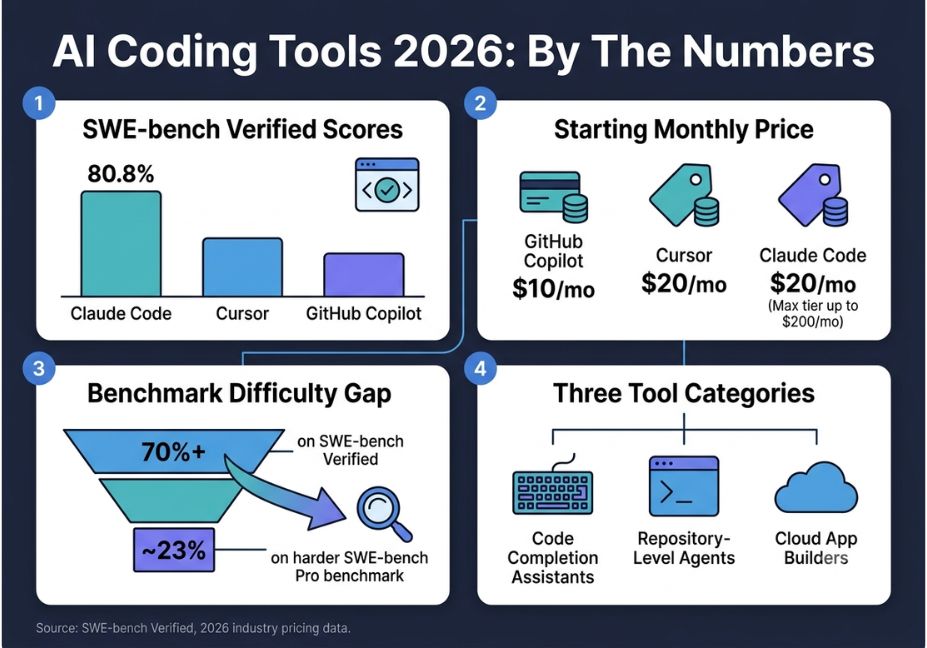
The best AI coding tools for developers in 2026 are not interchangeable. Some are autocomplete engines bolted onto an editor. Others are terminal-native agents that read an entire repository before touching a single line. A few are cloud builders that scaffold whole applications from one prompt. On SWE-bench Verified a human-validated benchmark of real GitHub issues, and the standard most teams now use to compare real-world coding ability top models resolve roughly 80% of issues autonomously. That’s a major jump from two years ago, though still far from perfect.
This guide breaks the market down by workflow role, pricing reality, and common failure points, so you can build a deliberate stack instead of guessing.
What Is an AI Coding Tool?
In short, “AI coding tool” now covers three distinct categories, not one.
- Code completion assistants suggest the next few lines as you type.
- Repository-level agents take a goal, inspect the codebase, edit multiple files, run tests, and iterate until the task passes.
- Cloud app builders generate an entire project frontend, backend, database, hosting from a natural-language description.
Model quality still matters, of course, but by 2026 the bigger differentiator is how well a tool integrates project context and behaves predictably on real production code rather than sandboxed demos.
How Do AI Coding Agents Actually Work?
Repository-level agents run what’s known as a tool-use loop. First, the agent reads the relevant files. Then it proposes a plan, makes an edit, executes a test or command, and observes the result repeating this cycle until the task resolves or hits a limit. As a result, this process looks fundamentally different from single-shot autocomplete.
Many 2026 agents, including Claude Code and Cursor, now speak the Model Context Protocol (MCP) an open specification for connecting agents to external tools, so they can read tickets, query databases, or check design specs mid-task instead of guessing. Because of this, Anthropic and the broader developer community maintain reference server implementations for the protocol, which is why MCP support has become a standard checkbox on comparison charts.
Architect’s Note: A tool-use loop is only as reliable as the guardrails around it. Agents with plan-before-act workflows showing a diff before executing tend to catch far fewer silent regressions than agents that edit and commit automatically.
Best AI Coding Tools by Category
Rather than one ranked list, here’s how the market actually splits by job-to-be-done. This structure also matters for how AI search tools like Google’s AI Overviews and Perplexity tend to extract and cite comparison content.
Code completion / IDE assistants: GitHub Copilot, JetBrains AI Assistant, Tabnine, Amazon Q Developer, Gemini Code Assist.
Repository-level / terminal agents (best for large, complex codebases): Claude Code, Cursor, Aider, Cline.
Cloud app builders (best for solo developers and fast prototyping): Replit Agent, Bolt.new, Lovable, v0.
Review and security layers: Qodo, CodeRabbit, Snyk Code.
In 2026, teams increasingly mix tools without one single framework. For example, editor assistants generate functions and tests while a developer types, while repository-level agents separately handle multi-file refactors and debugging loops across a codebase.
Head-to-Head: Claude Code vs. Cursor vs. GitHub Copilot
These three dominate developer discussions in 2026, largely because they solve different problems rather than competing head-on.
| Tool | Best For | Interface | Starting Price | SWE-bench Verified |
|---|---|---|---|---|
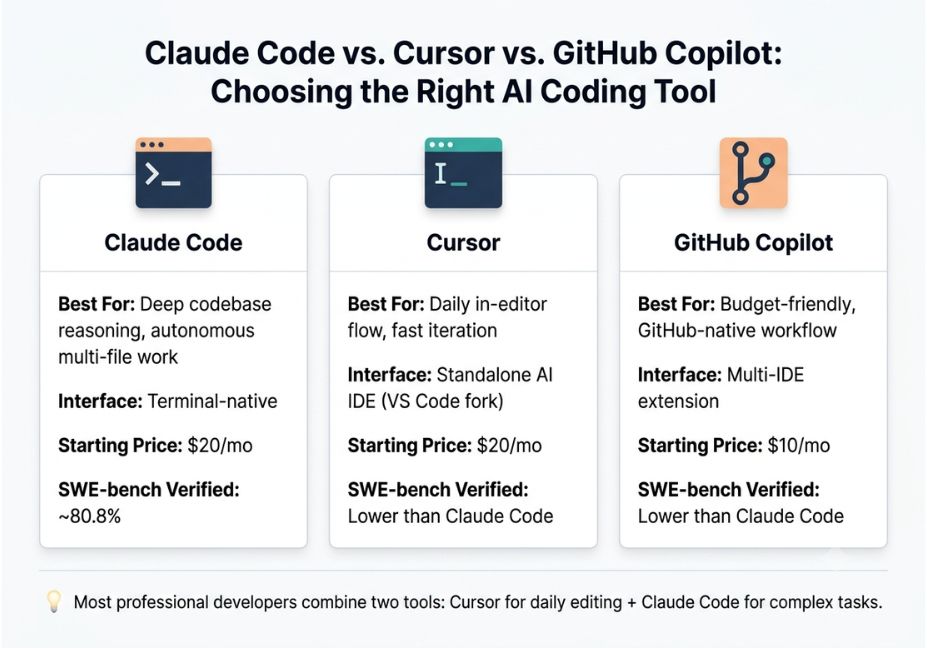
| Claude Code | Deep codebase reasoning, autonomous multi-file work | Terminal-native | $20/mo (Pro) | ~80.8% |
| Cursor | Daily in-editor flow, fast iteration | Standalone AI IDE (VS Code fork) | $20/mo (Pro) | Lower than Claude Code on comparable tasks |
| GitHub Copilot | Budget-friendly, GitHub-native workflow | Multi-IDE extension | $10/mo (Pro) | Lower than Claude Code on comparable tasks |
Cursor is built as a complete editor redesigned around AI-assisted development, rather than as a bolt-on extension. Claude Code, on the other hand, runs directly in the terminal with full filesystem access, running shell commands and iterating on tests until a task is done. Because each tool optimizes for a different workflow, the most common professional setup pairs Cursor for daily editing with Claude Code for complex, high-stakes tasks.
Is Claude Code better than Cursor? For raw autonomous problem-solving on large codebases, yes Claude Code’s benchmark scores are higher. But for fast, visual, in-editor iteration, Cursor is generally the better daily driver. Most developers benefit from both rather than choosing one.
Did You Know? SWE-bench Verified tests whether a model can resolve a real GitHub issue by producing a code patch that passes the repository’s existing test suite, not just generate an isolated function from a docstring. That’s why it has become the reference point for agentic coding claims across the industry.
Pricing Reality: Why the Sticker Price Doesn’t Match Your Bill
This is the gap most 2026 buying guides skip entirely. Cursor, Claude Code, GitHub Copilot, and OpenAI’s Codex have all converged on the same model: a monthly fee buys a pool of credits, and consumption is metered against underlying API token rates. In other words, the plan name is a deposit, not the actual bill.
- GitHub Copilot moved to usage-based billing on June 1, 2026, where one AI Credit equals $0.01, replacing the older premium-request allowance model.
- Cursor’s usage-based pricing has produced bills as high as $200 to $1,400 or more per month for developers who lean heavily on its Composer feature.
- Claude Code ships through Claude Pro ($20/mo) and Max plans ($100 or $200/mo), running on Claude Sonnet 5 by default.
Pro Tip: Before committing to a team-wide rollout, run a two-week pilot with your heaviest users on the actual usage-based tier, rather than the entry plan. The entry-level price rarely predicts what a power user spends once agent sessions run long.
What’s the Cheapest AI Coding Assistant in 2026?
For solo developers or small teams on a budget, GitHub Copilot’s $10/month Pro tier is still the lowest committed cost with real agentic features. However, several open-source options such as Aider paired with a lower-cost model API can cost less overall if you’re comfortable managing your own API key and usage limits.
Real-World Use Cases
- Legacy refactor. A senior engineer can use Claude Code to map out a large, unfamiliar codebase before safely refactoring a core module without breaking downstream dependencies.
- Rapid prototyping. With Replit Agent, a developer simply describes what they want, and the platform assembles a full application frontend, backend, database, auth, and deploy previews without manual setup.
- PR-adjacent automation. Because Copilot is built into the GitHub ecosystem, repo activity like issues, PRs, and commits can trigger downstream automations, such as summarizing a pull request in a team chat channel.
- Enterprise rollout. Tabnine focuses on zero code retention and no training on customer codebases, alongside compliance certifications like GDPR, SOC 2, and ISO 27001, including fully air-gapped deployment options.
Common Mistakes and How to Avoid Them
- Trusting benchmark scores as a guarantee. On the harder SWE-bench Pro benchmark, top models drop from over 70% on SWE-bench Verified to roughly 23%. Therefore, don’t extrapolate one leaderboard number to your specific codebase.
- Letting agents auto-commit without review. Plan-before-act workflows exist for a reason. Skipping the diff review step is the fastest way to ship a confidently wrong patch.
- Assuming one tool covers the whole lifecycle. Editor assistants handle in-line generation, while repository-level agents handle multi-file refactors. Treating them as interchangeable creates blind spots on both ends.
- Ignoring the cost curve. Usage-based billing means a tool that looked cheap in a demo can get expensive quickly under real agentic workloads. As a result, budget for the heavy-usage tier, not the headline price.
What Developers Are Saying
A growing number of developer discussion threads now challenge the assumption that AI coding tools automatically make teams faster. Trust, it turns out, is foundational: developers who feel uneasy about sharing proprietary logic or architecture with a tool simply won’t adopt it, no matter how capable it is. Consequently, this skepticism is pushing vendors toward tighter context handling and fewer retries, rather than raw model size, as the main selling point.
FAQ People Also Ask
What is the best AI coding tool for developers in 2026?
There isn’t one single winner. Claude Code leads on autonomous, repository-level tasks and benchmark scores. Cursor leads on day-to-day in-editor flow. GitHub Copilot remains the best budget entry point for teams already on GitHub.
Is GitHub Copilot still worth it in 2026?
Yes, for teams that want a low-friction assistant inside an existing GitHub workflow. It now includes agent mode and multi-file editing, though it lacks the deep autonomous reasoning of terminal-native agents like Claude Code.
What’s the difference between an AI coding assistant and an AI coding agent?
An assistant suggests completions as you type. An agent takes a goal, inspects the repository, edits multiple files, runs tests, and iterates — closer to a junior engineer than an autocomplete tool.
Do AI coding tools actually make developers faster?
Often, but not universally. Gains depend heavily on codebase size, task type, and how much review overhead the team adds to catch agent mistakes.
Are AI coding tools safe for proprietary codebases?
It depends on the vendor’s data policy. Enterprise-focused tools with zero code retention and on-premises deployment exist specifically for teams that can’t risk exposing proprietary logic.
How much does an AI coding tool cost per month?
Entry plans typically start between $10 and $20 per month, but usage-based billing means heavy users can pay $100 to $200 or more once agent sessions scale up.
Conclusion
The 2026 AI coding landscape rewards deliberate stacking over brand loyalty. Pair a fast in-editor assistant for daily work with a terminal-native agent for high-stakes, multi-file tasks, and budget for usage-based billing rather than the advertised entry price. Benchmark scores like SWE-bench Verified are a useful signal, not a guarantee the real test is how a tool behaves on your codebase, under review, over a full sprint. Bookmark this guide and check back as pricing tiers and model versions keep shifting through the rest of 2026.



