Type “face swap” into any app store today, and you’ll get results that were, only three years ago, possible solely with a VFX team and a render farm. In fact, the gap between novelty and production-grade output has closed so fast that marketing teams now run localized ad variants through the same pipelines that power meme apps. As a result, AI face swap has become both a genuinely useful content tool and a genuine legal liability sometimes in the same afternoon.
So, how does AI face swap technology actually work, and which tool should you use in 2026? This guide answers both. It ranks the tools worth using this year, explains the facial landmark detection pipeline underneath them, and because this is the part most roundups skip lays out exactly where the legal line sits before you publish anything.
What Is AI Face Swapping?
AI face swapping is a computer vision task where a model detects a face in a source image, maps its facial geometry using landmark points, and reconstructs that geometry onto a target face while preserving the target’s lighting, angle, and expression. In short, it’s a specific application of the broader category of AI-generated synthetic media known as deepfakes. However, face swap tools are best understood as deepfake tools with a friendlier interface and, in the reputable ones, built-in usage restrictions and deepfake detection safeguards.
Under the hood, most consumer apps use one of two architectures. First, there’s the GAN-based face swap approach, where a generator network learns to blend the two faces convincingly. Alternatively, newer diffusion model face swap pipelines tend to handle lighting and skin texture more naturally, though generation is slower as a trade-off.
How Does AI Face Swap Actually Work?
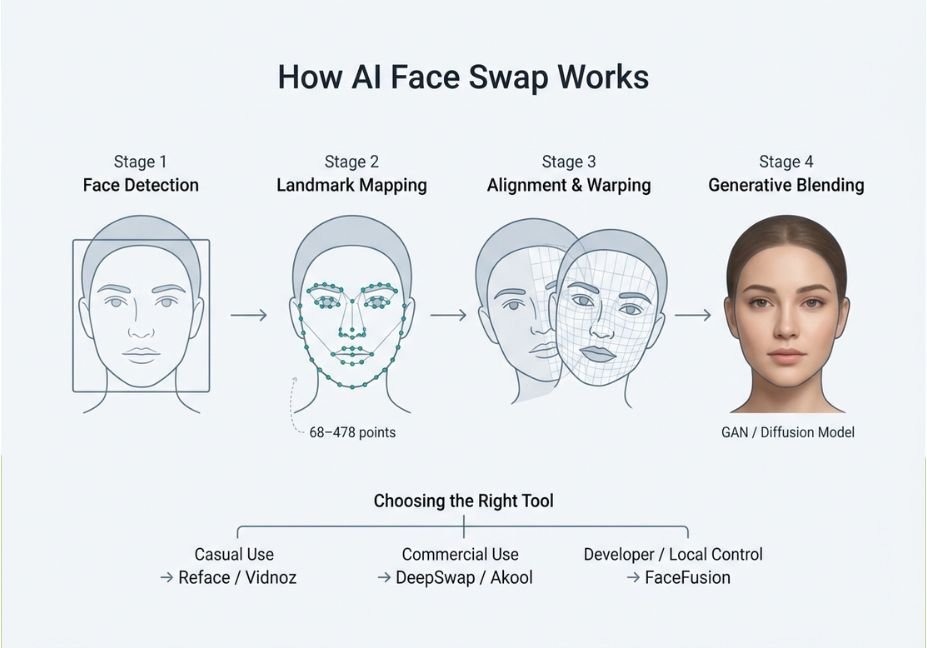
The pipeline runs in four stages, and understanding them explains why some tools handle group photos or side angles better than others.
- Face detection the model locates every face in the frame and draws a bounding box around each one.
- Landmark mapping next, it plots between 68 and roughly 478 points per face (eyes, nose bridge, jawline, mouth corners), building a geometric map of the face.
- Alignment and warping if the source and target faces differ in angle or scale, the model then warps one to match the other before any blending happens.
- Generative blending finally, a GAN or diffusion model fills in skin tone, texture, and lighting so the seam between the swapped face and the original frame disappears.
Technical note: Occlusion hands, hair, or glasses crossing the face is still the biggest failure point across the category. Therefore, tools that explicitly advertise occlusion handling are worth prioritizing if you’re working with candid or group shots rather than clean headshots.
Video adds a fifth requirement, since the model has to track head movement and expression frame by frame rather than swapping a single still. This is exactly why video face swap quality varies far more between tools than photo swap quality does.
Best AI Face Swap Tools 2026 — Compared
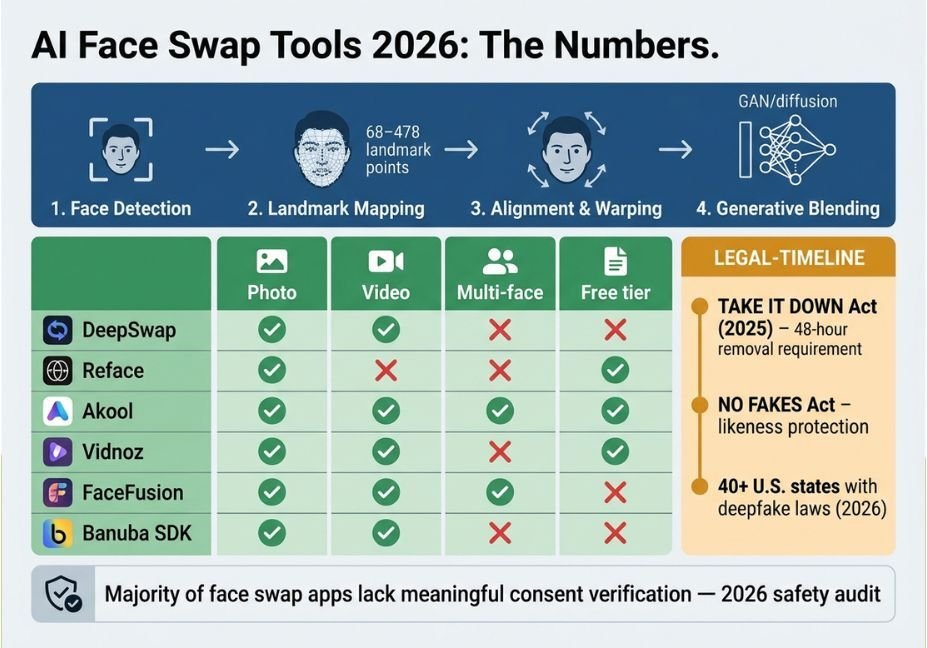
| Tool | Best for | Photo | Video | Multi-face | Free tier |
|---|---|---|---|---|---|
| DeepSwap | All-around quality, batch processing | Yes | Yes | Up to 6+ faces | Limited |
| Reface | Casual/viral social content | Yes | Short clips | Single face | Yes |
| Akool | Commercial/marketing campaigns | Yes | Yes | Group shots | Demo only |
| Vidnoz | Fast, browser-based, throwaway clips | Yes | Yes | Limited | Yes |
| FaceFusion (open source) | Developers, full local control | Yes | Yes | Configurable | Free (self-hosted) |
| Banuba SDK | Real-time face swap inside your own app | Yes | Real-time | Configurable | Enterprise quote only |
Pro tip: If you only need a handful of one-off swaps, a browser-based free tool is fine — this is also where most people land when searching for the best free AI face swap tool in 2026. But if you’re running this at any volume, such as batch marketing assets or an app feature, evaluate API access and per-image cost before quality, since that’s what will actually break your budget.
DeepSwap currently offers the broadest feature set: photos, video, and GIFs in one platform, automatic file deletion after 24 hours, and support for six-plus faces in a single video. Consequently, it’s the closest thing to a general-purpose pick on this list.
Reface, meanwhile, remains the easiest on-ramp for non-technical users who want a fast, fun result and don’t need commercial-grade output.
Akool is built specifically for marketing and studio use cases group shots, animated content, and campaign localization which is why it’s the tool most often cited by agencies working at scale.
For developers who want the pipeline itself rather than a hosted app, the open-source FaceFusion project exposes the full detection-to-blending pipeline and runs entirely on your own hardware. This matters for both privacy and customization.
Is AI Face Swap Legal? Consent, Regulation, and Where the Line Sits
This is the section most “best tools” articles either skip or bury in a disclaimer yet it’s the section that actually matters if you’re publishing anything with a real, identifiable person’s face in it.
The short answer: face swapping is legal in the U.S. and most jurisdictions when the person whose face is used has given consent, and the output isn’t used to defraud, defame, or sexualize them without permission. In other words, intent and consent not the technology itself determine legality.
Did you know? The federal TAKE IT DOWN Act, signed into law in 2025, criminalizes non-consensual intimate imagery generated with AI and requires platforms to remove reported content within 48 hours. Additionally, the separately introduced NO FAKES Act targets non-consensual use of a person’s voice or likeness in generative AI more broadly. On top of that, more than 40 U.S. states now have their own deepfake-specific statutes layered on top, and several state attorneys general have already brought enforcement actions.
So, is AI face swap legal without consent? No not in any jurisdiction with a deepfake or likeness-rights statute on the books, which by 2026 is most of them. Before you publish any face-swapped content commercially, check three things:
- Written consent, specific to AI face modification. To be clear, a person having posted their own photo publicly is not legal consent for you to alter it.
- Context. Using someone’s likeness to make them appear to say or do something they didn’t crosses from creative tool into defamation or fraud territory, even with otherwise-legal source material.
- Platform policy. Reputable tools, including DeepSwap and Akool, publish explicit acceptable-use policies that prohibit non-consensual intimate imagery outright, regardless of what your local law technically permits.
A 2026 systematic safety audit of consumer face swap apps found that most of the apps tested lacked meaningful consent verification or misuse prevention. Given that, the presence of consent checks and content moderation is a better quality signal than output resolution alone worth remembering the next time a “best tools” list ranks purely on realism.
Common Mistakes and How to Avoid Them
- Assuming public photos equal consent. They don’t, either legally or ethically. Instead, get explicit written permission for anything beyond personal, private use.
- Ignoring data retention policies. Cloud-based tools upload your source images to remote servers, so check how long they’re retained before you upload anything sensitive. FaceFusion and other local, open-source options avoid this entirely by processing everything on your own hardware.
- Publishing without disclosure. Emerging state and federal rules increasingly expect AI-generated or -modified media to be labeled. C2PA watermarking, now supported by a growing number of platforms, embeds that provenance information automatically.
- Judging quality from a single still frame. A swap that looks perfect in a paused frame can still fall apart on head turns or fast motion. Therefore, always review full video output rather than a thumbnail.
FAQ — People Also Ask
Is AI face swapping legal?
Yes, when the person depicted has given explicit consent and the content isn’t used for fraud, defamation, or non-consensual intimate imagery. Recent U.S. federal laws, including the TAKE IT DOWN Act, specifically criminalize non-consensual sexual deepfakes regardless of technical quality.
What’s the difference between a face swap and a deepfake?
A face swap is one specific technique: replacing one face with another using landmark mapping and generative blending. Deepfake, on the other hand, is the broader umbrella term covering any AI-generated synthetic media, including face swaps, voice cloning, and full-body synthesis.
Will an AI face swap tool keep my photos after I use it?
It depends on the platform. Most cloud-based tools upload images to remote servers and state a retention window in their privacy policy DeepSwap, for example, auto-deletes files after 24 hours. Locally run, open-source tools like FaceFusion never upload your images at all.
Can AI face swap tools handle video, not just photos?
Yes, though quality varies more here than with photos, since the model has to track head movement, expression, and lighting frame by frame. DeepSwap, Akool, and Vidnoz all support video; just check a tool’s maximum clip length before committing to a paid tier.
What’s the best AI face swap app for beginners right now?
Reface and Vidnoz both offer free, browser-based tools with minimal setup, which makes them the easiest entry points if you just want a quick result without evaluating architecture or API access.
Conclusion
Ultimately, the best AI face swap tool for you depends less on raw output quality most 2026-era tools clear that bar and more on three practical factors: whether you need video or just photos, whether your workflow needs an API versus a simple upload UI, and how seriously the platform takes consent and data retention. DeepSwap and Akool cover the broadest range of commercial use cases; FaceFusion is the right call if you want full local control; Reface and Vidnoz are enough for casual, low-stakes projects. Whichever tool you pick, get consent first the technology has gotten good enough that intent is now the only thing standing between a creative project and a legal one.