
Most organizations evaluating Microsoft Copilot hit the same wall: Microsoft’s licensing documentation is a maze of SKUs, add-ons, and overlapping plan names. You search “Copilot Enterprise vs Business” expecting a clear feature diff, and instead get three marketing pages that all say “AI-powered productivity.” Meanwhile, your IT admin is asking whether the $30 plan really justifies the $9/user premium, and your compliance officer wants to know what happens to sensitive payroll data when an employee types it into a chat prompt.
Here’s the short answer that most comparison articles miss: the underlying AI engine for both Copilot Business and Copilot Enterprise is technically identical. The same GPT-series models via Azure OpenAI Service, the same Microsoft Graph grounding, the same Semantic Index. What you’re actually buying with the Enterprise tier is a deeper governance stack and whether you need it depends entirely on your compliance posture, organizational size, and how much control you want over what Copilot can surface.
This guide unpacks both plans at the architecture level, with pricing updated as of June 2026.
What Is Microsoft 365 Copilot, Actually?
Before comparing tiers, it’s worth establishing what Copilot is under the hood. Every Copilot interaction passes through seven layers: your M365 apps (Word, Teams, Outlook), identity and access via Entra ID, an orchestration layer that decides what data to retrieve, Microsoft Graph grounding via the Semantic Index, AI inference through Azure OpenAI models, responsible AI safety filters, and finally response delivery with audit logging.
The Semantic Index is Copilot’s core retrieval engine. It builds continuously updated vector representations of your organization’s content documents, emails, Teams messages, SharePoint pages and uses similarity search to find the most relevant context for each prompt. Think of it as an always-on RAG pipeline built directly into your tenant. You can read more about how the Microsoft Graph Semantic Index works in Universal Cloud’s technical breakdown.
Both Business and Enterprise licenses generate this Semantic Index automatically. Both support Graph Connectors with a 50-million-item index quota. The AI surface area is the same.
Copilot Business vs Enterprise: Pricing Breakdown (2026)
As of December 1, 2025 following Microsoft’s December 2025 pricing and capabilities announcement Microsoft permanently reduced Copilot Business pricing and introduced new SKU structures.
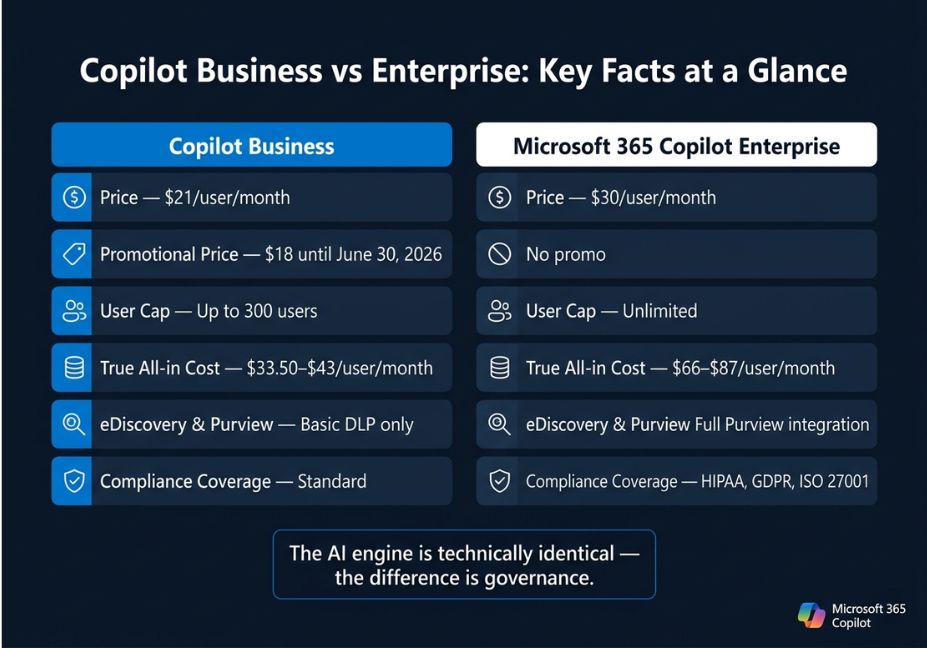
| Copilot Business | Microsoft 365 Copilot (Enterprise) | |
|---|---|---|
| Price (annual) | $21/user/month | $30/user/month |
| Promotional price | $18/user/month (until June 30, 2026) | — |
| Month-to-month | $25.20/user/month | ~$36/user/month |
| User cap | ≤300 users | No limit |
| Required base license | M365 Business Standard or Premium | M365 E3, E5, F1, F3, or Office 365 E3/E5 |
| True all-in cost | ~$33.50–$43/user/month | ~$66–$87/user/month |
| Minimum seats | 1 (no minimum since Jan 2024) | 1 |
PRO TIP: The promotional $18 price disappears June 30, 2026. If you’re deploying Copilot Business for an SMB, lock in annual commitments before renewal season. A 50-user deployment saves $1,800/year at the promotional rate vs standard pricing.
The official Microsoft 365 Copilot pricing page confirms that Copilot is not a standalone product it requires a qualifying base license, which is where the real cost differential lives. An M365 E3 base ($36/user/month) alone costs more than an entire Copilot Business deployment on top of M365 Business Standard.
The Governance Gap: Where Enterprise Actually Earns Its Price
This is the section most comparison articles skip. The AI does identical things. The difference is what happens around the AI who can see what, what gets logged, and what controls fire when Copilot encounters sensitive content.
Microsoft Purview integration is the biggest delta. Enterprise deployments get deep Purview hooks: sensitivity labels that restrict what Copilot can surface, Data Loss Prevention policies that fire at the AI layer, and full eDiscovery capture of Copilot prompts and responses. As Microsoft Learn’s Purview-for-Copilot documentation specifies, user prompts and AI responses are stored in the user’s Exchange mailbox, making them searchable via eDiscovery case queries but only if your tenant has the appropriate Purview configuration in place.
Copilot Business includes standard DLP policies and basic audit logs. It does not include:
- Microsoft Purview Customer Lockbox controls whether Microsoft engineers can access your tenant data during support operations
- Advanced eDiscovery legal hold, case management, and structured export for litigation
- Information Barriers prevents cross-department data leakage through Copilot’s semantic search
- Conditional access policies via Entra ID fine-grained access control tied to user role, device state, or location
ARCHITECT’S NOTE: If your organization operates in healthcare (HIPAA), finance (SOX), or EU markets (GDPR), the Enterprise tier’s Purview stack isn’t optional it’s the difference between compliant deployment and a reportable incident. Microsoft 365 Copilot Enterprise aligns with GDPR, HIPAA, and ISO 27001 compliance frameworks; Copilot Business does not provide that same depth of coverage.
One failure mode developers rarely anticipate: Copilot’s semantic search bypasses Information Barriers if those barriers are not explicitly applied to the Copilot service itself. A Business plan tenant with overshared SharePoint content will surface cross-team data to any user with a Copilot license, silently. Enterprise plans give you the tooling to catch this before it becomes a legal problem.
Agentic Capabilities: Copilot Studio Access Compared
Both plans include access to Copilot Studio for internal agent scenarios with licensed users. Lite agents those that retrieve from SharePoint or answer FAQ-style queries work on both tiers without additional licensing.
Where they diverge:
- Enterprise gets Copilot Studio capacity bundled more deeply into M365 E5, with 400 Security Compute Units (SCUs)/month per 1,000 user licenses for Security Copilot agents (rolling out since November 2026)
- Business supports lite agent creation but hits limits faster on complex agentic workflows involving external API connectors, sub-agent orchestration, or Dynamics 365 integration
- External/B2C agent scenarios consume Copilot Credits on both plans regardless of tier
DID YOU KNOW? Microsoft’s new M365 E7 tier (generally available May 1, 2026, at $99/user/month) bundles E5 + Copilot + the Entra Suite + AI management tools. For organizations already buying Copilot + Copilot Studio capacity packs separately, E7 may deliver better unit economics worth running the math before your next renewal.
Which Plan Is Right for Your Organization?
The decision tree is simpler than Microsoft’s docs make it appear.
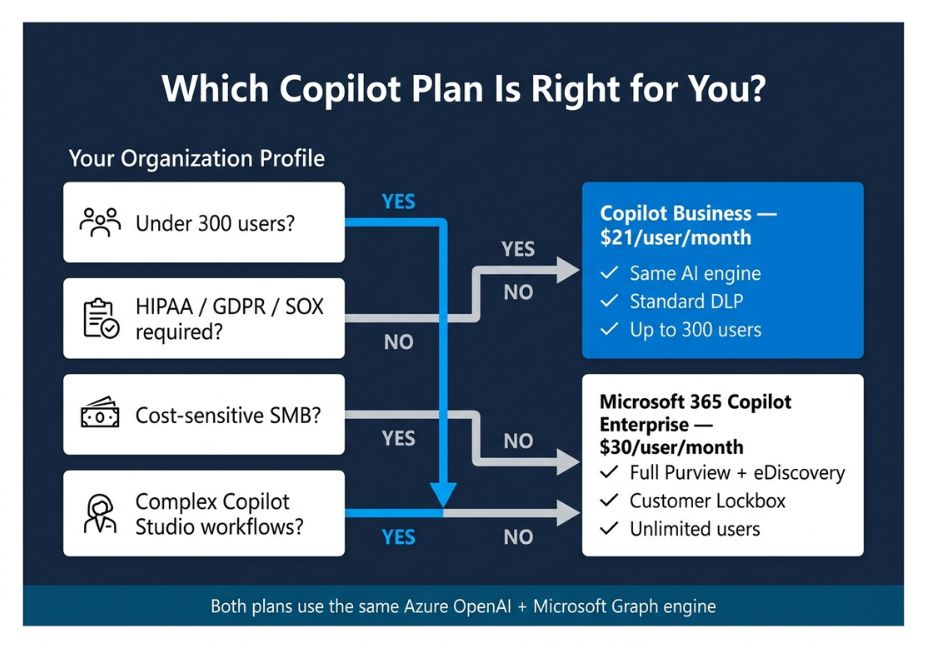
Choose Copilot Business if:
- Your organization has 300 or fewer users
- Your primary use case is M365 productivity (email drafting, document summarization, Teams meeting recaps, Excel analysis)
- Your compliance requirements are covered by standard DLP and basic audit logs
- You’re on M365 Business Standard or Premium
Choose Microsoft 365 Copilot (Enterprise) if:
- You need Purview integration for sensitivity labels, advanced eDiscovery, or Customer Lockbox
- Your organization exceeds 300 users or will scale past that
- Compliance with HIPAA, GDPR, SOX, or ISO 27001 is a deployment requirement
- You need cross-departmental Business Chat queries (executives querying meeting insights across divisions they didn’t attend)
- You’re building complex Copilot Studio agents that connect to Dynamics 365, SAP, Salesforce, or custom APIs
PRO TIP: For Business Premium customers under 300 users, Microsoft confirms the Copilot Business add-on delivers the same AI capabilities as the Enterprise offering. There is no technical reason to pay the premium unless your governance requirements demand the underlying Enterprise M365 license.
Common Deployment Mistakes (and How to Avoid Them)
Real-world Copilot rollouts fail for predictable reasons. These apply to both tiers but hit Enterprise deployments hardest because the attack surface is larger.
- Deploying before labeling sensitive content Copilot surfaces any document the user has permission to view. If your SharePoint is a permission sprawl files shared broadly “just in case” Copilot will happily summarize a confidential acquisition memo to someone who technically has read access. Apply Microsoft Purview sensitivity labels before enabling Copilot, not after.
- Not updating eDiscovery configurations for Copilot content Copilot-generated meeting summaries and Pages live in Exchange and OneDrive. If legal holds were configured before Copilot was deployed, they may not capture AI-generated content. A post-deployment litigation hold gap can result in spoliation sanctions.
- Misunderstanding the 300-user cap The cap applies to the Business add-on license, not to the underlying M365 plan. If you’re on Business Premium at 250 seats today but expect to grow past 300, budget for a tier migration redeploying licenses mid-year adds administrative overhead.
- Skipping Purview for “low-risk” use cases Teams meeting summaries feel innocuous. But if an attendee summarizes a board call that included MNPI (material non-public information), that summary is now in Exchange, shareable, and potentially subject to SEC disclosure rules. Governance isn’t just for healthcare.
What Developers and Admins Are Saying
IT practitioners on the r/Microsoft365 and r/sysadmin communities consistently flag two practical pain points with Copilot Business deployments: overshared SharePoint content surfacing unexpectedly and the absence of Customer Lockbox creating compliance concerns for smaller firms handling sensitive client data. Enterprise admins, by contrast, more often report governance setup complexity as the barrier — Purview requires deliberate pre-deployment configuration, and skipping it creates the exact exposure risks Purview is designed to prevent.
The consensus: Copilot Business is the right starting point for most SMBs. Upgrade paths to Enterprise are straightforward, but the governance tooling demands dedicated admin time that small teams may not have.
FAQ People Also Ask
The AI engine including Microsoft Graph grounding, the Semantic Index, and Azure OpenAI models is technically identical. The difference is governance depth. Copilot Business ($21/user/month) is limited to organizations with 300 or fewer users and offers standard DLP and basic audit logging. Microsoft 365 Copilot Enterprise ($30/user/month) adds Purview integration, advanced eDiscovery, Customer Lockbox, and deeper Entra ID conditional access controls.
Not inherently less secure both plans keep prompts and responses within your tenant and never use organizational data to train public AI models. Copilot Business is less governed: it lacks the full Microsoft Purview compliance stack, advanced eDiscovery, and Customer Lockbox. For organizations without HIPAA/GDPR/SOX obligations, Copilot Business’s security posture is adequate. For regulated industries, Enterprise governance controls are necessary.
Yes, within the user’s own permission scope. Both tiers use the Microsoft Graph Semantic Index to retrieve emails, documents, Teams messages, and calendar data the user already has access to. The Enterprise plan unlocks cross-departmental Business Chat queries executives can query meeting insights across teams they didn’t attend, if Graph permissions allow. Business plan users are limited to data within their own direct access.
The Copilot Business add-on is designed for organizations with up to 300 licensed users and only works on top of existing M365 Business (not Enterprise) base licenses. Organizations exceeding 300 users, or those on M365 E3/E5, must purchase Microsoft 365 Copilot (the Enterprise tier). There is no minimum seat requirement you can deploy a single license.
For Enterprise deployments, yes Purview should be treated as a prerequisite, not an afterthought. Without proper sensitivity label deployment and DLP configuration, Copilot will surface overshared content and may expose sensitive data through prompt responses. For Copilot Business on smaller tenants with simpler permission structures, Purview isn’t required, but reviewing SharePoint sharing settings before rollout is strongly recommended.
Conclusion
The Copilot Enterprise vs Business decision comes down to three questions: How large is your organization? How complex are your compliance requirements? And how much control do you need over what AI can surface from your data?
For SMBs under 300 seats with standard productivity needs, Copilot Business at $21/user/month is the rational choice the AI is identical, the savings are real, and the governance gap only matters if you’re operating in a regulated industry. For larger organizations, or any deployment where HIPAA, GDPR, or legal hold requirements apply, Microsoft 365 Copilot’s Enterprise tier isn’t just better governance it’s risk management.
In both cases, get your Microsoft Graph permissions and SharePoint access controls in order before you flip the switch. The best Copilot deployment is the one where the AI only surfaces what it should.
Bookmark this guide and explore more hands-on AI agent and Microsoft 365 architecture tutorials at agentiveaiagents.com.