
At the same stage, most implementations of AI encounter failure. Because of it’s base ChatGPT model, when asked questions about aspects of your proprietary processes, internal documentation, or niche datasets, it either “hallucinates” plausible answers or states that it doesn’t know anything – but the model isn’t the issue. Rather, it’s an issue of not having a functional connection between your data and the model.
There are three ways to resolve that disconnect: Custom GPTs, Fine-Tuning, and Retrieval-Augmented Generation (RAG). Each addresses a different issue, has different costs and technical specifications, and has different modes of failure. Choosing the wrong one can cause you to waste time, money, and trust.
This guide gives you an overview of the three of these methods with working Python Scripts, a side-by-side comparison table of each option, and guidelines on which option is the best fit for each type of use case.
What Does It Actually Mean to Train ChatGPT on Your Own Data?
Many developers get this wrong before they write a single line of code. So let’s be precise.
You cannot retrain GPT-4 or GPT-4o from scratch. OpenAI does not expose base model weights for full retraining. What you can do is customize the model’s behavior and knowledge through three different mechanisms, each of which works at a different layer of the system.
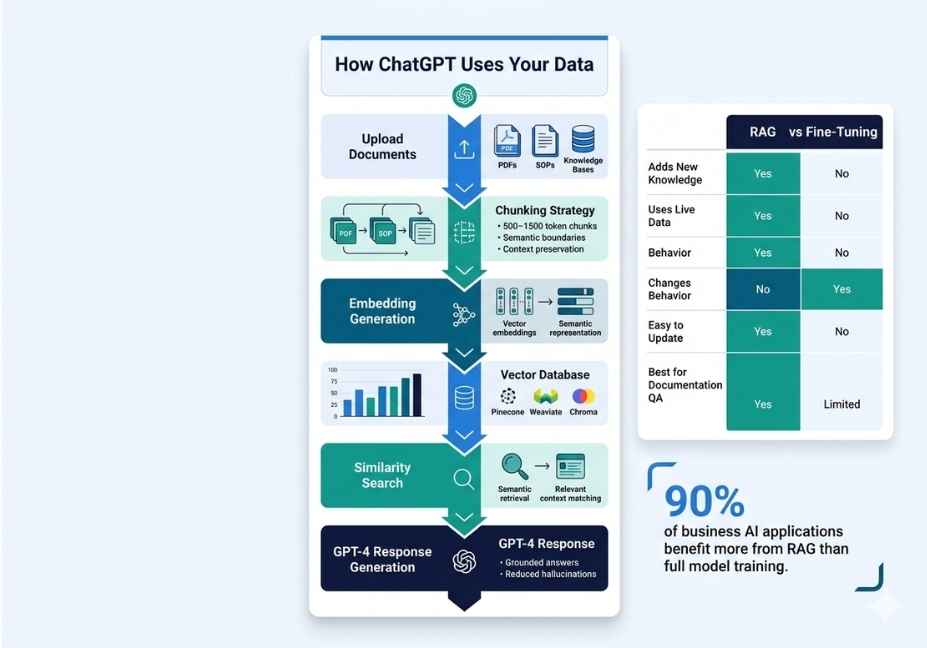
Fine-tuning adjusts the model’s internal weights using your labeled examples. As a result, it changes how the model responds, not what it can look up in real time. RAG, on the other hand, leaves the model completely unchanged. Instead, it feeds relevant chunks from your document library into the context window at query time essentially giving the model an open-book exam rather than asking it to memorize everything. Custom GPTs, finally, sit between the two. They offer a no-code interface where you upload files and write instructions, and OpenAI handles the retrieval layer automatically.
Understanding this distinction is, without question, the single most important step in this guide. The wrong architecture choice is the leading cause of failed AI deployments not model quality, not data volume.
Method 1: Custom GPTs The Fastest No-Code Option
If you do not need API-level control, Custom GPTs are the quickest path to a working solution. Moreover, they require no machine learning knowledge whatsoever.
Inside ChatGPT (Plus or Team plan), you can upload up to 20 files PDFs, Word documents, and CSVs and the system retrieves relevant chunks automatically when users ask questions.
How to set one up in five steps:
- Open ChatGPT and navigate to Explore GPTs, then click Create.
- In the Configure tab, write a system-level instruction that describes the GPT’s role, tone, and boundaries.
- Under Knowledge, upload your source files.
- Enable or disable web browsing and code execution based on your use case.
- Publish internally to your workspace, or publicly if appropriate.
Where Custom GPTs work well: Internal wikis, customer-facing FAQ bots, onboarding assistants, and quick knowledge-base prototypes. Where they break down: Large document corpora, structured data queries, anything requiring real-time updates, or use cases where retrieval accuracy is mission-critical.
Pro Tip: OpenAI’s built-in retrieval for Custom GPTs uses a fixed chunking strategy that you cannot control. Consequently, documents with large tables, deeply nested sections, or multi-column layouts produce poor retrieval results. For precision-critical use cases, build a custom RAG pipeline instead.
Privacy note: Files uploaded to Custom GPTs are stored by OpenAI and used within your organization’s workspace. For sensitive business data legal documents, financial records, or customer PII review OpenAI’s enterprise data handling policies before uploading.
Method 2: How to Fine-Tune ChatGPT on Your Own Data
Fine-tuning is the right tool when you need the model to behave differently not just know more. Specifically, it excels at enforcing a consistent response format, maintaining brand voice, routing tool calls reliably, or handling domain-specific phrasing with precision.
However, it is important to understand one critical limitation: fine-tuning is not a reliable knowledge injection tool. Fine-tuned models still hallucinate facts they were not shown during training. In fact, production benchmarks show that fine-tuning reduces hallucination rates by 20–50% on familiar task patterns but can increase overconfidence on out-of-scope queries.
Currently, OpenAI supports fine-tuning on gpt-4o-mini-2024-07-18, gpt-4.1-nano, and gpt-3.5-turbo. The process requires a JSONL training file where each line is a complete, valid JSON object representing one conversation example.
How to Prepare Your JSONL Training File
Each training example must follow this structure:
json
{"messages": [
  {"role": "system", "content": "You are a technical support agent for Acme Corp."},
  {"role": "user", "content": "How do I reset my API key?"},
  {"role": "assistant", "content": "To reset your API key, go to Settings > API > Regenerate Key. This action invalidates all active sessions immediately."}
]}
A few important rules apply here. First, every line must be a valid JSON object with no trailing commas. Second, OpenAI recommends a minimum of 50 to 100 high-quality, diverse examples before you can expect meaningful behavioral change. Third, more examples are not always better a small, clean, consistent dataset outperforms a large, noisy one almost every time.
How to Launch the Fine-Tuning Job via the API
python
import openai

# Step 1 — Upload your training file
with open("training_data.jsonl", "rb") as f:
    file_response = openai.files.create(file=f, purpose="fine-tune")

# Step 2 — Create the fine-tuning job
job = openai.fine_tuning.jobs.create(
    training_file=file_response.id,
    model="gpt-4o-mini-2024-07-18",
    hyperparameters={"n_epochs": 3}
)

print(job.id)  # Save this to monitor status
How to Monitor and Deploy the Fine-Tuned Model
python
# Check job status
status = openai.fine_tuning.jobs.retrieve(job.id)
print(status.status)  # queued → running → succeeded

# Use your fine-tuned model
response = openai.chat.completions.create(
    model=status.fine_tuned_model,  # ft:gpt-4o-mini:org::id
    messages=[{"role": "user", "content": "How do I reset my API key?"}]

print(response.choices[0].message.content)
What Does Fine-Tuning Cost?
Fine-tuning is surprisingly affordable for most teams. Training 100,000 tokens roughly 75 pages of text for three epochs costs approximately $2.40 at current OpenAI pricing. Inference on the resulting model costs slightly more per token than the base model, but typically amounts to fractions of a cent per query.
Technical Note: Watch your training loss curve carefully. If loss does not converge below 1.5 across three epochs, that signals one of three problems: insufficient data diversity, malformed examples, or a learning rate multiplier that is set too high. Fix the dataset before adding more data volume rarely solves a quality problem.
Technical Disclaimer: Fine-tuning availability, pricing, and supported models change frequently. The code above uses OpenAI Python SDK v1.x as of June 2025. Always verify current model support and token limits in OpenAI’s official fine-tuning documentation before building a production pipeline.
Method 3: RAG How to Connect ChatGPT to Your Documents
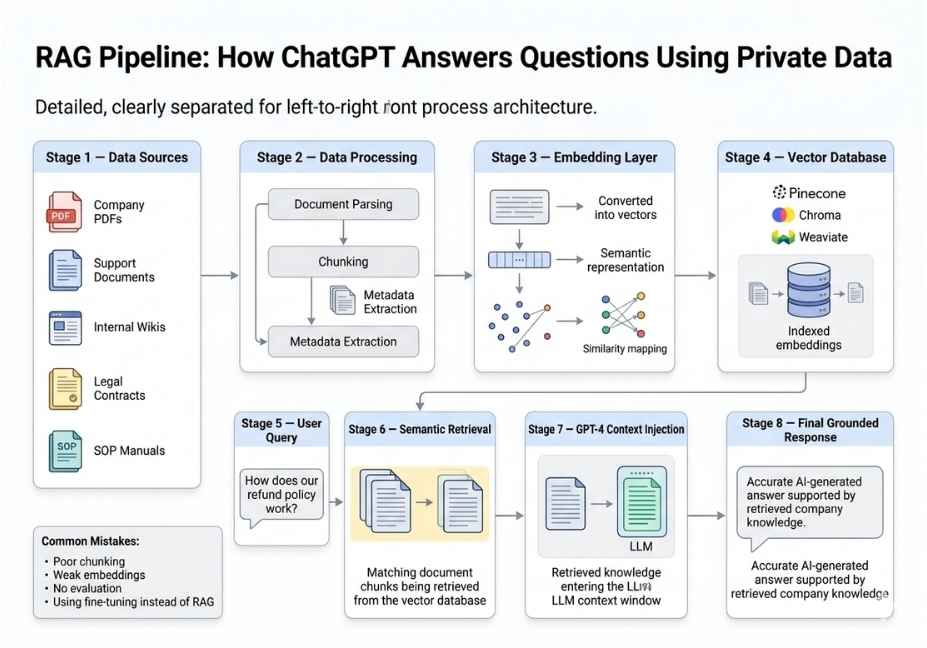
Retrieval-Augmented Generation is the production standard for grounding ChatGPT in your own documents, and for good reason. Instead of baking knowledge into model weights, RAG stores your content in a vector database, converts incoming queries into embeddings, and retrieves the most semantically relevant document chunks before passing them to the model as injected context.
According to benchmarks from production deployments, RAG performs 15–20% better than fine-tuning on factual tasks especially when source information changes frequently. Furthermore, because knowledge is stored externally rather than inside model parameters, you can update your knowledge base without retraining anything.
The core pipeline flows like this:
User query → Embed query → Vector search → Retrieve top-k chunks
→ Build prompt with retrieved context → LLM generates grounded answer
How to Build a Minimal RAG Pipeline with LangChain
python
from langchain_community.document_loaders import PyPDFLoader
from langchain.text_splitter import RecursiveCharacterTextSplitter
from langchain_openai import OpenAIEmbeddings, ChatOpenAI
from langchain_community.vectorstores import Chroma
from langchain.chains import RetrievalQA

# Step 1 — Load and chunk your documents
loader = PyPDFLoader("company_handbook.pdf")
docs = loader.load()

splitter = RecursiveCharacterTextSplitter(
    chunk_size=500,
    chunk_overlap=50

chunks = splitter.split_documents(docs)

# Step 2 — Embed chunks and store in vector database
embeddings = OpenAIEmbeddings(model="text-embedding-3-small")
vectorstore = Chroma.from_documents(chunks, embeddings)

# Step 3 — Build the retrieval chain
retriever = vectorstore.as_retriever(search_kwargs={"k": 4})
qa_chain = RetrievalQA.from_chain_type(
    llm=ChatOpenAI(model="gpt-4o"),
    retriever=retriever


# Step 4 — Query your documents
result = qa_chain.invoke({"query": "What is our remote work policy?"})
print(result["result"])
What Is the Right Chunking Strategy?
Chunking strategy is the single highest-leverage variable in a RAG pipeline. Here is why this matters so much. Chunk too small under 100 tokens and you lose surrounding context, causing the model to receive fragmented, uninterpretable passages. Chunk too large over 1,000 tokens and retrieval precision drops because relevant content gets diluted inside oversized blocks.
For most document types, a chunk size of 400 to 600 tokens with 10 to 15 percent overlap is the practical production baseline. For code-heavy technical documentation, smaller chunks of 200 to 300 tokens produce better semantic similarity scores during vector search.
Additionally, your embedding model at indexing time must exactly match the embedding model at query time. Mixing text-embedding-ada-002 for indexing with text-embedding-3-small at query time produces broken cosine distance calculations and garbage retrieval results a silent failure mode that is easy to miss in early testing.
Architect’s Note: For teams using LangChain’s retrieval chain implementation, the official documentation covers advanced retrieval patterns including multi-query retrieval, contextual compression, and self-querying retrievers. These are worth exploring once your baseline pipeline is stable.
Fine-Tuning vs. RAG vs. Custom GPTs Which Method Should You Use?
Choosing between these three approaches depends entirely on what problem you are actually trying to solve. Therefore, the table below maps each factor to the right method so you can make a confident decision before writing any code.
| Factor | Custom GPTs | Fine-Tuning | RAG |
|---|---|---|---|
| Technical skill required | None | Moderate | High |
| Knowledge stays current | Manual re-upload only | Requires full retraining | Yes update anytime |
| Hallucination risk | Medium | Medium to High | Low grounded in source |
| Response style control | Limited | Excellent | Moderate |
| Setup cost | Free | $2–$50+ | Infrastructure overhead |
| Scales to large document sets | No | No | Yes |
| Best use case | Quick bots, wikis | Brand voice, format compliance | Factual Q&A, live data |
| Data privacy control | Limited | Full | Full |
As a general rule: use RAG when factual accuracy matters. Use fine-tuning when behavioral consistency or output format matters. Combine both when you need the model to behave a specific way and retrieve accurate, up-to-date information which is the architecture behind most serious production deployments.
For teams working with open-source models rather than the OpenAI API, Hugging Face‘s open-source fine-tuning ecosystem supports parameter-efficient fine-tuning methods like LoRA and PEFT, which dramatically reduce the compute required to customize large models on your own hardware.
Common Mistakes When Training ChatGPT on Custom Data
Even experienced developers run into these issues. Therefore, knowing them in advance saves significant debugging time.
Treating fine-tuning as a knowledge injection tool. This is the most common and most costly mistake. Fine-tuning teaches the model behavioral patterns it does not reliably store facts. For knowledge grounding, RAG is the correct architecture, not fine-tuning.
Skipping a validation dataset. During fine-tuning, always pass a separate validation JSONL file alongside your training file. Without it, you cannot detect overfitting until the model is already deployed and giving confidently wrong answers.
Using zero overlap in RAG chunking. Sentences that fall across chunk boundaries get split into two incompletely retrieved fragments. Always use 10 to 15 percent overlap to preserve cross-boundary context.
Mismatching embedding models. As mentioned earlier, the embedding model used during document indexing must exactly match the one used at query time. This mismatch is a silent failure mode retrieval appears to work, but semantic similarity scores are meaningless.
Ignoring data privacy requirements. Before uploading sensitive business data customer records, legal documents, or financial information review your vendor’s data retention policy. For highly sensitive data, consider self-hosted vector databases like Chroma or Qdrant combined with locally run embedding models, rather than sending data to third-party APIs.
Over-training on too few examples. Fine-tuning on fewer than 30 examples consistently produces an overfit model that handles training-set queries well but fails completely on anything slightly different. Diversity in your training examples matters more than total volume.
What Developers Are Actually Saying About This
Practitioners on r/LocalLLaMA and the OpenAI Developer Community consistently report the same real-world experience. RAG outperforms fine-tuning on factual retrieval tasks, particularly when the knowledge base is large or changes frequently. Fine-tuning wins, however, when format compliance, consistent tone, and reliable tool-call routing are the primary goals.
One developer working with a 67K-token corpus reported that fine-tuning with a learning rate multiplier of 2.0 produced a training loss that failed to converge below 1.8 across three epochs — a clear signal of too aggressive a learning rate rather than insufficient data. Lowering the multiplier to 0.1 and cleaning duplicate examples resolved the issue.
The consistent takeaway across developer discussions: start with RAG and a well-engineered system prompt. Only move to fine-tuning after retrieval quality is validated and you have identified a specific behavioral problem that prompt engineering cannot solve.
FAQ People Also Ask
What is the difference between fine-tuning and RAG for ChatGPT?
Fine-tuning modifies the model’s internal weights using your labeled training examples, changing how it responds. RAG, by contrast, leaves the model completely unchanged and instead injects relevant document chunks into the context window at query time. Fine-tuning is better for behavioral consistency and output formatting. RAG is better for factual accuracy, especially when your knowledge base is large or changes frequently.
Can you train ChatGPT on your own documents without any coding?
Yes. OpenAI’s Custom GPTs feature lets you upload files and configure behavior through a no-code interface inside ChatGPT Plus or Team plans. For larger document sets or precise retrieval control, however, a custom RAG pipeline requires Python coding using frameworks like LangChain or LlamaIndex.
How do you prepare a JSONL file for fine-tuning ChatGPT?
Each line in your JSONL file must be a valid JSON object containing a messages array with system, user, and assistant turns. The assistant turn is the target response the model should learn to produce. OpenAI recommends a minimum of 50 to 100 examples, each with diverse query coverage and consistent formatting across the file.
Does fine-tuning ChatGPT actually stop hallucinations?
Not reliably. Fine-tuning reduces hallucination rates by 20 to 50 percent on familiar, in-distribution query patterns. However, on out-of-scope questions, it can actually increase overconfidence because the model becomes biased toward its training distribution. For strong factual grounding, RAG is the more robust architecture, since answers are always tied to retrieved source documents.
How much does it cost to fine-tune ChatGPT on your own data?
Training 100,000 tokens roughly 75 pages of text for three epochs on gpt-4o-mini costs approximately $2.40. Inference on the resulting fine-tuned model costs slightly more per token than the base model but typically amounts to fractions of a cent per API call. Costs scale linearly with token count and number of epochs.
What is the best way to connect ChatGPT to internal company documents?
RAG is the best production approach for connecting ChatGPT to internal documents. You load and chunk your documents, generate vector embeddings using a model like text-embedding-3-small, store them in a vector database such as Pinecone, Chroma, or Qdrant, and retrieve the most relevant chunks at query time. For a quick no-code prototype, Custom GPTs can get you started in under 30 minutes.
Conclusion
There is no single correct answer to how you train ChatGPT on your own data because the right answer depends entirely on what problem you are solving.
Custom GPTs are the fastest zero-code option for small, relatively static knowledge bases. Fine-tuning delivers the strongest behavioral control when you need consistent output formats, brand voice, or reliable tool routing. RAG is the production standard for factual grounding across large, dynamic document corpora and it is the approach most serious deployments rely on.
The most robust production systems, furthermore, combine all three layers: a fine-tuned model for behavioral consistency, a RAG pipeline for knowledge retrieval, and a carefully engineered system prompt to bind them together. Start with the method that matches your most immediate bottleneck. Validate it independently. Then add layers only when the previous one is stable.
For more hands-on RAG pipeline breakdowns, agentic workflow guides, and LLM implementation tutorials, explore agentiveaiagents.com.
12 Responses