
There are a lot of unsuccessful AI implementations due to a lack of a reliable memory layer, not for the reason that the model itself is weak. In fact, Microsoft’s Work Trend Index in 2026 found 46% of companies are already using agents to automate workflows. Most companies run into issues with their agents because there is no structured knowledge layer behind their agents to enable them to make accurate decisions. Therefore, even with the most powerful LLM, AI still relies on guesswork when it comes to providing answers because it lacks access to a properly indexed, semantically searchable knowledge base.
So, how can we fix this? By utilizing knowledge base software which will turn scattered, unstructured documents, runbooks, and policies into a structured retrieval layer that agents can use to query in real-time using techniques such as RAG pipelines, vector search, and more increasingly Model Context Protocol (MCP). This allows all agents to provide accurate, reliable citations for the answers they supply rather than relying on guesswork.
This guide will show you how knowledge base software works behind the scenes; the frameworks used in 2026 for developing agent-ready knowledge bases; ways to build your own agent-ready knowledge base from the ground-up.
Quick Answer (Extracted): Knowledge base software is a repository which allows people and agents to quickly store, index and retrieve structured and unstructured information. In a standard AI architecture, it provides the external memory layer for large language models thereby minimizing hallucinations.
What Is Knowledge Base Software?
Knowledge base software is a platform for storing, indexing, and retrieving information in a format optimized for both human readers and machine queries. Traditionally, it powered customer help centers and internal wikis. Today, however, it plays a far more critical role: it is the memory and grounding layer for LLMs and autonomous AI agents.
According to the anatomy of an AI agent knowledge base, a well-built agent knowledge base gives every agent the same rules, voice, and playbook so agents never improvise policy on the fly. At its core sit practical artifacts: policies, escalation paths, schemas, runbooks, and tool manifests. These are indexed so that agents retrieve exactly what they need, at exactly the right moment, without relying on unreliable parametric model memory.
Moreover, the definition has evolved significantly. A modern knowledge base is not a flat FAQ document. Instead, it is a retrieval-optimized data store typically backed by a vector store, a keyword index, or a knowledge graph that agents query at runtime to increase factual grounding and reduce hallucination risk.
Technical Note: Think of knowledge base software as the difference between an agent that remembers and one that retrieves. Retrieval always wins in production because it is grounded, auditable, and updatable whereas model memory is fixed at training time.
How Does Knowledge Base Software Work? (Architecture Deep-Dive)
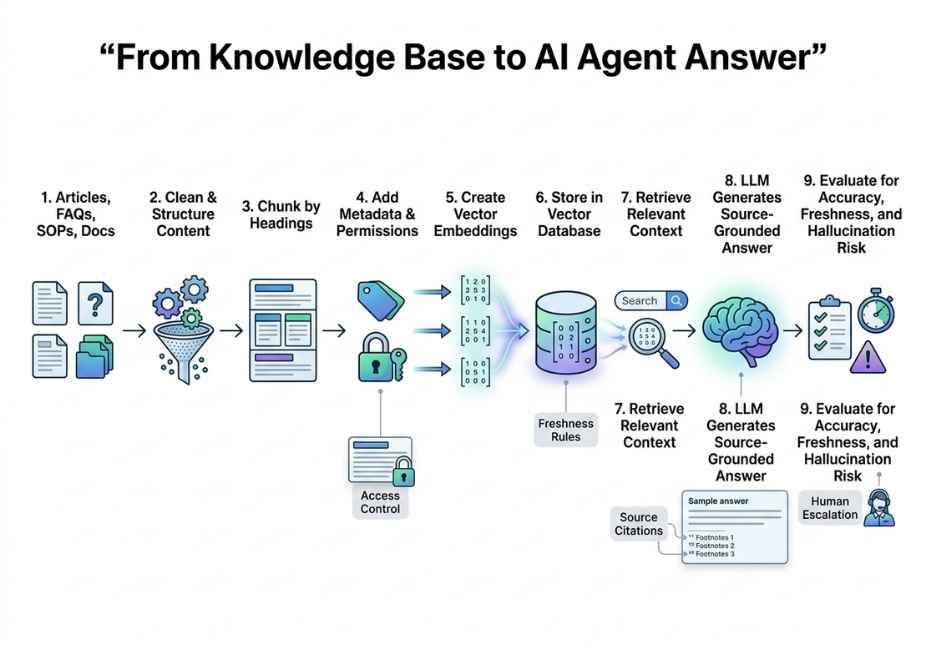
Understanding the internal architecture is essential before choosing a tool or framework. Specifically, the modern knowledge base pipeline follows a clear four-stage flow.
Stage 1 Data Ingestion
First, raw documents enter the system. These include PDFs, Markdown files, Confluence pages, Slack threads, API documentation, and code repositories. Tools like LlamaParse handle complex formats including tables, charts, and scanned PDFs by converting them into AI-ready structured text. Without clean ingestion, every downstream stage suffers.
Stage 2 : Chunking Strategy
Next, documents are split into discrete segments. This step is more nuanced than it appears. If chunks are too large, they waste the context window. If they are too small, they lose semantic coherence across sentence boundaries. Therefore, experienced teams choose from three main approaches:
- Fixed-size chunking for example, 512 tokens with a 50-token overlap to preserve boundary context
- Semantic chunking splits on topic boundaries rather than token counts, preserving meaning
- Hierarchical chunking maintains parent-child relationships for multi-hop retrieval across related sections
Stage 3 : Embedding and Indexing
After chunking, each segment passes through an embedding model such as OpenAI’s text-embedding-3-large or the open-source bge-m3 which converts text into dense numerical vectors. These vectors are then stored in a vector store such as Pinecone, Chroma, Weaviate, or Qdrant. Alongside these vector indexes, keyword indexes are maintained for hybrid retrieval.
Stage 4 : Retrieval at Query Time
Finally, when an agent receives a query, the system: embeds the query using the same embedding model, runs a semantic similarity search against the vector index, and when hybrid search is enabled combines vector results with BM25 keyword results using Reciprocal Rank Fusion (RRF). The resulting top-k chunks are then injected into the LLM’s context window as grounding evidence.
# LlamaIndex: Simple RAG retrieval from a knowledge base
from llama_index.core import VectorStoreIndex, SimpleDirectoryReader

documents = SimpleDirectoryReader("./docs").load_data()
index = VectorStoreIndex.from_documents(documents)

query_engine = index.as_query_engine(similarity_top_k=5)
response = query_engine.query("What is the escalation policy for tier-2 incidents?")
print(response)
Pro Tip: Hybrid search (vector + BM25 keyword) consistently outperforms pure vector search in production environments. As confirmed in research on agentic knowledge base patterns emerging in production, combining vector similarity, graph traversal, and exact-match keyword retrieval yields the highest retrieval accuracy across diverse query types particularly for proper nouns, product names, and error codes.
Knowledge Base Software Use Cases 5 Real-World AI Applications
Now that you understand how the retrieval loop works, it is worth examining where this architecture creates real business value. Knowledge base software is not limited to customer support anymore. In agentic architectures, it powers an expanding range of high-stakes workflows.
1. Enterprise Customer Support Agents Support agents query product documentation, policy documents, and historical ticket resolutions in real time. Because retrieval accuracy directly determines resolution rate, a weak knowledge base translates directly into expensive human escalations and lower CSAT scores.
2. Internal Developer Copilots Engineering teams feed runbooks, architecture decision records (ADRs), and API documentation into a knowledge base. Consequently, agents built on LangChain can surface the right context during incident response, code review, or sprint planning without developers having to search manually.
3. Financial Document Intelligence Banks and hedge funds use LlamaIndex-powered knowledge bases to process thousands of PDFs earnings reports, 10-Ks, and credit agreements. As a result, agents can answer complex multi-hop questions across documents in seconds rather than hours.
4. Compliance and Legal Research Regulatory documents, internal policies, and legal precedents are indexed for semantic search. Therefore, agents can cross-reference multiple sources and surface relevant clauses automatically without slow, expensive human review loops.
5. Multi-Agent Orchestration Memory In multi-agent systems, a shared knowledge base acts as common ground truth. Rather than each agent maintaining its own isolated state, all agents query the same retrieval layer. This prevents contradictory outputs, synchronizes context, and reduces inter-agent hallucination significantly.
Best Frameworks and Tools for AI-Native Knowledge Bases
With so many options available, choosing the right framework can feel overwhelming. However, the decision becomes straightforward once you map each tool to a specific use case. Here is a side-by-side comparison of the leading platforms in 2026:
| Tool / Framework | Best For | Vector Store Support | Agent Integration | Complexity |
|---|---|---|---|---|
| LlamaIndex | Document-heavy RAG, enterprise KB | Pinecone, Chroma, Weaviate, Qdrant | Native ReAct agents + Workflows | Medium |
| LangChain | Multi-step agent orchestration | All major vector stores | Native LangGraph + LCEL | Medium–High |
| RAGFlow | Production RAG pipeline management | Elasticsearch, Milvus | API-first | Medium |
| Haystack | Enterprise search + RAG | Weaviate, OpenSearch, Milvus | Pipeline-based | High |
| Chroma | Local / lightweight development | Native | LangChain/LlamaIndex plugins | Low |
| Pinecone | Managed vector search at scale | Native (cloud-hosted) | All major frameworks | Low (managed) |
As LlamaIndex’s official documentation on agent workflows explains, the framework gives developers core building blocks state, memory, and tool use that combine naturally with production knowledge bases and multi-agent coordination.
Architect’s Note: For most production deployments, the best approach is not LangChain or LlamaIndex it is both. Teams typically use LlamaIndex for the knowledge layer (ingestion, indexing, retrieval) and LangChain/LangGraph for the agent orchestration layer (planning, tool use, multi-agent coordination). This separation of concerns keeps each layer maintainable and swappable.
Step-by-Step: How to Build an Agent-Ready Knowledge Base
Now that you have chosen a framework, it is time to build. Below is the minimal viable architecture for an agent-queryable knowledge base using LlamaIndex and Pinecone tested in production environments.
Step 1 : Ingest and Parse Documents
Start by loading your source documents and splitting them into semantically coherent nodes. The chunk overlap ensures context is not lost at segment boundaries.
from llama_index.core import SimpleDirectoryReader
from llama_index.core.node_parser import SentenceSplitter

documents = SimpleDirectoryReader("./knowledge_docs").load_data()
parser = SentenceSplitter(chunk_size=512, chunk_overlap=64)
nodes = parser.get_nodes_from_documents(documents)
Step 2 : Embed and Index into Pinecone
Next, initialize your vector store and build the index. Each node is automatically embedded and uploaded to Pinecone for semantic similarity search at query time.
from llama_index.vector_stores.pinecone import PineconeVectorStore
from llama_index.core import VectorStoreIndex, StorageContext
import pinecone

pinecone.init(api_key="YOUR_KEY", environment="us-east-1-aws")
vector_store = PineconeVectorStore(index_name="agent-kb")
storage_context = StorageContext.from_defaults(vector_store=vector_store)
index = VectorStoreIndex(nodes, storage_context=storage_context)
Step 3 : Connect the Index to a ReAct Agent
Finally, wrap the query engine as a tool and pass it to a ReAct agent. The agent will now autonomously decide when to query the knowledge base based on the task at hand.
from llama_index.core.agent import ReActAgent
from llama_index.core.tools import QueryEngineTool

query_engine = index.as_query_engine(similarity_top_k=5)
kb_tool = QueryEngineTool.from_defaults(
    query_engine=query_engine,
    name="company_knowledge_base",
    description="Use this to answer questions about internal policies, runbooks, and documentation.")

agent = ReActAgent.from_tools([kb_tool], verbose=True)
response = agent.chat("What is the escalation path for a P0 incident?")
Technical Disclaimer: Code examples use LlamaIndex v0.10.x as of June 2026. Because the LlamaIndex API evolves rapidly, always verify against the official LlamaIndex documentation before deploying to production.
Common Mistakes and How to Avoid Them
Even experienced teams make costly errors at the knowledge base layer. Therefore, understanding these failure modes before you build saves significant debugging time later.
Mistake 1: Flat chunk size with no overlap When teams use fixed 512-token chunks with zero overlap, context fragmentation occurs. As a result, answers that span chunk boundaries get silently truncated, and the agent returns incomplete responses. The fix is simple: always use at least 10–15% overlap relative to chunk size.
Mistake 2: Vector-only retrieval Pure semantic search misses exact keyword matches for proper nouns, product names, and specific error codes. For instance, searching for “ERR_CONNECTION_RESET” in a vector store returns semantically similar but factually wrong results. Hybrid search (vector + BM25) consistently solves this. As described in the RAG architectural paradigm, hybrid retrieval is specifically essential for enterprise-grade accuracy.
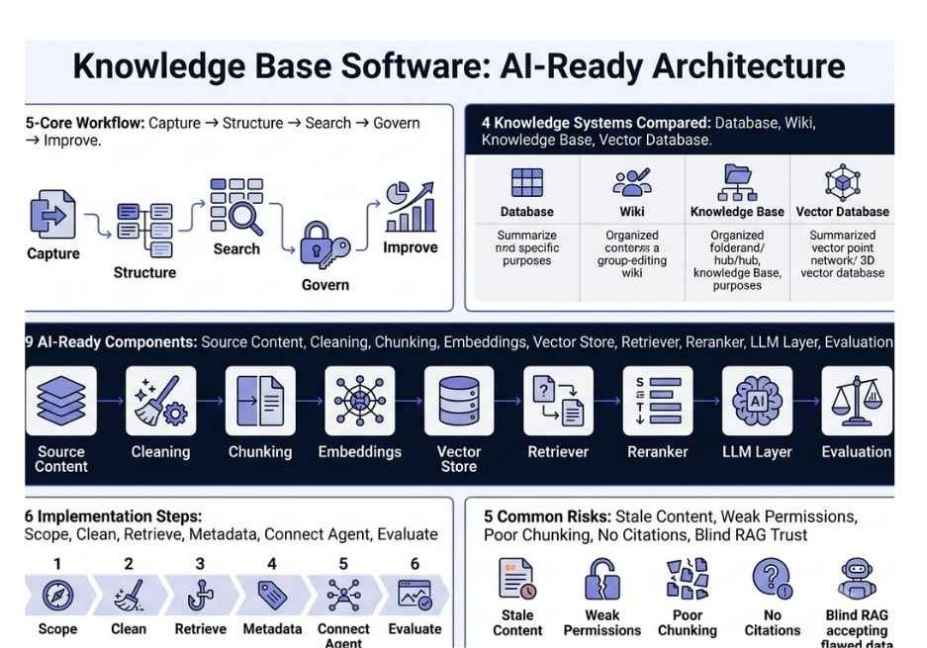
Mistake 3: Stale, never-updated indexes A knowledge base built once and never refreshed will drift from ground truth within weeks. Consequently, agents start citing outdated policies and deprecated APIs. The solution is an incremental indexing pipeline that detects document changes via webhook or scheduled diff and re-embeds only modified chunks automatically.
Mistake 4: Skipping the re-ranking layer Top-k semantic retrieval returns candidates, not answers. Without a cross-encoder re-ranker (such as Cohere Rerank or bge-reranker-v2), low-relevance chunks regularly make it into the LLM’s context window. Adding a re-ranker as a final filter step measurably reduces hallucination rates in retrieval-heavy tasks.
Mistake 5: Missing chunk metadata Without metadata filtering including document source, creation date, department, and access level agents retrieve outdated or entirely irrelevant content. Therefore, always attach rich metadata at ingestion time and enable filtered vector search at query time.
FAQ People Also Ask
What is knowledge base software used for in AI systems?
In AI systems, knowledge base software provides the external memory and grounding layer for large language models and autonomous agents. Instead of relying solely on parametric model memory, agents query an indexed knowledge base through RAG pipelines to retrieve relevant, current context before generating a response. This approach reduces hallucination and allows agents to access proprietary internal data without any model retraining.
How does knowledge base software work with RAG pipelines?
Knowledge base software serves as the storage and retrieval component of a RAG pipeline. Documents are ingested, chunked, embedded using an embedding model, and indexed into a vector store. When a query arrives, a semantic similarity search retrieves the most relevant document chunks. These chunks are then injected directly into the LLM’s context window as grounding evidence, so the model generates its answer from retrieved facts rather than from model memory.
What is the difference between a knowledge base and a vector database?
A vector database such as Pinecone, Chroma, or Weaviate is the storage engine that holds embedding vectors. A knowledge base, however, is the complete system built around it: including document ingestion pipelines, chunking logic, embedding models, keyword indexes, and retrieval orchestration. In other words, a vector database is the warehouse, while the knowledge base is the entire supply chain that decides what gets stored, how it is organized, and how it gets retrieved.
How do AI agents query a knowledge base?
AI agents typically query knowledge bases through one of three methods. First, they use direct tool calls via a QueryEngineTool in frameworks like LangChain or LlamaIndex. Second, they use RAG pipeline integration, where retrieval happens automatically as part of prompt assembly before the LLM generates a response. Third and increasingly common they use Model Context Protocol (MCP), which allows any MCP-compatible agent to connect to any MCP-compatible knowledge source without writing custom integration code.
What is the best knowledge base software for AI agents in 2026?
The best choice depends entirely on your use case. For document-heavy enterprise RAG, LlamaIndex is the strongest framework available. For multi-step agent orchestration over a knowledge base, LangChain combined with Pinecone is a battle-tested production stack. For teams that need a managed, infrastructure-light solution, RAGFlow and Haystack both offer excellent pipeline tooling. In most production systems, the winning architecture combines a specialized vector store with a separate agent orchestration layer.
Can knowledge base software work without cloud infrastructure?
Yes. Tools like Chroma and Qdrant run entirely locally, making them ideal for development environments, air-gapped deployments, or privacy-sensitive use cases. Moreover, LlamaIndex and LangChain both support local vector stores natively. That said, for production workloads requiring sub-100ms retrieval at scale, managed cloud vector stores like Pinecone generally outperform self-hosted alternatives.
Conclusion
Knowledge base software in 2026 is no longer a customer support tool it is the retrieval infrastructure that determines whether your AI agents are trustworthy or unreliable. Three takeaways every agent builder should walk away with: first, chunking strategy and hybrid search are the single highest-leverage optimizations in your retrieval stack; second, metadata-filtered vector search is the dividing line between prototype demos and real production systems; third, Model Context Protocol is rapidly becoming the standard interface that cleanly decouples agent logic from knowledge source implementation.
Ultimately, the difference between an agent that confidently hallucinates and one that accurately cites your internal runbook comes entirely down to how well you have built this layer. Build it right, and every agent downstream benefits. Build it wrong, and no model however powerful will save you.
Bookmark this guide and explore more hands-on AI agent tutorials at agentiveaiagents.com.
3 Responses