

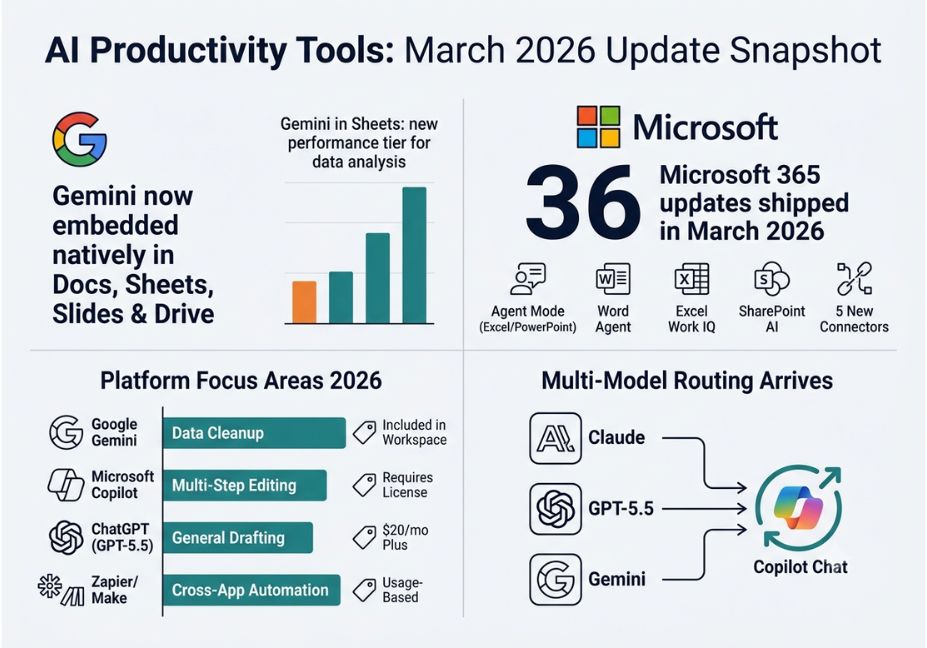
In March 2026, Google implemented Gemini into Docs, Sheets, Slides, and Drive, while Microsoft rolled out 36 updates of Copilot such as the Agent Mode which is working in Excel and PowerPoint. What changed is that there was a shift from AI performing simple answer provision to AI doing multi-tasking jobs in office programs.
The truth is that teams did not start using new applications in March 2026. At the same time, the tools they had in their workplaces were working as performing agents. Indeed, the core news of the development of AI tools in March 2026 is that Google incorporated Gemini in Docs, Sheets, and Slides while Microsoft actively delivered 36 innovative updates of Copilot. The major change in AI tools in March 2026 took place.
The guide provides a comprehensive overview of what was launched, how various tools function, what the shortcomings are, and what functions should be implemented first.
What Changed in AI Productivity Tools in March 2026?
March’s updates centered on three platforms moving from “AI assistant” to “AI agent.” Google made Gemini a default layer across Workspace rather than a separate app. Meanwhile, Microsoft expanded Copilot Agent Mode into Excel, Word, and PowerPoint, letting Copilot make multi-step edits instead of one-shot drafts. In addition, enterprise Copilot deployments began offering model choice including Anthropic’s Claude and OpenAI’s models inside the same chat interface, so a task can be routed to whichever model handles it best.
How Does Copilot Agent Mode Work in Excel and Word? (The Agent Loop, Explained)
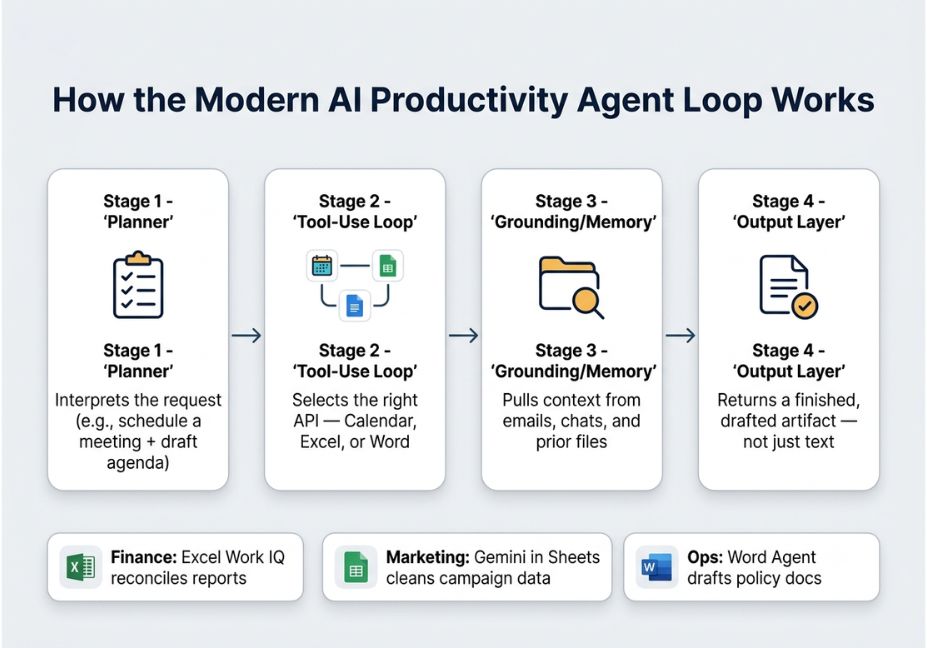
Underneath the new features, every platform runs a version of the same pattern. A planner breaks a request into steps. A tool-selection layer decides which app or API to call. A memory or grounding layer pulls in relevant context before generating output. This mirrors the retrieval-augmented generation pattern, applied to office documents instead of open-domain question answering.
- Planner: interprets the request, for example “schedule a meeting and draft the agenda”
- Tool-use loop: selects the calendar, document, or spreadsheet API needed for each step
- Grounding/memory: pulls context from emails, chats, and prior files
- Output layer: returns a drafted artifact, not just text
Architect’s Note: Grounding quality, not model size, is usually the actual bottleneck. Copilot’s Work IQ context layer and Gemini’s cross-file synthesis both exist specifically to fix generic, ungrounded output, which was the most common complaint about 2025-era assistants.
Google Workspace: Is Gemini Included in a Google Workspace Subscription?
Yes, as of March 2026, Gemini is included for AI Ultra and Pro subscribers directly inside Docs, Sheets, Slides, and Drive, rather than sitting in a separate panel. Gemini in Sheets reached a new performance tier for structured data analysis. As a result, Gemini can now synthesize information across a user’s files, email, and the open web while keeping data access scoped and logged.
Did You Know? Google also rebuilt Maps around a conversational query layer called Ask Maps that same month. This shows the same agent-plus-memory pattern is expanding well past document editing and into consumer-facing products.
Microsoft 365 Copilot: 36 Updates and a Working Agent Mode
Microsoft’s March 2026 Copilot release notes documented roughly 36 changes across Word, Excel, PowerPoint, Teams, and SharePoint. The headline items were:
- Edit with Copilot (Agent Mode) rolled out to Excel and PowerPoint for all licensed users, enabling multi-step edits instead of single responses.
- Word Agent drafts long-form documents, such as policy papers and strategic plans, directly from a prompt, handling research, structure, and formatting.
- Excel Work IQ automatically pulls context from emails, meetings, and chats before making a multi-step edit.
- SharePoint AI, built on the earlier Knowledge Agent, lets teams build sites and libraries using natural language.
- Five new Copilot Connectors and admin-side branding controls rounded out the release, alongside Microsoft Purview governance updates for enterprise teams.
Microsoft’s official release-notes documentation also confirms that Anthropic’s Claude models became selectable inside Copilot Chat in the following release cycle. This is evidence that multi-model routing is becoming a standard enterprise feature rather than a novelty.
A simplified version of the tool-use loop behind Agent Mode-style features works like this: a function takes a request and a set of context sources, a planner decomposes the request into steps, and for each step a tool is selected, such as the Excel API or Calendar API. Grounded context is then retrieved from sources like emails, documents, and chat history, the step executes with that context, memory is updated with the result, and finally all step results are compiled into a single output.
AI Productivity Tools Use Cases Five Real-World Examples
- Finance teams use Copilot’s Excel Work IQ to reconcile a report against context pulled from related emails and meeting notes automatically.
- Marketing teams use Gemini in Sheets to clean and analyze campaign data without manual pivot-table work.
- Operations leads use Word Agent to generate a first draft of a compliance policy, then edit rather than write from scratch.
- Support teams use automation platforms like Zapier to route a customer email into a task and a confirmation reply through one described workflow.
- Cross-functional teams now route the same request to different models: a fast model for routine questions, and a stronger reasoning model for multi-step analysis.
Best AI Productivity Tools for Enterprise Teams in 2026: March Comparison
Google Gemini, embedded in Workspace, is best suited for data cleanup and cross-file synthesis and is included with AI Ultra and Pro tiers. Its core March 2026 update was native embedding in Docs, Sheets, and Slides, alongside a Gemini in Sheets performance boost.
Microsoft 365 Copilot, with Agent Mode in Excel and PowerPoint plus Word Agent and Work IQ, is best suited for multi-step document and spreadsheet edits, and it requires a Copilot license.
ChatGPT running GPT-5.5, with native computer use and Excel integration, is best suited for general-purpose drafting and research. Its free tier is now ad-supported, while Plus is priced at $20 a month.
Zapier and Make, offering plain-English multi-app workflow building, are best suited for cross-app automation without custom code, and are priced on usage-based tiers.
Pro Tip: Don’t collect all four. Most teams get more value from mastering the one or two tools already embedded in their existing stack than from adding a new subscription every quarter.
Step-by-Step: How Do You Adopt These Updates Without Tool Overload?
First, audit your current stack to check whether Gemini or Copilot is already licensed before evaluating a new tool. Next, pick one workflow bottleneck, such as scheduling, document drafting, or data cleanup, rather than trying to automate everything at once. Then, turn on the native agent feature first, such as Agent Mode or Gemini in Sheets, before adding a third-party automation layer. After that, test grounding quality by feeding the tool a real document or dataset from your own context, not a generic prompt, to see if the output is actually usable. Finally, set governance controls early, since admin footers, Purview DLP, and connector permissions are easier to configure before rollout than after.
Common Mistakes and How to Avoid Them
Treating agent output as final is a common mistake. Agent Mode and Word Agent still need human review before anything ships externally. Similarly, ignoring grounding scope causes problems: if Gemini or Copilot can’t see the right files, output reverts to generic text, so check data access before blaming the model. Adding tools instead of enabling features wastes money, since many organizations pay for a new automation platform when the update they need already shipped inside Microsoft 365 or Google Workspace. Finally, skipping governance is a longer-term risk. Enterprises that skip DLP and connector permission review during rollout tend to hit oversharing issues months later, not at launch.
What Developers and Teams Are Saying
Discussion across developer communities has focused less on raw model capability and more on the reliability of the tool-use loop, specifically whether an agent correctly identifies which app to call and whether grounding actually pulls the right context. This mirrors a broader 2026 trend that McKinsey Global Institute researchers have pointed to: productivity gains show up when generative AI is paired with real workflow automation, not just chat access.
FAQ People Also Ask (Voice Search & Snippet Optimized)
What changed in AI productivity tools in March 2026?
Google embedded Gemini natively across Docs, Sheets, Slides, and Drive, while Microsoft shipped roughly 36 Copilot updates, including a working Agent Mode in Excel and PowerPoint. The shared theme was agents executing multi-step tasks, not just answering prompts.
Is Gemini now built into Google Docs and Sheets?
Yes. As of March 2026, AI Ultra and Pro subscribers get Gemini embedded directly in Docs, Sheets, Slides, and Drive, with Gemini in Sheets reaching a new performance level for data analysis tasks.
What is Copilot Agent Mode, and how does it work?
Copilot Agent Mode lets Copilot make multi-step edits inside Excel, Word, and PowerPoint reformatting, restructuring, and refining content instead of producing a single one-shot draft.
Which AI model routing approach is best for productivity tools?
There’s no single best model for every task. The March 2026 trend toward multi-model routing, offering Claude, GPT-5.5, and Gemini inside the same interface, reflects that different models suit different jobs, from fast Q&A to long-form reasoning.
Do AI productivity agents work without human oversight?
Not reliably yet. Agent Mode and similar features handle drafting and multi-step edits well, but reviewers still need to check output before it ships, especially for anything external-facing or compliance-related.
Hey, what’s the best AI productivity tool for small business owners right now?
For most small teams, the tool already inside your existing subscription, whether that’s Gemini in Google Workspace or Copilot in Microsoft 365, delivers more value than adding a new standalone AI app.
Conclusion
The AI productivity tools updates of March 2026 didn’t introduce a new category. Instead, they matured the agent loop already sitting inside Gemini, Copilot, and ChatGPT. The biggest wins came from grounding and multi-step execution, not bigger models. Before adding another subscription, check whether the feature you need already shipped inside the tools you’re paying for. Bookmark this guide and explore more hands-on AI agent tutorials at agentiveaiagents.com.



