

Copilot agent mode is GitHub Copilot’s autonomous operating mode, in which the AI plans, executes, and verifies multi-step coding tasks reading your codebase, editing files, running tests, and fixing failures with human confirmation at each risky step, instead of responding to one request at a time. That one sentence is the whole concept. Everything below explains how it actually works, because most existing explanations stop at “it edits code for you” and never show the architecture underneath.
Most write-ups of GitHub Copilot’s agent mode read like a feature tour: turn it on, type a prompt, watch it edit files. However, agent mode is really a production instance of the same agent loop every agentic AI system is built around. If you’ve already built anything with a tool-use loop or an orchestration layer, Copilot’s agent mode isn’t a mystery box it’s a familiar pattern wearing an IDE’s clothes. In fact, a recent arXiv study measuring agent-driven library migration found the approach could correctly update most call sites without constant supervision, which suggests the pattern holds up under real workloads, not just demos.
What is Copilot agent mode, exactly?
Copilot agent mode is the mode in which Copilot stops responding to single requests and instead plans and executes multi-step tasks. It differs from “ask” mode, which only answers what’s directly requested, and from “edit” mode, which makes targeted changes without broader task decomposition. According to GitHub’s own primer on agent mode, it functions as a synchronous collaborator that analyzes your codebase, plans a solution, and refines it through testing similar in spirit to how OpenAI’s Codex and Anthropic’s Claude-based coding agents operate inside their own environments.
How does Copilot’s agent loop actually work?
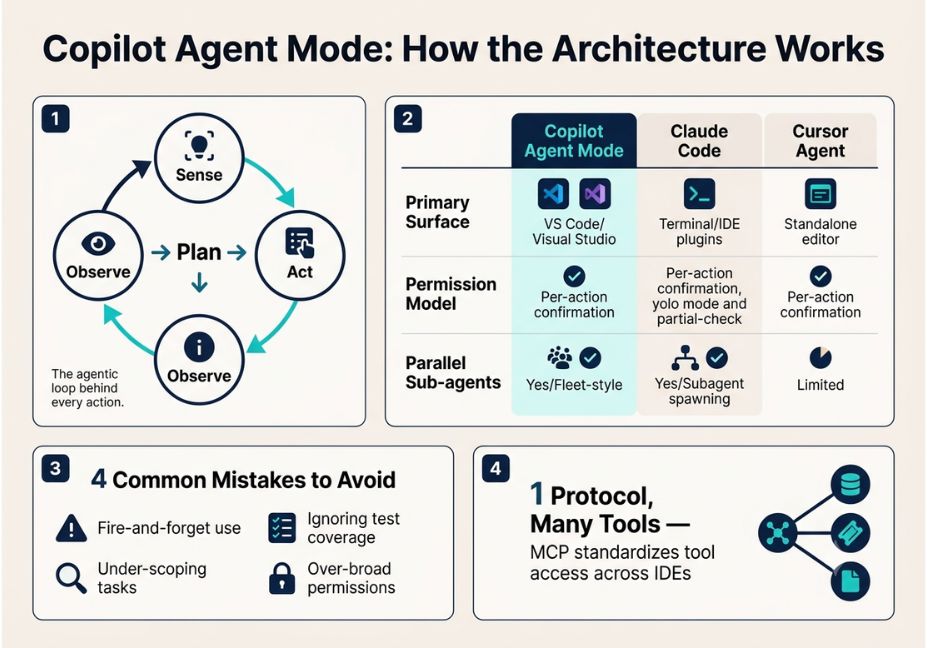
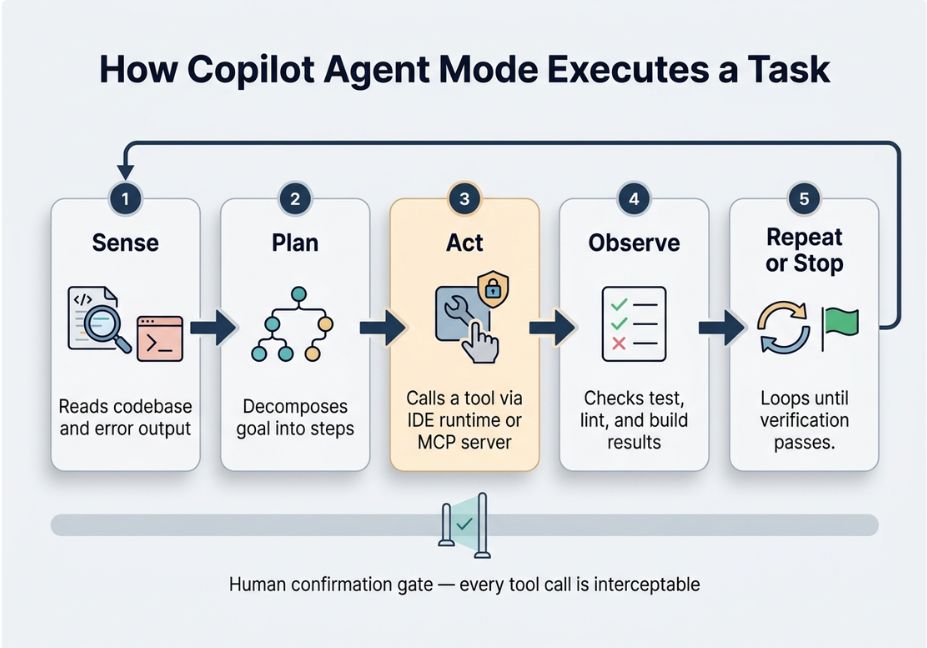
Strip away the branding, and agent mode is an agentic loop: sense (read the codebase and error output), plan (decompose the goal into steps), act (call a tool), observe (check the result), and repeat until a stop condition is met. Three details matter architecturally:
- The model doesn’t touch your disk directly. It emits an intent “run this test,” “edit this file” and the IDE runtime executes it. Because of this separation, every action stays interceptable, loggable, and blockable.
- Context is discovered, not assumed. The agent actively searches and reads files to populate its context window, rather than relying on a static prompt.
- Verification is the real stop signal. Tests, linters, and build output tell the loop when it’s actually done not just when the model claims it is.
Pro Tip: When you design your own agent loops, borrow this pattern directly separate “the model proposes” from “the runtime executes.” It’s the cleanest way to keep a permission model auditable.
Where does MCP fit into Copilot’s architecture?
Modern Copilot deployments increasingly route tool calls through the Model Context Protocol (MCP) rather than hardcoded integrations. MCP standardizes how a client VS Code, in this case connects to external tool servers, and each server advertises its own capabilities (tools, resources, prompts) in a consistent format.
This matters because it decouples “what Copilot can do” from “what’s built into the IDE.” As a result, agent mode can reach a database, check a ticketing system, or pull from a knowledge base, using the same propose-then-execute loop it already uses for file edits. Microsoft’s documentation on the permission model confirms this directly: every tool invocation, whether MCP-sourced or built-in, passes through the same confirmation gate before it runs.
Did you know? Research on distributed agent systems including a distributed multi-agent architecture paper proposing “Principal Agent” and “Gateway Agent” roles describes almost the same separation of planning from execution that MCP formalizes for IDE-based agents. The parallel isn’t coincidental; both designs solve the same underlying orchestration problem.
How does Copilot agent mode compare to Claude Code and Cursor?
| Copilot Agent Mode | Claude Code | Cursor Agent | |
|---|---|---|---|
| Primary surface | VS Code / Visual Studio / GitHub | Terminal, IDE plugins | Standalone editor |
| Tool access | Built-in + MCP servers | MCP + built-in tools | Built-in + some MCP |
| Permission model | Per-action confirmation (configurable) | Per-action confirmation, “yolo” mode available | Per-action confirmation |
| Parallel sub-agents | Yes (fleet-style delegation in CLI) | Yes (subagent spawning) | Limited |
| Verification loop | Tests/linters as stop criteria | Tests/linters as stop criteria | Tests/linters as stop criteria |
Architect’s Note: These tools converge more than they diverge. All three run the same plan-execute-validate loop; the real differentiators are where they live (terminal vs. IDE vs. standalone editor) and how much control you get over the permission model.
What are real-world use cases for Copilot agent mode?
- Library and framework migrations a quantitative study measuring agent-driven migration coverage used Copilot agent mode to update call sites across a codebase, scored against a custom “Migration Coverage” metric.
- Multi-file feature implementation turning a spec into changes across several files, running tests between edits.
- Debugging loops reproducing a bug, instrumenting the code, and validating a fix without manual re-runs.
- Cross-tool workflows via MCP checking a ticket, pulling database context, and editing code in one session.
What mistakes should you avoid with Copilot agent mode?
- Treating it as fire-and-forget. It’s built for human-in-the-loop confirmation, not full autonomy by default.
- Under-scoping the task. Vague prompts force the planner to guess at scope, so specify constraints up front.
- Ignoring the verification loop. Weak test coverage means a weaker stop signal for the agent.
- Granting broad tool permissions by default. MCP makes adding capability easy it doesn’t make auditing that capability easy later.
Technical Disclaimer: Agent mode implementations evolve quickly across VS Code, Visual Studio, and the Copilot CLI. Details here reflect publicly documented behavior as of mid-2026; check current Microsoft Learn docs for the latest options.
FAQ
What is agent mode in GitHub Copilot?
Agent mode is a Copilot operating mode that plans and executes multi-step coding tasks reading the codebase, editing files, and running commands instead of responding to single isolated requests.
How is agent mode different from Copilot’s chat mode?
Chat mode answers one request in isolation. Agent mode decomposes a broader goal into steps, executes them through tool calls, and iterates using test or build feedback as a stop signal.
Is Copilot agent mode safe to let run unsupervised?
It’s designed around human-in-the-loop confirmation for actions like running terminal commands, so it isn’t fully unsupervised by default. Safety ultimately depends on how much auto-approval you configure.
What is the Model Context Protocol, and why does it matter for Copilot?
MCP is a standard that lets an IDE client connect to external tool servers, so agent mode can reach databases, tickets, or other systems through the same propose-execute loop it uses for built-in tools.
Can Copilot agent mode run terminal commands on its own?
Yes, but it requests confirmation before running commands or invoking tools that aren’t built in, unless broader auto-approval has been configured.
Conclusion
Copilot’s agent mode isn’t a new category of tool. It’s a well-known agentic loop plan, act, observe, verify wrapped around an IDE and increasingly wired to external systems through MCP. Once you see it that way, it becomes far easier to configure sensibly, compare fairly against tools like Claude Code or Cursor, and reuse the same pattern in your own agent builds. Bookmark this guide and explore more hands-on agentic-workflow breakdowns at agentiveaiagents.com.



